If you want better claw grip comfort
Choose Razer Cobra Pro. It scores 4.6 vs 3.2 for claw grip comfort, with a 4.0 overall score.

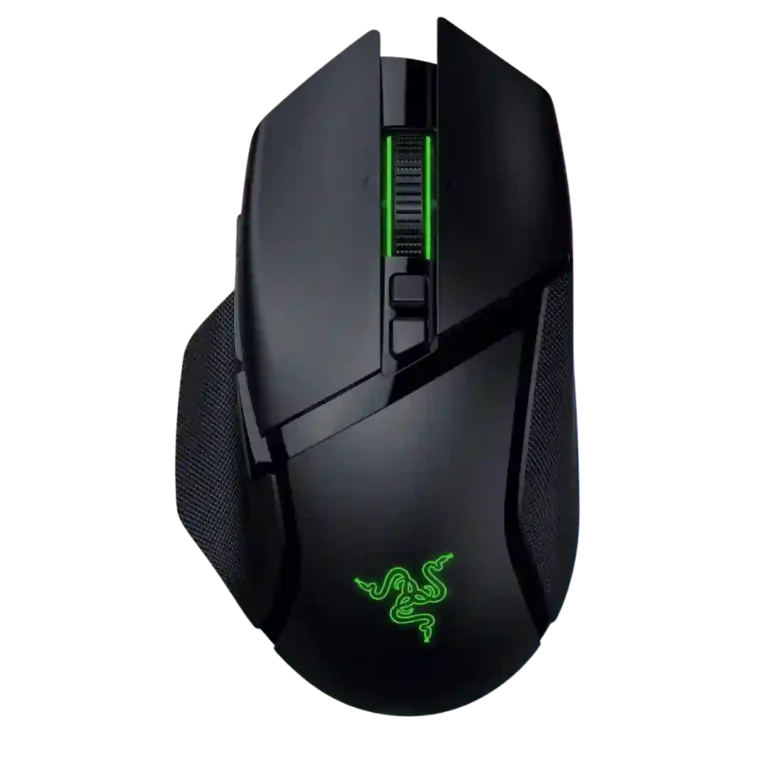
Choose it for ergonomic comfort, strong battery life, deep customization, and a premium all-purpose setup. Skip it if you need a lightweight FPS mouse or already own a cheaper Basilisk V3 Pro.
Best for right-handed palm-grip users who want one premium mouse for gaming, productivity, macros, RGB, and long wireless use. It especially suits players who value control and extra inputs more than ultralight speed.
Not for left-handed users, budget-focused buyers, or competitive FPS players who prioritize low weight and fast flicks. It is also less compelling for current Basilisk V3 Pro owners unless they specifically want the battery and sensor refresh.
Reviewers broadly see the Razer Basilisk V3 Pro 35K as a polished, feature-rich wireless mouse built around comfort, precision, and versatility. Its strongest evidence centers on ergonomic palm support, a high-performing sensor, extensive button customization, RGB, and long battery life. The main tradeoff is that the same heft and feature density that make it useful for work, MMOs, MOBAs, and mixed gaming also make it less agile for competitive FPS play. Value is the other recurring caveat: several reviewers liked the mouse but questioned paying extra when older Basilisk models deliver much of the same experience for less.
Compared with other Gaming Mice, this product is above average in tilt gesture controls, software stability, lift-off distance, near average in software usability, charging convenience, below average in weight, cross-platform compatibility, FPS gaming suitability.
| Attribute | This product | Category average | Difference |
|---|---|---|---|
| weight | 2.7 | 4.1 | -1.4 |
| cross-platform compatibility | 2.2 | 4.0 | -1.8 |
| tilt gesture controls | 4.7 | 3.0 | +1.7 |
| software stability | 4.4 | 3.0 | +1.4 |
| FPS gaming suitability | 3.0 | 4.2 | -1.1 |
| lift-off distance | 5.0 | 3.8 | +1.2 |
| palm grip comfort | 4.9 | 3.8 | +1.1 |
| Bluetooth support | 4.5 | 3.5 | +1.0 |
Choose Razer Cobra Pro. It scores 4.6 vs 3.2 for claw grip comfort, with a 4.0 overall score.
Choose SteelSeries Aerox 9 Wireless. It scores 5.0 vs 2.2 for cross-platform compatibility, with a 4.1 overall score.
Choose ASUS ROG Harpe Ace Mini. It scores 4.7 vs 2.7 for weight, with a 4.2 overall score.
Choose Corsair M75 Wireless. It scores 4.7 vs 2.3 for handedness options, with a 3.9 overall score.
Products reviewers directly compared with this model, grouped into quick takeaways.
It can handle FPS games accurately, but multiple reviewers said its weight makes fast flicks and competitive play less ideal than lighter FPS-focused mice.
Reviewers generally praised the sensor, but several said the jump from earlier high-DPI Basilisk sensors is not a major real-world upgrade for most players.
Battery life was a strength across reviews, with several reviewers reporting long use between charges. RGB lighting and high polling rates can reduce that advantage.
Yes, reviewers often highlighted the HyperScroll tilt wheel as useful for productivity and extra inputs, though Smart-Reel behavior was sometimes described as distracting or inconsistent.
The strongest fit is right-handed palm grip, with good long-session comfort. Fingertip and some claw users may find the mouse too heavy or shape-specific.
Synapse is used for deep customization, macros, lighting, DPI, and scroll settings. Reviews found it powerful, but some also called it annoying, overwhelming, or limited on Linux.
These are a few of the reviews included in our analysis.


Choose the ROG Harpe II Ace for ultralight FPS play, precise tracking, smooth glide, and web-based tuning. Skip it if you need palm-grip support, MMO buttons, onboard profiles, or long...
Pros: glide smoothness, weight
Cons: handedness options

Best for ultra-light, competition-focused speed, precise tracking, stable wireless, and long battery life. Skip it if you need quieter clicks, left-handed support, Bluetooth, more buttons, or better value for casual...
Pros: value for money, weight
Cons: click noise, RGB features

Choose it if you want a premium MMO/productivity mouse with 12 adjustable side buttons, strong battery life, and Stream Deck integration. Skip it if you need an ultralight FPS mouse,...
Pros: button customization, MMO gaming suitability
Cons: FPS gaming suitability

Best for precise wireless tracking, smooth glide, strong battery life, and unusually good 8K value. Skip it if you need polished software, quiet snappy clicks, true left-handed controls, or gentle...
Pros: software usability, sensor performance
Cons: RGB features, scroll wheel quality