If you want better debounce customization
Choose Glorious Model D3. It scores 4.8 vs 2.0 for debounce customization, with a 4.3 overall score.

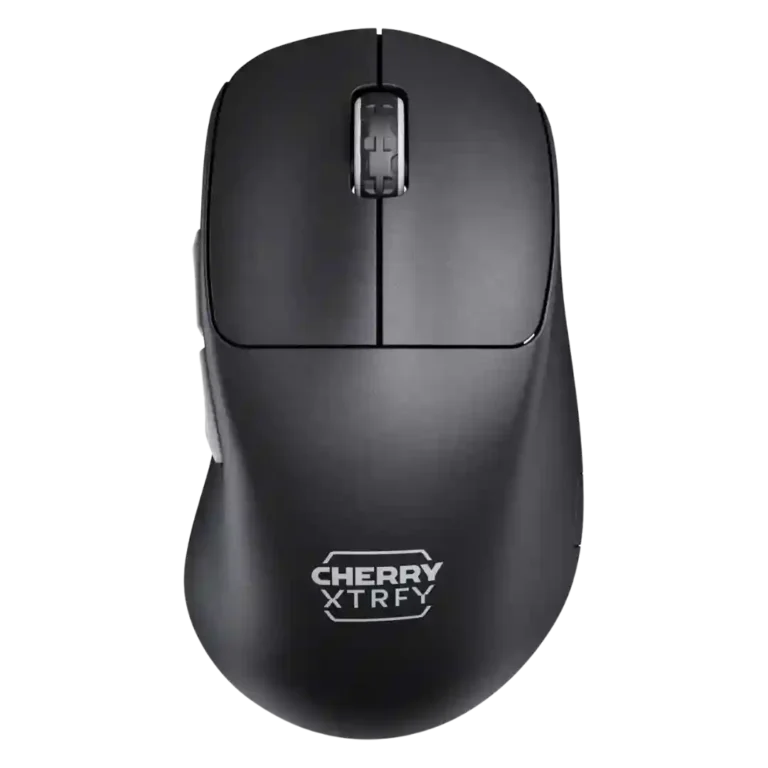
Choose the Cherry M64 Pro if you want a light, plug-and-play wireless mouse with a distinctive ergonomic shape. Skip it if you need software control, granular DPI, easy wired charging, or the best value at $139.
Best for gamers who want a very light, plug-and-play wireless mouse with a distinctive ergonomic M64 shape and strong tracking. It suits palm or claw users who value fast wireless performance over deep software control.
Not ideal for users who need granular DPI/software customization, frequently play while charging, prefer fingertip grip, or have large hands that are easily cramped. Value-focused buyers may prefer the cheaper standard version.
The Cherry M64 Pro lands as a lightweight, performance-first wireless mouse with a shape reviewers found distinctive and often comfortable. Its best evidence centers on low weight, strong sensor tracking, stable wireless performance, smooth glide, and an ergonomic feel that can lock the hand in well for palm or claw styles. The tradeoff is that Cherry’s no-software approach keeps setup simple but makes detailed adjustments tedious, while the side-mounted charging port repeatedly drew complaints. Value is also contested: some reviewers considered the performance worth it, but others saw the 8K upcharge and $139 price as difficult against strong competitors.
Compared with other Gaming Mice, this product is above average in firmware reliability, weight, balance and weight distribution, near average in shape comfort, FPS gaming suitability, below average in debounce customization, button customization, charging convenience.
| Attribute | This product | Category average | Difference |
|---|---|---|---|
| debounce customization | 2.0 | 3.9 | -1.9 |
| firmware reliability | 4.5 | 2.6 | +1.9 |
| button customization | 2.8 | 4.3 | -1.5 |
| charging convenience | 2.7 | 4.0 | -1.3 |
| DPI range | 3.0 | 4.2 | -1.2 |
| profile switching | 2.7 | 3.8 | -1.1 |
| software usability | 2.9 | 3.9 | -1.0 |
| fingertip grip comfort | 2.7 | 3.7 | -1.1 |
Choose Glorious Model D3. It scores 4.8 vs 2.0 for debounce customization, with a 4.3 overall score.
Choose Endgame Gear OP1we. It scores 4.6 vs 4.3 for build quality, with a 4.1 overall score.
Choose Endgame Gear XM2we. It scores 4.9 vs 3.8 for claw grip comfort, with a 4.3 overall score.
Choose Turtle Beach Burst II Pro. It scores 4.7 vs 3.0 for DPI range, with a 4.3 overall score.
Compared with Cherry M64 Pro
Most reviewers found the M64 Pro comfortable, especially because of its low-profile ergonomic shape and thumb groove. Large-hand users may find palm and claw grips cramped.
The review evidence is strongly positive on wireless feel. Reviewers reported no lag, no latency, no hiccups, and generally smooth wireless performance.
Opinions are mixed. One reviewer found the 8K polling rate noticeably responsive, while IGN said higher-than-1000Hz polling was hard to perceive and mainly affected battery drain.
Charging is quick in the positive reviews, but the side-mounted USB-C port is a recurring complaint. Several reviewers found it awkward or unpleasant when using the mouse wired.
No. Reviewers described it as plug-and-play with on-mouse controls, which some liked for simplicity, but others found the manual button combinations tedious.
Side button feedback is mixed. Some reviewers praised the large, crisp thumb buttons, while others found the M64 side buttons mushy, pre-traveled, or harder to reach.
These are a few of the reviews included in our analysis.


Choose the ROG Harpe II Ace for ultralight FPS play, precise tracking, smooth glide, and web-based tuning. Skip it if you need palm-grip support, MMO buttons, onboard profiles, or long...
Pros: glide smoothness, weight
Cons: handedness options

Excellent tracking, comfortable right-handed ergonomics and a versatile scroll wheel make the Basilisk V3 a strong gaming and productivity mouse. Its substantial weight, fixed cable and sometimes over-sensitive automatic scrolling...
Pros: scroll wheel quality, RGB features
Cons: weight, handedness options

The L7 Pro delivers remarkably light handling, precise aiming and a grippy shell at a budget price. Stock skates are less impressive, and conflicting click-latency measurements warrant caution for latency-sensitive...
Pros: value for money, weight
Cons: wired connectivity

Best for ultra-light, competition-focused speed, precise tracking, stable wireless, and long battery life. Skip it if you need quieter clicks, left-handed support, Bluetooth, more buttons, or better value for casual...
Pros: value for money, weight
Cons: click noise, RGB features