If you want better battery life
Choose ASUS ROG Harpe Ace Aim Lab. It scores 4.7 vs 3.4 for battery life, with a 4.1 overall score.

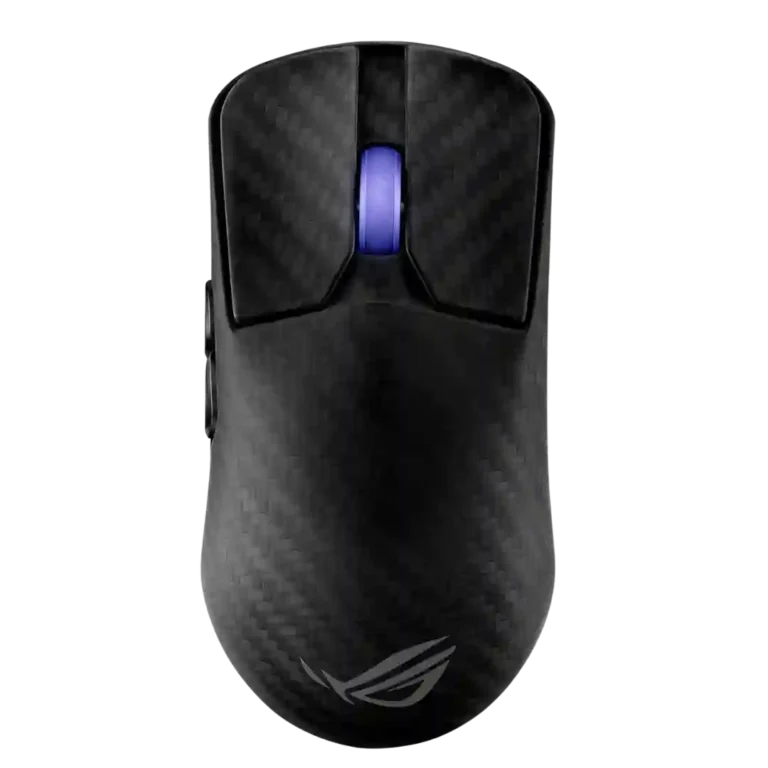
Choose the ROG Harpe Ace Extreme for a featherweight carbon-fiber FPS mouse with elite tracking and premium build. Skip it if $250 feels steep, you need long 8K battery life, or the safe long shape does not fit.
Best for competitive FPS players and ROG enthusiasts who want a 47g carbon-fiber showpiece with excellent tracking, low-latency wireless, and a safe medium-to-large shape. It especially suits users who value build rigidity and premium materials as much as performance.
Not for buyers seeking best value, MMO-style button counts, quiet clicks, or strong battery life at the highest polling rates. Small-hand users and players sensitive to side-button placement, scroll stiffness, or long rear humps should be cautious.
The ROG Harpe Ace Extreme is reviewed as a genuine flagship experiment: extremely light, rigid, fast, and packed with premium accessories. Its strongest evidence clusters around build quality, sensor performance, low-latency wireless, glide, and click feel, especially for FPS players who like a medium-to-large safe shape. The tradeoff is that the carbon-fiber showpiece approach does not erase practical limits. Reviewers repeatedly questioned the $250 price, battery life drops hard at high polling, software setup still produced friction, and side-button or scroll-wheel design divided testers. It performs like a top-tier mouse, but the evidence suggests its luxury materials matter most to enthusiasts who already love the Harpe shape.
Compared with other Gaming Mice, this product is above average in profile switching, weight, Bluetooth support, near average in Accuracy and tracking precision, build quality, below average in value for money, programmable buttons, battery life.
| Attribute | This product | Category average | Difference |
|---|---|---|---|
| value for money | 2.3 | 3.8 | -1.5 |
| programmable buttons | 2.8 | 4.1 | -1.3 |
| battery life | 3.4 | 4.2 | -0.8 |
| charging convenience | 3.0 | 4.0 | -1.0 |
| long-session comfort | 3.5 | 4.4 | -0.9 |
| palm grip comfort | 3.1 | 3.8 | -0.8 |
| ergonomic design | 3.5 | 4.3 | -0.8 |
| software stability | 2.3 | 3.0 | -0.7 |
Choose ASUS ROG Harpe Ace Aim Lab. It scores 4.7 vs 3.4 for battery life, with a 4.1 overall score.
Choose ASUS ROG Gladius III Wireless. It scores 4.5 vs 2.8 for programmable buttons, with a 4.3 overall score.
Choose Razer Viper V3 HyperSpeed. It scores 4.5 vs 2.3 for value for money, with a 4.1 overall score.
Choose Razer Viper V3 Pro. It scores 4.6 vs 3.8 for side button quality, with a 4.2 overall score.
Products reviewers directly compared with this model, grouped into quick takeaways.
Yes. Reviewers repeatedly praised its low weight, accurate sensor, responsive inputs, and fast wireless behavior for competitive shooters.
Most reviewers treated the price as the biggest drawback. They praised the carbon fiber build and performance but often said cheaper flagship mice offer similar practical performance.
Comfort depends strongly on hand size and grip. Medium-to-large claw and relaxed palm users were more likely to like it, while smaller-hand and fingertip-focused reviewers found it too long or awkward.
Battery life is decent at 1,000 Hz and with RGB off, but reviewers noted it drops sharply at 8,000 Hz and trails some competing flagships.
Armoury Crate Gear was seen as an improvement over full Armoury Crate, but reviewers still reported pop-ups, installation confusion, and troubleshooting issues.
Main clicks were often praised as crisp and premium, but side buttons divided reviewers because some found them small, loud, stiff, or too far forward.
Yes. Reviewers liked that it keeps Bluetooth for convenience while using 2.4 GHz wireless and the Polling Rate Booster for its highest-performance mode.
These are a few of the reviews included in our analysis.



Choose the ROG Harpe II Ace for ultralight FPS play, precise tracking, smooth glide, and web-based tuning. Skip it if you need palm-grip support, MMO buttons, onboard profiles, or long...
Pros: glide smoothness, weight
Cons: handedness options

Best for ultra-light, competition-focused speed, precise tracking, stable wireless, and long battery life. Skip it if you need quieter clicks, left-handed support, Bluetooth, more buttons, or better value for casual...
Pros: value for money, weight
Cons: click noise, RGB features

Choose it if you want a premium MMO/productivity mouse with 12 adjustable side buttons, strong battery life, and Stream Deck integration. Skip it if you need an ultralight FPS mouse,...
Pros: button customization, MMO gaming suitability
Cons: FPS gaming suitability

Best for precise wireless tracking, smooth glide, strong battery life, and unusually good 8K value. Skip it if you need polished software, quiet snappy clicks, true left-handed controls, or gentle...
Pros: software usability, sensor performance
Cons: RGB features, scroll wheel quality