If you want better per-key lighting control
Choose Logitech G915 X Lightspeed. It scores 4.6 vs 2.0 for per-key lighting control, with a 4.1 overall score.

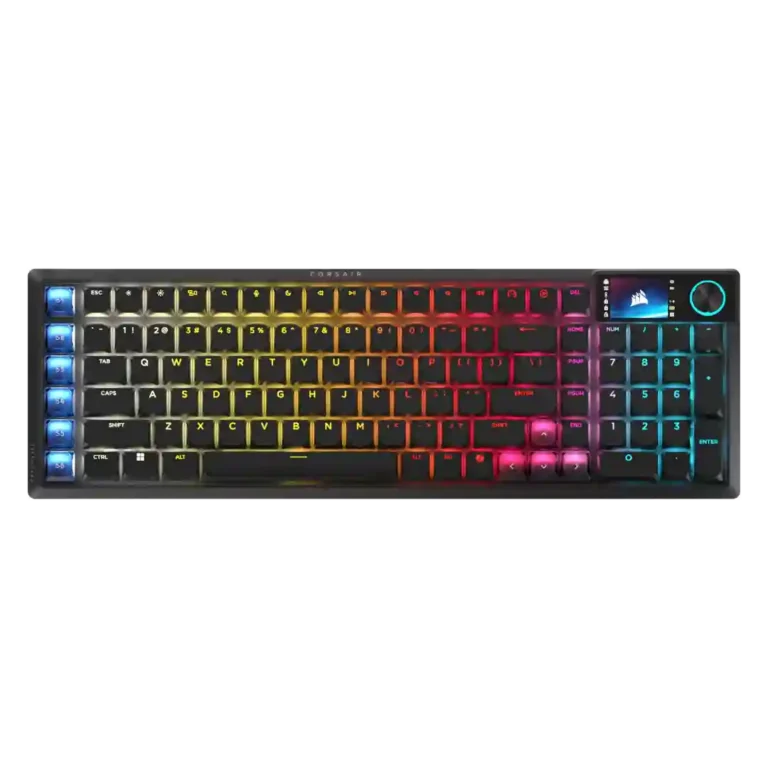
Choose it for exceptional low-profile typing, fast wireless gaming, and Stream Deck shortcuts in a compact numpad layout. Skip it if you want Hall Effect tuning, long battery life, mature software, or strong value.
Best for gamers, creators, and productivity users who want excellent low-profile typing, a numpad, fast tri-mode wireless, and programmable Stream Deck shortcuts in one premium board.
Not ideal for value-focused buyers, all-day wireless users with bright RGB, traditional-layout typists, or competitive players who require hot-swap switches, analog input, adjustable actuation, and rapid trigger.
Across the full review set, the Vanguard Air 99 earns near-universal praise for its smooth OPX switches, refined acoustics, rigid premium construction, and wired-like Slipstream performance. The 99% layout is genuinely useful for buyers who need a numpad without a conventional full-size footprint, while Stream Deck keys and the rotary dial can meaningfully streamline creator workflows. However, this is not a future-proof competitive board: it lacks hot-swap, analog input, adjustable actuation, and rapid trigger. The compressed layout causes frequent mis-presses for some users, and the LCD often adds less utility than its battery cost suggests. Web Hub is convenient but unevenly mature, with occasional Stream Deck and wake reliability issues. At roughly $260, it is compelling only when its exact blend of feel, wireless speed, numpad, and workflow controls matches your needs.
Compared with other Gaming Keyboards, this product is above average in portability, legend visibility, stabilizer quality, near average in overall satisfaction, software quality, below average in rapid trigger support, ease of switch replacement, hot-swappable switches.
| Attribute | This product | Category average | Difference |
|---|---|---|---|
| rapid trigger support | 1.3 | 3.6 | -2.3 |
| ease of switch replacement | 1.5 | 3.8 | -2.3 |
| hot-swappable switches | 1.3 | 3.5 | -2.2 |
| per-key lighting control | 2.0 | 4.1 | -2.1 |
| analog input support | 1.3 | 3.2 | -2.0 |
| wrist rest quality | 1.5 | 3.3 | -1.8 |
| value for money | 2.5 | 3.7 | -1.2 |
| key spacing | 2.6 | 4.0 | -1.3 |
Choose Logitech G915 X Lightspeed. It scores 4.6 vs 2.0 for per-key lighting control, with a 4.1 overall score.
Choose Epomaker P65. It scores 4.9 vs 1.3 for hot-swappable switches, with a 4.2 overall score.
Choose ASUS ROG Strix Scope II 96 Wireless. It scores 4.8 vs 2.6 for reliability, with a 4.2 overall score.
Choose Keychron K2 HE. It scores 4.9 vs 1.3 for rapid trigger support, with a 4.4 overall score.
Products reviewers directly compared with this model, grouped into quick takeaways.
Yes. Its responsive OPX switches, very low latency, 8K wired and wireless polling, N-key rollover, and FlashTap perform extremely well, though it lacks adjustable actuation and rapid trigger.
The switch feel, gasket mount, and sound dampening are widely praised as smooth, quiet, and unusually refined for a low-profile keyboard. The compressed key spacing and left-side SD keys can require a substantial adjustment period.
Corsair quotes up to roughly 55 hours under restrained settings. With the RGB and LCD active, reviewers commonly reported or expected about 20–30 hours.
No. The fixed OPX optical switches are not hot-swappable and do not offer analog input, adjustable actuation, or rapid trigger.
Yes. It supports Windows and macOS with included Mac keycaps and an OS switch, and reviewers also confirmed PlayStation and Xbox compatibility through supported connection modes.
Only for buyers who will use its exact combination of premium low-profile feel, numpad, fast wireless, LCD, dial, and Stream Deck controls. Reviewers generally considered it overpriced for simpler gaming or productivity needs.
These are a few of the reviews included in our analysis.



The Corsair Vanguard Air 99 Wireless is a super premium keyboard with LCD screen, low profile keys and Stream Deck compatibility. Our review.
With an LCD screen, rotary dial, browser-based profiles and six shortcut keys, the Vanguard Air 99 wireless is made for gamers and...
The CORSAIR VANGUARD AIR 99 WIRELESS is a premium low-profile gaming keyboard that successfully bridges the gap between competitive gaming […]
Personally, I don’t believe any keyboard should cost more than $150, so when I tested the Corsair Vanguard Air 99 Wireless, I was left...
The Corsair Vanguard Air 99 Wireless is a powerful low-profile mechanical keyboard for gaming and typing, but its drawbacks are too...

Good if you want a premium 96% Hall Effect keyboard for work and gaming with excellent build, sound, and customization. Skip it if you need cheaper esports-first speed, 8,000Hz polling,...
Pros: size and form factor, typing feel
Cons: switch options, portability

Choose it if competitive gaming speed, Rapid Trigger, and deep per-key customization matter more than extras. Skip it if you need wireless, dedicated arrows/media keys, adjustable height, or a lower-cost...
Pros: overall satisfaction, customization options
Cons: value for money, switch options

Good if you want a premium, quiet TKL Hall Effect keyboard for typing and gaming. Skip it if price, portability, 8,000Hz polling, or broad switch choice matters most.
Pros: build quality, switch feel
Cons: switch options

Good if you want a premium full-size Hall Effect keyboard with smooth switches, quiet sound, and deep customization. Skip it if you need a portable, budget-friendly board or broad switch...
Pros: build quality, keycap quality
Cons: switch options, portability