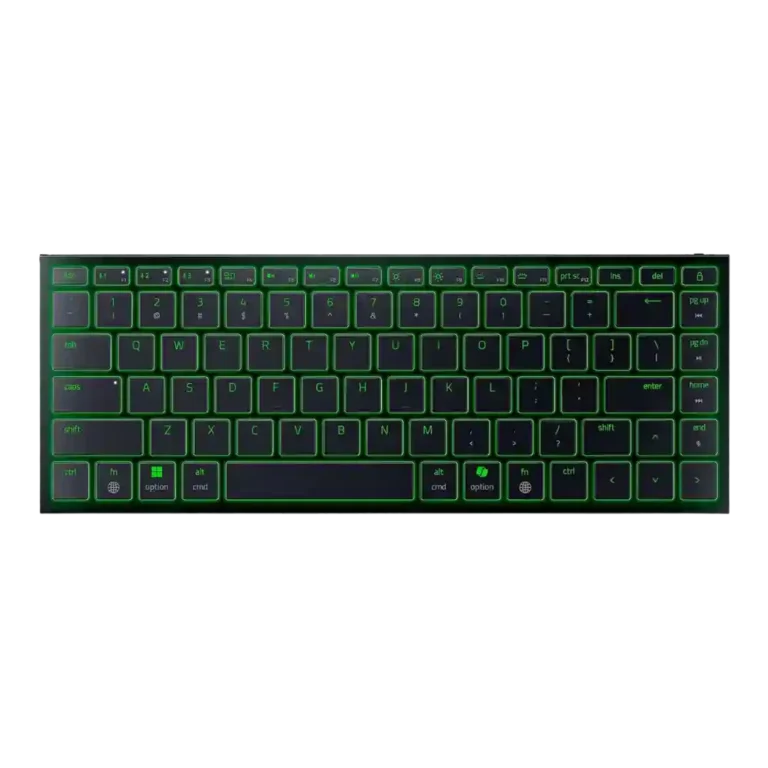
Razer Joro

Razer Joro Gaming Keyboard Review

Brand: Razer
Released: May 8, 2025
Updated: 4 months ago
3.7
Overall review score
237
Review insights
47
Scored features
16
Expert reviews

Bottom Line

Choose the Razer Joro if you need a premium, ultra-slim travel keyboard with Mac-friendly shortcuts, sturdy build, and quiet typing. Skip it for competitive gaming, mechanical feel, adjustable ergonomics, or better value.

Best for

Best for travelers, hybrid workers, Mac-and-Windows users, and handheld-gaming owners who want a thin, quiet keyboard that slips into a bag and still offers some gaming features.

Not for

Not ideal for competitive gamers, mechanical-keyboard fans, budget buyers, or anyone who needs adjustable feet, per-key RGB, very long RGB-on battery life, or the lowest wireless latency.

Verdict

Across the reviews, the Razer Joro lands as a polished travel-first keyboard rather than a full gaming-board replacement. Reviewers repeatedly praise its ultra-thin body, low weight, rigid aluminum-backed construction, quiet scissor switches, Mac compatibility, and easy multi-device use. The main tradeoff is that the same low-profile design that makes it bag-friendly also limits ergonomics, typing angle adjustment, switch tactility, and wireless gaming latency. RGB lighting and Snap Tap add gaming flavor, but single-zone lighting, Bluetooth-only wireless out of the box, and a high price make its value depend heavily on portability being the priority.

Feature Scorecards

Summary

47 reviewed features
  • Very positive 4.5-5.0
    12 (26%)
  • Positive 3.5-4.4
    22 (47%)
  • Neutral 2.5-3.4
    11 (23%)
  • Negative 1.5-2.4
    2 (4%)

Pros highlights

  • 4.6
    12 reviews strong consensus
    portability: 4.6, 12 reviews, strong consensus
    Portability was the strongest consensus point: reviewers repeatedly praised the thin, light, bag-friendly body for travel and mobile work.
  • 4.6
    10 reviews strong consensus
    build quality: 4.6, 10 reviews, strong consensus
    Build quality was one of the strongest themes, with reviewers repeatedly praising the rigid, sturdy construction despite the ultra-thin chassis.
  • 4.0
    10 reviews strong consensus
    connectivity: 4.0, 10 reviews, strong consensus
    Connectivity was praised for easy pairing and device switching, but Bluetooth-only wireless and dongle omissions created caveats.
  • 4.3
    9 reviews strong consensus
    RGB lighting quality: 4.3, 9 reviews, strong consensus
    RGB lighting quality was widely praised as vibrant, beautiful, bright, colorful, and unusually polished for this kind of travel keyboard.
  • 3.9
    9 reviews strong consensus
    software quality: 3.9, 9 reviews, strong consensus
    Software quality was mixed: reviewers liked Synapse's growing Mac support and clearer layout, but some encountered availability or dependency frustrations.
  • 3.5
    9 reviews low consensus
    battery life: 3.5, 9 reviews, low consensus
    Battery impressions were split: several reviewers praised all-day or weeklong use with modest lighting, while others criticized short runtime with RGB enabled.

Cons highlights

  • 2.9
    13 reviews strong consensus
    value for money: 2.9, 13 reviews, strong consensus
    Value for money was one of the weakest areas, with many reviewers calling the Joro expensive unless portability is the buyer's top priority.
  • 2.9
    10 reviews moderate consensus
    ergonomics: 2.9, 10 reviews, moderate consensus
    Ergonomics were mixed to negative overall: some liked the flat angle, but many criticized the lack of adjustable feet and fatigue over time.
  • 3.3
    8 reviews moderate consensus
    keycap quality: 3.3, 8 reviews, moderate consensus
    Keycap feedback was mixed: reviewers liked smooth, comfortable caps and etched legends, but several complained about smudges, fingerprints, or clammy feel.
  • 3.2
    7 reviews strong consensus
    gaming performance: 3.2, 7 reviews, strong consensus
    Gaming performance was context-dependent: reviewers found it acceptable or speedy for casual use, but weak for serious or PC-focused competitive gaming.
  • 3.4
    7 reviews moderate consensus
    layout options: 3.4, 7 reviews, moderate consensus
    Layout opinions split sharply: some reviewers found the 75% layout efficient, while others disliked the small Shift, spacebar, or right-side key choices.
  • 2.8
    6 reviews moderate consensus
    latency: 2.8, 6 reviews, moderate consensus
    Latency was a key concern outside wired mode, with multiple reviewers calling out Bluetooth input delay or the lack of low-latency wireless support.

Compared With Category Average

Compared with other Gaming Keyboards, this product is above average in portability, compatibility, noise level, near average in switch feel, connectivity, below average in sound dampening, per-key lighting control, latency.

Comparison summary

47 compared features
  • Above average 0.4+ pts higher
    10 (21%)
  • Same as average within 0.3 pts
    17 (36%)
  • Below average 0.4+ pts lower
    20 (43%)

Largest category differences

Attribute This product Category average Difference
sound dampening 2.0 4.2 -2.2
per-key lighting control 2.4 4.1 -1.8
latency 2.8 4.5 -1.7
gaming performance 3.2 4.5 -1.3
portability 4.6 3.5 +1.1
key responsiveness 3.5 4.6 -1.1
wireless performance 2.9 4.0 -1.1
ergonomics 2.9 3.8 -0.9

Consider This Instead

If you want better sound dampening

Choose Keychron Q1 HE. It scores 4.9 vs 2.0 for sound dampening, with a 4.2 overall score.

Compare

If you want better value for money

Choose Keychron K4 HE. It scores 4.6 vs 2.9 for value for money, with a 4.3 overall score.

Compare

If you want better gaming performance

Choose Keychron K2 HE. It scores 4.7 vs 3.2 for gaming performance, with a 4.4 overall score.

Compare

Compared in Reviews

Products reviewers directly compared with this model, grouped into quick takeaways.

  • Better: advanced actuation features GamesRadar notes that the Joro lacks fancier actuation features reserved for Razer's analog models.

Apple Magic Keyboard

  • Similar: overall concept PCWorld describes the Joro as essentially a gaming-oriented Apple Magic Keyboard.
  • Worse: typing preference SemiPro Tech+Gear says the Joro is generally better to type on than the Apple Magic Keyboard.
  • Alternative: Mac keyboard replacement Macworld says the Joro comes close to the Apple Magic Keyboard as an alternative.

Asus ROG Falchion RX Low Profile

  • Better: gaming responsiveness Trusted Reviews says the Joro is less responsive than low-profile mechanical options such as the Asus ROG Falchion RX Low Profile.
  • Better: typing texture and comfort GamesRadar finds the Asus ROG Falchion RX Low Profile more textured and satisfying overall.

FAQ

Is the Razer Joro good for travel?

Yes. Reviewers strongly agreed that its thin, light body makes it easy to carry in a backpack or travel setup.

Is it a good gaming keyboard?

It works for casual gaming and has Snap Tap, NKRO, and wired 1,000Hz support, but reviewers repeatedly said Bluetooth latency and scissor switches keep it from replacing a serious gaming keyboard.

How does the typing feel?

Most reviewers found the scissor switches crisp, quiet, and satisfying for such a slim board, though some found them slower or less tactile than mechanical alternatives.

Does the Joro work well with Macs?

Mac support was a clear strength. Reviewers praised Mac key labeling, macOS layout support, Synapse support on Mac, and easy switching across Apple and Windows devices.

What are the biggest drawbacks?

The most repeated drawbacks were the high price, fixed low typing angle, Bluetooth-only wireless out of the box, single-zone RGB, and layout compromises around smaller keys.

How is battery life?

Battery life is strong with lighting off or reduced, but reviews warned that RGB at high brightness drains it quickly.

Sample Expert Reviews We Analyzed

These are a few of the reviews included in our analysis.

Video Reviews

Article Reviews

Top Gaming Keyboards to Consider

#1 Keychron Q5 HE
4.5

Good if you want a premium 96% Hall Effect keyboard for work and gaming with excellent build, sound, and customization. Skip it if you need cheaper esports-first speed, 8,000Hz polling,...

Pros: size and form factor, typing feel

Cons: switch options, portability

#2 Wooting 60HE+
4.4

Choose it if competitive gaming speed, Rapid Trigger, and deep per-key customization matter more than extras. Skip it if you need wireless, dedicated arrows/media keys, adjustable height, or a lower-cost...

Pros: overall satisfaction, customization options

Cons: value for money, switch options

#3 Keychron Q3 HE
4.4

Good if you want a premium, quiet TKL Hall Effect keyboard for typing and gaming. Skip it if price, portability, 8,000Hz polling, or broad switch choice matters most.

Pros: build quality, switch feel

Cons: switch options

#4 Keychron Q6 HE
4.4

Good if you want a premium full-size Hall Effect keyboard with smooth switches, quiet sound, and deep customization. Skip it if you need a portable, budget-friendly board or broad switch...

Pros: build quality, keycap quality

Cons: switch options, portability