If you want better Connectivity versatility
Choose Logitech Lift. It scores 4.6 vs 2.0 for Connectivity versatility, with a 4.1 overall score.

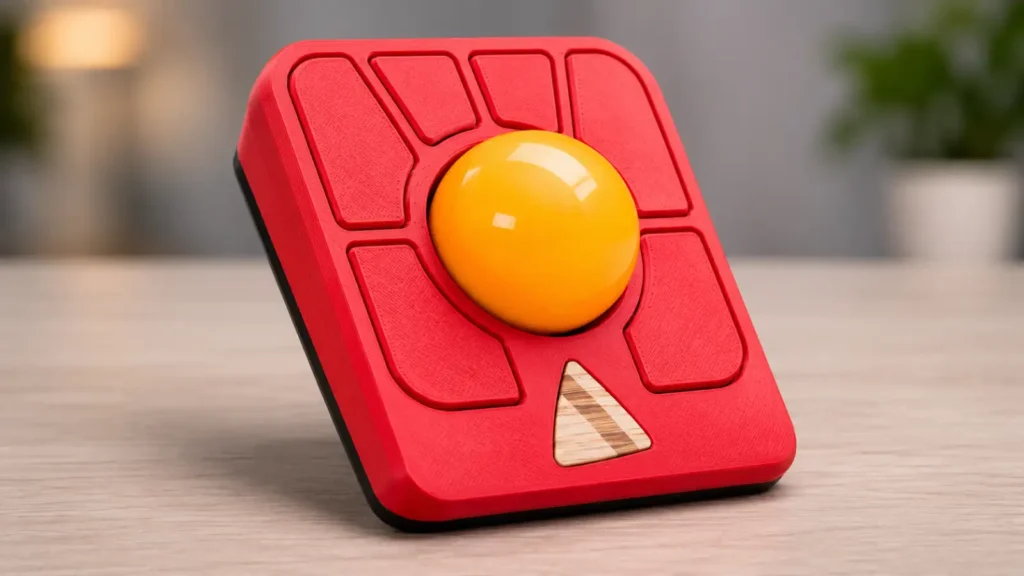
Low-stiction bearings, crisp buttons and unusually flexible firmware make this a compelling finger-operated trackball. Its audible rolling mechanism, compact ball and sometimes fiddly drag scrolling are the main compromises.
Trackball enthusiasts, desktop users seeking precise cursor placement and people who enjoy modifying hardware or firmware benefit most from the smooth bearings and customizable controls.
Users who need wireless operation or effortless timeline scrubbing should consider alternatives, particularly if they do not want to adjust scrolling firmware.
The Ploopy Adept stands out for precise cursor control, smooth roller bearings and consistently satisfying buttons. Its open-source design and VIA/QMK configuration make it especially appealing to people who want to tailor button layers, shortcuts and scrolling behavior. Several owners find it comfortable enough for full workdays, and its small footprint fits crowded desks. The compact ball is less convenient for sweeping cursor movements than larger trackballs, however, and the bearings are noticeably audible. Drag scrolling is precise but prevents simultaneous cursor movement, and sensitivity or Mac-specific behavior can require additional configuration. The printed enclosure also looks less refined than mainstream alternatives. For users who prioritize fine control, repairability and customization over wireless convenience or polished styling, the Adept is a particularly capable choice.
Compared with other Mice, this product is above average in polling rate, handedness options, repairability, near average in button customization, Wrist and forearm strain relief, below average in Color options, macOS compatibility, Connectivity versatility.
| Attribute | This product | Category average | Difference |
|---|---|---|---|
| Color options | 1.0 | 3.4 | -2.4 |
| polling rate | 5.0 | 2.9 | +2.1 |
| handedness options | 5.0 | 3.0 | +2.0 |
| repairability | 5.0 | 3.2 | +1.8 |
| gaming suitability | 4.5 | 2.7 | +1.8 |
| macOS compatibility | 2.5 | 4.3 | -1.8 |
| Companion software dependence | 4.5 | 2.8 | +1.7 |
| replacement parts availability | 5.0 | 3.3 | +1.7 |
Choose Logitech Lift. It scores 4.6 vs 2.0 for Connectivity versatility, with a 4.1 overall score.
Choose Kensington SlimBlade Pro Trackball. It scores 4.7 vs 2.5 for Trackball size, with a 4.0 overall score.
Choose VXE R1 Pro. It scores 5.0 vs 3.3 for premium feel, with a 4.3 overall score.
Choose Kensington Orbit Wireless Trackball with Scroll Ring. It scores 4.0 vs 3.6 for Learning curve, with a 4.1 overall score.
Compared with Ploopy Adept Trackball
The roller bearings deliver smooth movement with very little initial sticking, making fine cursor adjustments easy. They are more audible than many static-bearing designs.
No. The Adept is wired-only in its stock configuration.
A configurable drag-scroll button changes ball movement into scrolling. This is precise but prevents simultaneous pointer movement; alternative firmware can provide toggle-based scrolling.
Yes. VIA supports button reassignment and QMK enables deeper customization, including layers and macros. Settings can be stored on the device.
Several owners find it comfortable for full workdays, with little wrist discomfort. The compact body and relatively tall case may not suit everyone, and some owners add wedges or foam to change the angle.
The Adept is available as a kit or fully assembled. Open design files, replaceable bearings and accessible components make DIY assembly and repairs practical for technically inclined owners.
These are a few of the reviews included in our analysis.
How I customized my Ploopy Adept trackball for ergonomics and to make it work well on MacOS, including customizations to the underlying...
A little over a year ago, I was trying to figure out the right finger-operated trackball mouse for me. I had a favorite thumb-operated...
I recently came across Ploopy, a small company making open-source peripherals. They design mice, trackballs and even headphones. I was in the...
If you're plagued by RSI symptoms, it's high time you evaluate an alternative to traditional mice: trackballs. The Ploopy Adept is an...
The Ploopy Adept Trackball is a finger-operated trackball mouse that you can buy as a prebuilt or 'do-it-yourself' kit. It uses a PixArt...

Best for travel, quiet shared spaces, precise any-surface tracking, and multi-device productivity. Skip it if you have large hands, want all-day palm support, or need a gaming-focused mouse.
Pros: portability, click noise
Cons: hand size compatibility, dongle-free setup

Choose it if you want a premium MMO/productivity mouse with 12 adjustable side buttons, strong battery life, and Stream Deck integration. Skip it if you need an ultralight FPS mouse,...
Pros: button customization, MMO gaming suitability
Cons: FPS gaming suitability
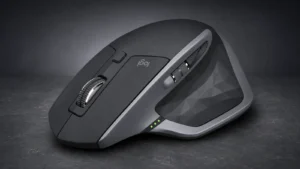
Dual scroll wheels, extensive shortcuts and seamless multi-computer control make this a superb productivity mouse. Its bulky right-handed shape, modest gaming performance and dated Micro USB charging are the main...
Pros: Overall satisfaction, ergonomic design
Cons: gaming suitability, button placement

Fast tracking, a very light shell and a grippy coating make this a compelling affordable FPS mouse. The optional 4K receiver costs extra, and Bluetooth is absent.
Pros: Overall satisfaction, gaming suitability
Cons: polling rate, Software and driver support