
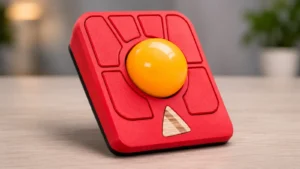
Ploopy Adept Trackball Feature Scores
Overall Scorata score: 4.3/5
Based on 8 analyzed reviews · View source samples
Explore all 80 feature scores for Ploopy Adept Trackball, organized into pros and cons.
Scores by Feature
Summary
80 reviewed features-
Very positive 4.5-5.039 (49%)
-
Positive 3.5-4.424 (30%)
-
Neutral 2.5-3.412 (15%)
-
Negative 1.5-2.44 (5%)
-
Very negative below 1.51 (1%)
Pros
Sort
-
Many owners describe it as a favorite or exceptional trackball thanks to its smoothness, customization and button feel. Some still prefer alternatives for particular workflows.
-
VIA makes remapping straightforward, while QMK opens up deeper customization including layers, macros and altered scrolling behavior.
-
The roller bearings deliver exceptionally smooth movement with little initial sticking, although their rolling texture can still be felt.
-
The buttons are a standout, with satisfying tactile clicks and well-defined activation areas.
-
Switches feel distinctly clicky and are easy to actuate without excessive pressure.
-
Open design files and firmware give owners meaningful control over the device, especially if they have the tools and skills to modify it themselves.
-
Mappings are stored directly on the device, so they survive power cycles and carry over to another computer.
-
The PixArt sensor is highly regarded for accurate tracking and strong raw performance.
-
The high-quality switches deliver crisp and dependable tactile feedback.
-
The assembled device feels solid and well crafted, despite occasional rough printing and less polished construction than established trackball brands.
-
The freely assignable buttons make it possible to tailor common actions and shortcuts to individual preferences.
-
Several owners comfortably use it for hours or full workdays. Larger trackballs may offer a more relaxed hand position for some users.
-
Low stiction and a capable optical sensor make small cursor adjustments unusually accurate.
-
Several owners report little or no unusual wrist discomfort during extended use, although individual ergonomic needs differ.
-
Saved mappings and browser configuration eliminate most ongoing software requirements. Some scroll adjustments still benefit from an extra utility.
-
QMK firmware can be replaced or edited to change scrolling and orientation. Simple flashes are easy, but some changes require compiling code and invalid files can cause problems.
-
The finger-operated shape feels comfortable to many owners, although its compact body can curl the fingers inward and its height may call for a small adjustment.
-
VIA and QMK offer extensive customization, but advanced changes and scroll-speed adjustments can call for extra tools.
-
The design is generally comfortable and adaptable through remapping or physical tilting. Holding a button to scroll and the relatively small body are less ergonomic for some users.
-
Initial configuration is straightforward through VIA, and the kit can be configured quickly after assembly.
-
The six surrounding buttons are generally accessible and clearly defined, especially after remapping or reorientation. A farther button may still require stretching.
-
Browser-based VIA makes basic changes easy. More complex scroll tuning and custom layouts can take extra software or technical effort.
-
Clicks register cleanly without free play or bouncing, including when pressing different areas of a button.
-
Button presses register reliably across the button surface, with consistent actuation force.
-
Multiple layers allow separate mappings for different hands, games and operating systems.
-
Configurable layers allow quick switching between handedness, work and gaming setups, or OS-specific controls.
-
Bearings can be swapped, and the open modular construction allows owners to replace worn parts instead of the entire device.
-
Ball-based scrolling offers precise, fluid control instead of conventional stepped wheel movements.
-
Six buttons give more options than four-button rivals, though other trackballs offer even more programmable controls.
-
The kit goes together quickly and intuitively, although soldering the sensor and inserting roller bearings require care.
-
The compact footprint saves space but may feel cramped to users accustomed to larger trackballs.
-
The printed finish ranges from impressively smooth to visibly uneven, depending on the unit and the owner's expectations.
-
Smooth, precise pointing makes gaming enjoyable, particularly for mouse-driven titles.
-
Clear assembly instructions and helpful firmware guidance support hands-on configuration.
-
Replacing bearings can improve movement when an original bearing is problematic, and alternative bearing materials are suggested for prolonged use.
-
Quality sensors, switches and other internal components are a strength, while the printed plastic can have loose filaments or small imperfections.
-
The Adept handles everyday computer work well. Small-ball cursor sweeps and the inability to scroll and point simultaneously can slow some workflows.
-
Fine cursor adjustments are smooth and accurate, while the smaller ball makes long screen-crossing movements less effortless.
-
After a few hours of practice and remapping, everyday operation becomes natural, although the bearings reward a slightly different movement technique.
-
The kit saves money for those willing to assemble it, and the Adept costs substantially less than the original Classic in the comparison.
-
The 3D-printed case and wooden badge have a distinctive handmade look that some find charming and others find unattractive.
-
Click latency compares favorably with the GameBall, benefiting responsive input.
-
The sensor's wide sensitivity range supports accurate tracking.
-
The ability to replace only worn components and update firmware can reduce the need to discard the whole device.
-
The symmetrical top-ball design can move between left- and right-handed operation with mirrored button mappings.
-
The assembled kit worked immediately when connected to the computer.
-
Its polling rate is higher than the GameBall's in the tested comparison, contributing to strong raw performance.
-
Its relatively small footprint makes it easier to carry than larger top-ball trackballs.
-
Open firmware allows technically skilled owners to maintain or adapt the trackball independently if official software support changes.
-
Standard electronic components and replaceable printed parts make sourcing repairs more approachable.
-
Raw pointing performance compares favorably with established trackball alternatives.
-
Stored mappings avoid the ongoing overhead of background configuration software.
-
Using the ball to scroll is fluid and precise, but holding a button prevents simultaneous cursor movement. Default speed, direction and Mac behavior may need adjustment.
-
Basic operation becomes intuitive fairly quickly after remapping, but drag scrolling, bearing movement and advanced firmware changes take practice.
-
The switches produce a satisfying click sound.
-
Fingertip operation feels natural, particularly after rotating and remapping the device.
-
The buttons have a pleasant flat texture that feels smoother than their printed appearance suggests.
-
Macros, modifiers and layers allow personalized shortcuts through configurable firmware.
-
The hand can rest comfortably on or beside the device, but the small footprint may encourage some fingers to curl inward.
-
On-device configurations work across operating systems, although Mac drag scrolling may need a specialized workaround.
-
The 3D-printed construction has held up comparably to a conventional mouse in one owner's experience so far.
-
For stationary desk use, the wired connection is generally unobtrusive, although it limits reclining away from the desk.
-
The casing is a little taller than some owners would prefer, though a hovering hand position or added tilt can make it comfortable.
Cons
Sort
-
The available colors have a polarizing appearance, with one owner preferring only the black case and red ball combination.
-
Roller bearings resist twisting the ball sideways, so users accustomed to twist-based scrolling need a different technique.
-
Wired-only operation limits connectivity flexibility, particularly for setups that need easy switching between computers.
-
Firmware flashing is quick and easy, but loading an invalid file can brick the device.
-
A September 2025 owner reported that shipping to the United States was temporarily unavailable.
-
The small ball helps keep the unit compact, but larger balls are preferred for broad cursor sweeps and a more spacious feel.
-
Mac-specific scroll handling may require firmware customization to avoid intermittent drag-scroll behavior.
-
Mac drag scrolling can be intermittent; a custom vertical-only workaround restores consistency at the cost of horizontal scrolling.
-
Omnidirectional scrolling is a useful capability, but horizontal movement can be sluggish or unreliable on Mac setups without modification.
-
Stock scrolling speed is not easily adjustable to every preference, especially horizontally. Alternative firmware or third-party tools can help tailor it.
-
The roller-bearing arrangement resists certain sideways movements, making it less freely multidirectional than static-bearing designs.
-
Bearing cleaning is somewhat more involved than with conventional static-bearing trackballs.
-
The bearings need occasional cleaning, and that upkeep is a little more involved than with some other trackballs.
-
An owner encountered a problematic bearing that performed better after replacement.
-
There is no included wrist rest, and some owners add foam or wedges to achieve a more comfortable angle.
-
The bearings are noticeably louder than static-bearing alternatives. Some users enjoy that audible feedback, while others find it a drawback.
-
The wooden logo adds character, but the handmade finish does not have the same polished feel as many mass-produced trackballs.
Use Cases
Best for
Sort
-
The open files, kit options and modifiable firmware make this an unusually flexible platform for hands-on builders. Physical modifications generally require doing the work yourself.
-
Owners seeking less wrist strain have found the stationary, adaptable design comfortable during long sessions. Physical angle adjustments may help tailor it to individual needs.
-
Everyday desktop work is comfortable and capable, though larger-ball rivals can be preferable for repeated sweeping cursor motions.
-
Smooth ball scrolling is useful for frequent navigation, especially with customized sensitivity or toggle behavior. Stock settings may frustrate users who want exact speed control.
-
Saved mappings follow the trackball between computers, but the cable prevents convenient wireless switching and Mac scrolling may require special configuration.
-
Button layers and combinations provide convenient access to macros, mirrored layouts and OS-specific functions.
-
Open firmware and extensive modification options make it especially appealing to technically inclined users who enjoy tailoring their hardware.
-
Open firmware and replaceable parts make continued ownership attractive. Some owners suggest upgrading the bearings for extended use.
-
Owners have adopted it for their everyday computer work, finding it comfortable enough for full workdays.
-
Experienced trackball users appreciate the low stiction and customization, even when they keep a larger trackball for specific tasks.
-
The relatively small body leaves room on a crowded desk without sacrificing the basic controls.
-
Low initial friction makes precise pixel-level cursor placement a particular strength.
-
It performs well for PC gaming, and one experienced trackball user favors it over a larger rival for games.
-
Ball-based scrolling and optional toggle behavior help navigate long pages without continuously holding a button.
-
Precise cursor placement suits photo editing, but slow horizontal scrolling can make navigating an image cumbersome.
-
Routine web navigation works well, but the cable makes browsing while reclined away from the desk less convenient.
-
Smooth low-stiction motion is particularly useful when a designer needs to target individual pixels.
-
Left-handed users can create a dedicated mirrored button layer and switch back to right-handed operation easily.
-
The precise low-stiction ball is useful for CAD tasks that require small pointer adjustments.
-
Switchable layers and accurate pointing make it adaptable between desktop work and PC gaming.
-
A small body fits onto limited portable work surfaces more easily than larger top-ball models.
-
The compact size fits a portable setup for working in places such as cafés, though a cable is still required.
-
Owners using multiple operating systems can keep custom mappings on the trackball without needing a separate configuration utility for every computer.
-
It is more affordable than the original Classic, though still a specialized trackball rather than a bargain-priced mouse.
-
Mouse-driven MMO play, including Old School RuneScape, works well with it.
-
Programmers benefit from accurate targeting, although a larger ball may be preferable for frequent broad cursor movements.
-
Mouse-driven management games such as Anno 1800 play comfortably with the trackball.
Conditional or not ideal for
-
Wireless useThere is no native wireless mode, limiting convenient use away from the desk or across multiple computers.
-
Video editingSluggish horizontal scrolling can make timeline scrubbing frustrating without further customization.