If you want better fingertip grip comfort
Choose Logitech M720 Triathlon. It scores 5.0 vs 1.0 for fingertip grip comfort, with a 4.2 overall score.

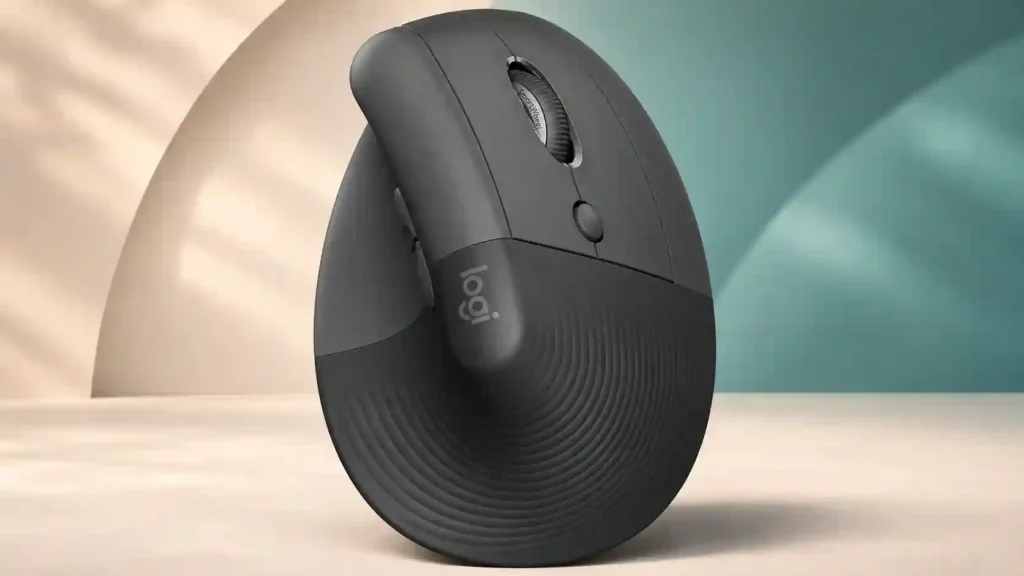
The Lift combines a comfortable handshake grip with quiet clicks and useful productivity shortcuts. It is especially appealing for smaller hands, but larger hands, demanding gaming and precision-heavy work may be better served by another mouse.
Small- and medium-handed office users, remote workers and people who switch between computers will benefit most from the comfortable grip and customizable shortcuts. It also suits shared offices where quiet clicks matter.
Large-handed users, demanding gamers, frequent travelers and people who need wired operation or repeated precise CAD navigation may prefer a different design.
The Logitech Lift is a compelling ergonomic productivity mouse, particularly for small and medium hands. Many testers report less wrist and forearm discomfort after switching to its upright grip, and the quiet main clicks, convenient multi-device switching and flexible app-specific shortcuts make it an appealing everyday work companion. Battery life is another strength: several extended tests showed minimal drain, although the advertised two-year endurance is not guaranteed. Its comfort is personal, however. Some users experienced pressure along the side of the wrist, a dragging pinky or difficulty controlling precise movements. Larger hands often need more room, while fast gaming and CAD work can expose limitations. The replaceable AA battery is convenient for some and disappointing for others. Try the shape before committing if comfort is your main priority.
Compared with other Mice, this product is above average in handedness options, click noise, USB receiver storage, near average in ergonomic design, battery life, below average in fingertip grip comfort, portability, USB-C connectivity.
| Attribute | This product | Category average | Difference |
|---|---|---|---|
| fingertip grip comfort | 1.0 | 3.8 | -2.8 |
| handedness options | 5.0 | 2.8 | +2.2 |
| portability | 1.8 | 3.9 | -2.1 |
| USB-C connectivity | 2.0 | 4.1 | -2.1 |
| grip comfort | 2.3 | 4.3 | -2.0 |
| claw grip comfort | 2.0 | 3.9 | -1.9 |
| click noise | 4.9 | 3.7 | +1.2 |
| USB receiver storage | 4.8 | 3.2 | +1.6 |
Choose Logitech M720 Triathlon. It scores 5.0 vs 1.0 for fingertip grip comfort, with a 4.2 overall score.
Choose Logitech MX Anywhere 3S. It scores 4.9 vs 1.8 for portability, with a 4.5 overall score.
Choose Logitech MX Master 3S. It scores 5.0 vs 2.0 for USB-C connectivity, with a 4.2 overall score.
Choose Logitech Pebble Mouse 2 M350s. It scores 4.8 vs 4.3 for value for money, with a 4.0 overall score.
Compared with Logitech Lift
Many testers experienced less wrist and forearm fatigue, but some found that pressure moved to the side of the wrist or elbow. Try the shape before buying if possible.
Small and medium hands are the most consistently recommended fit. Some larger-handed testers liked it, but many found the body too short or cramped.
Casual and slower-paced games can be enjoyable, but limited polling rates and the vertical grip make it less suited to fast competitive games or pinpoint precision.
Logitech claims up to two years from one AA battery. Multiple testers reported little drain over weeks or months, though actual runtime depends on usage.
Yes, Easy-Switch supports up to three devices and Options+ Flow can move the cursor and share content between compatible computers. The device button is underneath the mouse.
Yes, a dedicated left-handed Lift is available, generally in graphite. The reviewed Mac-specific variant has different color and receiver availability.
Options+ can enable horizontal scrolling by holding a side button while turning the wheel. There is no separate horizontal wheel, and the SmartWheel does not sustain free-spin like some premium mice.
These are a few of the reviews included in our analysis.


Your body will thank you for these Logitech peripherals.
Our tech writer, who’s tested countless wireless mice over the years, says Logitech makes the best ones. They’re well built, ergonomic, and...
Hands-on review of the Logitech Lift vertical mouse — comfort-first design (57° neutral grip), Logi Options+ customization, multi-device...
Ergonomic mice are everywhere now, but the Logitech Lift is one of the more approachable ones, falling somewhere between casual gear and...
For daily computer users who seek to avoid the repetitive strain injuries that can arise from too much time at the desk, the Logitech Lift is...

Best for travel, quiet shared spaces, precise any-surface tracking, and multi-device productivity. Skip it if you have large hands, want all-day palm support, or need a gaming-focused mouse.
Pros: portability, click noise
Cons: hand size compatibility, dongle-free setup

Choose it if you want a premium MMO/productivity mouse with 12 adjustable side buttons, strong battery life, and Stream Deck integration. Skip it if you need an ultralight FPS mouse,...
Pros: button customization, MMO gaming suitability
Cons: FPS gaming suitability

Choose the Kone II if you want a large, ergonomic mouse with deep customization and strong sensor performance. Skip it if you have small hands, need an ambidextrous mouse, or...
Pros: value for money, button customization
Cons: fingertip grip comfort, portability
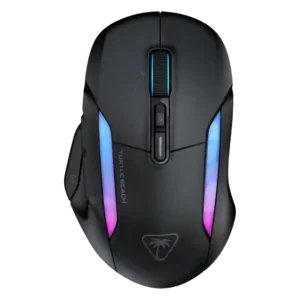
Good if you want a large, ergonomic wireless mouse with long battery life and deep customization. Skip it if you have small hands, prioritize ultralight FPS speed, or want the...
Pros: battery life, software usability
Cons: weight, FPS gaming suitability