If you want better handedness options
Choose Logitech Lift. It scores 5.0 vs 2.0 for handedness options, with a 4.1 overall score.

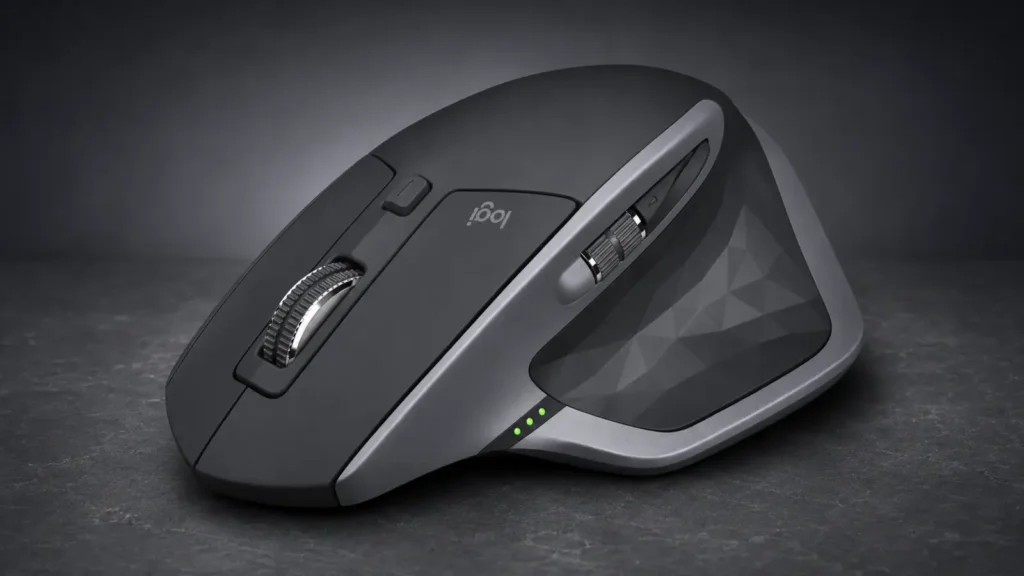
Dual scroll wheels, extensive shortcuts and seamless multi-computer control make this a superb productivity mouse. Its bulky right-handed shape, modest gaming performance and dated Micro USB charging are the main tradeoffs.
Desktop productivity users, especially right-handed people with larger hands, frequent document and spreadsheet navigation, video editing, or multi-computer workflows.
Left-handed users, people with very small hands, and competitive FPS gamers who need lightweight, highly responsive controls should consider alternatives.
The Logitech MX Master 2S remains a compelling productivity mouse, especially for people who navigate long documents, spreadsheets or editing timelines. Its sculpted body and thumb rest offer excellent support for many hands, while the adaptive scroll wheel and customizable controls help reduce repetitive actions. Logitech Flow is particularly valuable when working between multiple computers, letting users move the pointer and copy content across systems. Battery life is another highlight, with many owners reporting weeks between charges and convenient quick top-ups. The drawbacks are its substantial weight, awkwardly stacked side buttons, right-handed shape and dated Micro USB connector. It is less suitable for competitive gaming, and smaller hands may struggle. Older units also warrant attention to rubber wear and software compatibility. At a favorable price, it offers considerable productivity value.
Compared with other Mice, this product is above average in free-spin scrolling, software stability, Color options, near average in battery life, Cross-computer file and clipboard sharing, below average in USB receiver storage, click noise, polling rate.
| Attribute | This product | Category average | Difference |
|---|---|---|---|
| free-spin scrolling | 5.0 | 3.3 | +1.7 |
| software stability | 5.0 | 3.2 | +1.8 |
| USB receiver storage | 2.0 | 3.7 | -1.7 |
| Color options | 4.5 | 2.7 | +1.8 |
| Connectivity versatility | 5.0 | 3.3 | +1.7 |
| hand support | 4.9 | 3.4 | +1.6 |
| horizontal scrolling | 4.6 | 3.2 | +1.4 |
| click noise | 2.0 | 3.7 | -1.7 |
Choose Logitech Lift. It scores 5.0 vs 2.0 for handedness options, with a 4.1 overall score.
Choose Logitech M720 Triathlon. It scores 4.6 vs 2.0 for USB receiver storage, with a 4.2 overall score.
Choose Logitech MX Anywhere 3S. It scores 4.9 vs 2.0 for click noise, with a 4.5 overall score.
Choose Logitech MX Master 3S. It scores 5.0 vs 3.3 for DPI customization, with a 4.2 overall score.
Compared with Logitech MX Master 2S
Yes. Its customizable controls, adaptive main wheel, horizontal scroll wheel and supportive shape make it particularly well suited to productivity.
It can pair with up to three devices, and Logitech Flow allows seamless pointer movement and clipboard or file transfers between compatible computers on the same network.
Users commonly report several weeks between charges, with some approaching the advertised 70 days. Runtime varies with usage, and brief charging sessions can provide enough power for a workday.
No. It charges through a front-facing Micro USB port, which allows it to be used while charging.
It can handle casual games, but its weight, fixed low polling rate and productivity-oriented design make it less appealing for competitive or fast FPS gaming.
Yes. Multiple users successfully tracked on glass and other unconventional surfaces with the Darkfield sensor.
Fit varies for smaller hands, particularly around the stacked side buttons. The sculpted shape is explicitly right-handed, making it a poor choice for most left-handed users.
These are a few of the reviews included in our analysis.


Logitech MX Master 2S review from owner reports: a great wheel and Flow across three computers, against aging rubber, Micro USB and unclear...
The Logitech MX Master 2S is an impressive everyday mouse. It's made of high-quality plastic and has a premium and extremely well-built feel...
If you are thinking of getting a mouse, the Logitech MX Master 2S should definitely be in your checklist. But retailing at S$149, is this...

Best for travel, quiet shared spaces, precise any-surface tracking, and multi-device productivity. Skip it if you have large hands, want all-day palm support, or need a gaming-focused mouse.
Pros: portability, click noise
Cons: hand size compatibility, dongle-free setup

Choose it if you want a premium MMO/productivity mouse with 12 adjustable side buttons, strong battery life, and Stream Deck integration. Skip it if you need an ultralight FPS mouse,...
Pros: button customization, MMO gaming suitability
Cons: FPS gaming suitability
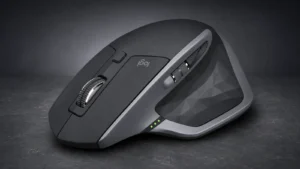
Dual scroll wheels, extensive shortcuts and seamless multi-computer control make this a superb productivity mouse. Its bulky right-handed shape, modest gaming performance and dated Micro USB charging are the main...
Pros: Overall satisfaction, ergonomic design
Cons: gaming suitability, button placement

Fast tracking, a very light shell and a grippy coating make this a compelling affordable FPS mouse. The optional 4K receiver costs extra, and Bluetooth is absent.
Pros: Overall satisfaction, gaming suitability
Cons: polling rate, Software and driver support