If you want better multi-device support
Choose Logitech M720 Triathlon. It scores 4.8 vs 2.0 for multi-device support, with a 4.2 overall score.

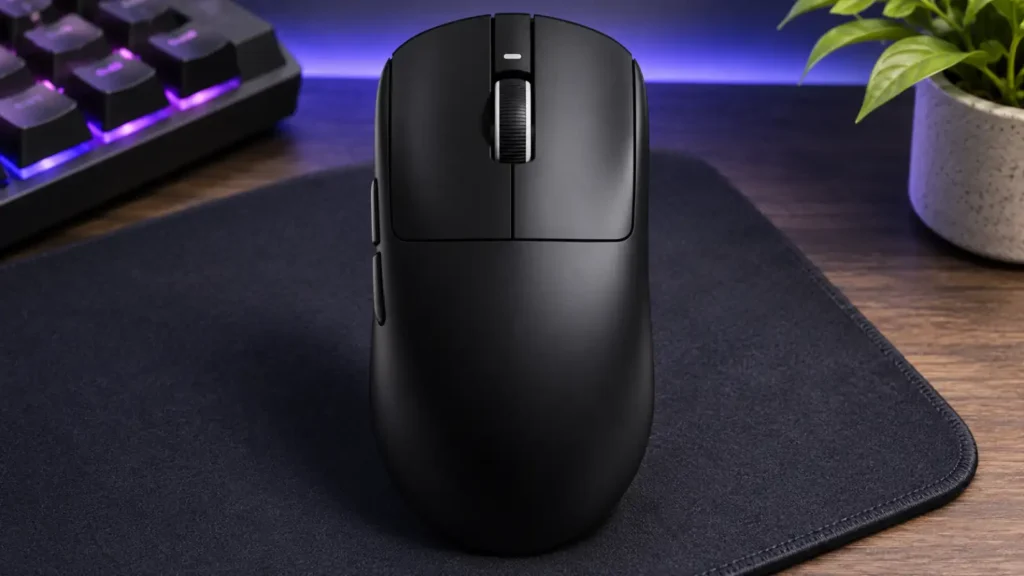
Fast tracking, a very light shell and a grippy coating make this a compelling affordable FPS mouse. The optional 4K receiver costs extra, and Bluetooth is absent.
Budget-conscious FPS and competitive PC gamers, particularly claw and fingertip users, who want quick aim adjustments and dependable wireless tracking.
Users who require multi-device switching, many MMO shortcuts or a large palm-supporting shell may prefer a more versatile mouse.
The VXE R1 Pro delivers much of the experience of premium wireless gaming mice at a considerably lower price. Its roughly 48–50 gram weight, precise sensor and low-latency clicks make rapid aim corrections easy, while the sturdy shell and grippy coating feel surprisingly refined. The rearward hump particularly suits claw grip, although large-handed palm users may prefer a larger mouse. Standard 1,000 Hz polling is sufficient for most players; unlocking 4,000 Hz requires an extra receiver and can reduce battery life. The stock feet are generally serviceable, and the configuration tools include a convenient browser option. Bluetooth is absent, advanced Mac configuration can be awkward, and the warranty is shorter than some flagship alternatives. For buyers who prioritize competitive FPS performance over extra connectivity and premium support, it is a strong value.
Compared with other Mice, this product is above average in gaming suitability, coating quality, Accidental button activation, near average in side button quality, software usability, below average in multi-device support, device switching, surface compatibility.
| Attribute | This product | Category average | Difference |
|---|---|---|---|
| gaming suitability | 4.8 | 2.3 | +2.5 |
| multi-device support | 2.0 | 4.3 | -2.3 |
| device switching | 2.0 | 4.2 | -2.2 |
| coating quality | 4.7 | 2.8 | +1.9 |
| surface compatibility | 2.0 | 4.1 | -2.1 |
| programmable buttons | 2.0 | 4.1 | -2.1 |
| Bluetooth support | 2.0 | 4.0 | -2.0 |
| Accidental button activation | 5.0 | 3.0 | +2.0 |
Choose Logitech M720 Triathlon. It scores 4.8 vs 2.0 for multi-device support, with a 4.2 overall score.
Choose Logitech MX Anywhere 3S. It scores 5.0 vs 2.0 for programmable buttons, with a 4.5 overall score.
Choose Logitech MX Master 3S. It scores 5.0 vs 2.0 for free-spin scrolling, with a 4.2 overall score.
Choose Logitech Lift. It scores 5.0 vs 2.0 for handedness options, with a 4.1 overall score.
Compared with VXE R1 Pro
Yes. Low weight, accurate tracking and quick click response make it a strong choice for competitive shooters.
No. Standard 1,000 Hz polling is sufficient for most players. The separate receiver enables up to 4,000 Hz, with a potential battery-life tradeoff.
Claw and fingertip grips are especially well supported. Palm grip can work for smaller hands, but larger hands may find the low shell too compact.
No. The Pro model uses 2.4 GHz wireless or a USB-C wired connection.
Reported charging intervals range from several days to around two weeks depending on usage and polling settings. Higher polling rates reduce endurance.
A browser-based configuration option is available. Language settings and advanced macOS remapping may require additional setup.
These are a few of the reviews included in our analysis.



Our VXE R1 Pro review covers shape, PAW3395 sensor, latency, battery life, 1K versus optional 4K polling, wireless limits, and which R1 model...
The VXE R1 Pro sits in a crowded but exciting part of the gaming mouse market: lightweight wireless mice that promise enthusiast-level...
VXE R1 Pro review: test wireless stability, tracking, clicks, and battery with a weekend plan. See pros, cons, and troubleshooting.
VXE R1 Pro review: lightweight 2.4GHz gaming mouse performance, Mac setup steps, button mapping options, troubleshooting, and comparisons
The VXE R1 Pro is a lightweight wireless gaming mouse, part of VXE's wider R1 Dragonfly lineup of mice that share the same shape but have...

Best for travel, quiet shared spaces, precise any-surface tracking, and multi-device productivity. Skip it if you have large hands, want all-day palm support, or need a gaming-focused mouse.
Pros: portability, click noise
Cons: hand size compatibility, dongle-free setup

Choose it if you want a premium MMO/productivity mouse with 12 adjustable side buttons, strong battery life, and Stream Deck integration. Skip it if you need an ultralight FPS mouse,...
Pros: button customization, MMO gaming suitability
Cons: FPS gaming suitability

Fast tracking, a very light shell and a grippy coating make this a compelling affordable FPS mouse. The optional 4K receiver costs extra, and Bluetooth is absent.
Pros: Overall satisfaction, gaming suitability
Cons: polling rate, Software and driver support

Choose the Kone II if you want a large, ergonomic mouse with deep customization and strong sensor performance. Skip it if you have small hands, need an ambidextrous mouse, or...
Pros: value for money, button customization
Cons: fingertip grip comfort, portability