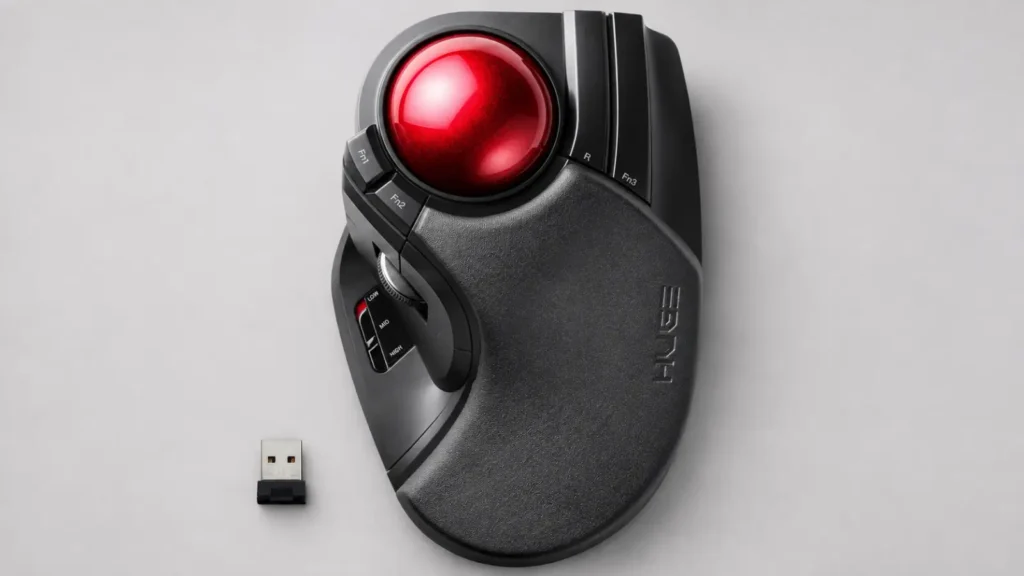
ELECOM Huge M-HT1DRBK

ELECOM Huge M-HT1DRBK Mouse Review

Brand: ELECOM
Released: July 16, 2017
Updated: 4 hours ago
3.7
Overall review score
267
Review insights
93
Scored features
10
Expert reviews

Bottom Line

A large, precise trackball and extensive programmable controls make the Huge an appealing desktop workhorse. Its unusual button layout, variable hand fit and intermittent wireless interference are the main compromises.

Desktop productivity users and strategy or simulation gamers who want fine finger-operated control and customizable shortcuts, especially those with medium or large hands who find the shape comfortable.

Competitive gamers, left-handed users, frequent travelers or people who require dependable multi-device connectivity. Small-handed buyers should test the fit first.

Verdict

The ELECOM Huge is especially appealing if you want a stationary pointing device with a large finger-operated ball, generous palm support and plenty of customizable shortcuts. Several reviewers find it exceptionally comfortable during long work sessions, and the ball makes fine cursor adjustments easy. Its modest price is another attraction. However, the oversized chassis does not guarantee a good fit: small hands may struggle to reach the controls, while some very large hands overshoot them. The unusual button layout also takes practice. Wireless interference, occasional defective units and limited replacement parts are meaningful concerns. Without Bluetooth or a wired fallback, the wireless model is less versatile than newer alternatives. It is a better match for desktop productivity and slower strategy games than competitive shooters, where high click latency and low polling can become disadvantages.

Feature Scorecards

Summary

93 reviewed features
  • Very positive 4.5-5.0
    28 (30%)
  • Positive 3.5-4.4
    31 (33%)
  • Neutral 2.5-3.4
    12 (13%)
  • Negative 1.5-2.4
    21 (23%)
  • Very negative below 1.5
    1 (1%)

Pros highlights

  • 4.8
    8 reviews strong consensus
    button count: 4.8, 8 reviews, strong consensus
    The many button functions give this trackball unusually broad shortcut options for its price.
  • 4.5
    8 reviews strong consensus
    hand support: 4.5, 8 reviews, strong consensus
    The integrated cushioned palm rest and finger supports are widely appreciated, although the raised pad can create pressure for some users.
  • 4.4
    8 reviews moderate consensus
    Overall satisfaction: 4.4, 8 reviews, moderate consensus
    The spacious finger-operated trackball and plentiful controls win enthusiastic recommendations, although wireless interruptions and inconsistent units temper satisfaction.
  • 4.3
    8 reviews strong consensus
    build quality: 4.3, 8 reviews, strong consensus
    The housing generally feels solid, with some owners reporting months or years of good service. Button flex, wheel wobble and creaking are the main exceptions.
  • 3.5
    8 reviews moderate consensus
    hand size compatibility: 3.5, 8 reviews, moderate consensus
    Fit depends as much on finger reach and grip as hand size. Medium and large hands often fare well, but some very large hands overshoot the controls.
  • 4.7
    7 reviews strong consensus
    programmable buttons: 4.7, 7 reviews, strong consensus
    The abundance of programmable controls is a standout, allowing shortcuts for navigation, editing and other repetitive tasks.

Cons highlights

  • 3.0
    7 reviews moderate consensus
    size: 3.0, 7 reviews, moderate consensus
    The oversized chassis provides extensive hand support, but the usable control area is not equally generous and the bulk can limit fit.
  • 3.3
    7 reviews strong consensus
    Learning curve: 3.3, 7 reviews, strong consensus
    The finger-operated ball and unusual thumb and finger assignments take practice; some adapt quickly, while others still misclick weeks later.
  • 3.4
    7 reviews low consensus
    scroll wheel quality: 3.4, 7 reviews, low consensus
    The thumb-operated notched wheel can feel smooth and precise, but some units wobble or feel sticky. Its rearward position also makes it awkward for some hands.
  • 2.8
    5 reviews strong consensus
    button quality: 2.8, 5 reviews, strong consensus
    The main clicks can feel excellent, but auxiliary buttons are sometimes soft, flexible, loose or difficult to actuate.
  • 1.9
    4 reviews strong consensus
    Bluetooth support: 1.9, 4 reviews, strong consensus
    Bluetooth is conspicuously absent, especially frustrating for users who encounter receiver interference.
  • 2.1
    4 reviews moderate consensus
    connection stability: 2.1, 4 reviews, moderate consensus
    Wireless stability is a substantial weakness: some units skip or disconnect near USB devices or other sources of interference.

Use Cases

Best for

  • 4.2
    7 reviews moderate consensus
    Large-handed users: 4.2, 7 reviews, moderate consensus
    Many large-handed users love the spacious body, but exceptionally long fingers can overshoot controls and require a claw-like position.
  • 4.7
    5 reviews strong consensus
    Desktop productivity: 4.7, 5 reviews, strong consensus
    Office work is a strong fit thanks to the stationary ball, comfortable rest and programmable shortcuts; high-speed gaming latency is less consequential here.
  • 4.4
    5 reviews strong consensus
    Medium-handed users: 4.4, 5 reviews, strong consensus
    Medium hands are commonly a good fit, with enough room for palm support and relatively accessible controls.

Not ideal for

  • Competitive gaming
    1.5
    2 reviews limited evidence
    Competitive gaming: 1.5, 2 reviews, limited evidence
    High click latency and low polling make it a poor choice for fast competitive games where quick responses matter.
  • Left-handed users
    1.0
    1 review
    Left-handed users: 1.0, 1 review
    Left-handed users should look for a symmetrical or dedicated left-handed trackball instead.

Compared With Category Average

Compared with other Mice, this product is above average in button count, tilt wheel support, hand support, near average in shape comfort, button customization, below average in 2.4GHz connectivity, wireless performance, connection stability.

Comparison summary

82 compared features
  • Above average 0.4+ pts higher
    20 (24%)
  • Same as average within 0.3 pts
    30 (37%)
  • Below average 0.4+ pts lower
    32 (39%)

Largest category differences

Attribute This product Category average Difference
2.4GHz connectivity 1.5 4.3 -2.8
wireless performance 2.0 4.6 -2.6
connection stability 2.1 4.6 -2.4
replacement parts availability 1.3 3.6 -2.4
portability 1.5 3.8 -2.3
reliability 2.0 4.3 -2.3
Bluetooth support 1.9 4.0 -2.1
motion consistency 2.2 4.3 -2.2

Consider This Instead

If you want better 2.4GHz connectivity

Choose Logitech Lift. It scores 5.0 vs 1.5 for 2.4GHz connectivity, with a 4.1 overall score.

Compare

If you want better portability

Choose VXE R1 Pro. It scores 5.0 vs 1.5 for portability, with a 4.3 overall score.

Compare

If you want better replacement parts availability

Choose Logitech M720 Triathlon. It scores 4.5 vs 1.3 for replacement parts availability, with a 4.2 overall score.

Compare

If you want better multi-device support

Choose Logitech MX Master 4. It scores 4.0 vs 2.0 for multi-device support, with a 3.6 overall score.

Compare

Compared in Reviews

Compared with ELECOM Huge M-HT1DRBK

ELECOM DEFT PRO

  • Compared Adds Bluetooth and wired options but feels smaller and less comfortable for large hands.
  • Compared Smaller ball and more connectivity, without the same large foam rest.
  • Better Offers the wired fallback missing from this wireless model.

Kensington Expert Mouse Wireless Trackball

  • More expensive Costs more than this trackball.
  • Worse Has fewer buttons and higher click latency, but offers free scrolling.

Kensington SlimBlade Trackball (2009)

  • Worse Less comfortable hand support for this reviewer.
  • Worse Less sturdy overall, with a wired connection and free-scrolling ring.

FAQ

Is the ELECOM Huge comfortable for large hands?

Many large-handed users praise its wide chassis and padded rest. Exceptionally long fingers can overshoot the controls, so fit is not guaranteed.

Does the wireless model support Bluetooth?

No. It uses a dedicated USB-A receiver and has no wired fallback; a separate wired model is available.

Is it good for gaming?

It suits slower strategy, management and casual games. High click latency and low polling make it less suitable for fast competitive play.

Can the buttons be customized?

Yes. Mouse Assistant allows extensive remapping, including shortcuts and macros, with functionality dependent on the operating system.

How reliable is its wireless connection?

Experiences vary. Some users report skipping or disconnections near USB devices, even with the receiver close by.

Does the trackball need cleaning?

Yes. The ball can be popped out for cleaning to remove dust and skin oil that can slow its movement.

Sample Expert Reviews We Analyzed

These are a few of the reviews included in our analysis.

Video Reviews

Article Reviews

custompc.com

This trackball mouse is indeed huge and includes loads of extra buttons, making it very versatile, though ironically it's not ideal for large...

Review score
3.6
rtings.com

The ELECOM HUGE M-HT1DRBK is a stationary, wireless trackball mouse designed for office and productivity tasks. It has an integrated...

Review score
3.3

Top Mice to Consider

#1 Logitech MX Anywhere 3S
4.5

Best for travel, quiet shared spaces, precise any-surface tracking, and multi-device productivity. Skip it if you have large hands, want all-day palm support, or need a gaming-focused mouse.

Pros: portability, click noise

Cons: hand size compatibility, dongle-free setup

#2 Corsair Scimitar Elite Wireless SE
4.4

Choose it if you want a premium MMO/productivity mouse with 12 adjustable side buttons, strong battery life, and Stream Deck integration. Skip it if you need an ultralight FPS mouse,...

Pros: button customization, MMO gaming suitability

Cons: FPS gaming suitability

#3 VXE R1 Pro
4.3

Fast tracking, a very light shell and a grippy coating make this a compelling affordable FPS mouse. The optional 4K receiver costs extra, and Bluetooth is absent.

Pros: Overall satisfaction, gaming suitability

Cons: polling rate, Software and driver support

#4 Turtle Beach Kone II
4.3

Choose the Kone II if you want a large, ergonomic mouse with deep customization and strong sensor performance. Skip it if you have small hands, need an ambidextrous mouse, or...

Pros: value for money, button customization

Cons: fingertip grip comfort, portability