If you want better USB-C connectivity
Choose Logitech MX Anywhere 3S. It scores 5.0 vs 2.5 for USB-C connectivity, with a 4.5 overall score.

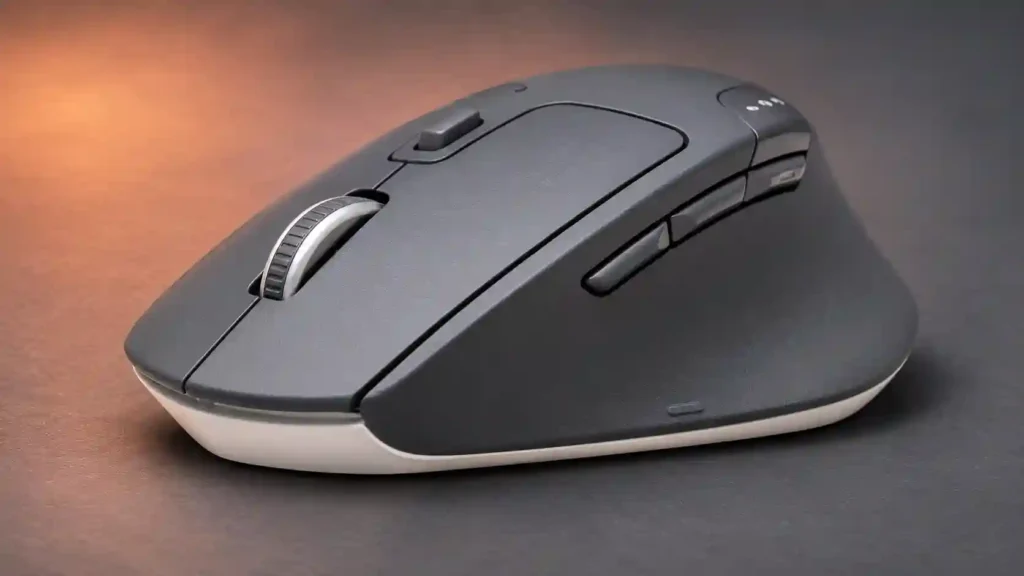
The M720 makes switching between three devices and navigating long documents remarkably easy for the price. Its right-handed shape, basic sensor and conventional clicks make it less suitable for competitive gaming or quiet shared spaces.
Budget-conscious office and hybrid workers who alternate among computers or tablets, navigate long documents or use spreadsheets. Its comfortable shape and configurable controls make repeated daily tasks easier.
Left-handed users, competitive FPS gamers and people who need very quiet operation or an ultracompact travel mouse. Very large-handed users should check the fit before buying.
The Logitech M720 Triathlon remains a strong value for everyday productivity, especially if your desk includes more than one computer. Its accessible device-switch button, dual-mode scroll wheel, configurable shortcuts and comfortable palm support make routine office tasks easier. Battery life is another standout: several long-term owners report extended use from a single AA, with Logitech claiming up to two years. The tradeoffs are a fairly heavy body, a fixed-sensitivity office sensor, conventional click noise and an older USB-A Unifying receiver. Comfort varies with hand size, and reports of rubber coating deterioration temper otherwise favorable durability assessments. Full customization and Flow depend on supported software. For budget-conscious right-handed office users who regularly switch machines, the feature set is compelling; competitive gamers, left-handed users and those who prioritize silent operation should look elsewhere.
Compared with other Mice, this product is above average in hand support, USB receiver storage, click consistency, near average in gesture controls, button customization, below average in click latency, USB-C connectivity, switch durability.
| Attribute | This product | Category average | Difference |
|---|---|---|---|
| click latency | 2.0 | 4.5 | -2.5 |
| hand support | 4.7 | 2.7 | +2.0 |
| USB-C connectivity | 2.5 | 4.5 | -2.0 |
| USB receiver storage | 4.6 | 2.9 | +1.8 |
| switch durability | 2.0 | 3.9 | -1.9 |
| click consistency | 5.0 | 3.3 | +1.7 |
| dongle-free setup | 4.6 | 3.3 | +1.3 |
| value for money | 4.6 | 3.7 | +0.9 |
Choose Logitech MX Anywhere 3S. It scores 5.0 vs 2.5 for USB-C connectivity, with a 4.5 overall score.
Choose Logitech MX Master 3S. It scores 5.0 vs 3.9 for receiver quality, with a 4.2 overall score.
Choose Logitech Pebble Mouse 2 M350s. It scores 5.0 vs 1.9 for handedness options, with a 4.0 overall score.
Choose Logitech Signature Comfort Plus M850 L. It scores 4.0 vs 3.1 for weight, with a 4.3 overall score.
Compared with Logitech M720 Triathlon
Yes. The Easy-Switch button cycles among three stored connections using Bluetooth or the compatible Unifying receiver. It controls one selected device at a time.
Logitech claims up to two years on one AA battery. Actual runtime varies, with several reports describing more than a year of use.
It can handle casual games, but its weight, fixed sensitivity and modest polling rate make it a poor choice for competitive shooters.
Several tests found that it does not track reliably on clear glass. A mousepad is the simplest workaround.
Basic mouse operation can work, but full Logitech Options+ customization is intended for supported Windows and macOS systems.
Larger-hand comfort varies by grip and preference. The asymmetric thumb rest is designed for right-handed use, making it a poor choice for most left-handed users.
No. The conventional mechanical wheel and clicks are acceptable to many users, but can be audible in a quiet room.
These are a few of the reviews included in our analysis.


The Logitech M720 Triathlon is a multi-device wireless mouse designed for high-endurance productivity. It bridges the gap between basic...
Find the perfect productivity mouse with our expert reviews. Compare ergonomic designs, wireless connectivity, programmable buttons, and more...
Information Technology Blog provides you with information and links to computer tips, tricks, solutions, news and relevant information to IT...
The Logitech M720 Triathlon suits multi-device office work, but its 2016 design shows its age. See its comfort, switching, battery, tracking...
Is the Logitech M720 Triathlon still worth buying in 2026? See how its three-device switching, comfort, scroll wheel, AA battery and...

Best for travel, quiet shared spaces, precise any-surface tracking, and multi-device productivity. Skip it if you have large hands, want all-day palm support, or need a gaming-focused mouse.
Pros: portability, click noise
Cons: hand size compatibility, dongle-free setup

Choose it if you want a premium MMO/productivity mouse with 12 adjustable side buttons, strong battery life, and Stream Deck integration. Skip it if you need an ultralight FPS mouse,...
Pros: button customization, MMO gaming suitability
Cons: FPS gaming suitability

Choose the Kone II if you want a large, ergonomic mouse with deep customization and strong sensor performance. Skip it if you have small hands, need an ambidextrous mouse, or...
Pros: value for money, button customization
Cons: fingertip grip comfort, portability
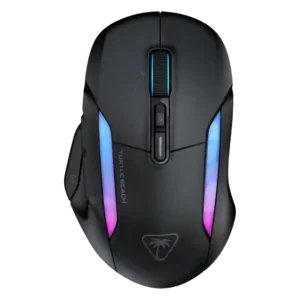
Good if you want a large, ergonomic wireless mouse with long battery life and deep customization. Skip it if you have small hands, prioritize ultralight FPS speed, or want the...
Pros: battery life, software usability
Cons: weight, FPS gaming suitability