
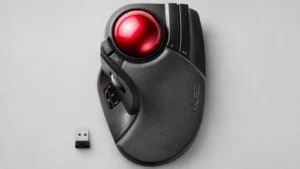
ELECOM Huge M-HT1DRBK Feature Scores
Overall Scorata score: 3.7/5
Based on 10 analyzed reviews · View source samples
Explore all 93 feature scores for ELECOM Huge M-HT1DRBK, organized into pros and cons.
Scores by Feature
Summary
93 reviewed features-
Very positive 4.5-5.028 (30%)
-
Positive 3.5-4.431 (33%)
-
Neutral 2.5-3.412 (13%)
-
Negative 1.5-2.421 (23%)
-
Very negative below 1.51 (1%)
Pros
Sort
-
The many button functions give this trackball unusually broad shortcut options for its price.
-
The abundance of programmable controls is a standout, allowing shortcuts for navigation, editing and other repetitive tasks.
-
The sculpted stationary design and padded rest can make pointing much more comfortable than a conventional mouse. Grip and desk height still matter.
-
The integrated cushioned palm rest and finger supports are widely appreciated, although the raised pad can create pressure for some users.
-
Mouse Assistant enables extensive button remapping, including practical shortcuts and custom functions.
-
The large ball makes subtle, accurate movements easy for experienced users, although initial precision takes practice.
-
The spacious finger-operated trackball and plentiful controls win enthusiastic recommendations, although wireless interruptions and inconsistent units temper satisfaction.
-
Many find the wide, contoured shape exceptionally comfortable, though others need to reposition their hand to reach the buttons.
-
Many find the large ball exceptionally smooth and easy to control, although some report less fluid motion and contamination-related sluggishness.
-
The housing generally feels solid, with some owners reporting months or years of good service. Button flex, wheel wobble and creaking are the main exceptions.
-
Multiple assignable controls and accurate finger tracking make everyday desktop tasks efficient once the unusual layout is learned.
-
The large ball, padded rest and extensive controls offer strong value, although poor quality control can erode the savings.
-
The deep red ball and black sculpted chassis have a distinctive, professional appearance that many find attractive.
-
The physical three-position sensitivity control makes it easy to change DPI without opening software.
-
Fine cursor control is a major strength when the connection and ball motion behave; interference can cause erratic movement.
-
The free Mouse Assistant software is useful and customizable, although its interface feels dated and some competing features are absent.
-
Switching between preset sensitivities is convenient, particularly when adapting cursor speed to different tasks.
-
Long-term users report months or years without notable rattling or flex, although unit quality varies.
-
The wheel can offer smooth, precise and responsive notched scrolling.
-
Three sensitivity presets allow users to balance fine control against faster cursor travel.
-
The ball itself is easy to manipulate and many controls are intuitive after adaptation, despite the initial learning curve.
-
The software is straightforward and makes mapping shortcuts easy, even if its interface looks old-fashioned.
-
Stationary pointing and cushioning can reduce wrist movement and strain, but the thick rest and thumb workload may introduce discomfort.
-
A relaxed claw grip can improve button reach, especially when the palm is positioned farther back.
-
Keyboard macros and other assigned commands make the numerous buttons useful for repetitive work and games.
-
The receiver makes initial setup straightforward, with customization available afterward through the companion software.
-
The plastic construction is generally solid, although some surfaces feel inexpensive and can creak when flexed.
-
The arrangement is thoughtful and efficient after practice, though some buttons and the rearward wheel are awkward to reach.
-
The plush rest and solid-feeling body give a surprisingly substantial impression for the price.
-
One long-term owner reports three months or more on a single set of batteries.
-
The main left and right clicks receive particularly strong praise for their firm, tactile feel.
-
Basic pointing works quickly after plugging in the included USB receiver.
-
The scroll wheel provides soft tactile feedback without an audible click in one hands-on assessment.
-
The main switches have a satisfying, firm click compared with ordinary mouse buttons.
-
Assigning zoom to a dedicated button is particularly useful for changing on-screen content quickly.
-
The ball can be popped out for straightforward cleaning, but regular removal of dust and skin oil is necessary to maintain smoothness.
-
Fit depends as much on finger reach and grip as hand size. Medium and large hands often fare well, but some very large hands overshoot the controls.
-
Some users find it exceptionally comfortable for hours of work, while others need extra arm support to offset the chassis height.
-
The relatively large bearing contact points can help resist clogging, though occasional cleaning is still advisable.
-
A relaxed finger grip can improve access to the controls without forcing the palm against the chassis.
-
The soft, compressible hand-rest material feels comfortable against the palm.
-
Mouse Assistant can activate different shortcut profiles when specific apps launch.
-
The wheel has pleasant, soft tactile feedback that makes ordinary scrolling easy.
-
Finger-operated tracking eliminates the need to repeatedly lift and reposition the mouse across a desk.
-
Replacing the synthetic ruby bearings with ceramic ones can make the ball slightly smoother and quieter without a difficult modification process.
-
A built-in receiver compartment helps keep the small dongle from getting misplaced during transport.
-
The trackball is much more convincing for leisurely games than competitive play, though some praise its precision and macros for gaming generally.
-
Left and right wheel tilt provide horizontal navigation that several competing trackballs lack.
-
Physical cursor lag is generally unlikely to be noticeable in ordinary use, provided the wireless setup is favorable.
-
The packaging is more modern-looking than the basic cartons used for some other trackballs.
-
A low-energy operating mode offers a convenient way to conserve battery power.
-
Standard AA batteries are simple to replace and avoid downtime for charging.
-
Mouse Assistant is appreciated for its simple, non-bloated approach.
-
The main OMRON switches feel premium, but the auxiliary controls use less satisfying switches.
-
The tilting wheel adds useful lateral scrolling inputs to the control layout.
-
Anti-slip pads usually hold the trackball in place, but one user found it could slide on a desk mat under pressure.
-
Button customization is available on Windows and macOS, but full functionality can vary by operating system version.
-
Missed button inputs are not expected to be common, although overall gaming latency remains a limitation.
-
The heavier construction is seen as a reasonable tradeoff for a substantial, solid stationary device.
Cons
Sort
-
Bluetooth is conspicuously absent, especially frustrating for users who encounter receiver interference.
-
Replacement receivers and balls are difficult or impossible to obtain, making lost or damaged components a concern.
-
The USB receiver can be sensitive to neighboring devices and cannot easily be replaced or paired with a donor unit.
-
The 2.4GHz connection is susceptible to interference and can become unstable even with the receiver nearby.
-
Wireless stability is a substantial weakness: some units skip or disconnect near USB devices or other sources of interference.
-
The wireless connection can work well, but receiver placement and intermittent interference can make it frustrating.
-
The thumb handles several controls, and the wheel reach or prolonged use of the side buttons can cause discomfort.
-
The dedicated wireless receiver is less flexible than tri-mode trackballs that support Bluetooth and wired fallback.
-
Cursor movement can skip, twitch or spin out, especially when the wireless connection is disrupted.
-
This wireless model cannot fall back to a cable; a separate wired version is preferable if radio interference or batteries are unwanted.
-
The oversized chassis and receiver-dependent design are not convenient for frequent transport.
-
The default thumb layout makes holding the left button while scrolling difficult or impossible without remapping.
-
One defective unit repeatedly woke a sleeping PC, with unplugging the receiver the only workable immediate solution.
-
One reviewer needed three units before finding one without defects; sticky scrolling, click issues and receiver problems can vary between samples.
-
The unconventional button layout can cause wrong or accidental presses even after days or weeks of use.
-
The thick, elevated wrist rest can press into the forearm or require additional arm support, even though its padding is comfortable.
-
The notched scroll wheel lacks a free-spinning mode, a feature some users miss from other mice and trackballs.
-
The asymmetric layout is designed for right-handed operation rather than ambidextrous use.
-
The single receiver connection lacks the flexible device switching offered by newer multi-mode trackballs.
-
Low polling can make cursor motion look choppy on high-refresh, high-resolution displays.
-
Reliability varies considerably; intermittent wireless problems and unit-specific defects can require exchanges.
-
The dedicated USB-A receiver requires an adapter or dock on USB-C-only computers.
-
The primary and auxiliary clicks can differ noticeably in feel, and some units have off-center or inconsistent actuation.
-
Wireless delay can be unobtrusive in ordinary work yet become problematic when interference causes lag and skipping.
-
Bearing modifications are possible with disassembly, but receiver failures and unavailable parts can force a full replacement.
-
The main clicks can feel excellent, but auxiliary buttons are sometimes soft, flexible, loose or difficult to actuate.
-
Click latency is high by modern gaming standards, even though it is lower than on some competing trackballs and rarely troublesome for desktop work.
-
Tracking is generally usable, but possible cursor spinout makes it less dependable for rapid competitive movement.
-
The oversized chassis provides extensive hand support, but the usable control area is not equally generous and the bulk can limit fit.
-
Replaceable batteries avoid charging cables but introduce periodic battery management.
-
Windows and macOS support is useful, but full customization should not be assumed on every future OS release.
-
A palm grip works for many users, but very long fingers can extend past the buttons.
-
The finger-operated ball and unusual thumb and finger assignments take practice; some adapt quickly, while others still misclick weeks later.
-
The thumb-operated notched wheel can feel smooth and precise, but some units wobble or feel sticky. Its rearward position also makes it awkward for some hands.
Use Cases
Best for
Sort
-
Many large-handed users love the spacious body, but exceptionally long fingers can overshoot controls and require a claw-like position.
-
Office work is a strong fit thanks to the stationary ball, comfortable rest and programmable shortcuts; high-speed gaming latency is less consequential here.
-
Medium hands are commonly a good fit, with enough room for palm support and relatively accessible controls.
-
The stationary ball and padded rest can reduce uncomfortable wrist movement, but hand fit, thumb workload and desk height determine the benefit.
-
The large ball allows very small movements and accurate positioning, but technique and reliable tracking remain important.
-
Budget-minded shoppers get an unusually feature-rich trackball for a modest price, provided the fit works for them.
-
Assignable buttons are useful for creative workflows, including quick zoom adjustments during live content production.
-
Assigning functions like zoom, mute or copy and paste to dedicated buttons makes frequent commands accessible immediately.
-
City builders, management games and other slower simulations are a natural fit because high-speed competitive response is less important.
-
Strategy and turn-based games suit the trackball because precision and comfort matter more than fast competitive response.
-
Fine cursor movement and programmable shortcuts can be useful in Photoshop and other photo-editing workflows.
-
Programmable shortcuts and ball control can assist timeline navigation and editing, depending on the application and preferred gestures.
-
Slower-paced casual games are a good match once the user is comfortable with finger-operated tracking.
-
The large, smooth ball is an appealing introduction to trackballs, but the unconventional button arrangement takes practice.
-
Adjustable sensitivity and fine movement can benefit graphic design applications that support higher DPI.
-
A bearing swap is achievable with ordinary disassembly and can slightly improve the feel of the ball.
-
Custom zoom and mute shortcuts can simplify live-show production without moving away from the mouse.
-
The higher DPI presets help move the pointer across large or multiple displays without excessive finger movement.
-
Programmable navigation buttons can speed up common browser actions.
-
The stationary ball eliminates the need for a large sweeping area, but the chassis itself still takes up substantial room.
Conditional or not ideal for
Sort
-
Small-handed usersSmall-handed users may struggle with the wide body and button reach. Some find it manageable, so testing the fit first is worthwhile.
-
Wireless useWireless operation reduces cable clutter, but the stationary form offers little reason to tolerate intermittent receiver issues if they arise.
-
FPS gamingOne reviewer likes the sensitivity for shooters, but latency-focused assessments favor conventional gaming mice for fast competitive FPS play.
-
Competitive gamingHigh click latency and low polling make it a poor choice for fast competitive games where quick responses matter.
-
Long-term ownershipSome users report years of satisfaction, but unavailable replacement parts and receiver defects pose long-term risks.
-
Left-handed usersLeft-handed users should look for a symmetrical or dedicated left-handed trackball instead.
-
TravelThe large footprint and dedicated receiver make it a poor travel mouse.
-
Multi-device workUsers who frequently switch between computers are better served by a trackball with multiple connection modes.