Best for charging convenience
ASUS ROG Harpe Ace Aim Lab
5.0 attribute score
Highest scored product for this attribute based on supporting review evidence.

Highest scored product for this attribute based on supporting review evidence.
Balances the attribute score, supporting reviews, and overall product strength.
Has the broadest review evidence for this attribute.
Strongest overall product among items with scored evidence for this attribute.

Charging convenience was praised, with reviewers noting quick top-ups from under 30 minutes to about an hour.
Pros: weight, grip texture
Cons: software usability, profile switching

Charging convenience was positive because reviewers could keep playing while charging or recover hours of play from short top-ups.
Pros: glide smoothness, weight
Cons: handedness options
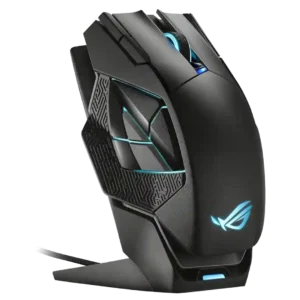
Charging convenience was a major strength, especially because the magnetic dock made it easy to keep the mouse topped up.
Pros: charging convenience, RGB features
Cons: side button quality, weight

Charging convenience was praised because the mouse can be used while charging and has convenient USB-C behavior.
Pros: battery life, software usability
Cons: click noise, fingertip grip comfort

Charging convenience had limited but positive evidence, especially around USB-C fast charging and quick top-ups.
Pros: shape comfort, value for money
Cons: handedness options

Charging convenience was mostly praised for quick charging, Qi support, and accessible charging, with one caveat about keeping USB-C nearby.
Pros: glide smoothness, scroll wheel quality
Cons: analog joystick usability, shape comfort

Charging and dongle convenience were mixed: USB-C and cable placement helped, but the booster/dongle setup could feel chunky.
Pros: value for money, sensor performance
Cons: software usability, grip texture

Power and charging convenience is mixed: some reviewers like easy-to-buy batteries, while others dislike needing spares or missing an internal rechargeable battery.
Pros: Accuracy and tracking precision, shape comfort
Cons: long-session comfort