If you want better FPS gaming suitability
Choose Logitech G305 Lightspeed. It scores 4.7 vs 3.8 for FPS gaming suitability, with a 4.3 overall score.

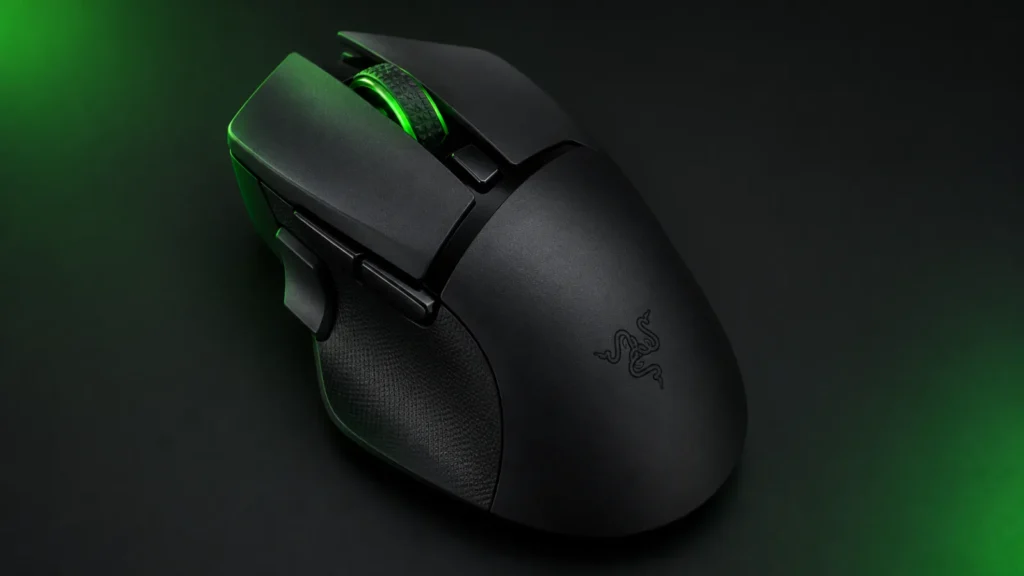
A comfortable sculpted shape, responsive wireless tracking and versatile controls make this a strong gaming-and-work mouse. Its substantial weight, replaceable AA power and basic scroll wheel are the tradeoffs.
Budget-conscious right-handed gamers who alternate between desktop work, casual games, strategy and MOBA titles benefit from the supportive shape and customizable shortcuts.
Left-handed users, competitive shooter players who prioritize effortless rapid flicks, and buyers needing a wired fallback should look elsewhere.
The Basilisk V3 X HyperSpeed makes a convincing case for buyers who want one comfortable wireless mouse for gaming and everyday work without paying premium prices. Its textured sides, supportive thumb rest and programmable controls are standout strengths, especially with the secondary Hypershift command layer. The 2.4 GHz connection delivers responsive, accurate tracking, while Bluetooth is useful for laptops and less demanding tasks. Battery life can be excellent, although reported runtime varies and replacing AA cells is less appealing to buyers who prefer built-in recharging. The roughly 110-gram body feels stable to some players but is less agile than lightweight esports mice. The simpler wheel also sacrifices tilt and free-spin scrolling. It is a particularly good fit for mixed gaming and productivity, provided the right-handed shape suits your grip.
Compared with other Gaming Mice, this product is above average in Dedicated DPI switch, Scroll wheel noise, button count, near average in switch feel, grip comfort, below average in onboard memory, wired connectivity, weight.
| Attribute | This product | Category average | Difference |
|---|---|---|---|
| onboard memory | 1.8 | 4.0 | -2.3 |
| Dedicated DPI switch | 4.8 | 3.0 | +1.7 |
| Scroll wheel noise | 5.0 | 3.4 | +1.6 |
| wired connectivity | 2.0 | 3.5 | -1.5 |
| weight | 2.9 | 4.1 | -1.2 |
| free-spin scrolling | 2.0 | 3.4 | -1.4 |
| tilt wheel support | 2.3 | 3.7 | -1.4 |
| button count | 4.7 | 3.5 | +1.2 |
Choose Logitech G305 Lightspeed. It scores 4.7 vs 3.8 for FPS gaming suitability, with a 4.3 overall score.
Choose Razer Naga V3 Pro. It scores 5.0 vs 1.8 for onboard memory, with a 4.2 overall score.
Choose Razer Basilisk V3. It scores 4.8 vs 2.0 for free-spin scrolling, with a 4.5 overall score.
Choose Logitech G502 HERO. It scores 5.0 vs 2.3 for Companion software dependence, with a 4.2 overall score.
Compared with Razer Basilisk V3 X HyperSpeed
Yes, its accurate sensor and low-latency receiver mode are capable for shooters. Its roughly 110–115 gram weight makes rapid flicks less effortless than with ultralight models.
No. It uses one replaceable AA battery, so you can swap in a fresh cell or use your own rechargeable AA batteries.
The quoted ratings are up to 285 hours over HyperSpeed and 535 hours over Bluetooth. Actual runtime varies with lighting, connection mode and usage, and some owners report much shorter life.
Yes, it supports both Bluetooth and a 2.4 GHz USB receiver. The receiver is preferable for latency-sensitive gaming.
No. The notched scroll wheel lacks both free-spin and horizontal tilt inputs found on higher-tier Basilisk models.
Basic mouse operation works on macOS through Bluetooth or the receiver, but the customization software for this model is Windows-only.
The sculpted thumb rest is comfortable for many grips, but one tester with larger hands found the narrow right side cramped. Fit depends on hand shape and grip style.
These are a few of the reviews included in our analysis.



Razer Basilisk V3 X HyperSpeed Review: Is It Worth It?: the top picks compared by specs, pros and cons, who each model suits, and what to...
We review Razer Basilisk V3 X HyperSpeed: its fit as a Mouse, pros, limits and current price context before buying, with alternatives and...
Dive into our in-depth review of the Razer Basilisk V3 X HyperSpeed, a gaming mouse packed with features for FPS, MOBA, and MMO enthusiasts...
Razer Basilisk V3 X Hyperspeed is a wireless ergonomic gaming mouse from Razer. It is part of the refresh of the Basilisk line-up. Like the...
These are the best gaming mice you can buy, with picks for different price ranges, hand sizes and PC game genres.

Choose the ROG Harpe II Ace for ultralight FPS play, precise tracking, smooth glide, and web-based tuning. Skip it if you need palm-grip support, MMO buttons, onboard profiles, or long...
Pros: glide smoothness, weight
Cons: handedness options

Excellent tracking, comfortable right-handed ergonomics and a versatile scroll wheel make the Basilisk V3 a strong gaming and productivity mouse. Its substantial weight, fixed cable and sometimes over-sensitive automatic scrolling...
Pros: scroll wheel quality, RGB features
Cons: weight, handedness options

The L7 Pro delivers remarkably light handling, precise aiming and a grippy shell at a budget price. Stock skates are less impressive, and conflicting click-latency measurements warrant caution for latency-sensitive...
Pros: value for money, weight
Cons: wired connectivity

Best for ultra-light, competition-focused speed, precise tracking, stable wireless, and long battery life. Skip it if you need quieter clicks, left-handed support, Bluetooth, more buttons, or better value for casual...
Pros: value for money, weight
Cons: click noise, RGB features