If you want better RGB features
Choose Razer Cobra Pro. It scores 4.6 vs 4.1 for RGB features, with a 4.0 overall score.

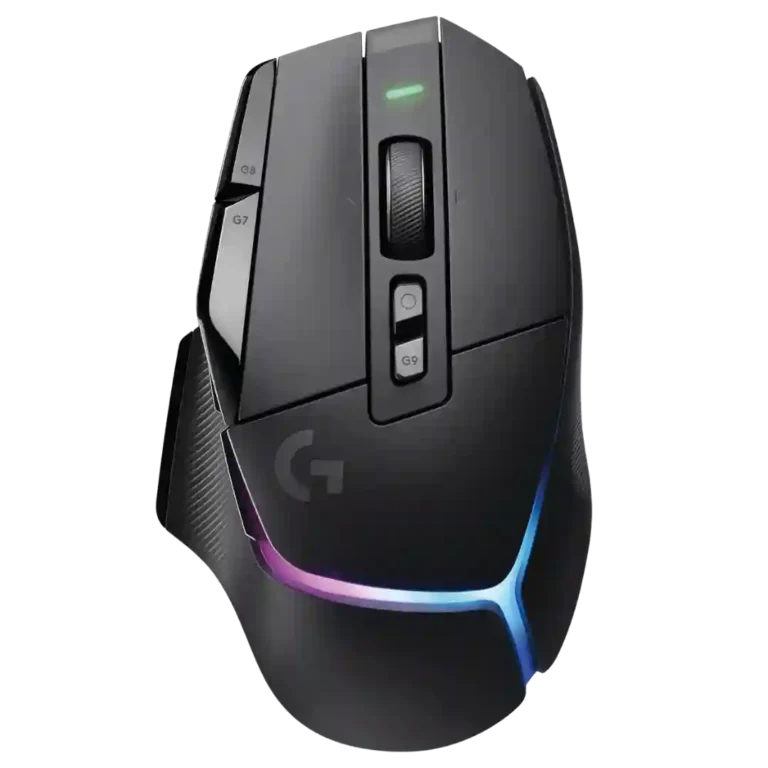
Choose the G502 X Plus for precise wireless tracking, ergonomic comfort, vivid RGB, and many customizable buttons. Skip it if you need Bluetooth, ultralight FPS handling, adjustable weights, or strong value at full price.
Best for right-handed gamers and productivity users who want precise wireless tracking, palm-friendly comfort, vivid RGB, onboard controls, and lots of remappable buttons in one mouse.
Not for left-handed users, Bluetooth-dependent multi-device setups, players who want an ultralight competitive FPS mouse, or buyers who mainly want the cheapest G502-style option.
The Logitech G502 X Plus lands as a feature-rich, high-performing wireless mouse built around excellent tracking, strong wireless response, vivid RGB, and a comfortable G502-style shape. Reviewers consistently liked the sensor, glide, switch feel, and deep button customization, and several found it useful for both gaming and productivity. The tradeoff is that its premium ambitions are uneven: the scroll wheel drew repeated complaints, the mouse is still heavy for competitive FPS play, Bluetooth is missing, and Powerplay convenience costs extra. The result is a polished all-rounder with standout control and comfort, but its value depends heavily on whether the extra RGB and G502 feature set matter more than weight, Bluetooth, and price.
Compared with other Gaming Mice, this product is above average in RGB features, profile switching, glide smoothness, near average in Accuracy and tracking precision, switch feel, below average in lift-off distance, Bluetooth support, polling rate.
| Attribute | This product | Category average | Difference |
|---|---|---|---|
| lift-off distance | 2.0 | 3.8 | -1.8 |
| Bluetooth support | 2.0 | 3.6 | -1.6 |
| polling rate | 2.5 | 3.9 | -1.4 |
| value for money | 2.9 | 3.8 | -0.9 |
| tilt gesture controls | 2.0 | 3.2 | -1.2 |
| handedness options | 1.5 | 2.6 | -1.1 |
| scroll wheel quality | 3.2 | 4.0 | -0.8 |
| cable flexibility | 2.5 | 3.6 | -1.1 |
Choose Razer Cobra Pro. It scores 4.6 vs 4.1 for RGB features, with a 4.0 overall score.
Choose Logitech G PRO X Superlight 2 DEX. It scores 4.8 vs 3.5 for weight, with a 4.1 overall score.
Choose Logitech G Pro Wireless. It scores 4.6 vs 1.5 for handedness options, with a 4.3 overall score.
Choose Razer Basilisk V3 Pro 35K. It scores 5.0 vs 2.0 for lift-off distance, with a 4.2 overall score.
Products reviewers directly compared with this model, grouped into quick takeaways.
Yes. Reviewers repeatedly praised the HERO sensor, tracking precision, smooth movement, and lack of stutter or hiccups.
It can work well for FPS thanks to accurate tracking, fast switches, and DPI controls. However, several reviewers said the weight makes it less ideal for serious competitive FPS play.
Opinions were mixed. Some reviewers liked the dual-mode wheel and improved stability, while others criticized stiffness, noise, wobble, backlash, or accidental side inputs.
No. Multiple reviewers called the lack of Bluetooth a drawback, especially for people who switch between multiple devices.
Battery life was mostly praised, especially with RGB off, but reviewers also noted RGB can drain it significantly and one long-term owner got much less than the advertised figure.
Reviewers disagreed. Some found G Hub intuitive and powerful, while others found button programming complicated or the software frustrating.
The evidence is mixed. Reviewers liked the RGB, but several questioned paying extra when RGB adds battery drain and is the main Plus-model difference.
These are a few of the reviews included in our analysis.



Choose the ROG Harpe II Ace for ultralight FPS play, precise tracking, smooth glide, and web-based tuning. Skip it if you need palm-grip support, MMO buttons, onboard profiles, or long...
Pros: glide smoothness, weight
Cons: handedness options

Best for ultra-light, competition-focused speed, precise tracking, stable wireless, and long battery life. Skip it if you need quieter clicks, left-handed support, Bluetooth, more buttons, or better value for casual...
Pros: value for money, weight
Cons: click noise, RGB features

Choose it if you want a premium MMO/productivity mouse with 12 adjustable side buttons, strong battery life, and Stream Deck integration. Skip it if you need an ultralight FPS mouse,...
Pros: button customization, MMO gaming suitability
Cons: FPS gaming suitability

Best for precise wireless tracking, smooth glide, strong battery life, and unusually good 8K value. Skip it if you need polished software, quiet snappy clicks, true left-handed controls, or gentle...
Pros: software usability, sensor performance
Cons: RGB features, scroll wheel quality