If you want better charging convenience
Choose Logitech G Pro X2 Superstrike. It scores 4.8 vs 2.2 for charging convenience, with a 4.0 overall score.

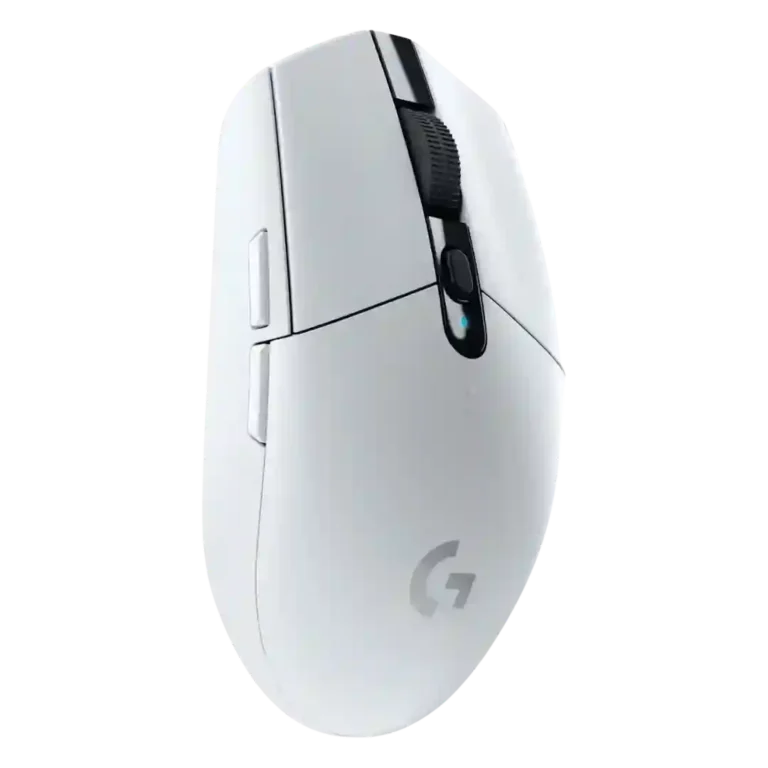
Choose the Logitech G305 for affordable, lag-free 2.4GHz wireless gaming, strong sensor accuracy, and long AA battery life. Skip it if you need Bluetooth, USB-C charging, large-hand ergonomics, lighter weight, or advanced tuning.
Best for budget-minded gamers who want reliable low-latency wireless performance, strong tracking, and long battery life in a compact mouse. It suits small-to-medium hands, travel setups, and claw or fingertip grips best.
Not for users who need Bluetooth, USB-C charging, lots of extra buttons, deep sensor/debounce tuning, or a truly lightweight modern feel. Large-hand palm grippers are also the most likely to find it uncomfortable.
The Logitech G305 Lightspeed comes across as a budget wireless gaming mouse that succeeds most where performance matters: reviewers repeatedly praised its Lightspeed connection, low perceived latency, HERO sensor accuracy, battery life, and price. The tradeoff is convenience and fit. Its AA-only power keeps runtime high but hurts charging flexibility and can make the rear feel heavy, while the compact egg shape works best for small-to-medium hands, fingertip users, and claw grippers. It also omits Bluetooth, RGB, richer sensor tuning, and extra buttons. Overall evidence points to a simple, fast, reliable mouse with strong value, but not a feature-rich or universally comfortable one.
Compared with other Gaming Mice, this product is above average in firmware reliability, value for money, software stability, near average in battery life, shape comfort, below average in acceleration control, balance and weight distribution, ergonomic design.
| Attribute | This product | Category average | Difference |
|---|---|---|---|
| acceleration control | 2.0 | 4.5 | -2.5 |
| balance and weight distribution | 2.0 | 4.1 | -2.1 |
| ergonomic design | 2.4 | 4.3 | -1.9 |
| charging convenience | 2.2 | 4.0 | -1.8 |
| debounce customization | 2.0 | 3.8 | -1.8 |
| firmware reliability | 4.5 | 2.7 | +1.8 |
| Bluetooth support | 1.9 | 3.6 | -1.7 |
| long-session comfort | 3.2 | 4.4 | -1.3 |
Choose Logitech G Pro X2 Superstrike. It scores 4.8 vs 2.2 for charging convenience, with a 4.0 overall score.
Choose Corsair M75 AIR Wireless. It scores 4.7 vs 3.5 for weight, with a 3.8 overall score.
Choose Logitech G Pro Wireless. It scores 5.0 vs 2.4 for ergonomic design, with a 4.3 overall score.
Choose Logitech G PRO X Superlight 2 DEX. It scores 5.0 vs 2.0 for acceleration control, with a 4.1 overall score.
Products reviewers directly compared with this model, grouped into quick takeaways.
Yes. Reviewers repeatedly praised its low latency, HERO sensor precision, and responsive wireless performance in shooters and competitive-style play.
Several reviewers said the Lightspeed wireless connection felt indistinguishable from wired use, with no noticeable lag or dropouts in normal gaming setups.
Battery life is a major strength. Reviews repeatedly cited or validated long AA runtime, including 250-hour claims and multi-month real-world use.
It depends. Reviewers liked the long runtime and easy battery swap, but many disliked the lack of USB charging, wired use, or built-in rechargeable convenience.
Small-to-medium hands, fingertip users, and claw grippers had the most positive fit feedback. Large hands and palm-grip users drew the most complaints.
No. Reviewers repeatedly noted that it relies on the USB dongle, which helps gaming performance but limits flexibility with tablets, phones, and port-limited devices.
These are a few of the reviews included in our analysis.




Choose the ROG Harpe II Ace for ultralight FPS play, precise tracking, smooth glide, and web-based tuning. Skip it if you need palm-grip support, MMO buttons, onboard profiles, or long...
Pros: glide smoothness, weight
Cons: handedness options

Best for ultra-light, competition-focused speed, precise tracking, stable wireless, and long battery life. Skip it if you need quieter clicks, left-handed support, Bluetooth, more buttons, or better value for casual...
Pros: value for money, weight
Cons: click noise, RGB features

Choose it if you want a premium MMO/productivity mouse with 12 adjustable side buttons, strong battery life, and Stream Deck integration. Skip it if you need an ultralight FPS mouse,...
Pros: button customization, MMO gaming suitability
Cons: FPS gaming suitability

Best for precise wireless tracking, smooth glide, strong battery life, and unusually good 8K value. Skip it if you need polished software, quiet snappy clicks, true left-handed controls, or gentle...
Pros: software usability, sensor performance
Cons: RGB features, scroll wheel quality