
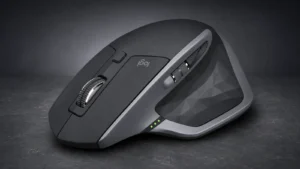
Logitech MX Master 2S Feature Scores
Overall Scorata score: 4.4/5
Based on 25 analyzed reviews · View source samples
Explore all 103 feature scores for Logitech MX Master 2S, organized into pros and cons.
Scores by Feature
Summary
103 reviewed features-
Very positive 4.5-5.062 (60%)
-
Positive 3.5-4.417 (17%)
-
Neutral 2.5-3.416 (16%)
-
Negative 1.5-2.48 (8%)
Pros
Sort
-
The sculpted right-handed shape and thumb rest earn widespread praise for comfort, though the size is a drawback for smaller hands.
-
Battery endurance is a standout, with many users going weeks between charges and some reporting around two months.
-
Overall satisfaction is exceptionally high for productivity, with fit, gaming performance and older hardware being the main exceptions.
-
Free-spin scrolling is particularly enjoyable and makes traversing long pages remarkably fast.
-
The Darkfield sensor tracks on a broad range of surfaces, including glass, fabric, wood and ordinary desktops.
-
Logitech Options and Flow are major selling points, offering extensive customization and effective multi-computer control.
-
Extensive remapping lets users tailor shortcuts, gestures and controls to individual applications and workflows.
-
Flow makes switching between computers nearly seamless, though the manual selector underneath is less convenient.
-
The Darkfield sensor is a major strength, with reliable tracking across diverse surfaces and improved sensitivity over its predecessor.
-
The main wheel is a favorite for its tactile steps and fast free-spinning mode.
-
Connecting several computers with one mouse is a major advantage for multi-system setups.
-
The broad thumb rest and high back support the hand and allow it to relax.
-
Custom shortcuts, dual scrolling and multi-computer controls help speed up everyday work substantially.
-
Flow enables convenient copying and pasting across computers, though large transfers depend on the network and not everyone needs the feature.
-
SmartShift smoothly changes from ratcheted to free-spinning scrolling based on how quickly the wheel is turned.
-
The thumb wheel is useful for sideways navigation in spreadsheets and timelines, but some find its sensitivity or feel imperfect.
-
Programmable directional gestures offer handy shortcuts, although their value depends on workflow and takes practice.
-
Pairing and Flow setup are typically straightforward with clear software guidance.
-
The front charging port lets work continue while plugged in, and quick top-ups are convenient; the Micro USB connector is dated.
-
The professional, understated design earns praise, though the chunky silhouette looks dated or nerdy to some.
-
The extensive productivity features often justify the premium price, but a discount is especially attractive for this older model.
-
Tracking is generally accurate and smooth enough for detailed desktop tasks, though dedicated gaming mice can be more precise.
-
Quick charging is excellent: a brief top-up can provide enough power for a workday.
-
The high, wide body works especially well for a palm grip, supporting the hand rather than requiring it to hover.
-
Mixing Mac and Windows computers is a useful strength, particularly for Flow and shared workspaces.
-
Application-specific profiles make it possible to use different shortcuts in editing software, browsers and other programs.
-
Logitech Options is generally intuitive to navigate and makes customizing the mouse straightforward.
-
The primary clicks feel defined, with pleasing tactile feedback and improved precision.
-
The wider sensitivity range helps with larger displays, although maximum sensitivity is excessive for some everyday setups.
-
The combination of Bluetooth and a USB receiver offers welcome flexibility for different devices and workstations.
-
Pairing a Flow-compatible Logitech keyboard with the mouse makes cross-computer work especially seamless.
-
The mouse slides smoothly across pads and desks despite its substantial weight.
-
Connections are often stable and Flow works smoothly, but interference, firewalls and occasional Bluetooth cutouts can cause trouble.
-
The construction feels solid and premium, with a tighter feel than the original model.
-
The extra controls offer plenty of functions without necessarily making the layout overwhelming.
-
The sculpted, tall profile fits the natural curve of many hands and provides a comfortable resting position.
-
Flow and its associated software worked without noticeable bugs in several tests.
-
The supportive shape is comfortable for extended work for many users, but small hands can become uncomfortable quickly.
-
The Unifying receiver provides a useful dedicated wireless connection, particularly when positioned close to the mouse.
-
Bluetooth and Flow can work very well on Macs, and Options adds convenient customization.
-
Remapping the wheels enables convenient functions such as volume adjustments and browser-tab switching.
-
Ratchet scrolling provides clear, precise steps, although the side wheel can be inconsistent for some users.
-
Bluetooth pairs easily and can work reliably, but some users prefer the receiver for accuracy or stability.
-
The mixture of textured plastic and rubber feels good, although the metallic-looking trim is not actual metal.
-
Basic mouse functionality is ready quickly without a separate software installation.
-
Programmable controls provide convenient access to frequently used functions without reaching for the keyboard.
-
Several long-term owners report years of reliable use, although aging rubber and component failures are potential concerns.
-
Some owners have used the mouse reliably for years, though aging components can eventually fail.
-
The primary buttons have satisfying travel and tactile feedback.
-
The large gliding feet help the mouse move smoothly over different surfaces.
-
Improved power management helps extend time between charges.
-
The small Unifying receiver is unobtrusive and can handle compatible Logitech peripherals together.
-
Windows setup is straightforward, and the USB receiver offers an option for older Windows machines.
-
Wireless latency is satisfactory for everyday work but not necessarily on par with gaming mice.
-
Textured sides and soft-touch material generally improve grip, although one user found the outside somewhat slippery.
-
Earlier color options included white and teal, which appeal to users looking beyond the standard dark finish.
-
Despite its weight, the body feels well balanced.
-
The controls are generally straightforward and useful in daily operation.
-
The comfortable grip is one of the main reasons to choose this mouse for work.
-
Bluetooth can reconnect immediately when the mouse is switched on.
-
The contoured construction and materials give the mouse an upscale feel.
-
The switches have crisp tactile feedback and enough depth to discourage accidental clicks.
-
Wireless reception can remain usable even across a room.
-
Programmable gestures can make zooming in and out a quick one-handed operation.
-
The improvements over the original are useful, especially battery life and Flow, but an upgrade is not essential if existing hardware meets your needs.
-
The wide main body can also accommodate a claw grip.
-
Wireless clicks register with fairly low delay for a productivity mouse.
-
The matte surface has a pleasant texture.
-
Sensitivity adjustments make it easy to move around documents with a light touch.
-
Battery replacement is a useful repair option that may extend the mouse's life.
-
A replaceable internal battery can extend the usable life of an aging mouse.
-
The improved sensor responds to smaller movements than its predecessor.
-
The configuration application uses a reasonable amount of memory.
-
The tall body offers a more restful hand position than a low-profile mouse for users who experience discomfort.
-
Hand fit varies: some find the shape suitable even for small hands, while others struggle with button reach.
-
Real battery endurance varies: some users validate the long advertised runtime, while heavy use can shorten it substantially.
-
A replacement battery is available as a repair option.
-
Ratcheted scrolling is audible, but free-spin mode is much quieter.
-
The feet can accumulate scratches after years of daily use, without necessarily compromising the overall experience.
Cons
Sort
-
The asymmetric body is designed around right-handed use; the lack of a left-handed version is disappointing.
-
There is no built-in receiver compartment, making the tiny USB dongle easier to misplace.
-
The fixed 125Hz polling rate is a weak point for fast gaming.
-
The rubber around the scroll wheel can deteriorate or become mushy on older units.
-
Three indicator lights are useful, but the lack of an accessible precise battery percentage frustrates several users.
-
The main buttons produce loud clicks that can be undesirable for people who prefer quiet peripherals.
-
The rubberized grip can degrade after extensive use.
-
One unit produced a slight, annoying rattle when lifted and set down.
-
The low polling rate is fixed rather than adjustable.
-
Its size and weight make it less portable than a compact travel mouse.
-
Current configuration-software compatibility is worth checking before purchasing older stock.
-
The large body offers substantial support but feels bulky to some people, especially those with smaller hands.
-
Casual games can work well, but the heavy body, low polling rate and productivity-oriented sensor are drawbacks for serious gaming.
-
The stacked thumb buttons are useful but often feel too small or awkward to distinguish; some users adapt or find them convenient.
-
The software is essential to unlocking remapping and Flow, which creates a dependency on compatible versions and installation.
-
Flow transfers rely on network quality and shared connectivity; large files may move faster using a separate drive.
-
Micro USB rather than USB-C is a dated charging choice, though infrequent charging reduces the inconvenience.
-
The free-spinning wheel may continue scrolling after switching applications unless stopped first.
-
The ratcheted wheel feels lighter than the more pronounced resistance some gaming-mouse users prefer.
-
Some users report unintended button presses with awkward grips, while others appreciate the resistance that helps prevent misclicks.
-
Button placement divides opinion: the layout is powerful but stacked side buttons can be difficult to reach.
-
Sensitivity can be tuned, but several users dislike the absence of clearly displayed numerical DPI settings in the software.
-
The gestures and unusual controls require some practice, but can become intuitive and useful with time.
-
The heavy body can be tiring or inconvenient, particularly for gaming, though some users appreciate its reassuring weight on a desk.
Use Cases
Best for
Sort
-
Flow is exceptionally useful for people working across several computers, although it offers little benefit to users who rarely switch systems.
-
This is an excellent desk-work mouse, with programmable controls, comfortable hand support and efficient navigation.
-
Fast scrolling and back/forward controls make navigating websites effortless, though a cheaper mouse may suffice for browsing alone.
-
The free-spinning wheel makes navigating lengthy documents much quicker.
-
The horizontal wheel and customizable shortcuts speed up timeline navigation, cutting and trimming.
-
Tracking on glass can work without a mousepad, a major benefit for glass-topped desks.
-
The fast wheel excels when scrolling frequently through lengthy pages and documents.
-
Precise tracking, scrolling and configurable shortcuts are useful when editing photographs.
-
Sideways scrolling and customizable controls are useful for navigating artboards, canvases and design documents.
-
The high sensitivity and cross-screen navigation are helpful when working across large or multiple displays.
-
The large sculpted body offers ample room and palm support for larger hands.
-
Long-term owners report solid performance over several years, but worn rubber and dated connectivity are risks on older units.
-
The versatile controls make it a favorite for a range of everyday computing tasks.
-
The fast wheel helps users skip through hundreds of lines of code quickly.
-
The dedicated horizontal wheel makes moving through spreadsheets easier.
-
Remapped shortcuts and gestures can reduce the need to reach for the keyboard.
-
Wireless convenience and long battery endurance make it a practical cordless desk mouse.
-
Its weight and extensive controls suit creative workflows where functionality matters more than rapid movement.
-
Switching to a paired iPad can be quick and convenient.
-
The pronounced thumb rest accommodates average-sized hands comfortably.
-
Editing shortcuts can be assigned to the mouse so repeated cut and delete operations require only a few clicks.
-
It works well for non-FPS games where fast competitive response is less important.
-
Adjustable sensitivity helps move efficiently through word-processing documents.
-
It is suitable for slower turn-based games alongside productive tasks.
-
The elevated, supportive shape may be more comfortable than a low-profile mouse for users who experience pain.
Conditional or not ideal for
Sort
-
Small-handed usersSmall-handed users may find the body too large or side buttons difficult to reach, although a few find the primary buttons accessible.
-
Left-handed usersThe strongly right-handed shape makes thumb controls and comfortable hand placement difficult for left-handed users.
-
Budget-conscious buyersThe premium price is hard to justify for tight budgets unless the extra productivity controls are valuable or a good discount is available.
-
Competitive gamingMost reviewers discourage competitive gaming due to the productivity focus and slow polling, though one found it playable.
-
TravelA bulky body and lack of receiver storage make it less convenient to carry than a smaller mobile mouse.
-
FPS gamingIt falls behind gaming-oriented mice in some first-person shooters.