If you want better handedness options
Choose Logitech MX Anywhere 3S. It scores 4.0 vs 1.0 for handedness options, with a 4.5 overall score.

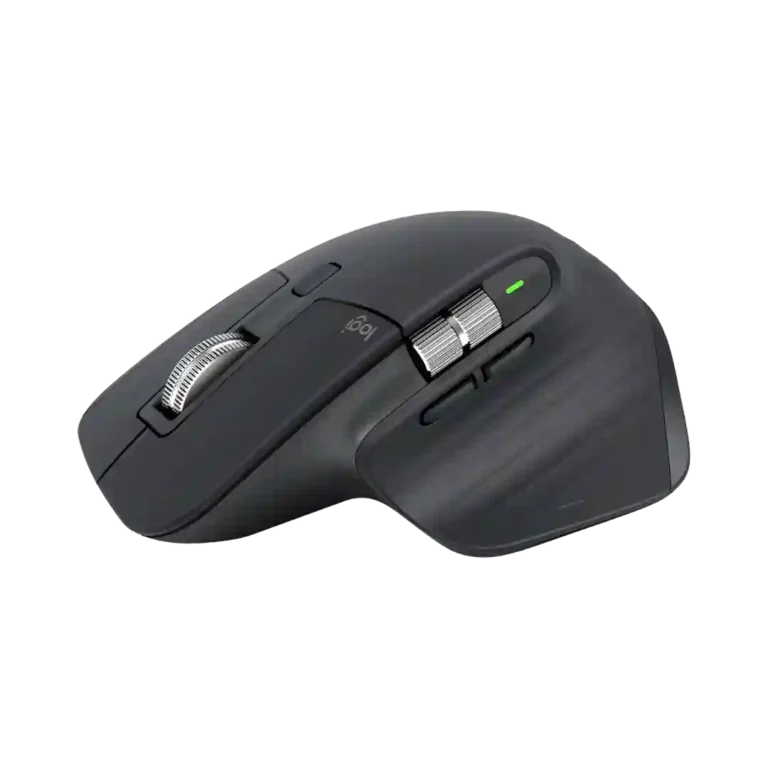
Choose it for all-day productivity, exceptional scrolling, quiet clicks, deep customization, and multi-device work. Skip it if you are left-handed, want a light competitive-gaming mouse, or need onboard profiles, true wired input, or stronger long-term switch and coating durability.
Best for medium-to-large right-handed users who spend hours in productivity, creative, coding, spreadsheet, or multi-device workflows and will use the scroll wheels and customization heavily.
Not ideal for left-handed users, small hands, frequent travelers who want a compact mouse, competitive gamers, or buyers who need onboard profiles, true wired input, or maximum long-term serviceability.
The Logitech MX Master 3S remains an outstanding productivity mouse because its sculpted comfort, MagSpeed scrolling, quiet main clicks, precise Darkfield sensor, multi-device support, and deep Options+ customization consistently improve desk workflows. Battery life and fast USB-C charging are also major strengths. The tradeoffs are real, though: it is large, heavy, and right-handed only, its 125Hz polling rate limits serious gaming, and the USB-C port cannot provide true wired input. Long-term feedback also raises concerns about rubber coating wear, scroll-wheel looseness, and occasional click-switch failures. For medium-to-large right-handed users who spend hours in productivity apps, its strengths clearly outweigh those drawbacks, especially at a discount.
Compared with other Mice, this product is above average in hand support, DPI customization, click noise, near average in charging speed, gaming suitability, below average in switch durability, onboard memory, feet quality.
| Attribute | This product | Category average | Difference |
|---|---|---|---|
| switch durability | 1.0 | 4.1 | -3.1 |
| onboard memory | 1.0 | 3.8 | -2.8 |
| hand support | 5.0 | 2.4 | +2.6 |
| feet quality | 2.0 | 4.5 | -2.5 |
| wired connectivity | 1.1 | 3.5 | -2.4 |
| handedness options | 1.0 | 3.0 | -2.0 |
| macro support | 2.0 | 4.2 | -2.2 |
| DPI customization | 5.0 | 2.9 | +2.1 |
Choose Logitech MX Anywhere 3S. It scores 4.0 vs 1.0 for handedness options, with a 4.5 overall score.
Choose Logitech Signature Comfort Plus M850 L. It scores 5.0 vs 1.5 for repairability, with a 4.3 overall score.
Choose Turtle Beach Kone II. It scores 5.0 vs 1.0 for switch durability, with a 4.3 overall score.
Choose Razer Basilisk Mobile. It scores 4.5 vs 1.0 for onboard memory, with a 4.1 overall score.
Products reviewers directly compared with this model, grouped into quick takeaways.
Yes for most medium-to-large right-handed users. Its sculpted shape, thumb rest, and palm support are repeatedly praised, though smaller hands can find it too large.
The main left and right clicks are one of its biggest strengths. Reviewers consistently describe them as extremely quiet while retaining enough tactile feedback for normal work.
It is fine for casual games, but not ideal for competitive play. The 141g weight and 125Hz polling rate are the main limitations.
Yes. It can pair with up to three devices, and reviewers generally find switching fast and useful for mixed laptop, desktop, tablet, Windows, and Mac setups.
Battery life is excellent, with many reviewers reporting weeks to roughly two months of use. Fast USB-C charging also restores hours of use from a short top-up.
The main concerns are the right-handed-only shape, large and heavy body, no onboard memory, no true wired input, missing receiver storage, coating wear, and some long-term switch or scroll-wheel failures.
These are a few of the reviews included in our analysis.



Logitech MX Master 3S comes equipped with an 8,000 DPI sensor and new quiet click buttons. It is the ultimate productivity tool for designers...
Get a 30% Shopee SG voucher from me here
Despite Dzamira's initial first impressions of the mouse’s exterior, the MX Master 3S seems to have checked off (almost) all of the boxes on...
Review of the Logitech MX Master 3S wireless performance mouse with 8K DPI glass-tracking sensor, electromagnetic MagSpeed wheel, and...
The MX Master 3S keeps everything that made the 3 great and fixes the one thing people actually complained about: the click noise.
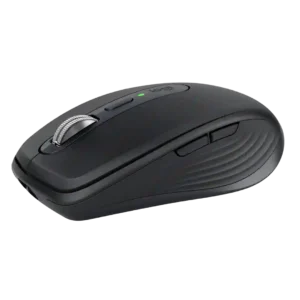
Best for travel, quiet shared spaces, precise any-surface tracking, and multi-device productivity. Skip it if you have large hands, want all-day palm support, or need a gaming-focused mouse.
Pros: motion consistency, programmable buttons
Cons: palm grip comfort, hand support

Choose it if you want a premium MMO/productivity mouse with 12 adjustable side buttons, strong battery life, and Stream Deck integration. Skip it if you need an ultralight FPS mouse,...
Pros: click latency, macro support
Cons: firmware reliability, tilt gesture controls

Choose the Kone II if you want a large, ergonomic mouse with deep customization and strong sensor performance. Skip it if you have small hands, need an ambidextrous mouse, or...
Pros: click latency, motion consistency
Cons: handedness options, portability

Good if you want a large, ergonomic wireless mouse with long battery life and deep customization. Skip it if you have small hands, prioritize ultralight FPS speed, or want the...
Pros: left and right click quality, software stability
Cons: polling rate, cross-platform compatibility