
If you want better ergonomic design
Choose Logitech MX Anywhere 3S. It scores 4.0 vs 1.9 for ergonomic design, with a 4.5 overall score.

Quiet clicks, pocketable size and three-device Bluetooth switching make this an excellent low-cost travel mouse. Its flat grip, limited buttons and separately sold receiver make it less appealing for long desktop sessions.
Travelers, commuters, students and laptop users seeking quiet clicking, a small footprint and easy switching between multiple devices.
People who need supportive all-day ergonomics, especially with larger hands, or extra buttons and precise controls for demanding gaming and design work.
The Logitech Pebble Mouse 2 M350s is most convincing as an inexpensive travel mouse, not a full-time ergonomic workstation tool. Its slim, pocketable design, exceptionally quiet clicks and easy switching between three paired devices make it especially handy for laptops, shared spaces and compact desks. Reviewers also appreciate the long expected life of its replaceable AA battery and the useful Logi Options+ app, which adds shortcuts and app-specific controls to the middle button. The catch is physical comfort: its nearly flat body provides little support for larger hands or long working days, and the missing side buttons can slow familiar workflows. Tracking is good enough for routine tasks but does not satisfy precision-oriented work or competitive gaming. A Logi Bolt receiver must usually be purchased separately for the standalone mouse. If portability and quiet operation matter more than hand-filling comfort, the M350s makes sense.
Compared with other Mice, this product is above average in USB receiver storage, handedness options, click noise, near average in macOS compatibility, surface compatibility, below average in ergonomic design, long-session comfort, horizontal scrolling.
| Attribute | This product | Category average | Difference |
|---|---|---|---|
| ergonomic design | 1.9 | 4.3 | -2.4 |
| USB receiver storage | 5.0 | 2.3 | +2.7 |
| long-session comfort | 1.9 | 4.3 | -2.4 |
| horizontal scrolling | 1.5 | 3.9 | -2.4 |
| handedness options | 5.0 | 2.8 | +2.2 |
| rechargeable battery | 2.0 | 4.2 | -2.2 |
| shape comfort | 2.3 | 4.1 | -1.9 |
| button placement | 2.0 | 3.9 | -1.9 |
Choose Logitech MX Anywhere 3S. It scores 4.0 vs 1.9 for ergonomic design, with a 4.5 overall score.
Choose Logitech MX Master 3S. It scores 5.0 vs 1.4 for hand support, with a 4.2 overall score.
Choose Logitech MX Master 4. It scores 4.0 vs 2.0 for button count, with a 3.7 overall score.
Choose Logitech Signature Comfort Plus M850 L. It scores 4.7 vs 1.9 for long-session comfort, with a 4.3 overall score.
Compared with Logitech Pebble Mouse 2 M350s
Yes. Its shallow, lightweight shape slips into a laptop bag or pocket, and the replaceable AA battery avoids frequent charging.
It can stay paired with up to three Bluetooth devices and switch between them using the button underneath.
Multiple assessments praise its especially quiet SilentTouch clicks, making it useful in libraries, offices and shared rooms.
Not for everyone. Its almost flat shape offers limited palm support and can become uncomfortable during long sessions, particularly for larger hands.
The standalone M350s typically does not include a Logi Bolt receiver, so Bluetooth is the immediate connection method. Some keyboard-and-mouse combo packages include the receiver.
Logi Options+ lets you remap the middle scroll-wheel button and set shortcuts or Smart Actions, but there are no side buttons.
It is usable for simple point-and-click games but is a poor choice for fast shooters or competitive games because of its shape and limited performance.
These are a few of the reviews included in our analysis.

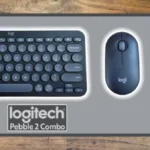



With its handy, compact form factor and ridiculously lengthy battery life, I now exclusively use the Logitech Pebble Mouse 2 when I’m on the go.
The Logitech Pebble Mouse 2 (model M350s) is a slim, quiet, cheap travel mouse.
Slim, quiet Bluetooth mouse for travel and multiple devices; its flat shape and basic controls are compromises.
A slim 76 g body, quiet clicks, three-device Easy-Switch, a customizable middle button, and up to 24 months from one AA battery make the...
The M350s makes sense as a portable pointing device. Its slim shape is a reason to check comfort, not a promise of it.

Best for travel, quiet shared spaces, precise any-surface tracking, and multi-device productivity. Skip it if you have large hands, want all-day palm support, or need a gaming-focused mouse.
Pros: portability, click noise
Cons: hand size compatibility, dongle-free setup

Choose it if you want a premium MMO/productivity mouse with 12 adjustable side buttons, strong battery life, and Stream Deck integration. Skip it if you need an ultralight FPS mouse,...
Pros: button customization, MMO gaming suitability
Cons: FPS gaming suitability

Choose the Kone II if you want a large, ergonomic mouse with deep customization and strong sensor performance. Skip it if you have small hands, need an ambidextrous mouse, or...
Pros: value for money, button customization
Cons: fingertip grip comfort, portability
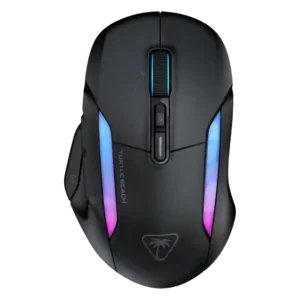
Good if you want a large, ergonomic wireless mouse with long battery life and deep customization. Skip it if you have small hands, prioritize ultralight FPS speed, or want the...
Pros: battery life, software usability
Cons: weight, FPS gaming suitability