
Logitech Lift Feature Scores
Overall Scorata score: 4.1/5
Based on 33 analyzed reviews · View source samples
Explore all 97 feature scores for Logitech Lift, organized into pros and cons.
Scores by Feature
Summary
97 reviewed features-
Very positive 4.5-5.033 (34%)
-
Positive 3.5-4.439 (40%)
-
Neutral 2.5-3.48 (8%)
-
Negative 1.5-2.416 (16%)
-
Very negative below 1.51 (1%)
Pros
Sort
-
The main buttons are remarkably quiet; the side buttons can be noticeably louder.
-
Global and per-app remapping offer substantial flexibility for shortcuts and navigation.
-
Battery endurance is a standout, with several tests showing very little drain over weeks or months; two years remains a manufacturer estimate.
-
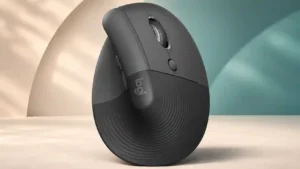
The upright handshake shape often relieves wrist and forearm strain, although some users experience pressure in a different spot.
-
The curved vertical body feels natural to many hands, but its angle and width are not universally comfortable.
-
The handshake shape often reduces wrist or forearm discomfort, but it can shift pressure elsewhere and is not a guaranteed remedy.
-
Pairing with multiple computers or tablets is a useful strength of the mouse.
-
Per-app profiles are useful for different workflows, although some presets failed to install and remembering many shortcuts can be difficult.
-
Switching between paired devices is easy, though the underside button requires lifting the mouse.
-
App-specific shortcuts and convenient device switching help streamline everyday work.
-
Construction generally feels sturdy, but some testers consider the plastic less premium than competing models.
-
Many users report less fatigue after hours at the desk; a few still develop wrist or elbow discomfort.
-
The wheel is almost silent for many users, although one tester heard lateral knocking during scrolling.
-
Many find the features and ergonomic design worth the price, while others see better value in cheaper or more versatile mice.
-
The soft rubberized finish usually provides a secure hold, but it can collect grime or provide insufficient grip for some hands.
-
Separate right- and left-handed models are welcome for a shape that cannot be used ambidextrously.
-
Movement is smooth on many desks and mats, though some find the thin feet less slippery than conventional mice.
-
Initial pairing and basic setup are simple, though choosing the correct Logitech software can be confusing.
-
The SmartWheel offers useful quick scrolling and tactile slow scrolling, but some miss a true free-spinning wheel or dislike its angle.
-
Flow makes moving the cursor and copying content between computers convenient, with occasional slight hesitation.
-
The magnetic battery cover is easy to remove and usually secure, although it can pop off when dropped.
-
The SmartWheel automatically changes from measured scrolling to rapid scrolling, which is useful for navigation.
-
The interface is generally straightforward, though percentage-based sensitivity controls and multiple Logitech apps can confuse users.
-
Options+ offers extensive productivity customization, but early versions and occasional quirks can be frustrating.
-
The sculpted thumb rest is welcome, although the base can leave the pinky or wrist resting on the desk.
-
A standard AA is easy to swap and avoids charging downtime, but requires keeping spare batteries.
-
The mouse is generally intuitive after adjusting to the vertical position, though some never feel comfortable with it.
-
Connections are usually seamless and dependable, with little reported interruption.
-
Slow scrolling can be precise and controlled, while the wheel can also move rapidly through pages.
-
The unusual shape divides opinion: some love the sleek curves and playful design, others find it unattractive.
-
Bluetooth and the included USB receiver provide flexible wireless connectivity, but there is no wired mode.
-
Bluetooth is convenient and works well for normal use, though the receiver can avoid Bluetooth congestion.
-
The built-in receiver compartment keeps the USB dongle conveniently tucked away.
-
The damped switches trade crisp tactile feedback for quietness; some enjoy the feel and others find it mushy.
-
Programmable thumb, wheel and sensitivity controls help reduce repeated keyboard actions.
-
Clicks generally register promptly and consistently in everyday use.
-
Cloud backup makes it convenient to restore custom settings across computers.
-
Most find it a worthwhile ergonomic productivity mouse, although the fit and vertical grip are highly personal.
-
It is a compelling lower-cost upgrade for users seeking a smaller vertical design, though fit remains personal.
-
The optical sensor handles normal work well, but one test unit exhibited erratic sensitivity and demanding precision is a weakness.
-
Most controls are accessible, but the sensitivity button and some angled controls can be awkward to reach.
-
Main clicks are easy and quiet, though the softer feel is less satisfying for those who like crisp feedback.
-
Holding a side button enables horizontal scrolling, but a dedicated horizontal wheel is missed by some users.
-
Long-term users have had reliable service, but the rubber finish raises concerns about wear and grime.
-
Basic mouse functions work straight out of the box without advanced customization software.
-
Tracking is often smooth and accurate on ordinary desks, although the vertical grip can compromise precise movements.
-
Adjustment can take anywhere from minutes to a week or longer; precision and hand posture may take practice.
-
The sensitivity range is adequate for everyday productivity but less suited to demanding gaming or high-resolution setups.
-
The software battery percentage is handy and provides an easy way to monitor remaining power.
-
The wheel generally has light resistance and tactile feedback.
-
Sensitivity is adjustable for different tasks, but percentages instead of numerical DPI frustrate some users.
-
The compact vertical shape is appealing for smaller hands but its height and base can still feel bulky.
-
Weight feels manageable to many, though some consider it on the heavier side.
-
The smaller shell suits small and medium hands particularly well, but larger hands often feel cramped.
-
Palm grip can suit smaller hands, but may feel cramped or leave fingers overhanging for larger hands.
-
The mouse works well on Mac, although some miss Apple's smooth inertia scrolling or need an adapter for the receiver.
-
Scrolling speed and behavior can be adjusted to suit individual preferences.
-
The three colors offer welcome variety, but left-handed and Mac variants have fewer choices.
-
Some find the build premium, while others notice a less upscale plastic finish than the MX line.
-
The included Bolt receiver is useful, but USB-A and incompatibility with older Unifying receivers can be inconvenient.
-
Ordinary desk surfaces and mats work well, but clear glass is a notable weakness.
-
The Bolt receiver provides a useful alternative to Bluetooth, including when wireless congestion is a concern.
-
It works across common desktop operating systems and is handy for mixed-platform setups.
-
The dedicated sensitivity switch can be handy, but its awkward placement and limited feedback bother some users.
-
Fast flicks help cover long pages, but the wheel does not provide the sustained free-spin of higher-end models.
-
Click response is adequate for productivity and casual games, but not ideal for demanding competitive play.
-
Wireless operation generally performs well for work, with different connection options to suit the setup.
-
Buttons generally respond well, but tactile feedback and the harder-to-reach controls draw criticism.
-
The included receiver is appreciated, though USB-C users may need an adapter.
-
Smart Actions can streamline repetitive sequences into a single button press.
-
Wireless response is generally adequate for work, though the Bluetooth polling rate is low for fast play.
-
Generally dependable in routine work, although an isolated sensor fault was reported.
Cons
Sort
-
There is no wired operating mode, which limits flexibility for users who need a cable.
-
Light gaming is possible, but low polling rates, limited precision and the vertical shape make it a poor dedicated gaming mouse.
-
Claw grip can work for some hand sizes, but other users find it causes rotation or requires squeezing.
-
The lack of a USB-C receiver or cable connection is inconvenient for USB-C-only computers.
-
Despite its smaller footprint than other vertical mice, the tall shell is not very bag-friendly.
-
Fingertip grip is contentious: some find it unsuitable for the vertical shape, while others recommend it.
-
Cursor control is smooth for many users, but the unusual grip can make pinpoint movements harder.
-
The textured grip can develop visible dirt and skin-oil residue, particularly in lighter colors.
-
The lack of onboard memory means custom mappings rely on the software.
-
Advanced customization depends on the companion software rather than stored mouse settings.
-
The handshake grip is comfortable for many, but some have to squeeze harder to move or lift the mouse.
-
Some automatic profiles and assigned actions fail to work as expected.
-
A firmware update option was confusing and failed to recognize the mouse in one long-term test.
-
Rubberized areas and bottom crevices can accumulate grime that is difficult to remove.
-
The extra controls are useful, but demanding users may want more programmable buttons.
-
The grip can cause unintended primary clicks when reaching for a thumb button.
-
A demanding middle-click force caused difficulty for one CAD user, despite others finding it acceptable.
-
The wheel lacks dedicated left/right tilt inputs.
-
The feet are serviceable but thin, with some reports of scratching or less smooth glide.
-
The low polling rate suits office work but produces less fluid cursor motion than gaming mice.
-
The absence of a rechargeable cell disappoints some buyers, while others prefer the long-lasting replaceable AA.
-
The thumb buttons are useful and usually accessible, although their louder clicks and occasional accidental presses are drawbacks.
-
Inputs are responsive for ordinary work, but demanding fast movements expose limitations.
-
Recycled plastic and paper packaging earn praise, but disposable batteries undermine the environmental appeal for some.
-
Soft-touch materials feel pleasant, although the plastic can feel cheaper and the rubber may accumulate grime.
Use Cases
Best for
Sort
-
Small hands benefit from the compact vertical shell and reachable controls.
-
Comfort and programmable shortcuts make it a strong office mouse, although precision-heavy workflows can be more demanding.
-
Medium hands generally fit comfortably, though longer fingers may extend beyond the buttons.
-
Easy-Switch and Flow make the mouse especially useful when working across computers.
-
A dedicated left-handed model makes the vertical design accessible to lefties, though color choice is limited.
-
Quiet main clicks make it suitable for shared offices and other noise-sensitive workspaces.
-
The comfortable shape and quiet operation suit home-office work over long days.
-
It is a reasonably priced entry to premium vertical mice, though cheaper alternatives exist and the price is harder to justify if shortcuts go unused.
-
Quiet clicks make late-night work less likely to disturb others.
-
The relatively affordable vertical shape is approachable for first-time vertical-mouse buyers who can try the fit.
-
Casual games are manageable, especially slower titles that do not demand fast, precise movements.
-
Quickly assigned controls are useful for common actions without reaching for the keyboard.
-
The mouse handles web browsing comfortably, with useful navigation shortcuts and rapid scrolling.
-
Fast shooters are generally a poor fit, although one tester enjoyed playing Halo with it.
-
App-specific editing shortcuts help, but the lack of a dedicated horizontal wheel can be inconvenient for timelines.
-
Rapid scrolling helps traverse long documents, although the wheel lacks sustained free-spin.
-
Muted clicks and generally quiet scrolling help avoid distracting others.
-
The two wireless connection choices and long AA endurance make cordless use convenient.
-
Fast scrolling and optional horizontal scrolling help navigate large spreadsheets.
-
Per-app shortcuts can speed creative work, but demanding precision tasks may favor conventional mice.
-
It can be a comfortable alternative to a laptop trackpad for everyday work.
-
Programmable controls can accomplish editing actions with one hand.
-
A comfortable wrist position can benefit programmers who use a mouse throughout the day.
-
The mouse can be enjoyable for slower strategy games when keyboard shortcuts are acceptable.
-
A programmable microphone-mute shortcut can make video meetings easier.
-
A fabric desk mat offers smooth movement, although debris can gather around the base.
-
Custom display shortcuts and device switching are useful across multiple screens.
Conditional or not ideal for
Sort
-
Large-handed usersLarger hands often overhang the buttons or lack support, although some testers with large hands liked the shape.
-
Photo editingPhoto-editing shortcuts are useful, but some users struggle with fine pointer placement and sliders.
-
Wired useAnyone needing a physical wired connection should choose another mouse; this model works wirelessly only.
-
Precision-intensive workDemanding precision work is a mixed fit: some adapt readily, while others struggle with fine cursor control.
-
Glass desk surfacesClear glass desks are a poor match because tracking fails without a suitable mousepad.
-
TravelThe tall, awkward shape makes it less convenient to carry than compact travel mice.
-
General everyday useIt handles ordinary browsing and computing well once the vertical grip feels familiar.
-
3D modelingRepeated middle-click navigation can be uncomfortable for CAD and 3D modeling, particularly if it aggravates hand strain.
-
Limited desk spaceThe taller and broader shape can be inconvenient in cramped workspaces.