
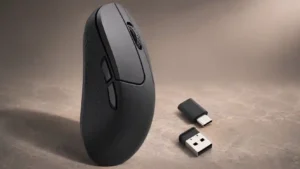
Keychron M3 Mini Feature Scores
Overall Scorata score: 4.0/5
Based on 67 analyzed reviews · View source samples
Explore all 99 feature scores for Keychron M3 Mini, organized into pros and cons.
Scores by Feature
Summary
99 reviewed features-
Very positive 4.5-5.044 (44%)
-
Positive 3.5-4.430 (30%)
-
Neutral 2.5-3.415 (15%)
-
Negative 1.5-2.49 (9%)
-
Very negative below 1.51 (1%)
Pros
Sort
-
Fast, smooth pointer response is a standout in games and desktop work, particularly through the USB receiver.
-
The roughly mid-50-gram design is easy to move and carry. A minority prefer a heavier, more substantial feel.
-
The 1K version includes USB-A and USB-C receivers plus adapters and a cable; the 4K model uses a different receiver arrangement.
-
Fast movements track accurately and smoothly, making precise pointer placement a consistent strength.
-
MacBook owners frequently praise the smooth response and easy compatibility, particularly with USB-C receivers, though receiver failures are possible.
-
Light weight, quick clicks and excellent tracking deliver strong gaming performance, although shell and feet limitations keep it from being an ideal enthusiast mouse.
-
The configuration software offers plentiful settings and has improved over time; owners also appreciate the web configurator.
-
The PixArt sensor delivers excellent tracking in games and everyday work, even during rapid movements.
-
Huano switches have a tactile, snappy feel that many enjoy, with a click weight that depends on personal preference.
-
Onboard controls and persistent settings let users avoid keeping companion software running.
-
Settings and profiles remain stored on the mouse, so the configuration app need not stay open.
-
Battery life is generally good, particularly on the 4K model with its more efficient electronics. Some units have shorter runtimes or misleading charge readings.
-
The clean, understated styling appeals to many buyers, even if the design is not especially distinctive.
-
Performance and connectivity are unusually strong for the price, although cheap-feeling materials or premature failures make the cost harder to justify for some owners.
-
Many users find the shape and textured sides secure and comfortable to hold.
-
The compact hourglass shape works particularly well for claw grip, including some aggressive claw grips.
-
Primary clicks feel precise and pleasant, but shell flex and post-travel can detract from their feel.
-
The receiver connection is typically quick and responsive; isolated firmware and receiver problems can interrupt it.
-
A dedicated USB-C receiver is particularly convenient for modern laptops on the 1K model, although isolated receiver failures occur.
-
Dedicated underside controls are convenient, although the small switches can be stiff to operate.
-
Tracking remains consistent during quick movements, with no notable tracking problems in several tests.
-
A light, compact body slips easily into a laptop bag or briefcase.
-
The small symmetrical shape feels comfortable to many, but others find its curve awkward or the shell too small.
-
Configuration is straightforward, and most adjustments can be saved once without keeping the program running.
-
Bluetooth is convenient for laptops and travel, although it feels less smooth than the receiver and some owners experience disconnects.
-
Wireless operation is fast and responsive, with especially strong performance when using the receiver.
-
The solid shell often feels sturdy for its weight, although some units flex and some owners find the construction cheap.
-
The simple layout provides useful side buttons without a redundant top-mounted DPI control.
-
Fingertip grip is a good fit for the light, compact body, although rearward balance may matter to some users.
-
Five stored profiles allow detailed configuration for different preferences and tasks.
-
The main buttons generally respond crisply, although a large thumb can occasionally obstruct actuation.
-
Clicks are generally pleasantly tactile and relatively quiet, particularly compared with some competing switches.
-
Small and medium hands often fit well; larger hands can use claw or fingertip grip, depending on their proportions.
-
Button functions can be tailored to personal workflows, including keyboard and multimedia shortcuts.
-
Sensitivity adjustment and smooth tracking allow quick, precise cursor movements.
-
Simple operation and easy configuration make the mouse approachable for everyday users.
-
Several owners report that it works immediately without fiddly configuration.
-
Reassignable buttons offer useful shortcuts without requiring a complicated setup.
-
The lightweight configuration program does not need to run continuously in the background.
-
The lighter design improves on the original M3, and the 4K version's better battery life and polling options can justify the premium.
-
Sensitivity can be customized for different preferences, although the desktop utility's 100-DPI steps are not as fine as some alternatives.
-
The 1K version is already responsive; the 4K option adds headroom, although the difference is not obvious in every game or setup.
-
The stock feet glide adequately on ordinary pads, but premium alternatives are smoother and certain pads feel less controlled.
-
Side-button placement helps prevent accidental presses for some grips.
-
Polling rate can be changed directly on the mouse, without opening the configuration program.
-
It is compact and portable, but only modestly smaller than the original M3 and too small for some hands.
-
The tactile scroll wheel works well for basic scrolling, though occasional interruptions and its lack of fast scrolling disappoint some users.
-
The cable is flexible and not overly rigid, which is useful when using the mouse plugged in.
-
The underside DPI switch makes sensitivity changes possible without a software visit.
-
The internal rechargeable battery can be replaced with some disassembly.
-
The wheel has a tactile, somewhat firm feel that some enjoy and others find too resistant.
-
Balance is generally good, although the rear can feel slightly heavy when fingertip gripping.
-
Separate USB-A and USB-C receivers simplify moving between computers, although manually disconnecting a receiver may be necessary.
-
It works well for ordinary office tasks, but the basic wheel and click feel are less suitable for some productivity workflows.
-
The feet work well across many tested surfaces, including smooth desks, but their control varies with the pad.
-
Many owners experience trouble-free daily operation, but intermittent disconnections and early failures are genuine risks.
-
Very low click latency makes rapid inputs feel immediate.
-
Bluetooth offers a convenient way to use the mouse without plugging in a receiver.
-
The 4K version's more efficient controller substantially improves battery performance over the 1K version.
-
The shell is relatively easy to open for maintenance and replacement of the battery or side-button board.
-
The receiver connection can feel effectively lag-free during play.
-
Some owners enjoy the responsive buttons while others find them mushy or cheap-feeling.
-
The adjustable sensitivity spans a wide range, up to 26,000 DPI.
-
The updated software can manage multiple compatible devices conveniently.
-
Wired gaming works well alongside the wireless receiver mode.
-
The mouse remains usable while charging by cable, but an owner experienced an early charging failure.
-
Clicks are generally dependable, but uneven travel and a wobbly left button on some units reduce consistency of feel.
-
The included cable can be useful and flexible, though tight packaging has kinked some 1K cables.
-
Palm grip can work for smaller hands, while larger hands may find the body too short.
-
Debounce timing can be adjusted to suit gaming, though changing the factory setting is recommended by one tester.
-
The symmetrical body accommodates either hand, although the extra buttons are on the left side only.
-
The 4K scroll wheel operates relatively quietly.
-
The inexpensive Huano switches perform well, even though one tester preferred the higher-end switches in the larger model.
-
The shell texture improves grip for one tester, while the 4K version's bare plastic feels slippery to another assessment.
Cons
Sort
-
Support is a weak point for some owners, including long waits for replacement receivers and unhelpful email responses.
-
Receiver failures have affected some units, including a defective 4K dongle and a nonfunctional USB-C receiver.
-
Some mice hold up well over months of daily use, while others develop charging, connection or button failures within months.
-
Many connections are stable, but intermittent dropouts and defective receivers have caused substantial frustration for some owners.
-
Receiver firmware problems have required reflashing on some units, occasionally without resolving dropouts.
-
The Mini name can be misleading because the body is only slightly smaller than the original M3.
-
Firmware updates are more cumbersome than necessary because the configuration software does not directly handle them.
-
Switching between stored profiles still requires opening the software on the 4K version.
-
The unusual skate outline limits the choice of exact-fit aftermarket feet.
-
There is no convenient onboard storage for the small receivers, making them easier to misplace.
-
Early units have exhibited minor shell imperfections and occasional receiver quality-control problems.
-
Measured weights can run a few grams above the advertised figure, and the 1K packaging and documentation did not consistently agree.
-
Some find the mouse surprisingly premium for its price, while others dislike the hard, insubstantial plastic feel.
-
The charge indicator is handy when working correctly, but its tiny LED is difficult to see and one unit gave premature low-battery warnings.
-
Comfort varies significantly with hand shape and grip; the curved symmetrical shell is not universally ergonomic.
-
Initial pairing is often quick, but defective receivers and repeated Bluetooth pairing failures can make setup frustrating.
-
Some early 1K packaging kinked the cable; softer packaging on the 4K version improves the unboxing experience.
-
A full charge takes around two hours in one test, which is acceptable rather than especially quick.
-
Textured sides improve purchase for some hands, but the rough plastic irritates others enough to warrant grip tape or sanding.
-
The raised curve can fill the palm nicely, though it does not follow every hand naturally.
-
Opinions of the ABS plastic vary from pleasantly tactile to hard and inexpensive-feeling.
-
The side buttons are generally accessible, but their flush placement and the rear button can make them harder to reach for certain grips.
-
The stock feet are usable but not as refined as premium skates; aftermarket replacements can improve control.
-
Side buttons can feel tactile and responsive, but excess travel, cheap feel and an isolated early failure detract from their quality.
-
Extended use is comfortable for some owners, but others report finger fatigue or discomfort from the compact shape.
Use Cases
Best for
Sort
-
Budget shoppers get accurate tracking, light weight and useful connectivity without flagship pricing.
-
Fast tracking and flexible connectivity make it a useful single mouse for work and gaming.
-
The mouse is a convenient everyday work companion, although design-oriented tasks and fast document scrolling expose its limitations.
-
The compact body and adaptable connections suit laptop-based work away from a permanent desk.
-
The small body and Bluetooth mode are convenient for travel, especially when leaving a receiver at home.
-
Small hands often suit the compact shape, though its wide curve does not feel natural to everyone.
-
Light weight, smooth tracking and reliable operation make it a good general-purpose mouse for many owners.
-
Wireless operation is versatile, with receiver and Bluetooth modes for different devices and needs.
-
Casual play benefits from low weight and responsive tracking without requiring an expensive specialist mouse.
-
Skate-removal ramps and easy disassembly help with modifications, although the unusual skate shape limits exact-fit replacements.
-
Low latency, accurate tracking and easy movement make it especially capable for first-person shooters.
-
Bottom-mounted buttons make common settings accessible without launching software.
-
PC gamers get responsive tracking and an easy-to-move shape at an attractive price.
-
Two receivers can make work across computers convenient, but there is no seamless receiver hot-switching mechanism.
-
Low click latency and accurate tracking support competitive FPS play.
-
Bluetooth worked without trouble on an iPad in hands-on use.
-
The mouse is a useful trackpad alternative for more precise gaming and comfortable extended work.
-
The symmetrical shell can work for left-handed users, but the left-side thumb buttons favor right-handed operation.
Conditional or not ideal for
Sort
-
Large-handed usersLarger hands may find it comfortable with an aggressive claw or fingertip grip, but palm fit and thumb clearance can be difficult.
-
Long-term ownershipLong-term ownership is mixed: some units survive months of daily use without wear, while others fail within a few months.
-
Technology enthusiastsEnthusiasts who demand refined shells, clicks and high polling performance may prefer more specialized gaming mice.
-
Glass mousepadsThe hard stock skates are not a great match for glass pads, where aftermarket feet may offer better control.
-
Graphic designThe wheel and clicks are not ideal for design work that demands more refined controls.