If you want better profile switching
Choose Logitech G305 Lightspeed. It scores 5.0 vs 2.0 for profile switching, with a 4.3 overall score.

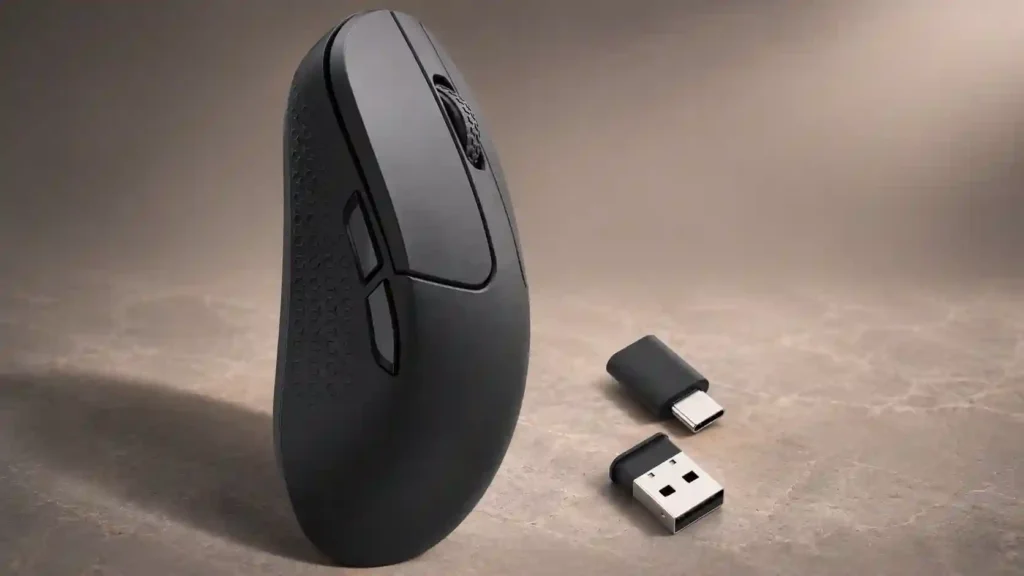
Excellent tracking, low weight and flexible connectivity make this an unusually capable budget mouse for gaming and work. The compact shape, rough grips and occasional reliability problems are the main reservations.
Budget-conscious FPS and casual PC gamers, Mac laptop users and people who switch between work and play benefit from accurate tracking, low weight and flexible connections.
Buyers who need a specialized ergonomic fit, refined controls for design work or enthusiast-grade skates and shell construction should consider alternatives. Long-term reliability is also mixed.
The Keychron M3 Mini delivers much of the responsiveness expected from a more expensive gaming mouse, without the premium price. Its lightweight shape, accurate sensor and quick clicks make it particularly appealing for FPS games, while Bluetooth and receiver connectivity make it practical for everyday work and MacBook use. The 1K version is especially convenient for laptop owners thanks to its USB-C and USB-A receivers, while the 4K version offers higher wireless polling and substantially improved battery life in hands-on testing. The main compromises are the stock feet, divisive plastic grip texture and a shell that does not suit every hand. Some owners have also experienced receiver, charging or connection failures, with slow support. It is a compelling value for buyers prioritizing speed and versatility over premium materials or specialist ergonomics.
Compared with other Gaming Mice, this product is above average in macOS compatibility, Software resource usage, handedness options, near average in value for money, Bluetooth support, below average in connection stability, setup ease, USB receiver storage.
| Attribute | This product | Category average | Difference |
|---|---|---|---|
| macOS compatibility | 4.6 | 1.6 | +3.0 |
| Software resource usage | 5.0 | 2.2 | +2.8 |
| connection stability | 2.4 | 4.5 | -2.0 |
| setup ease | 2.9 | 4.9 | -2.0 |
| USB receiver storage | 2.0 | 3.8 | -1.8 |
| profile switching | 2.0 | 3.8 | -1.8 |
| durability over time | 2.3 | 4.0 | -1.7 |
| Packaging quality and presentation | 3.0 | 4.5 | -1.5 |
Choose Logitech G305 Lightspeed. It scores 5.0 vs 2.0 for profile switching, with a 4.3 overall score.
Choose McHose L7 Pro. It scores 5.0 vs 2.4 for connection stability, with a 4.5 overall score.
Choose Razer Basilisk V3. It scores 5.0 vs 2.8 for premium feel, with a 4.5 overall score.
Choose Logitech G PRO X3 SUPERSTRIKE. It scores 4.6 vs 3.9 for build quality, with a 3.8 overall score.
Compared with Keychron M3 Mini
Yes. Its low weight, accurate sensor and low click latency make it especially capable for FPS play.
The 4K version supports higher wireless polling and has more efficient electronics that improve battery life. The 1K version includes separate USB-A and USB-C receivers, whereas the 4K version uses a different receiver.
Many MacBook owners report smooth, responsive operation, especially with the USB-C receiver. Bluetooth is convenient but can be less smooth or less reliable.
It can suit claw or fingertip grips, but larger hands may find it too small for palm grip or have difficulty reaching certain buttons.
No. The mouse stores settings onboard and provides physical DPI and polling-rate controls, although changing stored profiles may require software.
One 1K test confirmed around 70 hours, while another estimated 35–40 hours. The 4K version has substantially improved endurance at 1K polling, but higher polling consumes more power.
The stock feet are less refined than premium alternatives, and the rough grip texture divides opinion. Some owners have experienced faulty receivers, intermittent connections or early charging failures.
These are a few of the reviews included in our analysis.

Precise sensor, long battery life, extensive connectivity. In the Keychron M3 Mini Review, we put the wireless gaming mouse to the test.
The Keychron M3 Mini is a wireless gaming mouse and a smaller version of the Keychron M3. It has a symmetrical shape with textured plastic...

Choose the ROG Harpe II Ace for ultralight FPS play, precise tracking, smooth glide, and web-based tuning. Skip it if you need palm-grip support, MMO buttons, onboard profiles, or long...
Pros: glide smoothness, weight
Cons: handedness options

Excellent tracking, comfortable right-handed ergonomics and a versatile scroll wheel make the Basilisk V3 a strong gaming and productivity mouse. Its substantial weight, fixed cable and sometimes over-sensitive automatic scrolling...
Pros: scroll wheel quality, RGB features
Cons: weight, handedness options

The L7 Pro delivers remarkably light handling, precise aiming and a grippy shell at a budget price. Stock skates are less impressive, and conflicting click-latency measurements warrant caution for latency-sensitive...
Pros: value for money, weight
Cons: wired connectivity

Best for ultra-light, competition-focused speed, precise tracking, stable wireless, and long battery life. Skip it if you need quieter clicks, left-handed support, Bluetooth, more buttons, or better value for casual...
Pros: value for money, weight
Cons: click noise, RGB features