If you want better layout options
Choose Epomaker G84 HE. It scores 4.9 vs 2.7 for layout options, with a 4.3 overall score.

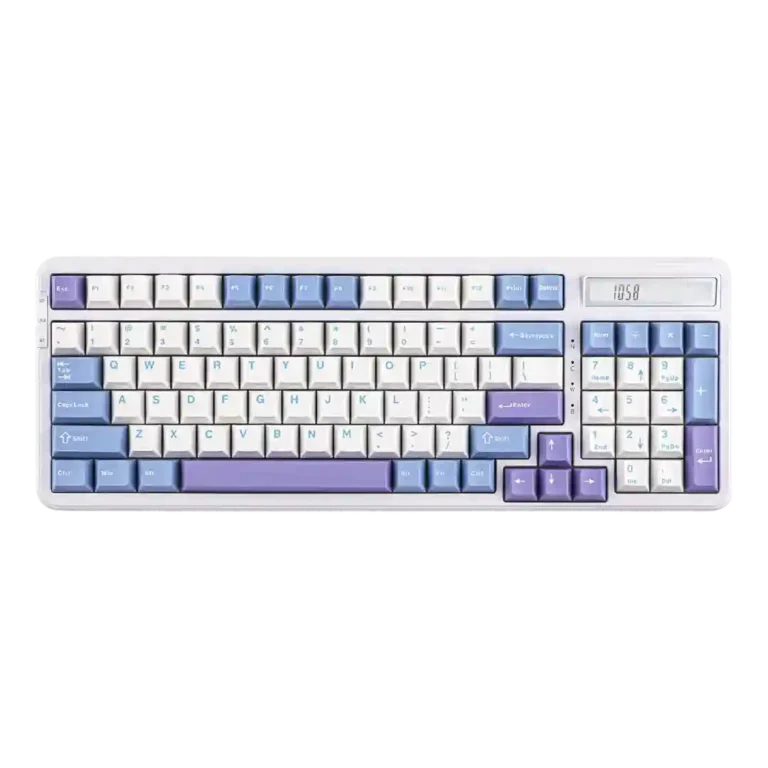
Choose the Epomaker Cypher96 if you want a compact numpad keyboard with cushioned typing, strong customization and a handy calculator. Skip it if body flex, limited stock switch variety, or occasional pinging would bother you.
Best for productivity users, office workers and casual gamers who want a compact numpad layout, comfortable typing, tri-mode connectivity, RGB customization and a genuinely useful calculator.
Not for buyers who want a premium metal chassis, deep QMK/VIA-style customization, tactile or clicky stock switch choices, or a full-size layout with traditional navigation spacing.
Reviewers consistently frame the Epomaker Cypher96 as a productivity-focused 96% mechanical keyboard that feels better than its price suggests. Its strongest evidence is around typing: cushioned gasket feel, responsive linear switches, durable PBT keycaps, customizable RGB, tri-mode connectivity and an unusually useful built-in calculator. The main tradeoff is that the budget plastic build does not satisfy everyone. Some reviewers called it sturdy and solid, while others found body flex, hollow feel, weak side lighting, inconsistent legends, or stabilizers that need tuning. It also leans toward linear switches only, which limits out-of-box variety. Overall, the review evidence points to a comfortable, feature-rich office and gaming hybrid with a few enthusiast-level compromises.
Compared with other Gaming Keyboards, this product is above average in hot-swappable switches, ease of switch replacement, reliability, near average in typing feel, acoustics, below average in key spacing, layout options, frame rigidity.
| Attribute | This product | Category average | Difference |
|---|---|---|---|
| key spacing | 2.5 | 4.0 | -1.5 |
| layout options | 2.7 | 4.0 | -1.3 |
| hot-swappable switches | 4.6 | 3.5 | +1.1 |
| frame rigidity | 3.4 | 4.5 | -1.0 |
| ease of switch replacement | 4.7 | 3.7 | +1.0 |
| build quality | 3.8 | 4.5 | -0.7 |
| reliability | 4.4 | 3.6 | +0.8 |
| connectivity | 4.5 | 3.8 | +0.7 |
Choose Epomaker G84 HE. It scores 4.9 vs 2.7 for layout options, with a 4.3 overall score.
Choose Keychron Q3 HE. It scores 4.8 vs 3.6 for materials quality, with a 4.4 overall score.
Choose NuPhy Air60 HE. It scores 5.0 vs 3.4 for frame rigidity, with a 4.0 overall score.
Choose HyperX Alloy Rise. It scores 4.7 vs 3.3 for legend visibility, with a 4.0 overall score.
Products reviewers directly compared with this model, grouped into quick takeaways.
Yes. Reviewers repeatedly praised its cushioned gasket feel, responsive switches, comfortable typing position and smooth typing feel, especially for long productivity sessions.
Most reviewers found it useful for quick number work or productivity, though one reviewer said the calculator is basic and wanted extra functions.
It is mixed. Several reviewers called the board sturdy or solid for plastic, but others noticed body flex, a hollow feel, PCB dipping or stabilizers that need tuning.
Yes. Reviewers praised the hot-swappable PCB and easy switch replacement, but the stock switch choices were criticized for being limited mostly to linear options.
The software was generally described as easy or polished enough, with support for remapping, macros and RGB effects. Some evidence also notes it is not as deep as enthusiast platforms.
The review evidence is positive for casual and fast-paced gaming, with praise for responsiveness, low latency, 1000Hz polling and anti-ghosting. Layout and switch preferences may still matter.
The most repeated concerns are body flex or hollowness, limited stock switch variety, occasional metallic pinging, and some mixed comments about color, legends or stabilizers.
These are a few of the reviews included in our analysis.


Good if you want a premium 96% Hall Effect keyboard for work and gaming with excellent build, sound, and customization. Skip it if you need cheaper esports-first speed, 8,000Hz polling,...
Pros: size and form factor, typing feel
Cons: switch options, portability

Choose it if competitive gaming speed, Rapid Trigger, and deep per-key customization matter more than extras. Skip it if you need wireless, dedicated arrows/media keys, adjustable height, or a lower-cost...
Pros: overall satisfaction, customization options
Cons: value for money, switch options

Good if you want a premium, quiet TKL Hall Effect keyboard for typing and gaming. Skip it if price, portability, 8,000Hz polling, or broad switch choice matters most.
Pros: build quality, switch feel
Cons: switch options

Good if you want a premium full-size Hall Effect keyboard with smooth switches, quiet sound, and deep customization. Skip it if you need a portable, budget-friendly board or broad switch...
Pros: build quality, keycap quality
Cons: switch options, portability