Other features
24-inch mode quality
LG 45GX950A-B
3.0
Shrinking the display to 24 inches offers a focused view for fast games, but the lower-resolution scaling can look soft or downright unusable. The smaller competitive modes are far more divisive than the native 5K2K picture.
Samsung Odyssey OLED G91SD S49DG910SNo score yet
Bass reproduction
LG 45GX950A-B
3.0
The built-in speakers deliver some bass at moderate volume, but low-frequency impact is modest. They suit everyday playback better than bass-heavy entertainment.
Samsung Odyssey OLED G91SD S49DG910SNo score yet
Cable management
LG 45GX950A-B
4.6
The compact stand, cable pass-through and rear cover help keep wires tidy despite the enormous display. Management is useful without being especially elaborate.
Samsung Odyssey OLED G91SD S49DG910SNo score yet
Calibration potential
LG 45GX950A-B
4.3
The factory picture is already appealing, and both on-monitor tweaks and calibration software can refine its grayscale and color accuracy. Exact targets can still require additional calibration tools.
Samsung Odyssey OLED G91SD S49DG910SNo score yet
Delivery condition
LG 45GX950A-B
5.0
Careful packaging kept the large curved test panel in good condition on arrival. A protected delivery is especially welcome for a display of this size.
Samsung Odyssey OLED G91SD S49DG910SNo score yet
Dual-mode versatility
LG 45GX950A-B
4.5
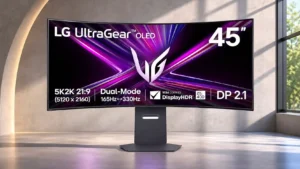
The choice between detailed 5120×2160 at 165Hz and smoother 2560×1080 at 330Hz makes the monitor unusually versatile. The high-speed mode sacrifices obvious sharpness, and opinions differ on how often that tradeoff is worthwhile.
Samsung Odyssey OLED G91SD S49DG910SNo score yet
Edge dimming behavior
LG 45GX950A-B
2.0
Protective dimming around the edges can show up as uneven brightness, especially in uniform dark scenes. It is usually subtle in varied content but can bother people who notice vignetting.
Samsung Odyssey OLED G91SD S49DG910SNo score yet
Gradient smoothness
LG 45GX950A-B
3.0
Fine gradients are reasonably smooth, but subtle tonal transitions do not quite match the refinement of the best QD-OLED alternatives.
Samsung Odyssey OLED G91SD S49DG910SNo score yet
HDR highlight detail
LG 45GX950A-B
5.0
Small HDR highlights stand out against inky blacks, giving explosions, sparks and bright reflections impressive definition. Detail stays visible in many demanding contrast-heavy scenes.
Samsung Odyssey OLED G91SD S49DG910SNo score yet
HDR mode versatility
LG 45GX950A-B
3.7
There are several HDR settings to suit taste and room conditions, including more faithful and punchier choices. None perfectly combines maximum highlight brightness with the tightest tonal accuracy.
Samsung Odyssey OLED G91SD S49DG910SNo score yet
Headphone output quality
LG 45GX950A-B
5.0
The four-pole headphone output and DTS modes deliver engaging, distinct sound profiles with compatible headsets. Headphone playback receives much stronger praise than some built-in speaker assessments.
Samsung Odyssey OLED G91SD S49DG910SNo score yet
Heat management
LG 45GX950A-BNo score yet
Samsung Odyssey OLED G91SD S49DG910S
4.0
Thermal brightness management is presented as a useful safeguard for keeping the large OLED panel comfortable and protected.
Image retention
LG 45GX950A-BNo score yet
Samsung Odyssey OLED G91SD S49DG910S
2.0
Static toolbars and game HUDs warrant care; one extended coding session was followed by a faint, temporary ghost.
Image scaling
LG 45GX950A-B
2.1
Lower-resolution modes look much softer than native 5K2K, and the smaller simulated screen sizes suffer particularly poor scaling. Smoother 330Hz motion does not always make up for the loss of definition.
Samsung Odyssey OLED G91SD S49DG910SNo score yet
Input lag
LG 45GX950A-B
5.0
Input lag is consistently very low on PC, keeping controls responsive in both primary modes. Some console measurements are less impressive, but PC gaming responsiveness is a clear strength.
Samsung Odyssey OLED G91SD S49DG910SNo score yet
Packaging quality and presentation
LG 45GX950A-BNo score yet
Samsung Odyssey OLED G91SD S49DG910S
5.0
Thick protective packaging is reassuring for such a large and delicate display.
Panel quality control
LG 45GX950A-BNo score yet
Samsung Odyssey OLED G91SD S49DG910S
1.0
Concerns about cracks and possible pixel issues make return policies and inspection especially important at this price.
PC gaming compatibility
LG 45GX950A-B
5.0
Fast motion, high-bandwidth connections and vivid OLED picture quality make the monitor highly capable when paired with a gaming PC.
Samsung Odyssey OLED G91SD S49DG910SNo score yet
Photo editing
LG 45GX950A-B
3.7
The resolution and large canvas can help with graphics and photo work, but the tight curvature can distort straight lines. It is better as a versatile creative display than as a flat reference monitor.
Samsung Odyssey OLED G91SD S49DG910SNo score yet
Portability and weight
LG 45GX950A-BNo score yet
Samsung Odyssey OLED G91SD S49DG910S
1.8
Heavy hardware, a broad panel and the need for a strong monitor arm make relocating or mounting it demanding.
PS5 gaming
LG 45GX950A-B
3.3
PS5 gaming works with a properly proportioned 16:9 image, HDR and high-refresh output where supported. Expect black bars, not genuine ultrawide console gameplay, and some console-specific HDR compromises.
Samsung Odyssey OLED G91SD S49DG910SNo score yet
Remote control usability
LG 45GX950A-B
5.0
An included remote makes it convenient to change modes and audio level without reaching behind the massive display.
Samsung Odyssey OLED G91SD S49DG910SNo score yet
Retail availability
LG 45GX950A-B
2.0
Availability can be limited even after launch, making it harder to find a reasonable deal on this unusual screen.
Samsung Odyssey OLED G91SD S49DG910SNo score yet
Screen uniformity
LG 45GX950A-B
2.0
Some panels show faint dark-gray banding, tinted edges or edge dimming, especially on uniform images. These flaws often recede during varied gaming content.
Samsung Odyssey OLED G91SD S49DG910SNo score yet
Speaker quality
LG 45GX950A-B
3.1
Sound quality splits opinion: several find the speakers rich, clear or surprisingly powerful, while others hear distortion or thin sound. External audio remains attractive for demanding listeners.
Samsung Odyssey OLED G91SD S49DG910SNo score yet
Stand stability
LG 45GX950A-B
4.0
Several assessments found the stand solid and well controlled, while others noticed wobble when the large panel was bumped. Stability depends partly on the desk and how it is positioned.
Samsung Odyssey OLED G91SD S49DG910SNo score yet
USB hub functionality
LG 45GX950A-B
3.0
The two USB-A downstream ports can handle basic peripherals, but their data path relies on the USB-C connection. The arrangement is less convenient than a fuller desktop hub.
Samsung Odyssey OLED G91SD S49DG910SNo score yet
Viewing angles
LG 45GX950A-B
5.0
Viewing angles are consistently excellent, with little degradation when looking from the sides or sitting within the curve. The wide panel retains strong color and contrast across the image.
Samsung Odyssey OLED G91SD S49DG910SNo score yet
VRR compatibility
LG 45GX950A-B
5.0
Support for common adaptive-sync standards broadens compatibility across modern GPUs. The screen can take advantage of variable refresh in both principal display modes.
Samsung Odyssey OLED G91SD S49DG910SNo score yet
VRR flicker
LG 45GX950A-B
3.3
Variable-refresh flicker remains an OLED caveat, especially in dark scenes with unstable frame rates. Some testing found it restrained, while another assessment saw it worsen in the 330Hz mode.
Samsung Odyssey OLED G91SD S49DG910SNo score yet
Windows Auto Color Management compatibility
LG 45GX950A-B
4.0
Windows Auto Color Management offers another way to improve SDR color handling while keeping settings flexible. It can be a little less accurate than the best dedicated profile.
Samsung Odyssey OLED G91SD S49DG910SNo score yet
Performance
Automatic brightness limiting
LG 45GX950A-B
3.5
SDR's uniform-brightness behavior keeps desktop windows from constantly dimming, though OLED brightness limiting remains noticeable in some bright content. Static-area dimming can also intrude during HDR viewing.
Samsung Odyssey OLED G91SD S49DG910SNo score yet
Color brightness
LG 45GX950A-B
2.1
Bright saturated colors are a weak spot compared with QD-OLED alternatives. Higher white-highlight brightness does not produce the same improvement in vivid color brightness.
Samsung Odyssey OLED G91SD S49DG910SNo score yet
DisplayPort connectivity
LG 45GX950A-B
3.1
DisplayPort 2.1 offers modern connectivity, but its bandwidth falls short of the UHBR20 maximum, so full-resolution high-refresh signals can require compression. One setup also suffered HDMI-versus-DisplayPort reliability differences.
Samsung Odyssey OLED G91SD S49DG910SNo score yet
Display Stream Compression clarity
LG 45GX950A-B
3.0
Display Stream Compression is generally treated as an acceptable way to obtain the maximum native-resolution refresh rate. There is limited user control over DSC, which may frustrate enthusiasts who want every signal option exposed.
Samsung Odyssey OLED G91SD S49DG910SNo score yet
Included DisplayPort cable length
LG 45GX950A-B
2.0
One unboxing found the supplied DisplayPort cable too short for a PC positioned farther from the desk. Owners with distant towers may need a longer cable.
Samsung Odyssey OLED G91SD S49DG910SNo score yet
KVM switch performance
LG 45GX950A-B
1.3
There is no integrated KVM switch, a notable omission for a premium monitor with multiple video inputs. Switching a keyboard and mouse between computers needs another solution.
Samsung Odyssey OLED G91SD S49DG910SNo score yet
On-screen display usability
LG 45GX950A-B
4.6
LG's joystick-driven menus are generally straightforward, with convenient shortcuts and clear setting groups. Some controls feel more limited or inconsistent than those on competing premium gaming displays.
Samsung Odyssey OLED G91SD S49DG910SNo score yet
Operating noise
LG 45GX950A-B
5.0
The active cooling fan runs quietly enough to go unnoticed even by someone sensitive to noise. Operating sound should rarely distract from work or play.
Samsung Odyssey OLED G91SD S49DG910SNo score yet
Spatial audio quality
LG 45GX950A-B
5.0
DTS Headphone:X delivers a striking spatial presentation when paired with a compatible headset. The distinct EQ presets are particularly appealing for immersive gaming audio.
Samsung Odyssey OLED G91SD S49DG910SNo score yet
Controls and connectivity
Control button responsiveness
LG 45GX950A-B
5.0
The small joystick responds readily to directional inputs, making picture adjustments less fiddly than they could be on a screen this large.
Samsung Odyssey OLED G91SD S49DG910SNo score yet
HDR adjustment controls
LG 45GX950A-B
4.0
Low and High peak-brightness selections give useful control over HDR presentation. The tradeoff is that the brightest setting can lift the entire dark scene instead of preserving the most faithful tone curve.
Samsung Odyssey OLED G91SD S49DG910SNo score yet
HDR tone mapping accuracy
LG 45GX950A-B
2.2
HDR tone mapping is a recurring compromise: the most accurate mode caps peak highlights, while brighter modes over-lift darker areas. Console calibration and source-based tone mapping are additional concerns.
Samsung Odyssey OLED G91SD S49DG910SNo score yet
Smart TV platform
LG 45GX950A-BNo score yet
Samsung Odyssey OLED G91SD S49DG910S
1.0
Without integrated Tizen apps, this version depends on an attached device for streaming services.
Software and driver support
LG 45GX950A-BNo score yet
Samsung Odyssey OLED G91SD S49DG910S
4.0
Samsung’s display utility helps unlock the best configuration, but using it and maintaining graphics drivers adds a setup step.
Comfort and build
Eye comfort features
LG 45GX950A-BNo score yet
Samsung Odyssey OLED G91SD S49DG910S
4.0
Flicker-free and Eye Saver options help long sessions, while the wide curve can keep distant content within a more comfortable viewing arc.
PWM flicker comfort
LG 45GX950A-B
3.0
The monitor's anti-flicker provisions are limited, so sensitive owners may still need to consider OLED flicker behavior in variable-refresh situations.
Samsung Odyssey OLED G91SD S49DG910SNo score yet
Tracking and training
Gamma tracking
LG 45GX950A-B
4.3
Gamma and white balance are often strong out of the box, but certain profiles and calibration attempts can introduce tracking errors. Getting an exact preferred gamma curve may require software workarounds.
Samsung Odyssey OLED G91SD S49DG910SNo score yet
Ownership and support
Hardware calibration support
LG 45GX950A-B
5.0
LG's calibration software and profile memories offer serious tuning options for owners with measurement tools. The facility is useful, but realizing its full benefit takes extra equipment and effort.
Samsung Odyssey OLED G91SD S49DG910SNo score yet
HDMI 2.1 support
LG 45GX950A-B
4.8
The two high-bandwidth HDMI 2.1 ports are well suited to current PCs and consoles. They help make a large PC-first monitor flexible for secondary gaming devices.
Samsung Odyssey OLED G91SD S49DG910SNo score yet
Reliability over time
LG 45GX950A-BNo score yet
Samsung Odyssey OLED G91SD S49DG910S
1.0
Concerns about possible panel cracking and failures introduce an ownership risk that deserves attention alongside the excellent visuals.