Compare ASUS ROG Swift OLED PG32UCWM vs LG 45GX950A-B

ASUS ROG Swift OLED PG32UCWM

ASUS ROG Swift OLED PG32UCWM

Overall score 4.3 / 5

Based on 9 scored reviews

vs
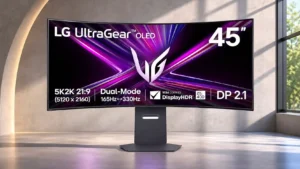
LG 45GX950A-B

LG 45GX950A-B

Overall score 4.1 / 5

Based on 22 scored reviews

How we score

Scorata scores summarize analyzed review evidence on a 1–5 scale; they are not laboratory measurements or a simple average of customer star ratings. Feature scores summarize the reviews covering that feature. The overall score averages feature scores within each review, then combines review averages. When both expert and customer evidence are available, those two groups receive equal weight. Products can have different review coverage, so small score gaps do not establish a winner.

Recommendations prioritize important features for the category, with a score of at least 3.5, a gap of at least 0.25 points and at least two supporting reviews per product. Features with widely varying scores or broad connectivity contexts are excluded from recommendations. These safeguards do not establish statistical significance.

Quick verdict

What each product is best for

The review evidence points to a tradeoff: KVM switch performance and warranty and support service versus Display-mode switching reliability and Shadow detail. Choose according to which strengths matter more to you; the overall score alone does not settle that choice.

Choose ASUS ROG Swift OLED PG32UCWM for KVM switch performance and warranty and support service.

Choose LG 45GX950A-B for Display-mode switching reliability and Shadow detail.

Why these recommendations?

ASUS ROG Swift OLED PG32UCWM

Where It Has the Edge

  • KVM switch performance is 4.5 vs 1.3. The built-in KVM adds flexibility for connecting devices and using the monitor with more than one computer.
  • warranty and support service is 4.8 vs 2.0. A three-year warranty explicitly includes OLED burn-in, providing reassurance despite the technology’s inherent aging risks.
  • burn-in protection is 4.6 vs 2.7. OLED Care functions include pixel cleaning, screen shifting, logo handling and a presence sensor. They offer useful safeguards,...

LG 45GX950A-B

Where It Has the Edge

  • Display-mode switching reliability is 4.8 vs 3.0. Switching between the two main display modes is generally straightforward, sometimes with a dedicated button or software shortcut....
  • Shadow detail is 5.0 vs 3.8. Dark-game details remain clear thanks to OLED pixel control and strong black separation. It handles shadows particularly well...
  • HDR highlight detail is 5.0 vs 3.8. Small HDR highlights stand out against inky blacks, giving explosions, sparks and bright reflections impressive definition. Detail stays...
ASUS ROG Swift OLED PG32UCWM 4.3 overall score
LG 45GX950A-B 4.1 overall score

Compare features

Scores are out of 5. Missing scores mean missing review evidence, not a missing feature.

Scored on both products

Performance

KVM switch performance
ASUS ROG Swift OLED PG32UCWM
4.5

The built-in KVM adds flexibility for connecting devices and using the monitor with more than one computer.

LG 45GX950A-B
1.3

There is no integrated KVM switch, a notable omission for a premium monitor with multiple video inputs. Switching a keyboard and mouse between computers needs another solution.

Adaptive sync performance
ASUS ROG Swift OLED PG32UCWM
3.0

Variable refresh generally suits smooth gaming, but the anti-flicker setting creates a narrow frame-rate range where VRR disengages and tearing or judder may appear.

LG 45GX950A-B
5.0

FreeSync and G-SYNC compatibility keep motion fluid with minimal tearing and stutter. Adaptive sync works effectively across different refresh settings.

DisplayPort connectivity
ASUS ROG Swift OLED PG32UCWM
5.0

Full-bandwidth DisplayPort 2.1 can run 4K 240Hz 10-bit video without DSC on a compatible graphics card, adding useful headroom for high-end PCs.

LG 45GX950A-B
3.1

DisplayPort 2.1 offers modern connectivity, but its bandwidth falls short of the UHBR20 maximum, so full-resolution high-refresh signals can require compression. One setup also suffered HDMI-versus-DisplayPort reliability differences.

Color brightness
ASUS ROG Swift OLED PG32UCWM
4.0

Removing the extra white subpixel improves the vibrancy of bright saturated colors compared with older WOLED designs, although QD-OLED competitors can still have an edge.

LG 45GX950A-B
2.1

Bright saturated colors are a weak spot compared with QD-OLED alternatives. Higher white-highlight brightness does not produce the same improvement in vivid color brightness.

Display-mode switching reliability
ASUS ROG Swift OLED PG32UCWM
3.0

A direct hardware shortcut helps switch between 4K and high-speed modes, but changing while a game is open can scramble the interface temporarily.

LG 45GX950A-B
4.8

Switching between the two main display modes is generally straightforward, sometimes with a dedicated button or software shortcut. A few connection-specific reports describe slower or troublesome changes, particularly over DisplayPort.

HDR performance
ASUS ROG Swift OLED PG32UCWM
3.8

HDR can look excellent in dark, high-contrast scenes, but limited full-screen brightness and imperfect bright-mode tracking keep it behind the best alternatives.

LG 45GX950A-B
4.4

Dark HDR gaming scenes can look spectacular thanks to deep blacks, crisp highlights and rapid pixel response. Bright full-screen scenes and bright color reproduction are less convincing, with different settings favoring punch or accuracy.

Overall picture quality
ASUS ROG Swift OLED PG32UCWM
4.4

Excellent sharpness, color, motion and contrast produce a striking image, although full-screen brightness and some HDR or viewing-angle behavior fall short of perfection.

LG 45GX950A-B
5.0

The towering 5K2K OLED delivers crisp details, deep blacks and strong HDR impact in many games. It is most spectacular in dark or mixed scenes rather than bright full-screen content.

Brightness
ASUS ROG Swift OLED PG32UCWM
2.9

Large bright scenes and full-screen white are less punchy than on some newer competitors, despite strong small highlights and enough SDR output for many users.

LG 45GX950A-B
3.4

Small bright highlights can be punchy for OLED, but sustained bright scenes are comparatively dim. Brightness evaluations vary with content, mode and room lighting.

Automatic brightness limiting
ASUS ROG Swift OLED PG32UCWM
3.0

Brightness can shift as bright content fills more of the screen. Uniform Brightness steadies desktop viewing, but sacrificing higher peaks and HDR consistency remains part of the compromise.

LG 45GX950A-B
3.5

SDR's uniform-brightness behavior keeps desktop windows from constantly dimming, though OLED brightness limiting remains noticeable in some bright content. Static-area dimming can also intrude during HDR viewing.

On-screen display usability
ASUS ROG Swift OLED PG32UCWM
5.0

The joystick menus are quick and intuitive, with programmable shortcuts for commonly used gaming and picture settings.

LG 45GX950A-B
4.6

LG's joystick-driven menus are generally straightforward, with convenient shortcuts and clear setting groups. Some controls feel more limited or inconsistent than those on competing premium gaming displays.

Picture-in-picture and picture-by-picture
ASUS ROG Swift OLED PG32UCWM
5.0

Flexible picture-in-picture and picture-by-picture layouts let two sources share the screen, including individually adjustable windows.

LG 45GX950A-B
4.7

Picture-in-picture and picture-by-picture make the broad screen useful for viewing two sources at once. The modes are particularly handy for PC-and-console or laptop-and-console setups.

Color accuracy
ASUS ROG Swift OLED PG32UCWM
4.5

sRGB and calibrated modes can look exceptionally accurate, but the default wide-gamut SDR setting may oversaturate colors and the boosted HDR setting can distort tracking.

LG 45GX950A-B
4.3

SDR color is often pleasing or accurate with appropriate settings, including good factory calibration on some units. Other measurements find oversaturation or color errors, so demanding work benefits from tuning.

Contrast
ASUS ROG Swift OLED PG32UCWM
5.0

Per-pixel OLED lighting creates exceptional contrast and crisp separation between dark backgrounds and bright details, even in moderately lit rooms.

LG 45GX950A-B
5.0

Near-perfect OLED blacks yield exceptionally strong perceived contrast and depth. High-contrast gaming and HDR imagery are among its biggest strengths.

Other features

Premium feel
ASUS ROG Swift OLED PG32UCWM
5.0

Solid construction, premium finish and enthusiast-grade controls lend the monitor a genuine flagship character.

LG 45GX950A-B
2.0

The appearance is understated, but a premium price does not always translate into the luxurious finish offered by some competing ultrawides.

Windows Auto Color Management compatibility
ASUS ROG Swift OLED PG32UCWM
2.0

One test found Windows 11 Auto Color Management failed to clamp SDR colors properly, although selecting the monitor’s own sRGB mode provided a workaround.

LG 45GX950A-B
4.0

Windows Auto Color Management offers another way to improve SDR color handling while keeping settings flexible. It can be a little less accurate than the best dedicated profile.

Burn-in protection
ASUS ROG Swift OLED PG32UCWM
4.6

OLED Care functions include pixel cleaning, screen shifting, logo handling and a presence sensor. They offer useful safeguards, though they cannot guarantee immunity from burn-in.

LG 45GX950A-B
2.7

Pixel shifting, a screen saver and cleaning cycles offer basic OLED care. Protection controls are more limited than on some competitors, and static desktop content remains an ownership concern.

Screen uniformity
ASUS ROG Swift OLED PG32UCWM
3.8

Dark-gray banding is modest compared with several earlier Tandem WOLEDs, but some samples show edge darkening, faint dirty-screen effect or tonal shifts.

LG 45GX950A-B
2.0

Some panels show faint dark-gray banding, tinted edges or edge dimming, especially on uniform images. These flaws often recede during varied gaming content.

Gaming image presets
ASUS ROG Swift OLED PG32UCWM
5.0

Racing is a strong everyday preset, and alternative color spaces and HDR profiles help adapt the image to different content.

LG 45GX950A-B
3.3

Useful gaming profiles and picture modes are available, but some defaults over-sharpen the image or hide adjustments. Finding the most natural-looking configuration may require experimentation.

Viewing angles
ASUS ROG Swift OLED PG32UCWM
3.3

Color remains attractive head-on, but greenish edge or off-axis shifts are reported, ranging from barely visible to strongly distracting depending on the tester.

LG 45GX950A-B
5.0

Viewing angles are consistently excellent, with little degradation when looking from the sides or sitting within the curve. The wide panel retains strong color and contrast across the image.

Text fringing
ASUS ROG Swift OLED PG32UCWM
5.0

The familiar RGB stripe virtually eliminates the colored borders around text seen on many earlier OLEDs, especially useful for reading and office work.

LG 45GX950A-B
3.4

The updated pixel structure and higher density reduce colored edges around text versus older WOLEDs. Some residual softness and fringing remain compared with conventional LCD or RGB-stripe panels.

Built-in speakers
ASUS ROG Swift OLED PG32UCWM
2.0

There are no internal speakers, a notable inconvenience if you want sound without connecting headphones or separate audio equipment.

LG 45GX950A-B
3.6

The built-in speakers are a useful convenience and can sound clear and surprisingly loud, but assessments vary sharply. Some find them distorted or weak enough to prefer headphones or external speakers.

Built-in RGB lighting
ASUS ROG Swift OLED PG32UCWM
3.0

Backlighting and the desk projector add visual flair, though the glow can be too weak for ambient wall lighting and some find the projection excessive.

LG 45GX950A-B
4.5

The rear RGB accent adds a little personality without cluttering the front. Its colors can be customized or switched off for a more restrained setup.

Power efficiency
ASUS ROG Swift OLED PG32UCWM
2.5

Removing the white subpixel increases power use on white-heavy content versus some previous WOLED monitors, with a smaller difference during gaming.

LG 45GX950A-B
1.0

Energy use is a noticeable drawback for such a large, bright OLED screen. Efficiency is not its selling point.

USB hub functionality
ASUS ROG Swift OLED PG32UCWM
4.5

The USB hub conveniently accommodates peripheral input devices and supports a cleaner multi-device desk setup.

LG 45GX950A-B
3.0

The two USB-A downstream ports can handle basic peripherals, but their data path relies on the USB-C connection. The arrangement is less convenient than a fuller desktop hub.

Screen coating clarity
ASUS ROG Swift OLED PG32UCWM
4.7

The haze-free glossy surface gives unusually crisp text and an almost glass-like picture without matte grain, at the cost of strong mirror reflections.

LG 45GX950A-B
3.2

The anti-glare finish is polarizing: it mutes mirror reflections, but its visible grain or haze reduces perceived crispness. Fans of glossy OLED clarity may find this coating disappointing.

Reflection handling
ASUS ROG Swift OLED PG32UCWM
2.7

The glossy coating preserves clean blacks and sharpness but reflects nearby windows, lamps and faces more directly than matte finishes.

LG 45GX950A-B
4.1

The matte treatment is effective against sharp reflections, although certain light positions still create diffuse glare or raised-looking blacks. Moderate room lighting generally suits it better than a sunny window behind the user.

Shadow detail
ASUS ROG Swift OLED PG32UCWM
3.8

Shadow Boost and an accurate sRGB gamma option recover dark detail, but native-mode near-black tracking can be weak or uneven.

LG 45GX950A-B
5.0

Dark-game details remain clear thanks to OLED pixel control and strong black separation. It handles shadows particularly well when a scene mixes darkness with bright highlights.

Port selection
ASUS ROG Swift OLED PG32UCWM
5.0

DisplayPort 2.1, HDMI 2.1, USB-C and USB data ports provide an extensive connection suite for premium gaming and work setups.

LG 45GX950A-B
3.8

High-bandwidth HDMI, DisplayPort and USB-C make the main video connections versatile. The small downstream USB selection and missing KVM are disappointing at this price.

HDR highlight detail
ASUS ROG Swift OLED PG32UCWM
3.8

Small bright objects can stand out brilliantly against black, but particular presets clip highlights or cap output, requiring deliberate HDR mode choices.

LG 45GX950A-B
5.0

Small HDR highlights stand out against inky blacks, giving explosions, sparks and bright reflections impressive definition. Detail stays visible in many demanding contrast-heavy scenes.

Image scaling
ASUS ROG Swift OLED PG32UCWM
3.3

Downscaling to 1080p is comparatively smooth for a dual-mode 4K screen, but smaller emulated windows and operating-system scaling reduce sharpness or complicate text sizing.

LG 45GX950A-B
2.1

Lower-resolution modes look much softer than native 5K2K, and the smaller simulated screen sizes suffer particularly poor scaling. Smoother 330Hz motion does not always make up for the loss of definition.

Competitive gaming suitability
ASUS ROG Swift OLED PG32UCWM
4.8

Switching from sharp 4K 240Hz to extremely responsive 1080p 480Hz gives fast-paced competitive games a meaningful speed and motion advantage.

LG 45GX950A-B
3.7

The 330Hz mode and OLED responsiveness can serve fast competitive play, but the huge image and softer scaling make it less focused than smaller esports monitors. Competitive suitability depends on the game and priorities.

24-inch mode quality
ASUS ROG Swift OLED PG32UCWM
4.0

The smaller simulated screen size makes competitive play more flexible, but image quality falls as the active resolution shrinks.

LG 45GX950A-B
3.0

Shrinking the display to 24 inches offers a focused view for fast games, but the lower-resolution scaling can look soft or downright unusable. The smaller competitive modes are far more divisive than the native 5K2K picture.

Stand stability
ASUS ROG Swift OLED PG32UCWM
5.0

The broad, substantial base keeps the large screen steady with very little wobble.

LG 45GX950A-B
4.0

Several assessments found the stand solid and well controlled, while others noticed wobble when the large panel was bumped. Stability depends partly on the desk and how it is positioned.

Calibration potential
ASUS ROG Swift OLED PG32UCWM
5.0

Good factory color can be refined further with RGB adjustment and profiling, with excellent results achieved in the calibrated SDR modes.

LG 45GX950A-B
4.3

The factory picture is already appealing, and both on-monitor tweaks and calibration software can refine its grayscale and color accuracy. Exact targets can still require additional calibration tools.

Panel type
ASUS ROG Swift OLED PG32UCWM
4.3

The novel tandem RGB-stripe WOLED panel solves much of OLED’s font-fringing problem and retains deep blacks, though removing the white subpixel hurts brightness efficiency.

LG 45GX950A-B
5.0

WOLED brings the expected deep blacks and rapid response with a notably higher pixel density than earlier 45-inch OLED designs. Its color volume still trails some QD-OLED competitors.

Sharpness
ASUS ROG Swift OLED PG32UCWM
5.0

The standard RGB-stripe layout and 4K resolution yield razor-sharp images and unusually clean fonts for a glossy gaming OLED.

LG 45GX950A-B
4.4

Fine detail and text look far clearer than on previous low-density 45-inch OLEDs. Native 5K2K is impressive, although smaller 4K screens and glossy or RGB-stripe designs can still look crisper.

Color gamut
ASUS ROG Swift OLED PG32UCWM
4.4

Coverage around the DCI-P3 space is generous and a step above older standard WOLEDs, though it falls slightly short of the widest competing OLED panels.

LG 45GX950A-B
3.9

The WOLED panel covers DCI-P3 well and produces vibrant game colors, but color range trails leading QD-OLEDs. The difference is most apparent in highly saturated HDR imagery.

Included accessories
ASUS ROG Swift OLED PG32UCWM
5.0

The package includes the cables and mounting adapter needed to get started, plus a protective cloth and other useful extras.

LG 45GX950A-B
4.5

An HDMI cable, DisplayPort cable and USB-C cable are included, sparing buyers several immediate accessory purchases. The package generally feels well equipped for setup.

Desk footprint
ASUS ROG Swift OLED PG32UCWM
2.3

The three-pronged stand is stable but takes up considerable desk depth, potentially crowding a shallow workstation or large mousepad.

LG 45GX950A-B
2.7

The huge panel demands substantial desk width and depth, although its relatively compact flat stand helps recover some usable surface. Measure your workstation before making room for the 800R curve.

Single-player cinematic gaming suitability
ASUS ROG Swift OLED PG32UCWM
4.5

Perfect blacks, vivid color and sharp environmental details are especially attractive for cinematic titles, though bright HDR scenes may look restrained.

LG 45GX950A-B
4.9

The enormous 21:9 field of view and high native resolution make story-rich, exploratory and cinematic games a standout experience. Deep blacks and fast OLED response complete the effect.

Cable management
ASUS ROG Swift OLED PG32UCWM
5.0

Routing cables through the stand keeps the generous selection of connections manageable without excessive clutter.

LG 45GX950A-B
4.6

The compact stand, cable pass-through and rear cover help keep wires tidy despite the enormous display. Management is useful without being especially elaborate.

Refresh rate
ASUS ROG Swift OLED PG32UCWM
5.0

A 240Hz 4K baseline provides excellent responsiveness, while the optional 480Hz full-HD mode makes speed the priority for esports.

LG 45GX950A-B
4.6

Native 165Hz is smooth for high-resolution games, and the optional 330Hz mode is enticing for fast play. Achieving the faster rate requires giving up the detailed 5K2K image.

GPU demands
ASUS ROG Swift OLED PG32UCWM
3.0

Driving 4K at 240 frames per second calls for a powerful graphics card, making the 1080p 480Hz option a useful performance alternative.

LG 45GX950A-B
2.6

Driving 11 million pixels at high settings is demanding, especially in modern AAA games. A powerful graphics card is needed to get the full benefit of 5K2K and high refresh rates.

Photo editing
ASUS ROG Swift OLED PG32UCWM
4.0

Sharp 4K detail and calibrated SDR color make photo work practical; specific professional color spaces may require profiling.

LG 45GX950A-B
3.7

The resolution and large canvas can help with graphics and photo work, but the tight curvature can distort straight lines. It is better as a versatile creative display than as a flat reference monitor.

Dual-mode versatility
ASUS ROG Swift OLED PG32UCWM
4.7

Native 4K 240Hz covers detailed games and work; 1080p 480Hz trades definition for outstanding motion clarity, a flexibility multiple testers appreciated.

LG 45GX950A-B
4.5

The choice between detailed 5120×2160 at 165Hz and smoother 2560×1080 at 330Hz makes the monitor unusually versatile. The high-speed mode sacrifices obvious sharpness, and opinions differ on how often that tradeoff is worthwhile.

Pixel density
ASUS ROG Swift OLED PG32UCWM
5.0

At roughly 140 PPI, the 32-inch 4K panel keeps text and interfaces crisp and leaves room for productive desktop layouts.

LG 45GX950A-B
4.8

At about 125 pixels per inch, the 5K2K panel is a huge upgrade over earlier 45-inch OLED ultrawides. It is still less dense than smaller 4K monitors, but text and fine details are much more usable.

VRR flicker
ASUS ROG Swift OLED PG32UCWM
3.5

Variable-refresh flicker can occur with large frame-rate swings; ASUS’s anti-flicker setting reduces some cases but can interrupt VRR at certain frame rates.

LG 45GX950A-B
3.3

Variable-refresh flicker remains an OLED caveat, especially in dark scenes with unstable frame rates. Some testing found it restrained, while another assessment saw it worsen in the 330Hz mode.

Overall satisfaction
ASUS ROG Swift OLED PG32UCWM
5.0

The monitor impresses as a fast, sharp flagship, but its expensive pricing and HDR tradeoffs make the buying recommendation less unanimous.

LG 45GX950A-B
4.8

The monitor earns strong enthusiasm for its screen size, sharpness and immersive gaming, even from those who criticize particular settings. Its steep cost, aggressive curve and a few display compromises keep it from being an easy all-purpose recommendation.

USB-C power delivery
ASUS ROG Swift OLED PG32UCWM
4.7

Up to 90W USB-C charging supports compatible laptops and reduces the need for another charging cable.

LG 45GX950A-B
4.8

USB-C with up to 90W delivery is a practical bonus for laptops and MacBooks. A single cable can supply video and charge a compatible notebook.

HDR mode versatility
ASUS ROG Swift OLED PG32UCWM
3.8

Several HDR presets and an adjustable setting are available, yet the choice largely comes down to accurate but dim True Black or brighter, less accurate tone mapping.

LG 45GX950A-B
3.7

There are several HDR settings to suit taste and room conditions, including more faithful and punchier choices. None perfectly combines maximum highlight brightness with the tightest tonal accuracy.

Stand adjustability
ASUS ROG Swift OLED PG32UCWM
4.3

Height, tilt and swivel adjustments feel smooth and stable, but the included stand cannot rotate into portrait orientation.

LG 45GX950A-B
4.5

Height, tilt and swivel adjustment are generous enough to position the screen comfortably. The compact flat metal base adds practical space compared with wide-legged stands.

Aspect ratio
ASUS ROG Swift OLED PG32UCWM
5.0

Selectable 27-inch and 24.5-inch viewing formats broaden the ways to use the 16:9 screen for faster competitive play.

LG 45GX950A-B
4.9

The taller 21:9 layout offers more useful vertical room than many 32:9 alternatives without sacrificing much horizontal immersion. It is especially appealing for games and work that benefit from height as well as width.

Black levels
ASUS ROG Swift OLED PG32UCWM
5.0

Deep OLED blacks are a standout, and the WOLED design holds black depth unusually well even with ambient room lighting.

LG 45GX950A-B
5.0

Individual OLED pixels switch fully off for exceptionally deep blacks. This gives dim environments, shadowy games and high-contrast scenes real depth.

Blooming control
ASUS ROG Swift OLED PG32UCWM
5.0

Per-pixel lighting prevents bright objects from creating halos or spill into neighboring dark areas, a clear advantage over zone-dimmed LCDs.

LG 45GX950A-B
5.0

OLED's per-pixel lighting produces clean bright objects against dark backgrounds, with essentially no blooming or halo distractions. Starfields and high-contrast game scenes look particularly crisp.

Input lag
ASUS ROG Swift OLED PG32UCWM
5.0

Input latency is consistently outstanding in high-speed play, with a particularly quick 480Hz mode and very little processing delay.

LG 45GX950A-B
5.0

Input lag is consistently very low on PC, keeping controls responsive in both primary modes. Some console measurements are less impressive, but PC gaming responsiveness is a clear strength.

Motion clarity
ASUS ROG Swift OLED PG32UCWM
5.0

Near-instant OLED transitions are exceptionally clean at 240Hz, and the optional 480Hz mode improves fast-moving target definition further.

LG 45GX950A-B
5.0

The OLED panel renders fast motion with excellent clarity and almost no response smearing. Switching to 330Hz improves smoothness further, although the reduced resolution brings its own softness.

PC gaming compatibility
ASUS ROG Swift OLED PG32UCWM
5.0

The high-speed 4K OLED panel and modern gaming connections provide a premium PC gaming experience with plenty of performance headroom.

LG 45GX950A-B
5.0

Fast motion, high-bandwidth connections and vivid OLED picture quality make the monitor highly capable when paired with a gaming PC.

Resolution
ASUS ROG Swift OLED PG32UCWM
5.0

4K resolution on the 32-inch panel provides rich detail and a large working area, though many users will want operating-system text scaling.

LG 45GX950A-B
5.0

The 5120×2160 resolution finally gives a 45-inch ultrawide the detail it deserves. Games and desktop text look substantially sharper than on older 3440×1440 panels of similar size.

Response time
ASUS ROG Swift OLED PG32UCWM
5.0

Very fast OLED pixel transitions support crisp moving images and a responsive feel in demanding games.

LG 45GX950A-B
5.0

Pixel response is extraordinarily fast across refresh rates, giving clean movement with little overshoot. It compares particularly well with even high-end LCD gaming panels.

VESA mount compatibility
ASUS ROG Swift OLED PG32UCWM
5.0

An included adapter simplifies mounting to a compatible standard monitor arm, especially when the recessed fixture would otherwise obstruct attachment.

LG 45GX950A-B
5.0

Standard VESA mounting gives flexibility to use an arm or wall mount if the desk stand is unsuitable. The size and weight still demand appropriate support.

Ownership and support

Warranty and support service
ASUS ROG Swift OLED PG32UCWM
4.8

A three-year warranty explicitly includes OLED burn-in, providing reassurance despite the technology’s inherent aging risks.

LG 45GX950A-B
2.0

The two-year warranty is less reassuring than the three-year burn-in coverage available on several rivals. Burn-in terms could be stated more clearly, especially for such an expensive OLED.

Value for money
ASUS ROG Swift OLED PG32UCWM
2.1

Pricing around flagship territory divides opinion: the sharp RGB-stripe panel and feature set impress, but much cheaper 4K OLEDs often deliver comparable gaming thrills.

LG 45GX950A-B
2.1

The launch-level price is a major barrier, even allowing for its unusual 45-inch 5K2K panel. A lower sale price helps, but there are much cheaper OLED alternatives for owners who do not need this exact format.

Setup ease
ASUS ROG Swift OLED PG32UCWM
5.0

Tool-free assembly and the included cables and adapter make the initial setup straightforward.

LG 45GX950A-B
5.0

Tool-free stand attachment and supplied cables make initial assembly approachable despite the giant panel. The bulk of the monitor remains the main handling consideration.

Controls and connectivity

Color calibration controls
ASUS ROG Swift OLED PG32UCWM
5.0

Adjustable RGB, gamma, saturation and color-space settings offer useful fine-tuning; the dedicated sRGB Cal preset is accurate but locks many controls.

LG 45GX950A-B
3.8

There is a worthwhile selection of white-balance, gamma and six-color adjustments, plus software calibration. Controls vary by picture preset, and some modes lock useful adjustments.

HDR tone mapping accuracy
ASUS ROG Swift OLED PG32UCWM
3.3

Tone mapping provides rich depth when configured carefully; the brighter HDR modes lift dark scenes beyond their intended appearance.

LG 45GX950A-B
2.2

HDR tone mapping is a recurring compromise: the most accurate mode caps peak highlights, while brighter modes over-lift darker areas. Console calibration and source-based tone mapping are additional concerns.

HDR adjustment controls
ASUS ROG Swift OLED PG32UCWM
3.6

Adjustable HDR can substantially increase highlight brightness, but turning it up risks raised shadows and inaccurate tone reproduction.

LG 45GX950A-B
4.0

Low and High peak-brightness selections give useful control over HDR presentation. The tradeoff is that the brightest setting can lift the entire dark scene instead of preserving the most faithful tone curve.

Control button responsiveness
ASUS ROG Swift OLED PG32UCWM
5.0

The power button asks for confirmation, reducing accidental shutdowns, while quick-access controls make everyday operation more deliberate.

LG 45GX950A-B
5.0

The small joystick responds readily to directional inputs, making picture adjustments less fiddly than they could be on a screen this large.

PC-based monitor controls
ASUS ROG Swift OLED PG32UCWM
5.0

DisplayWidget Center provides useful software access to picture settings, shortcuts and firmware, though not every hardware toggle is available there.

LG 45GX950A-B
5.0

LG's desktop control and calibration utilities make certain settings easier to change without using the rear joystick. Software also adds tuning options beyond the monitor's basic menus.

Comfort and build

PWM flicker comfort
ASUS ROG Swift OLED PG32UCWM
4.0

A smaller brightness dip than older OLED panels may make the monitor more comfortable for people bothered by display flicker.

LG 45GX950A-B
3.0

The monitor's anti-flicker provisions are limited, so sensitive owners may still need to consider OLED flicker behavior in variable-refresh situations.

Design and aesthetics
ASUS ROG Swift OLED PG32UCWM
5.0

The translucent rear shell and ROG lighting look distinctive and premium, although the elaborate gamer styling is not universally subtle.

LG 45GX950A-B
4.6

A clean rear shell, slim bezel framing and restrained accents make the monitor look stylish without excessive gaming decoration. A few find the finish less luxurious than its premium price suggests.

Screen size
ASUS ROG Swift OLED PG32UCWM
5.0

The 31.5-inch viewable screen is immersive in games and spacious for desktop work, although it needs a reasonably generous desk.

LG 45GX950A-B
4.6

The towering 45-inch screen delivers an unusually expansive view and plenty of workspace. It can also dominate an ordinary desk, so buyers should be comfortable with its size.

Build quality
ASUS ROG Swift OLED PG32UCWM
5.0

The substantial metal-backed design and sturdy stand give this premium monitor a well-constructed feel.

LG 45GX950A-B
5.0

The stand and chassis feel substantial and carefully built, with a reassuringly solid base. The large panel still needs careful handling.

Tracking and training

Gamma tracking
ASUS ROG Swift OLED PG32UCWM
4.7

Grayscale and sRGB gamma track well in calibrated modes, though native SDR shadow reproduction and HDR luminance tracking have inconsistencies.

LG 45GX950A-B
4.3

Gamma and white balance are often strong out of the box, but certain profiles and calibration attempts can introduce tracking errors. Getting an exact preferred gamma curve may require software workarounds.

Evidence available for one product

Other features

Ease of use
ASUS ROG Swift OLED PG32UCWM
5.0

The joystick interface, customizable shortcuts and companion software make the extensive settings more approachable than the feature list suggests.

LG 45GX950A-BNo score yet
Backlight bleed control
ASUS ROG Swift OLED PG32UCWM
5.0

The self-emissive OLED panel avoids the backlight bleed associated with LCDs, helping dark scenes remain free of unwanted glow.

LG 45GX950A-BNo score yet
Bass reproduction
ASUS ROG Swift OLED PG32UCWMNo score yet
LG 45GX950A-B
3.0

The built-in speakers deliver some bass at moderate volume, but low-frequency impact is modest. They suit everyday playback better than bass-heavy entertainment.

Console gaming compatibility
ASUS ROG Swift OLED PG32UCWMNo score yet
LG 45GX950A-B
3.0

Consoles can output a sharp 16:9 image with HDR and supported high refresh rates, but they cannot fill the ultrawide format natively. Stretched presentation and side bars make this a secondary rather than ideal console screen.

Curved screen immersion
ASUS ROG Swift OLED PG32UCWMNo score yet
LG 45GX950A-B
4.0

The tight 800R curve can feel wonderfully enveloping during gaming and simulations, yet others find it excessive for everyday use and straight-line work. Its shape is a major preference-dependent decision.

Delivery condition
ASUS ROG Swift OLED PG32UCWMNo score yet
LG 45GX950A-B
5.0

Careful packaging kept the large curved test panel in good condition on arrival. A protected delivery is especially welcome for a display of this size.

Edge dimming behavior
ASUS ROG Swift OLED PG32UCWMNo score yet
LG 45GX950A-B
2.0

Protective dimming around the edges can show up as uneven brightness, especially in uniform dark scenes. It is usually subtle in varied content but can bother people who notice vignetting.

ELMB strobing quality
ASUS ROG Swift OLED PG32UCWM
2.7

ELMB sharpens 120Hz or 240Hz motion, but disables HDR and VRR; one latency test found such a large penalty that the mode was not worth using.

LG 45GX950A-BNo score yet
Firmware updateability
ASUS ROG Swift OLED PG32UCWM
4.0

Firmware can be updated by the user, including through ASUS software, making maintenance more straightforward.

LG 45GX950A-BNo score yet
Gaming feature selection
ASUS ROG Swift OLED PG32UCWM
4.3

Timers, crosshairs, sniper tools and shadow aids accompany the high-speed panel. They are convenient extras rather than the monitor’s main selling point.

LG 45GX950A-BNo score yet
Ghosting control
ASUS ROG Swift OLED PG32UCWMNo score yet
LG 45GX950A-B
5.0

Instant OLED pixel transitions produce little or no visible ghosting, overshoot or smearing. Fast camera movement remains exceptionally clean.

Gradient smoothness
ASUS ROG Swift OLED PG32UCWMNo score yet
LG 45GX950A-B
3.0

Fine gradients are reasonably smooth, but subtle tonal transitions do not quite match the refinement of the best QD-OLED alternatives.

Headphone output quality
ASUS ROG Swift OLED PG32UCWMNo score yet
LG 45GX950A-B
5.0

The four-pole headphone output and DTS modes deliver engaging, distinct sound profiles with compatible headsets. Headphone playback receives much stronger praise than some built-in speaker assessments.

Heat management
ASUS ROG Swift OLED PG32UCWM
4.5

Internal heatsinks and a newer power design support cool operation without fans, with hands-on temperature checks finding modest chassis warmth.

LG 45GX950A-BNo score yet
Image retention
ASUS ROG Swift OLED PG32UCWM
3.0

Static desktop use carries an ongoing image-retention risk despite the built-in OLED care tools and warranty coverage.

LG 45GX950A-BNo score yet
Integrated power supply
ASUS ROG Swift OLED PG32UCWM
5.0

An internal power supply avoids a bulky external brick, simplifying installation and cable routing.

LG 45GX950A-BNo score yet
Mac integration
ASUS ROG Swift OLED PG32UCWMNo score yet
LG 45GX950A-B
4.0

The USB-C input works with MacBooks and supports a work-and-game setup, though macOS scaling can add overhead. It is convenient but not completely frictionless.

Productivity versatility
ASUS ROG Swift OLED PG32UCWMNo score yet
LG 45GX950A-B
4.2

Abundant horizontal and vertical workspace makes window tiling, timelines and simultaneous applications genuinely practical. The strong 800R curve and OLED burn-in concerns are the main compromises for full-time work.

Proximity sensor responsiveness
ASUS ROG Swift OLED PG32UCWM
5.0

The adjustable presence sensor can switch the OLED pixels off when the desk is unattended, with configurable distance, timing and sensitivity.

LG 45GX950A-BNo score yet
PS5 gaming
ASUS ROG Swift OLED PG32UCWMNo score yet
LG 45GX950A-B
3.3

PS5 gaming works with a properly proportioned 16:9 image, HDR and high-refresh output where supported. Expect black bars, not genuine ultrawide console gameplay, and some console-specific HDR compromises.

Remote control usability
ASUS ROG Swift OLED PG32UCWMNo score yet
LG 45GX950A-B
5.0

An included remote makes it convenient to change modes and audio level without reaching behind the massive display.

Retail availability
ASUS ROG Swift OLED PG32UCWMNo score yet
LG 45GX950A-B
2.0

Availability can be limited even after launch, making it harder to find a reasonable deal on this unusual screen.

SDR/HDR mode switching
ASUS ROG Swift OLED PG32UCWM
3.0

Automatic Dolby Vision and HDR10 switching can briefly black out the screen, and detection does not work reliably in every PC app.

LG 45GX950A-BNo score yet
Speaker quality
ASUS ROG Swift OLED PG32UCWMNo score yet
LG 45GX950A-B
3.1

Sound quality splits opinion: several find the speakers rich, clear or surprisingly powerful, while others hear distortion or thin sound. External audio remains attractive for demanding listeners.

Ultrawide gaming experience
ASUS ROG Swift OLED PG32UCWMNo score yet
LG 45GX950A-B
5.0

Ultrawide PC games gain tremendous immersion from the tall screen, high resolution and wraparound curve. The experience is outstanding when games support 21:9 well and the desk can accommodate the display.

USB port accessibility
ASUS ROG Swift OLED PG32UCWM
5.0

The available ports were easy to reach and connect during setup.

LG 45GX950A-BNo score yet
VRR compatibility
ASUS ROG Swift OLED PG32UCWMNo score yet
LG 45GX950A-B
5.0

Support for common adaptive-sync standards broadens compatibility across modern GPUs. The screen can take advantage of variable refresh in both principal display modes.

Performance

Black equalizer performance
ASUS ROG Swift OLED PG32UCWM
4.5

Shadow Boost can reveal detail in dark SDR scenes, and adaptive gaming controls can raise visibility where darker areas would otherwise hide objects.

LG 45GX950A-BNo score yet
Display Stream Compression clarity
ASUS ROG Swift OLED PG32UCWMNo score yet
LG 45GX950A-B
3.0

Display Stream Compression is generally treated as an acceptable way to obtain the maximum native-resolution refresh rate. There is limited user control over DSC, which may frustrate enthusiasts who want every signal option exposed.

Esports display mode
ASUS ROG Swift OLED PG32UCWM
5.0

Simulated 27-inch and 24.5-inch windows preserve 480Hz and accommodate a compact competitive field of view, with substantial resolution tradeoffs.

LG 45GX950A-BNo score yet
Included DisplayPort cable length
ASUS ROG Swift OLED PG32UCWMNo score yet
LG 45GX950A-B
2.0

One unboxing found the supplied DisplayPort cable too short for a PC positioned farther from the desk. Owners with distant towers may need a longer cable.

Local dimming performance
ASUS ROG Swift OLED PG32UCWM
5.0

Individual OLED pixels give exceptionally precise light control, keeping black areas dark even beside bright details.

LG 45GX950A-BNo score yet
Operating noise
ASUS ROG Swift OLED PG32UCWMNo score yet
LG 45GX950A-B
5.0

The active cooling fan runs quietly enough to go unnoticed even by someone sensitive to noise. Operating sound should rarely distract from work or play.

Spatial audio quality
ASUS ROG Swift OLED PG32UCWMNo score yet
LG 45GX950A-B
5.0

DTS Headphone:X delivers a striking spatial presentation when paired with a compatible headset. The distinct EQ presets are particularly appealing for immersive gaming audio.

Ownership and support

Content aspect-ratio support
ASUS ROG Swift OLED PG32UCWMNo score yet
LG 45GX950A-B
2.7

The tall 21:9 format works beautifully with games that support ultrawide output, but some titles add black bars or distort the field of view. Checking individual game support matters.

Dolby Vision support
ASUS ROG Swift OLED PG32UCWM
3.0

Dolby Vision is handy for compatible entertainment sources, but automatic HDR10 detection on Windows can be unreliable and brightness is limited in its Dolby Vision modes.

LG 45GX950A-BNo score yet
Hardware calibration support
ASUS ROG Swift OLED PG32UCWMNo score yet
LG 45GX950A-B
5.0

LG's calibration software and profile memories offer serious tuning options for owners with measurement tools. The facility is useful, but realizing its full benefit takes extra equipment and effort.

HDMI 2.1 support
ASUS ROG Swift OLED PG32UCWMNo score yet
LG 45GX950A-B
4.8

The two high-bandwidth HDMI 2.1 ports are well suited to current PCs and consoles. They help make a large PC-first monitor flexible for secondary gaming devices.

PC signal connection reliability
ASUS ROG Swift OLED PG32UCWMNo score yet
LG 45GX950A-B
3.0

Connections can work smoothly, but one setup had serious DisplayPort HDR and mode-switching problems and worked reliably over HDMI instead. Performance appears sensitive to the particular hardware and input.

Comfort and build

Eye comfort features
ASUS ROG Swift OLED PG32UCWM
4.0

Uniform Brightness can reduce abrupt shifts in desktop luminance, which helps during extended sessions of static work.

LG 45GX950A-BNo score yet
Screen bezel design
ASUS ROG Swift OLED PG32UCWMNo score yet
LG 45GX950A-B
5.0

Slim, evenly proportioned bezels and a logo-free front let the OLED image dominate. The restrained frame reinforces the premium, minimalist appearance.

Controls and connectivity

Software support
ASUS ROG Swift OLED PG32UCWM
5.0

ASUS companion software can change presets, tune display features and update firmware without relying entirely on the physical menu.

LG 45GX950A-BNo score yet

Other Top Monitors to Consider

#1 Asus ROG Swift 34 QD-OLED PG34WCDN
4.5

This 360Hz QD-OLED ultrawide delivers exceptional gaming motion, vibrant HDR and dramatically cleaner text. Its high price, less-than-perfect bright-room blacks and occasional HDR dimming are the main reasons to hesitate.

Pros: color gamut, contrast

Cons: value for money, Resolution

#2 MSI MPG 341CQR QD-OLED X36
4.4

The 360Hz QD-OLED panel delivers exceptional HDR gaming, responsive motion, and cleaner text than earlier ultrawides. Its 3440×1440 resolution is less sharp than 4K, and premium pricing remains a hurdle.

Pros: refresh rate, Text fringing

Cons: Resolution, GPU demands

#3 Dell U4025QW
4.4

A huge, sharp ultrawide workspace and unusually capable Thunderbolt dock make the U4025QW outstanding for demanding productivity and editing. Its high price, modest HDR, and imperfect motion handling keep it...

Pros: overall picture quality, color accuracy

Cons: value for money, built-in speakers

#4 ASUS ROG Strix OLED XG27ACDNG
4.4

Lightning-fast 360Hz OLED gaming, rich color and an unusually flexible USB-C/KVM setup are the big draws. Strong room lighting, limited full-screen HDR brightness and static-content burn-in concerns keep it from...

Pros: color gamut, overall satisfaction

Cons: reflection handling, VRR flicker