Other features
Ease of use
Samsung Odyssey OLED G80SH S32HG802S
5.0
Dropping the former Tizen smart-TV layer simplifies everyday operation, with a familiar PC monitor menu in its place.
Samsung Odyssey OLED G91SD S49DG910SNo score yet
Aspect ratio
Samsung Odyssey OLED G80SH S32HG802SNo score yet
Samsung Odyssey OLED G91SD S49DG910S
5.0
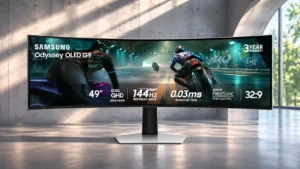
The 32:9 layout provides an expansive, bezel-free field of view that is especially rewarding in compatible games and wide desktop workspaces.
Cable management
Samsung Odyssey OLED G80SH S32HG802S
4.0
A pass-through opening in the stand tidies power and signal cables, while USB-C docking further reduces desk clutter.
Samsung Odyssey OLED G91SD S49DG910SNo score yet
Curved screen immersion
Samsung Odyssey OLED G80SH S32HG802SNo score yet
Samsung Odyssey OLED G91SD S49DG910S
4.7
The gentle wrap draws peripheral action into view and can reduce head movement across the enormous screen.
Desk footprint
Samsung Odyssey OLED G80SH S32HG802SNo score yet
Samsung Odyssey OLED G91SD S49DG910S
1.0
Its nearly desk-spanning width and substantial stand make physical space as important as graphics performance.
Device compatibility
Samsung Odyssey OLED G80SH S32HG802S
5.0
Desktop PCs, compatible laptops, DeX tablets, PlayStation 5 and Switch 2 all receive useful display features, though modes vary by device.
Samsung Odyssey OLED G91SD S49DG910SNo score yet
Gaming feature selection
Samsung Odyssey OLED G80SH S32HG802S
4.5
Crosshair overlays, black equalizer, adaptive sync and other gaming tools give players plenty of customization choices.
Samsung Odyssey OLED G91SD S49DG910SNo score yet
HDR highlight detail
Samsung Odyssey OLED G80SH S32HG802S
5.0
Small reflections, light sources and other bright details pop with convincing intensity, lending dimensionality to HDR scenes.
Samsung Odyssey OLED G91SD S49DG910SNo score yet
HDR mode versatility
Samsung Odyssey OLED G80SH S32HG802S
5.0
Static tone mapping serves accuracy, while Active boosts perceived brightness and impact; both have useful but distinct roles.
Samsung Odyssey OLED G91SD S49DG910SNo score yet
Headphone jack convenience
Samsung Odyssey OLED G80SH S32HG802S
4.0
The 3.5 mm jack provides a useful connection for headphones or external speakers when no built-in audio is available; sound quality itself is not evaluated.
Samsung Odyssey OLED G91SD S49DG910SNo score yet
Image retention
Samsung Odyssey OLED G80SH S32HG802SNo score yet
Samsung Odyssey OLED G91SD S49DG910S
2.0
Static toolbars and game HUDs warrant care; one extended coding session was followed by a faint, temporary ghost.
Image scaling
Samsung Odyssey OLED G80SH S32HG802S
4.0
AI upscaling clearly improves 720p and 1080p sources, while 1440p gains are smaller. It needs the display to receive a truly sub-4K signal and can look sharpened.
Samsung Odyssey OLED G91SD S49DG910SNo score yet
Input lag
Samsung Odyssey OLED G80SH S32HG802S
4.9
Controls feel immediate with very little input delay. The optional flicker-reduction setting can add substantial latency, however.
Samsung Odyssey OLED G91SD S49DG910SNo score yet
Mac integration
Samsung Odyssey OLED G80SH S32HG802SNo score yet
Samsung Odyssey OLED G91SD S49DG910S
4.0
A USB-C-to-HDMI cable can make the monitor work with a MacBook, although it is not a one-cable Mac docking solution.
Packaging quality and presentation
Samsung Odyssey OLED G80SH S32HG802SNo score yet
Samsung Odyssey OLED G91SD S49DG910S
5.0
Thick protective packaging is reassuring for such a large and delicate display.
Panel quality control
Samsung Odyssey OLED G80SH S32HG802SNo score yet
Samsung Odyssey OLED G91SD S49DG910S
1.0
Concerns about cracks and possible pixel issues make return policies and inspection especially important at this price.
PC gaming compatibility
Samsung Odyssey OLED G80SH S32HG802S
5.0
An especially compelling pairing for high-end PCs: 4K detail, 240Hz motion and dramatic OLED contrast come together in one screen.
Samsung Odyssey OLED G91SD S49DG910SNo score yet
Photo editing
Samsung Odyssey OLED G80SH S32HG802S
5.0
Color range and 4K sharpness suit photo work, with calibration advised where exact tones matter.
Samsung Odyssey OLED G91SD S49DG910SNo score yet
Portability and weight
Samsung Odyssey OLED G80SH S32HG802SNo score yet
Samsung Odyssey OLED G91SD S49DG910S
1.8
Heavy hardware, a broad panel and the need for a strong monitor arm make relocating or mounting it demanding.
Power-on readiness
Samsung Odyssey OLED G80SH S32HG802S
2.0
One owner needed to install the Samsung driver before the monitor was recognized when first connected.
Samsung Odyssey OLED G91SD S49DG910SNo score yet
Screen uniformity
Samsung Odyssey OLED G80SH S32HG802S
5.0
The OLED panel exhibits highly even color and illumination without familiar LCD backlight problems.
Samsung Odyssey OLED G91SD S49DG910SNo score yet
Sleep and wake behavior
Samsung Odyssey OLED G80SH S32HG802S
1.0
A reported bug resets HDR brightness to zero after sleep or restart, creating a frustrating repeated setup burden.
Samsung Odyssey OLED G91SD S49DG910SNo score yet
Stand stability
Samsung Odyssey OLED G80SH S32HG802S
3.0
The base feels stable in normal use, but light contact can make the whole monitor visibly vibrate.
Samsung Odyssey OLED G91SD S49DG910SNo score yet
Ultrawide gaming experience
Samsung Odyssey OLED G80SH S32HG802SNo score yet
Samsung Odyssey OLED G91SD S49DG910S
5.0
The immersive 32:9 view is a highlight in supported games, though uneven ultrawide support and high GPU demands are caveats.
USB hub functionality
Samsung Odyssey OLED G80SH S32HG802S
4.0
The two USB-A ports can serve connected peripherals, and compatible USB-C devices can use the hub through a single cable. Data bandwidth may trade off against maximum video mode.
Samsung Odyssey OLED G91SD S49DG910SNo score yet
Viewing angles
Samsung Odyssey OLED G80SH S32HG802S
5.0
Color and contrast remain very consistent from the side, making the screen easier to share than many LCD alternatives.
Samsung Odyssey OLED G91SD S49DG910SNo score yet
VRR compatibility
Samsung Odyssey OLED G80SH S32HG802S
3.8
Common adaptive-refresh standards are supported, which is helpful for changing frame rates. Dark-scene flicker means compatibility is not always trouble-free.
Samsung Odyssey OLED G91SD S49DG910SNo score yet
VRR flicker
Samsung Odyssey OLED G80SH S32HG802S
2.1
Frame-rate fluctuations can cause distracting flashes in dark games. Stabilizing settings may mitigate this, with possible added input lag.
Samsung Odyssey OLED G91SD S49DG910SNo score yet
Performance
Automatic brightness limiting
Samsung Odyssey OLED G80SH S32HG802S
4.0
Larger bright scenes retain more output than on earlier OLED designs, although brightness limiting has not disappeared entirely.
Samsung Odyssey OLED G91SD S49DG910SNo score yet
Black equalizer performance
Samsung Odyssey OLED G80SH S32HG802S
3.0
Shadow controls can bring hidden dark objects into view, but aggressive settings wash out the contrast that makes OLED attractive.
Samsung Odyssey OLED G91SD S49DG910SNo score yet
Color brightness
Samsung Odyssey OLED G80SH S32HG802S
5.0
The QD-OLED layer maintains vivid saturation even as bright HDR elements intensify, keeping colorful scenes energetic.
Samsung Odyssey OLED G91SD S49DG910SNo score yet
DisplayPort connectivity
Samsung Odyssey OLED G80SH S32HG802S
4.6
Full-bandwidth DisplayPort 2.1 is powerful enough for uncompressed 4K/240Hz on compatible hardware. One owner reported intermittent DP signal dropouts that did not occur over HDMI.
Samsung Odyssey OLED G91SD S49DG910SNo score yet
Display Stream Compression clarity
Samsung Odyssey OLED G80SH S32HG802S
5.0
With a full UHBR20 connection and compatible GPU, the reviewer verified 4K/240Hz without compression. DSC remains a visually lossless fallback for older links.
Samsung Odyssey OLED G91SD S49DG910SNo score yet
KVM switch performance
Samsung Odyssey OLED G80SH S32HG802S
1.2
There is no integrated KVM switch, so moving one keyboard and mouse between computers is less convenient than on some rivals.
Samsung Odyssey OLED G91SD S49DG910SNo score yet
On-screen display usability
Samsung Odyssey OLED G80SH S32HG802S
4.5
A conventional joystick menu makes key settings accessible and avoids Samsung’s older smart-TV interface. The compact layout and abundance of picture settings still take learning.
Samsung Odyssey OLED G91SD S49DG910SNo score yet
Picture-in-picture and picture-by-picture
Samsung Odyssey OLED G80SH S32HG802SNo score yet
Samsung Odyssey OLED G91SD S49DG910S
5.0
Showing two sources at once is a genuinely useful feature, especially across this wide panel, though mode changes can take a moment.
Ownership and support
Content aspect-ratio support
Samsung Odyssey OLED G80SH S32HG802SNo score yet
Samsung Odyssey OLED G91SD S49DG910S
1.0
Not every game handles 32:9 correctly; incompatible titles may require fixes or compromise the immersive view.
Dolby Vision support
Samsung Odyssey OLED G80SH S32HG802S
2.0
Xbox users do not get Dolby Vision on this monitor, so the other available HDR formats become the practical options.
Samsung Odyssey OLED G91SD S49DG910SNo score yet
HDMI 2.1 support
Samsung Odyssey OLED G80SH S32HG802S
5.0
Two HDMI 2.1 inputs accommodate modern consoles and other fast video sources, including 4K at 120Hz console modes.
Samsung Odyssey OLED G91SD S49DG910SNo score yet
PC signal connection reliability
Samsung Odyssey OLED G80SH S32HG802SNo score yet
Samsung Odyssey OLED G91SD S49DG910S
1.0
Some multi-device cable arrangements reportedly struggle to maintain the intended resolution and refresh rate together.
Tracking and training
Gamma tracking
Samsung Odyssey OLED G80SH S32HG802S
2.0
Gamma is imperfect before calibration, so exact tonal accuracy may require additional tuning.
Samsung Odyssey OLED G91SD S49DG910SNo score yet
Controls and connectivity
HDR adjustment controls
Samsung Odyssey OLED G80SH S32HG802S
3.0
HDR offers many detailed settings and two tone-mapping approaches, but dialing in shadows and brightness can become frustrating.
Samsung Odyssey OLED G91SD S49DG910SNo score yet
HDR tone mapping accuracy
Samsung Odyssey OLED G80SH S32HG802S
2.5
Static mapping better preserves the intended light balance; Active looks livelier but can lift midtones and alter bright detail. Some peak modes crush shadows.
Samsung Odyssey OLED G91SD S49DG910SNo score yet
PC-based monitor controls
Samsung Odyssey OLED G80SH S32HG802SNo score yet
Samsung Odyssey OLED G91SD S49DG910S
5.0
Samsung Display Manager makes the many image and split-screen settings easier to handle than navigating the on-screen menu alone.
Smart TV platform
Samsung Odyssey OLED G80SH S32HG802SNo score yet
Samsung Odyssey OLED G91SD S49DG910S
1.0
Without integrated Tizen apps, this version depends on an attached device for streaming services.
Software support
Samsung Odyssey OLED G80SH S32HG802S
4.0
Samsung’s official Windows driver and color profile are useful for proper device recognition and configuration.
Samsung Odyssey OLED G91SD S49DG910SNo score yet