Other features
24-inch mode quality
Dell U4025QWNo score yet
LG 45GX950A-B
3.0
Shrinking the display to 24 inches offers a focused view for fast games, but the lower-resolution scaling can look soft or downright unusable. The smaller competitive modes are far more divisive than the native 5K2K picture.
Bass reproduction
Dell U4025QWNo score yet
LG 45GX950A-B
3.0
The built-in speakers deliver some bass at moderate volume, but low-frequency impact is modest. They suit everyday playback better than bass-heavy entertainment.
Blooming control
Dell U4025QWNo score yet
LG 45GX950A-B
5.0
OLED's per-pixel lighting produces clean bright objects against dark backgrounds, with essentially no blooming or halo distractions. Starfields and high-contrast game scenes look particularly crisp.
Built-in RGB lighting
Dell U4025QWNo score yet
LG 45GX950A-B
4.5
The rear RGB accent adds a little personality without cluttering the front. Its colors can be customized or switched off for a more restrained setup.
Burn-in protection
Dell U4025QWNo score yet
LG 45GX950A-B
2.7
Pixel shifting, a screen saver and cleaning cycles offer basic OLED care. Protection controls are more limited than on some competitors, and static desktop content remains an ownership concern.
Calibration potential
Dell U4025QWNo score yet
LG 45GX950A-B
4.3
The factory picture is already appealing, and both on-monitor tweaks and calibration software can refine its grayscale and color accuracy. Exact targets can still require additional calibration tools.
Console gaming compatibility
Dell U4025QWNo score yet
LG 45GX950A-B
3.0
Consoles can output a sharp 16:9 image with HDR and supported high refresh rates, but they cannot fill the ultrawide format natively. Stretched presentation and side bars make this a secondary rather than ideal console screen.
Delivery condition
Dell U4025QWNo score yet
LG 45GX950A-B
5.0
Careful packaging kept the large curved test panel in good condition on arrival. A protected delivery is especially welcome for a display of this size.
Dual-mode versatility
Dell U4025QWNo score yet
LG 45GX950A-B
4.5
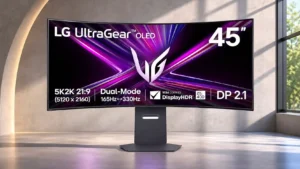
The choice between detailed 5120×2160 at 165Hz and smoother 2560×1080 at 330Hz makes the monitor unusually versatile. The high-speed mode sacrifices obvious sharpness, and opinions differ on how often that tradeoff is worthwhile.
Edge dimming behavior
Dell U4025QWNo score yet
LG 45GX950A-B
2.0
Protective dimming around the edges can show up as uneven brightness, especially in uniform dark scenes. It is usually subtle in varied content but can bother people who notice vignetting.
Environmental sustainability
Dell U4025QW
5.0
Recycled materials add appeal for buyers who value a less wasteful construction, alongside the monitor's functional strengths.
LG 45GX950A-BNo score yet
Ethernet network sharing
Dell U4025QW
4.8
The built-in 2.5Gb Ethernet jack is valued for giving connected laptops wired networking without a separate adapter.
LG 45GX950A-BNo score yet
Ghosting control
Dell U4025QWNo score yet
LG 45GX950A-B
5.0
Instant OLED pixel transitions produce little or no visible ghosting, overshoot or smearing. Fast camera movement remains exceptionally clean.
Gradient smoothness
Dell U4025QWNo score yet
LG 45GX950A-B
3.0
Fine gradients are reasonably smooth, but subtle tonal transitions do not quite match the refinement of the best QD-OLED alternatives.
HDR highlight detail
Dell U4025QWNo score yet
LG 45GX950A-B
5.0
Small HDR highlights stand out against inky blacks, giving explosions, sparks and bright reflections impressive definition. Detail stays visible in many demanding contrast-heavy scenes.
HDR mode versatility
Dell U4025QWNo score yet
LG 45GX950A-B
3.7
There are several HDR settings to suit taste and room conditions, including more faithful and punchier choices. None perfectly combines maximum highlight brightness with the tightest tonal accuracy.
Headphone output quality
Dell U4025QWNo score yet
LG 45GX950A-B
5.0
The four-pole headphone output and DTS modes deliver engaging, distinct sound profiles with compatible headsets. Headphone playback receives much stronger praise than some built-in speaker assessments.
Image retention
Dell U4025QW
5.0
Long-running static desktop content has not produced persistent retention for one owner, a welcome reassurance compared with OLED burn-in concerns.
LG 45GX950A-BNo score yet
Image scaling
Dell U4025QWNo score yet
LG 45GX950A-B
2.1
Lower-resolution modes look much softer than native 5K2K, and the smaller simulated screen sizes suffer particularly poor scaling. Smoother 330Hz motion does not always make up for the loss of definition.
Integrated power supply
Dell U4025QW
5.0
A built-in power supply eliminates the bulky external brick and makes the desk feel tidier.
LG 45GX950A-BNo score yet
Monitor daisy-chaining
Dell U4025QW
4.7
Connecting a second display through the downstream Thunderbolt connection can simplify expansion and reduce cabling back to the computer.
LG 45GX950A-BNo score yet
Overdrive tuning
Dell U4025QW
5.0
Fast overdrive and stable high frame rates can help conceal blur, although the underlying panel cannot match top gaming screens.
LG 45GX950A-BNo score yet
Portability and weight
Dell U4025QW
2.0
This heavy 40-inch display is cumbersome to lift, position, or mount, and may require assistance or a stronger arm.
LG 45GX950A-BNo score yet
Power-on readiness
Dell U4025QW
5.0
One owner reports a quick one-to-two-second wake-up, keeping laptop desk use responsive.
LG 45GX950A-BNo score yet
Power efficiency
Dell U4025QWNo score yet
LG 45GX950A-B
1.0
Energy use is a noticeable drawback for such a large, bright OLED screen. Efficiency is not its selling point.
PS5 gaming
Dell U4025QWNo score yet
LG 45GX950A-B
3.3
PS5 gaming works with a properly proportioned 16:9 image, HDR and high-refresh output where supported. Expect black bars, not genuine ultrawide console gameplay, and some console-specific HDR compromises.
Remote control usability
Dell U4025QWNo score yet
LG 45GX950A-B
5.0
An included remote makes it convenient to change modes and audio level without reaching behind the massive display.
Retail availability
Dell U4025QWNo score yet
LG 45GX950A-B
2.0
Availability can be limited even after launch, making it harder to find a reasonable deal on this unusual screen.
Shadow detail
Dell U4025QWNo score yet
LG 45GX950A-B
5.0
Dark-game details remain clear thanks to OLED pixel control and strong black separation. It handles shadows particularly well when a scene mixes darkness with bright highlights.
Sleep and wake behavior
Dell U4025QW
2.0
A Mac owner finds monitor sleep and wake inconsistent, occasionally requiring time or a laptop-lid adjustment.
LG 45GX950A-BNo score yet
Speaker quality
Dell U4025QWNo score yet
LG 45GX950A-B
3.1
Sound quality splits opinion: several find the speakers rich, clear or surprisingly powerful, while others hear distortion or thin sound. External audio remains attractive for demanding listeners.
Thunderbolt accessory transfer speed
Dell U4025QW
2.5
Thunderbolt docking is broadly capable, but some owners encounter reduced accessory throughput versus a dedicated full-speed dock.
LG 45GX950A-BNo score yet
Thunderbolt docking connectivity
Dell U4025QW
4.9
The Thunderbolt 4 hub is a principal reason to buy, collapsing a complex laptop workstation into the monitor itself.
LG 45GX950A-BNo score yet
USB port accessibility
Dell U4025QW
4.9
A concealed pop-out front bay makes it easy to attach temporary drives, accessories, and charging cables while keeping the desk clean.
LG 45GX950A-BNo score yet
VRR flicker
Dell U4025QWNo score yet
LG 45GX950A-B
3.3
Variable-refresh flicker remains an OLED caveat, especially in dark scenes with unstable frame rates. Some testing found it restrained, while another assessment saw it worsen in the 330Hz mode.
Windows Auto Color Management compatibility
Dell U4025QWNo score yet
LG 45GX950A-B
4.0
Windows Auto Color Management offers another way to improve SDR color handling while keeping settings flexible. It can be a little less accurate than the best dedicated profile.
Performance
Automatic brightness adjustment
Dell U4025QW
3.4
Ambient-light adaptation is convenient and may ease eye strain, but some users turn it off because it dims the screen more than they like.
LG 45GX950A-BNo score yet
Automatic brightness limiting
Dell U4025QWNo score yet
LG 45GX950A-B
3.5
SDR's uniform-brightness behavior keeps desktop windows from constantly dimming, though OLED brightness limiting remains noticeable in some bright content. Static-area dimming can also intrude during HDR viewing.
Color brightness
Dell U4025QWNo score yet
LG 45GX950A-B
2.1
Bright saturated colors are a weak spot compared with QD-OLED alternatives. Higher white-highlight brightness does not produce the same improvement in vivid color brightness.
Display-mode switching reliability
Dell U4025QWNo score yet
LG 45GX950A-B
4.8
Switching between the two main display modes is generally straightforward, sometimes with a dedicated button or software shortcut. A few connection-specific reports describe slower or troublesome changes, particularly over DisplayPort.
Included DisplayPort cable length
Dell U4025QWNo score yet
LG 45GX950A-B
2.0
One unboxing found the supplied DisplayPort cable too short for a PC positioned farther from the desk. Owners with distant towers may need a longer cable.
Local dimming performance
Dell U4025QW
1.7
Without fine-grained backlight zones, illuminated areas lift surrounding blacks and weaken HDR contrast.
LG 45GX950A-BNo score yet
Operating noise
Dell U4025QWNo score yet
LG 45GX950A-B
5.0
The active cooling fan runs quietly enough to go unnoticed even by someone sensitive to noise. Operating sound should rarely distract from work or play.
Spatial audio quality
Dell U4025QWNo score yet
LG 45GX950A-B
5.0
DTS Headphone:X delivers a striking spatial presentation when paired with a compatible headset. The distinct EQ presets are particularly appealing for immersive gaming audio.
Controls and connectivity
Control button responsiveness
Dell U4025QWNo score yet
LG 45GX950A-B
5.0
The small joystick responds readily to directional inputs, making picture adjustments less fiddly than they could be on a screen this large.
HDR adjustment controls
Dell U4025QWNo score yet
LG 45GX950A-B
4.0
Low and High peak-brightness selections give useful control over HDR presentation. The tradeoff is that the brightest setting can lift the entire dark scene instead of preserving the most faithful tone curve.
HDR tone mapping accuracy
Dell U4025QWNo score yet
LG 45GX950A-B
2.2
HDR tone mapping is a recurring compromise: the most accurate mode caps peak highlights, while brighter modes over-lift darker areas. Console calibration and source-based tone mapping are additional concerns.
PC-based monitor controls
Dell U4025QWNo score yet
LG 45GX950A-B
5.0
LG's desktop control and calibration utilities make certain settings easier to change without using the rear joystick. Software also adds tuning options beyond the monitor's basic menus.
Software and driver support
Dell U4025QW
5.0
Dell Display Manager adds practical window layouts and KVM controls beyond the monitor's hardware menus.
LG 45GX950A-BNo score yet
Comfort and build
Eye comfort features
Dell U4025QW
5.0
Low-blue-light and flicker-conscious features, plus smooth scrolling, are appreciated for long desk sessions; individual comfort still depends on settings.
LG 45GX950A-BNo score yet
PWM flicker comfort
Dell U4025QWNo score yet
LG 45GX950A-B
3.0
The monitor's anti-flicker provisions are limited, so sensitive owners may still need to consider OLED flicker behavior in variable-refresh situations.
Screen bezel design
Dell U4025QWNo score yet
LG 45GX950A-B
5.0
Slim, evenly proportioned bezels and a logo-free front let the OLED image dominate. The restrained frame reinforces the premium, minimalist appearance.
Ownership and support
Hardware calibration support
Dell U4025QWNo score yet
LG 45GX950A-B
5.0
LG's calibration software and profile memories offer serious tuning options for owners with measurement tools. The facility is useful, but realizing its full benefit takes extra equipment and effort.
PC signal connection reliability
Dell U4025QWNo score yet
LG 45GX950A-B
3.0
Connections can work smoothly, but one setup had serious DisplayPort HDR and mode-switching problems and worked reliably over HDMI instead. Performance appears sensitive to the particular hardware and input.
Reliability over time
Dell U4025QW
4.5
Longer-term owners remain satisfied after one to eighteen months, but that experience cannot establish durability over many years.
LG 45GX950A-BNo score yet
Warranty and support service
Dell U4025QWNo score yet
LG 45GX950A-B
2.0
The two-year warranty is less reassuring than the three-year burn-in coverage available on several rivals. Burn-in terms could be stated more clearly, especially for such an expensive OLED.