Other features
Accessory compatibility
ASUS ROG Swift OLED PG32UCDM Gen3
5.0
The supplied VESA adapter gives owners the option to use a monitor arm, addressing the broad stand's desk-space drawback. Included cables and mounting accessories also support flexible setups.
ASUS ROG Strix XG27ACSNo score yet
ELMB strobing quality
ASUS ROG Swift OLED PG32UCDM Gen3No score yet
ASUS ROG Strix XG27ACS
2.7
ELMB can make fast motion clearer, especially at high refresh rates. Brightness loss, double images, crosstalk, and red fringing leave opinions sharply divided.
OLED motion blur reduction
ASUS ROG Swift OLED PG32UCDM Gen3
2.8
ELMB can recreate 240Hz-like clarity at a fixed 120Hz, which helps lower-powered systems. It also cuts brightness, disables VRR and HDR, and can add enough lag to limit its appeal.
ASUS ROG Strix XG27ACSNo score yet
Overdrive tuning
ASUS ROG Swift OLED PG32UCDM Gen3No score yet
ASUS ROG Strix XG27ACS
4.8
Unusually effective variable overdrive delivers a reliable one-setting experience. The highest slider levels can create unwanted inverse ghosting.
Packaging presentation
ASUS ROG Swift OLED PG32UCDM Gen3
5.0
Careful protective packing, reusable sleeve materials, and recyclable molded pulp make unboxing feel appropriately premium.
ASUS ROG Strix XG27ACSNo score yet
Per-input settings memory
ASUS ROG Swift OLED PG32UCDM Gen3
1.5
Color and brightness preferences are not stored separately for each source, meaning laptop and desktop users may have to reset their settings after changing inputs.
ASUS ROG Strix XG27ACSNo score yet
Phone stand utility
ASUS ROG Swift OLED PG32UCDM Gen3No score yet
ASUS ROG Strix XG27ACS
3.4
The slot in the base can neatly hold a phone for guides or calls, but large phones may not fit and some find it gimmicky.
Power efficiency
ASUS ROG Swift OLED PG32UCDM Gen3No score yet
ASUS ROG Strix XG27ACS
4.0
Energy use is typical and reasonably efficient for a 27-inch IPS LCD without costly local dimming.
Repairability
ASUS ROG Swift OLED PG32UCDM Gen3No score yet
ASUS ROG Strix XG27ACS
2.0
A sealed internal power supply and guidance toward professional service make self-repair less appealing.
Screen coating clarity
ASUS ROG Swift OLED PG32UCDM Gen3No score yet
ASUS ROG Strix XG27ACS
3.0
The matte coating contains moderate grain, a small clarity tradeoff for its anti-reflection properties.
SDR/HDR mode switching
ASUS ROG Swift OLED PG32UCDM Gen3No score yet
ASUS ROG Strix XG27ACS
5.0
SDR material looks unusually accurate even with HDR mode active, minimizing the need to swap Windows display modes.
Sleep and wake behavior
ASUS ROG Swift OLED PG32UCDM Gen3
4.1
The Neo Proximity Sensor usually blanks the screen when the user leaves and restores it on return. Sensor timing can still be inconvenient, including reports of unwanted blanking during still moments.
ASUS ROG Strix XG27ACSNo score yet
Suspend and resume
ASUS ROG Swift OLED PG32UCDM Gen3
4.7
The proximity sensor conveniently switches pixels off when the desk is unattended and restores the screen upon return. Its delay options and occasional unwanted blanking can be frustrating.
ASUS ROG Strix XG27ACSNo score yet
Tripod mount versatility
ASUS ROG Swift OLED PG32UCDM Gen3No score yet
ASUS ROG Strix XG27ACS
4.8
A threaded mount above the screen offers an unusually convenient place to position a webcam or other compatible camera gear.
VRR flicker
ASUS ROG Swift OLED PG32UCDM Gen3
2.9
Variable-refresh flicker can be noticeable in darker scenes or fluctuating frame rates, and one tester found the anti-flicker controls ineffective. Other owners see little flicker or find the mitigation helpful.
ASUS ROG Strix XG27ACSNo score yet
Performance
Automatic brightness limiting
ASUS ROG Swift OLED PG32UCDM Gen3
3.3
The uniform-brightness setting can keep desktop luminance steady, while more dramatic HDR modes may noticeably dim across changing scenes. Experiences vary with the chosen mode and content.
ASUS ROG Strix XG27ACSNo score yet
Cleaning ease
ASUS ROG Swift OLED PG32UCDM Gen3
5.0
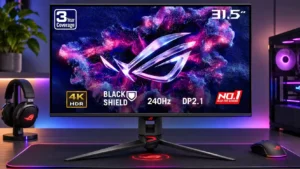
The tougher BlackShield surface is easier and less stressful to wipe down than older glossy OLED coatings. Testers particularly welcome fewer visible cleaning marks and scratches.
ASUS ROG Strix XG27ACSNo score yet
Listing accuracy
ASUS ROG Swift OLED PG32UCDM Gen3No score yet
ASUS ROG Strix XG27ACS
2.0
The HDR label overpromises what the actual edge-lit hardware can deliver, despite otherwise capable motion specifications.
Operating noise
ASUS ROG Swift OLED PG32UCDM Gen3
5.0
Passive cooling kept the monitor effectively silent over several days of use, with no fan noise to distract from games.
ASUS ROG Strix XG27ACSNo score yet
Picture-in-picture and picture-by-picture
ASUS ROG Swift OLED PG32UCDM Gen3
5.0
Picture-in-picture and side-by-side input modes make it easier to monitor two connected devices, a welcome addition to an already flexible gaming display.
ASUS ROG Strix XG27ACSNo score yet
Battery and charging
Charging speed
ASUS ROG Swift OLED PG32UCDM Gen3No score yet
ASUS ROG Strix XG27ACS
2.0
The small USB-C power output cannot adequately power a laptop and offers little beyond light charging for smaller devices.
Controls and connectivity
Color calibration controls
ASUS ROG Swift OLED PG32UCDM Gen3No score yet
ASUS ROG Strix XG27ACS
4.8
Excellent sRGB modes and ample tuning options make accurate colors achievable with little extra work; the calibrated preset restricts some controls.
Comfort and build
Eye comfort features
ASUS ROG Swift OLED PG32UCDM Gen3
1.0
One owner experienced persistent eye strain and headaches despite using blue-light filtering, so the controls could not solve their discomfort.
ASUS ROG Strix XG27ACSNo score yet
Screen coating durability
ASUS ROG Swift OLED PG32UCDM Gen3
4.5
BlackShield's tougher surface makes cleaning feel less risky, and some testers report clear improvements in resistance to marks. Longer-term scratch resistance is not yet established.
ASUS ROG Strix XG27ACSNo score yet
Ownership and support
Warranty and support service
ASUS ROG Swift OLED PG32UCDM Gen3
4.3
Three-year coverage including OLED burn-in is valued as added reassurance with an expensive self-emissive display; it cannot eliminate all ownership risks.
ASUS ROG Strix XG27ACSNo score yet