If you want better DPI range
Choose Logitech G PRO X Superlight 2 DEX. It scores 4.8 vs 3.7 for DPI range, with a 4.1 overall score.

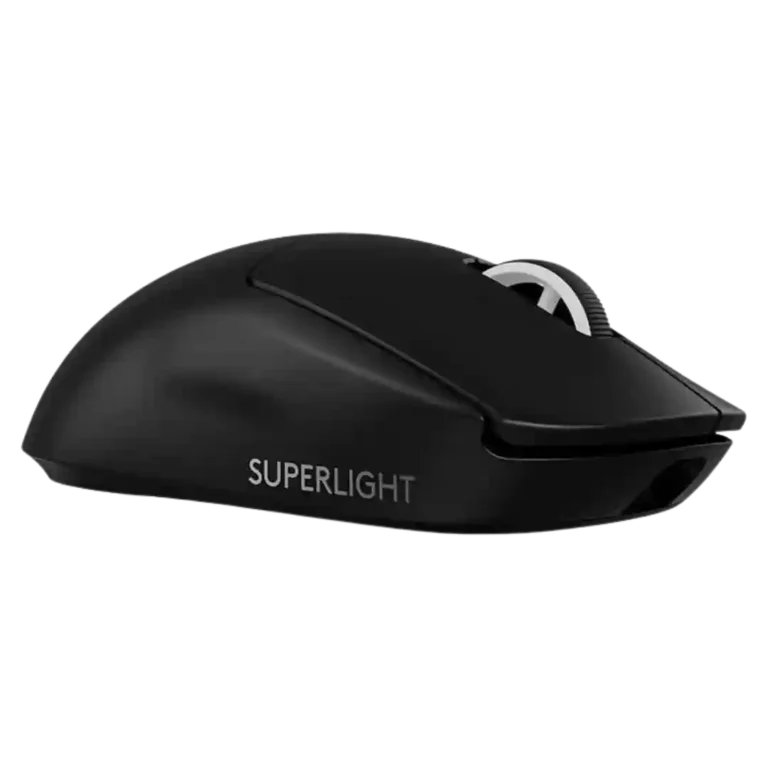
Choose the Logitech G Pro X Superlight 2 for competitive FPS speed, comfort, battery life, and reliable wireless performance. Skip it if you need a bargain, softer clicks, smoother stock skates, a DPI button, or lots of extra controls.
It best serves competitive FPS players who prioritize low weight, a familiar safe shape, precise tracking, low-latency wireless use, and long battery life. It also fits users already comfortable with Logitech’s Superlight shape and G Hub ecosystem.
It is not ideal for buyers who want lots of buttons, Bluetooth, RGB, a dedicated DPI switch, or the best value from a small upgrade. Users sensitive to heavy clicks, stock-skate drag, or G Hub complexity may prefer another mouse.
Across the reviews, the Logitech G Pro X Superlight 2 lands as a conservative but highly capable esports mouse. Reviewers repeatedly praise the low weight, familiar shape, accurate HERO 2 sensor, responsive wireless feel, strong battery life, and tactile Lightforce switches. The tradeoff is that Logitech kept the no-frills formula: no onboard DPI button, no Bluetooth, no RGB, limited buttons, and stock skates or cable quality that several reviewers disliked. It feels most convincing when judged as a competitive FPS tool, less so as a value upgrade from the original Superlight or as a feature-rich all-purpose mouse.
Compared with other Gaming Mice, this product is above average in software stability, fingertip grip comfort, FPS gaming suitability, near average in switch feel, sensor performance, below average in cable flexibility, skate durability, MOBA gaming suitability.
| Attribute | This product | Category average | Difference |
|---|---|---|---|
| cable flexibility | 2.0 | 3.7 | -1.7 |
| skate durability | 2.0 | 3.6 | -1.6 |
| software stability | 4.5 | 3.0 | +1.5 |
| MOBA gaming suitability | 2.5 | 4.0 | -1.5 |
| palm grip comfort | 2.5 | 3.8 | -1.3 |
| fingertip grip comfort | 5.0 | 3.7 | +1.3 |
| side button quality | 2.6 | 3.7 | -1.1 |
| scroll wheel quality | 3.0 | 4.0 | -1.0 |
Choose Logitech G PRO X Superlight 2 DEX. It scores 4.8 vs 3.7 for DPI range, with a 4.1 overall score.
Choose Logitech G Pro Wireless. It scores 5.0 vs 2.5 for palm grip comfort, with a 4.3 overall score.
Choose Logitech G502 X Plus. It scores 4.8 vs 3.5 for glide smoothness, with a 3.9 overall score.
Choose Razer Cobra Pro. It scores 4.6 vs 3.8 for surface compatibility, with a 4.0 overall score.
Compared with Logitech G PRO X Superlight 2
Yes. Reviewers repeatedly praised its accuracy, responsiveness, low weight, and fast wireless feel for first-person shooters and competitive play.
The evidence is mixed. Reviewers liked USB-C, the newer sensor, better battery life, and updated switches, but several said the changes are too minor to justify an upgrade if the original still works.
Many reviewers liked their crisp, tactile, responsive feel. Others found them heavier, louder, or less ideal for spam-clicking games.
No. Multiple reviewers criticized the missing DPI button because DPI changes require G Hub or remapping one of the limited buttons.
Battery life was generally praised, with reviewers reporting long use between charges. Several noted that higher polling rates reduce runtime.
Opinions were mixed to negative. Some reviewers liked the glide, but several complained about drag, thin PTFE feet, or worse performance on softer and rougher pads.
These are a few of the reviews included in our analysis.




Choose the ROG Harpe II Ace for ultralight FPS play, precise tracking, smooth glide, and web-based tuning. Skip it if you need palm-grip support, MMO buttons, onboard profiles, or long...
Pros: glide smoothness, weight
Cons: handedness options

Excellent tracking, comfortable right-handed ergonomics and a versatile scroll wheel make the Basilisk V3 a strong gaming and productivity mouse. Its substantial weight, fixed cable and sometimes over-sensitive automatic scrolling...
Pros: scroll wheel quality, RGB features
Cons: weight, handedness options

The L7 Pro delivers remarkably light handling, precise aiming and a grippy shell at a budget price. Stock skates are less impressive, and conflicting click-latency measurements warrant caution for latency-sensitive...
Pros: value for money, weight
Cons: wired connectivity

Best for ultra-light, competition-focused speed, precise tracking, stable wireless, and long battery life. Skip it if you need quieter clicks, left-handed support, Bluetooth, more buttons, or better value for casual...
Pros: value for money, weight
Cons: click noise, RGB features