If you want better switch feel
Choose Logitech G502 X Plus. It scores 4.6 vs 3.9 for switch feel, with a 3.9 overall score.

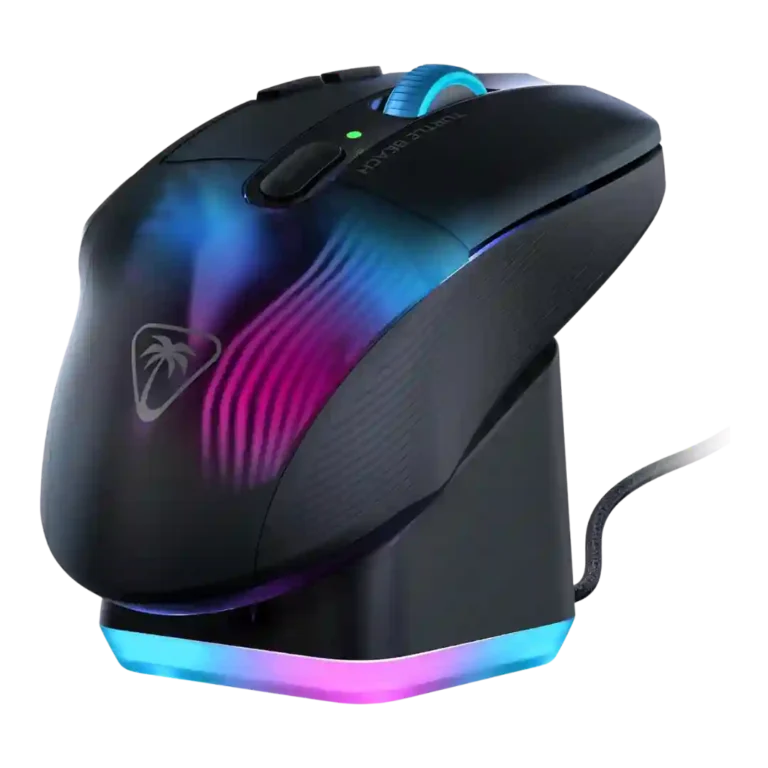
Choose it for deep button customization, RGB, strong wireless response, and easy dock charging. Skip it if you need light FPS focus, quiet controls, polished software, or premium feel for the price.
Best for right-handed gamers or productivity users who will use the many buttons, Easy-Shift, profiles, RGB ecosystem, wireless modes, and charging dock. It especially fits MMO, MOBA, multi-genre, and shortcut-heavy workflows.
Not ideal for buyers focused on ultralight FPS performance, quiet/simple controls, flawless software, or maximum value. It is also risky for users sensitive to palm shape, click feel, or 4D scroll-wheel stiffness.
Reviewers describe the Turtle Beach Kone XP Air as a feature-heavy wireless gaming mouse with standout RGB, broad button mapping, a useful charging dock, and generally strong sensor and wireless performance. The tradeoff is focus: its many controls can help MMO, MOBA, productivity, and multi-genre players, but they add weight and complexity that some FPS-focused reviewers disliked. Comfort and build impressions split sharply, with several reviewers praising the shape and long-session feel while others criticized hand strain, mushy clicks, loud or awkward scroll-wheel behavior, software bugs, and a price that often felt hard to justify. Its best evidence is for users who will actually use the dock, profiles, macros, and extra buttons.
Compared with other Gaming Mice, this product is above average in RGB features, fingertip grip comfort, programmable buttons, near average in charging convenience, side button quality, below average in materials quality, firmware reliability, left and right click quality.
| Attribute | This product | Category average | Difference |
|---|---|---|---|
| materials quality | 2.5 | 3.9 | -1.4 |
| firmware reliability | 1.5 | 2.8 | -1.3 |
| left and right click quality | 3.1 | 4.2 | -1.1 |
| RGB features | 4.3 | 3.6 | +0.7 |
| grip texture | 3.0 | 4.0 | -1.0 |
| fingertip grip comfort | 4.8 | 3.7 | +1.1 |
| programmable buttons | 4.8 | 4.0 | +0.8 |
| value for money | 3.2 | 3.7 | -0.5 |
Choose Logitech G502 X Plus. It scores 4.6 vs 3.9 for switch feel, with a 3.9 overall score.
Choose SteelSeries Aerox 5 Wireless. It scores 4.7 vs 4.3 for charging convenience, with a 4.0 overall score.
Choose Logitech G Pro X2 Superstrike. It scores 5.0 vs 3.1 for left and right click quality, with a 4.0 overall score.
Choose Corsair Darkstar RGB. It scores 4.7 vs 2.5 for materials quality, with a 3.9 overall score.
Products reviewers directly compared with this model, grouped into quick takeaways.
Yes, many reviewers liked the large number of programmable controls for MMO-style play. A few still preferred more dedicated thumb-button layouts for pure MMO use.
Most reviewers reported no perceptible lag, no input issues, or a strong wireless signal over 2.4GHz. Bluetooth was valued for flexibility but was not always treated as the best gaming mode.
Battery feedback was mixed-positive. Several reviewers praised long life and the dock, but others said real use fell short of the 100-hour claim when RGB and high-performance settings were active.
Usually yes. Reviewers often called the dock convenient, easy, or game-changing, though a few complained about sensitivity, desk grip, or the fact that the mouse cannot be used while sitting on the dock.
Comfort was split. Several reviewers found it comfortable for long sessions, but others reported hand strain, awkward palm support, or a shape that did not suit their grip.
Customization was a major strength, with macros, profiles, RGB, DPI, and button remapping praised. Software quality was mixed because some reviewers found Swarm clunky, buggy, overwhelming, or dated.
These are a few of the reviews included in our analysis.






Choose the ROG Harpe II Ace for ultralight FPS play, precise tracking, smooth glide, and web-based tuning. Skip it if you need palm-grip support, MMO buttons, onboard profiles, or long...
Pros: glide smoothness, weight
Cons: handedness options

Best for ultra-light, competition-focused speed, precise tracking, stable wireless, and long battery life. Skip it if you need quieter clicks, left-handed support, Bluetooth, more buttons, or better value for casual...
Pros: value for money, weight
Cons: click noise, RGB features

Choose it if you want a premium MMO/productivity mouse with 12 adjustable side buttons, strong battery life, and Stream Deck integration. Skip it if you need an ultralight FPS mouse,...
Pros: button customization, MMO gaming suitability
Cons: FPS gaming suitability

Best for precise wireless tracking, smooth glide, strong battery life, and unusually good 8K value. Skip it if you need polished software, quiet snappy clicks, true left-handed controls, or gentle...
Pros: software usability, sensor performance
Cons: RGB features, scroll wheel quality