If you want better software stability
Choose Corsair Katar Elite Wireless. It scores 5.0 vs 1.8 for software stability, with a 4.0 overall score.

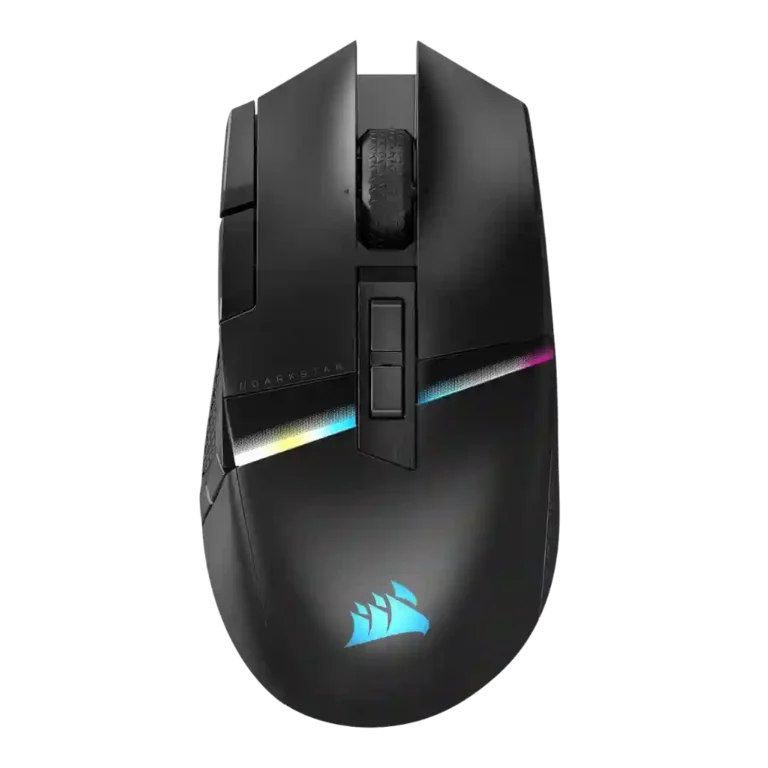
Choose the Corsair Darkstar RGB if you want a premium MMO/MOBA mouse with strong tracking, deep customization, and useful tilt gestures. Skip it if battery life, easy software, left-handed use, or lower price matters more.
Best for right-handed MMO, MOBA, and skill-heavy game players who want many programmable inputs, strong tracking, and are willing to tune iCUE. It also fits productivity users who can benefit from macros, profiles, and gesture controls.
Not for left-handed users, budget-focused buyers, or anyone who wants simple plug-and-play software and long battery life with RGB on. Smaller-hand fingertip users may also find the body and side-button reach awkward.
Across the reviews, the Corsair Darkstar RGB lands as a specialized premium gaming mouse rather than an easy universal recommendation. Its best evidence is around the Marksman sensor, low-latency 2.4GHz wireless, surprisingly manageable weight, strong build, textured grip, and deep button/gesture customization. The tradeoff is that the same unique side-button layout that gives it personality also creates a learning curve, and iCUE ranges from easy in one review to frustrating or unstable in several others. Battery life is the clearest repeated weakness, especially with RGB enabled, while the stiff cable makes charging less elegant than the price suggests. For MMO/MOBA players who will invest time in setup, the hardware impresses; for plug-and-play users, the quirks are hard to ignore.
Compared with other Gaming Mice, this product is above average in tilt gesture controls, click noise, MMO gaming suitability, near average in programmable buttons, build quality, below average in battery life, cable flexibility, charging convenience.
| Attribute | This product | Category average | Difference |
|---|---|---|---|
| battery life | 2.2 | 4.3 | -2.1 |
| cable flexibility | 1.9 | 3.6 | -1.7 |
| charging convenience | 2.5 | 4.0 | -1.5 |
| scroll wheel quality | 2.5 | 4.0 | -1.5 |
| software stability | 1.8 | 3.0 | -1.2 |
| tilt gesture controls | 4.0 | 3.1 | +1.0 |
| software usability | 2.9 | 3.9 | -1.0 |
| handedness options | 1.5 | 2.6 | -1.1 |
Choose Corsair Katar Elite Wireless. It scores 5.0 vs 1.8 for software stability, with a 4.0 overall score.
Choose Turtle Beach Kone II. It scores 5.0 vs 2.2 for battery life, with a 4.3 overall score.
Choose ASUS ROG Harpe Ace Mini. It scores 4.8 vs 1.9 for cable flexibility, with a 4.2 overall score.
Choose Razer Cobra Pro. It scores 4.6 vs 3.3 for RGB features, with a 4.0 overall score.
Compared with Corsair Darkstar RGB
Yes, most reviews see it as a strong MMO/MOBA mouse because of its 15 programmable buttons, profiles, macros, and tilt gestures. The main caveat is that the unusual side-button cluster takes practice.
Reviewers say it is surprisingly capable in shooters thanks to accurate tracking, low-latency wireless, and manageable weight. It is still not framed as a pure ultralight FPS-first mouse.
They are one of the most distinctive features, and several reviewers found them smooth, fun, or genuinely useful. Other reviews found them sensitive, software-dependent, or unreliable in faster games.
Battery life is the weakest repeated point. Reviews especially criticize the roughly 20 to 25 hour range with RGB on, while lighting-off modes are seen as more acceptable but still behind some rivals.
Evidence is mixed. One review calls iCUE easy to navigate, but several others describe it as confusing, unintuitive, unstable, or a slog because software and hardware settings are separated.
No. Palm and claw comfort receive positive evidence, and the right-handed shape is often praised, but fingertip comfort is split and one review says left-handed gamers should not apply.
These are a few of the reviews included in our analysis.


Choose the ROG Harpe II Ace for ultralight FPS play, precise tracking, smooth glide, and web-based tuning. Skip it if you need palm-grip support, MMO buttons, onboard profiles, or long...
Pros: glide smoothness, weight
Cons: handedness options

Excellent tracking, comfortable right-handed ergonomics and a versatile scroll wheel make the Basilisk V3 a strong gaming and productivity mouse. Its substantial weight, fixed cable and sometimes over-sensitive automatic scrolling...
Pros: scroll wheel quality, RGB features
Cons: weight, handedness options

The L7 Pro delivers remarkably light handling, precise aiming and a grippy shell at a budget price. Stock skates are less impressive, and conflicting click-latency measurements warrant caution for latency-sensitive...
Pros: value for money, weight
Cons: wired connectivity

Best for ultra-light, competition-focused speed, precise tracking, stable wireless, and long battery life. Skip it if you need quieter clicks, left-handed support, Bluetooth, more buttons, or better value for casual...
Pros: value for money, weight
Cons: click noise, RGB features