If you want better fingertip grip comfort
Choose Turtle Beach Kone XP Air. It scores 4.8 vs 2.0 for fingertip grip comfort, with a 4.1 overall score.

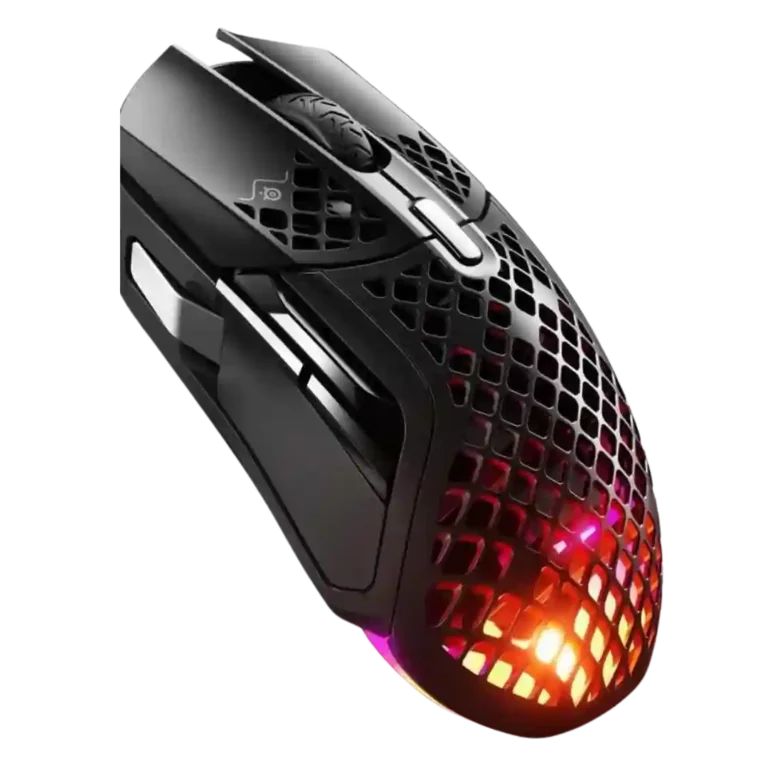
Choose it for a lightweight, comfortable wireless mouse with smooth glide and many programmable inputs. Skip it if you need dependable long battery life, easy-to-reach side controls, left-handed support, or top value at full price.
Best for right-handed palm or claw grip users who play across genres and want a light wireless mouse with extra programmable buttons, smooth glide, and strong 2.4GHz performance.
Not ideal for left-handed users, fingertip grippers, smaller hands that struggle with forward side buttons, competitive FPS specialists, or buyers who expect maximum battery life with RGB and high polling enabled.
Across reviews, the SteelSeries Aerox 5 Wireless lands as a versatile, comfortable multi-genre mouse rather than a specialist. Reviewers consistently liked its light feel, smooth PTFE glide, accurate sensor, crisp switches, and broad button customization. The tradeoff is that the very features meant to broaden its appeal also create friction: the forward thumb button and up/down rocker are repeatedly awkward, Bluetooth is best treated as a convenience mode, and real battery life varies sharply with RGB, polling, and efficiency settings. Build quality and water/dust reassurance were stronger than the holey shell might suggest, but value depends heavily on sale pricing because several reviewers felt the launch price was hard to justify.
Compared with other Gaming Mice, this product is above average in click noise, cable flexibility, charging convenience, near average in value for money, weight, below average in debounce customization, fingertip grip comfort, lift-off distance.
| Attribute | This product | Category average | Difference |
|---|---|---|---|
| debounce customization | 2.0 | 3.8 | -1.8 |
| fingertip grip comfort | 2.0 | 3.7 | -1.7 |
| lift-off distance | 2.5 | 3.8 | -1.3 |
| side button quality | 2.9 | 3.7 | -0.8 |
| battery life | 3.6 | 4.2 | -0.7 |
| click noise | 4.5 | 3.4 | +1.1 |
| cable flexibility | 4.4 | 3.6 | +0.8 |
| charging convenience | 4.7 | 4.0 | +0.8 |
Choose Turtle Beach Kone XP Air. It scores 4.8 vs 2.0 for fingertip grip comfort, with a 4.1 overall score.
Choose Logitech G502 X Plus. It scores 4.8 vs 4.3 for sensor performance, with a 3.9 overall score.
Choose Turtle Beach Kone II Air. It scores 5.0 vs 2.1 for software stability, with a 4.3 overall score.
Choose Turtle Beach Kone II. It scores 4.6 vs 2.9 for side button quality, with a 4.3 overall score.
Products reviewers directly compared with this model, grouped into quick takeaways.
It works well for casual and fast FPS play thanks to its low weight, smooth glide, and accurate sensor. Competitive-focused reviewers were more mixed because the size, weight, and side-button layout can limit fine aim or quick access.
Battery life is highly settings-dependent. Some reviewers got strong multi-session endurance, while others reported much shorter runtime with RGB and high polling enabled.
The two standard side buttons were often usable, but the forward thumb button and up/down rocker were the most repeated complaints. Several reviewers found them stiff, far forward, or awkward under pressure.
Bluetooth is useful for portability and secondary devices, but reviewers generally preferred 2.4GHz for gaming. Several described Bluetooth as slower, choppier, or less suitable for competitive play.
Most reviewers found the shell surprisingly sturdy, with good build quality and reassuring IP54 water/dust protection. A few still disliked the feel or look of the holes.
Opinions on SteelSeries GG were split. Some reviewers found it clear and powerful, while others called it cluttered, bloated, buggy, or limited on macOS.
Value was mixed. Reviewers liked the feature set and sale pricing, but many felt the launch price was steep given battery caveats, awkward buttons, and strong alternatives.
These are a few of the reviews included in our analysis.



Choose the ROG Harpe II Ace for ultralight FPS play, precise tracking, smooth glide, and web-based tuning. Skip it if you need palm-grip support, MMO buttons, onboard profiles, or long...
Pros: glide smoothness, weight
Cons: handedness options

Best for ultra-light, competition-focused speed, precise tracking, stable wireless, and long battery life. Skip it if you need quieter clicks, left-handed support, Bluetooth, more buttons, or better value for casual...
Pros: value for money, weight
Cons: click noise, RGB features

Choose it if you want a premium MMO/productivity mouse with 12 adjustable side buttons, strong battery life, and Stream Deck integration. Skip it if you need an ultralight FPS mouse,...
Pros: button customization, MMO gaming suitability
Cons: FPS gaming suitability

Best for precise wireless tracking, smooth glide, strong battery life, and unusually good 8K value. Skip it if you need polished software, quiet snappy clicks, true left-handed controls, or gentle...
Pros: software usability, sensor performance
Cons: RGB features, scroll wheel quality