
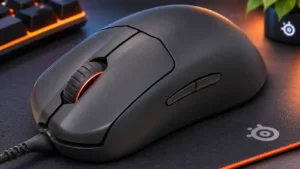
SteelSeries Prime Feature Scores
Overall Scorata score: 3.9/5
Based on 17 analyzed reviews · View source samples
Explore all 100 feature scores for SteelSeries Prime, organized into pros and cons.
Scores by Feature
Summary
100 reviewed features-
Very positive 4.5-5.033 (33%)
-
Positive 3.5-4.438 (38%)
-
Neutral 2.5-3.413 (13%)
-
Negative 1.5-2.415 (15%)
-
Very negative below 1.51 (1%)
Pros
Sort
-
The optical-magnetic switches have a distinctive, crisp and satisfying tactile click.
-
Gaming performance is consistently strong, especially in fast-paced shooters, although the latest high-end models offer more advanced performance.
-
The solid housing feels sturdy, with little flex or rattling despite its low weight.
-
Light weight, accurate aiming and quick clicks make this especially effective for shooters.
-
The main buttons have satisfying clicks that are easy to actuate from different positions.
-
The optical-magnetic switches deliver an unusually crisp, solid feel.
-
The right-handed contours make the mouse comfortable for many users; the tall rear hump is a personal-fit caveat.
-
At around 69 grams the mouse is easy to move quickly, though lighter competitors exist.
-
The Prime is a particularly good buy at discounted prices. At its original $60 price, the sparse controls are harder to justify.
-
The sculpted shape is widely liked, though the high rear hump and finger-rest contours do not suit everyone.
-
Tracking is precise enough for quick flick shots, steady sniping and careful cursor placement.
-
The TrueMove Pro sensor is fast and dependable in normal movement, although lift-off behavior can be troublesome.
-
The sculpted body offers a comfortable grip, particularly around the thumb and palm.
-
Quick flicks and button inputs feel responsive during fast gameplay.
-
The mouse usually glides smoothly, but the stock feet can feel slower than alternatives, especially after use.
-
The mesh-sleeved cable is generally lightweight and well protected, although it does not feel as free-moving as every competing cable.
-
The soft cable generally moves freely with little drag, though some samples feel stiffer than competing cables.
-
The generous palm area can be comfortable, although some hands rest partly on the mousepad instead.
-
The restrained black design appeals to minimalists, while fans of colorful gaming gear may prefer more visual flair.
-
The detachable cord makes storage and replacement easier, though some question the benefit on a wired-only mouse.
-
Sensitivity presets can be fine-tuned in the software to suit different screens and games.
-
Low click latency makes shots and other inputs feel immediate.
-
The ergonomic shape can remain comfortable over hours of play.
-
The mouse feels dependable in both everyday work and fast-paced games once configured.
-
The customization controls are generally intuitive, with helpful explanations, although the separate settings window and initial setup can be inconvenient.
-
SteelSeries GG offers useful customization, but the additional software and initial configuration can be frustrating.
-
Claw grip works well for many hands, but the sloped shape can feel awkward for some players.
-
The single illuminated scroll wheel offers adjustable colors and effects. Some prefer the restraint, while others want more lighting or simpler effect editing.
-
The broad sensitivity range offers ample room for different play styles, though the very highest settings are impractical for some users.
-
The medium-sized body is easy to handle for many players, although some prefer a lower-profile mouse.
-
The buttons feel solid with little unwanted travel or play.
-
The switches feel consistent across clicks and different pressing positions.
-
Fingertip grip is a viable option with this versatile shape.
-
The 1,000 Hz maximum polling rate provides a responsive experience for fast-paced play.
-
The mouse moves smoothly on desks and mousepads; revised feet also avoid scratching on some pads that troubled earlier batches.
-
The matte finish conceals fingerprints for some users, but others notice greasy residue accumulating easily.
-
The hard ABS plastic feels substantial and avoids fragile rubberized coatings, although it can feel blockier than newer designs.
-
The protective tray and attractive packaging make a good impression on opening the box.
-
The textured plastic feels comfortable and secure to some, but others find it slippery when lifting the mouse.
-
The cable sits securely in the recessed connector when plugged in properly.
-
The optical-magnetic design reduces susceptibility to unintended double-clicking caused by electrical contact wear.
-
Firmware updates through the companion software are handled smoothly.
-
The shape accommodates a range of hand sizes, with a particularly good fit for medium and larger hands.
-
Recording, editing and assigning macros is straightforward.
-
Tracking feels consistent across extended gaming sessions.
-
The included cable is long enough to route around a desk and leave useful slack.
-
Game-specific configurations can launch automatically, reducing manual setup between titles.
-
Replacement cables are available at a reasonable price, and the feet can also be replaced.
-
The tactile, clearly defined scroll steps make individual movements easy to distinguish.
-
The palm and thumb have useful support, but the high hump and lack of a dedicated pinky rest may not suit every hand.
-
The switches inspire confidence in their longevity, although the claimed click lifespan has not been demonstrated by these short tests.
-
The wired connection appeals to players who prefer a tethered setup, but the cord still needs managing.
-
The stock skates are functional and usually smooth, but premium PTFE alternatives are faster; revised batches differ in feel.
-
Precise pointer placement helps with both work and games, although initial sensitivity and lift-off behavior can interfere with control.
-
Tracking is free from problematic angle snapping in normal use.
-
The illuminated scroll wheel adds a customizable touch of color to the otherwise plain shell.
-
Optical-magnetic switches provide quick actuation.
-
The availability of customization software on both Windows and macOS is an advantage over some rivals.
-
The unpainted ABS shell is expected to resist the peeling and stickiness of rubberized coatings over time.
-
The simple layout is easy to use in games that do not require many commands.
-
The companion software supports customization on macOS as well as Windows.
-
Settings programmed on a PC can carry over when the mouse is used with an Xbox.
-
The recessed connector locks the cable in place to help prevent port damage.
-
The programmable buttons provide useful in-game shortcuts for a simple control layout.
-
Affordable replacement cables make damage to the detachable cord less likely to end the mouse's useful life.
-
Windows users can customize mouse settings using the companion software.
-
The main buttons are highly customizable, but the underside sensitivity button cannot be reassigned.
-
It performs well in MOBAs that need only a few mouse commands, but more input-heavy play may require extra buttons.
-
The detachable cable helps with packing, but the full-size body is not ideal for compact laptop bags.
-
Automatic per-game profiles are useful, but the physical controls cannot switch complete profiles directly.
-
The bare mouse matches its advertised 69-gram weight, but the figure excludes the attached cable, which can be misleading to some shoppers.
Cons
Sort
-
The dedicated sensitivity button is on the underside, which makes changing DPI during a match awkward.
-
An overly sensitive wheel click can trigger unwanted scrolling behavior.
-
The bottom-mounted sensitivity switch is awkward to reach, and the small side buttons can be difficult for some users.
-
The older Micro-USB connector is a recurring disappointment compared with USB-C, though it does not prevent normal use.
-
The limited button count makes it a less attractive choice for input-heavy MMOs.
-
Getting the mouse recognized and configured in SteelSeries GG can take extra effort.
-
The small side buttons can feel stiff or recessed; the front one is particularly difficult for some hands to press reliably.
-
Two side buttons are enough for basic shooter controls, but players accustomed to extra inputs may miss them.
-
The recessed proprietary connector limits the choice of compatible replacement cables.
-
The ridged wheel and adjacent gaps collect dirt and are not easy to wipe clean.
-
The companion software is important to getting satisfactory sensitivity and customization.
-
The base model lacks the broader connectivity choices of its siblings, limiting versatility.
-
There is no free-scrolling mode for people who need faster navigation.
-
The right-handed design limits its suitability for left-handed players.
-
Promotional pages and giveaways make the GG software feel more cluttered than necessary.
-
The package lacks spare glide feet, an omission at the original asking price.
-
Initial pointer movement may feel heavy until the default sensitivity or companion software settings are adjusted.
-
The required software account is unwelcome for users who prefer not to share email or password information.
-
Lift-off distance divides testers: one finds it very low, while another reports unwanted cursor movement when repositioning the mouse.
-
The attached cable can make the mouse feel slightly top-heavy, but this is not a major drawback for everyone.
-
The mouse works well with compatible Xbox games, but its settings software is unavailable directly on the console.
-
SteelSeries devices can share one software suite, but lighting patterns do not automatically synchronize.
-
The updated cable and feet are an improvement over the original batch, which drew much stronger criticism.
-
The thick, blockier construction feels somewhat dated next to newer lightweight designs.
-
The scroll wheel can be audible without necessarily becoming irritating.
-
The pronounced click sound can be satisfying, but its volume may annoy nearby people.
-
Precise cursor control and the comfortable shape help with desk work, but the limited controls reduce productivity versatility.
-
The matte finish feels pleasant and can conceal fingerprints, but it can also become greasy or slippery for some users.
-
The wheel has defined tactile steps, but its inexpensive feel, sensitivity and tendency to collect dirt draw complaints.
Use Cases
Best for
Sort
-
Discounts make this a compelling option for budget-minded gamers who do not require extra buttons or wireless connectivity.
-
Quick movement, precise tracking and crisp clicks make the Prime a particularly good fit for FPS games.
-
The low weight and quick response are useful for competitive play, although it does not match every newer flagship.
-
The roomy body suits medium and larger hands particularly well.
-
Some smaller hands fit the Prime comfortably, but the smaller Mini is often a better match.
-
The comfortable shape and reliable gaming performance suit casual players who prefer a simple layout.
-
It is versatile for games with modest input requirements, particularly with custom software profiles.
-
The wired mouse delivers quick clicks and strong tracking for PC gaming.
-
The comfortable palm support and precision work well for writing and pointer-heavy tasks, but extra productivity controls are limited.
-
The mouse works well for MOBAs with a modest number of controls, but players needing many inputs may prefer extra buttons.
-
The combination of precise gaming controls and comfortable desk use makes it useful for both gaming and everyday work.
-
The comfortable ergonomic shape can remain easy to hold over long gaming sessions.
-
The side buttons remain usable for Fortnite despite their small size.
-
It delivers snappy aiming in keyboard-and-mouse-compatible Xbox shooters, though configuration is easier on a PC.
-
The subtle wheel lighting adds some style without creating a distracting visual effect.
-
Precise aiming helps with bow shots and careful movement in exploratory and survival games.
Conditional or not ideal for
Sort
-
On-the-fly control shortcutsThe underside CPI control interrupts gameplay when sensitivity needs to be changed quickly.
-
MMO gamingThe small number of extra buttons limits access to the numerous commands common in MMO games.
-
TravelA removable cable makes packing easier, but the large body is less convenient for laptop travel.
-
Left-handed usersThe sculpted right-handed shell makes this a poor choice for left-handed users.
-
Shared offices and librariesThe noticeably loud clicks may disturb other people in quiet shared spaces.
-
Strategy gamingThe sparse button layout may disappoint RTS players who rely on many mouse shortcuts.