If you want better click noise
Choose Logitech G Pro X2 Superstrike. It scores 4.6 vs 2.0 for click noise, with a 4.0 overall score.

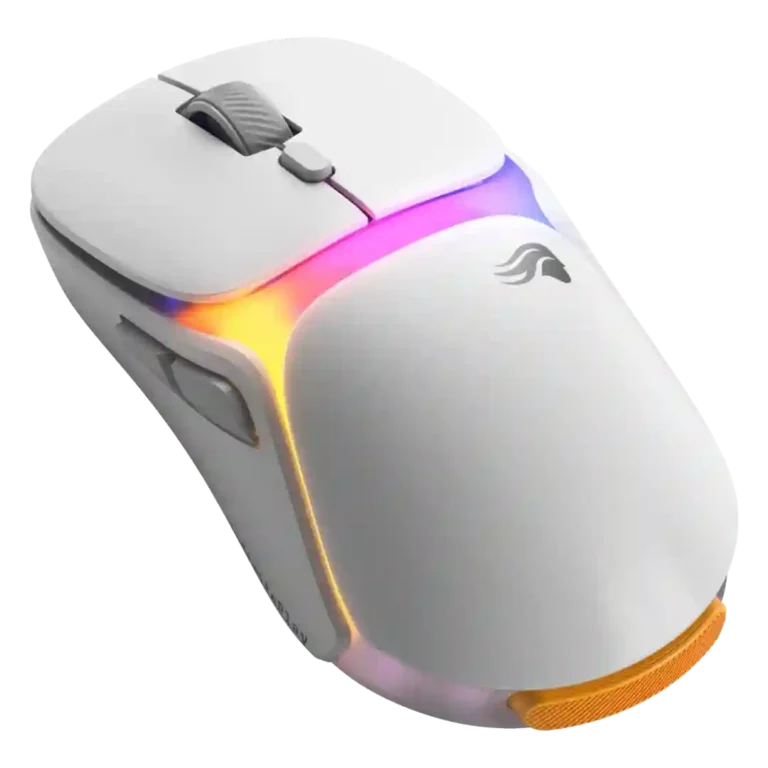
Choose the Glorious Model O3 if you value cable-free battery swaps, a useful dock, and a comfortable lightweight feel. Skip it if you need flawless competitive wireless tracking, a crisper scroll wheel, or the best value at $160.
Best for players who dislike charging cables and value a hot-swappable battery system, useful dock controls, smooth glide, and a comfortable Model O-style shape. It also fits casual and everyday competitive gaming where convenience matters as much as peak wireless consistency.
Not for buyers who prioritize the lightest competitive FPS feel, the crispest scroll wheel, minimal desk gear, or the best performance-per-dollar. Reviewers who disliked the rear battery shape or price found the concept hard to justify.
Reviewers consistently frame the Glorious Model O3 Wireless as a smart, genuinely useful battery-system mouse rather than a pure esports benchmark. Its hot-swappable batteries, Guardian backup, and dock make charging feel nearly invisible, and several reviewers also praised its glide, software, build, and general comfort. The tradeoff is that the same battery concept adds weight, rear balance changes, desk clutter, and a price that drew repeated skepticism. Performance impressions were mostly usable to strong in real play, but tracking consistency, scroll-wheel feel, software/firmware rough edges, and the long shape kept some reviewers from calling it a top competitive option.
Compared with other Gaming Mice, this product is above average in battery life, debounce customization, programmable buttons, near average in software usability, build quality, below average in portability, macro support, 2.4GHz connectivity.
| Attribute | This product | Category average | Difference |
|---|---|---|---|
| portability | 2.0 | 3.9 | -1.9 |
| macro support | 2.5 | 4.2 | -1.7 |
| 2.4GHz connectivity | 2.8 | 4.4 | -1.7 |
| ecosystem integration | 2.5 | 4.2 | -1.7 |
| motion consistency | 3.0 | 4.5 | -1.5 |
| click noise | 2.0 | 3.5 | -1.5 |
| FPS gaming suitability | 2.9 | 4.2 | -1.3 |
| profile switching | 2.5 | 3.8 | -1.3 |
Choose Logitech G Pro X2 Superstrike. It scores 4.6 vs 2.0 for click noise, with a 4.0 overall score.
Choose Razer Basilisk V3 Pro 35K. It scores 4.9 vs 2.5 for macro support, with a 4.2 overall score.
Choose Logitech G309 Lightspeed. It scores 4.8 vs 2.5 for profile switching, with a 4.1 overall score.
Choose HyperX Pulsefire Haste 2. It scores 4.8 vs 2.0 for portability, with a 4.0 overall score.
Products reviewers directly compared with this model, grouped into quick takeaways.
Yes. Reviewers repeatedly praised the hot-swappable batteries and Guardian battery because the mouse can keep working while batteries are swapped.
Reviewers were split. Those who valued never touching a cable liked it, while others felt $159.99 was hard to justify for a convenience feature.
Real gameplay was usually smooth, but some reviewers reported less consistent wireless tracking or receiver setup issues compared with premium rivals.
It can work for FPS play, and one review praised fast aiming. However, multiple reviewers warned that the shape, weight, or wireless consistency may not suit serious competitive FPS players.
Comfort depends heavily on grip and hand position. Some reviewers loved the Model O shape, while others felt the rear battery extension made it awkward or back-heavy.
The most repeated drawbacks were price, scroll wheel precision, rear weight balance, divisive RGB design, and some software or receiver rough edges.
These are a few of the reviews included in our analysis.




Choose the ROG Harpe II Ace for ultralight FPS play, precise tracking, smooth glide, and web-based tuning. Skip it if you need palm-grip support, MMO buttons, onboard profiles, or long...
Pros: glide smoothness, weight
Cons: handedness options

Best for ultra-light, competition-focused speed, precise tracking, stable wireless, and long battery life. Skip it if you need quieter clicks, left-handed support, Bluetooth, more buttons, or better value for casual...
Pros: value for money, weight
Cons: click noise, RGB features

Choose it if you want a premium MMO/productivity mouse with 12 adjustable side buttons, strong battery life, and Stream Deck integration. Skip it if you need an ultralight FPS mouse,...
Pros: button customization, MMO gaming suitability
Cons: FPS gaming suitability

Best for precise wireless tracking, smooth glide, strong battery life, and unusually good 8K value. Skip it if you need polished software, quiet snappy clicks, true left-handed controls, or gentle...
Pros: software usability, sensor performance
Cons: RGB features, scroll wheel quality