
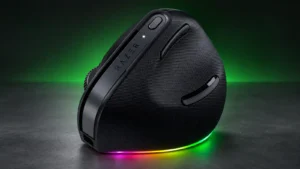
Razer Pro Click V2 Vertical Feature Scores
Overall Scorata score: 3.8/5
Based on 18 analyzed reviews · View source samples
Explore all 107 feature scores for Razer Pro Click V2 Vertical, organized into pros and cons.
Scores by Feature
Summary
107 reviewed features-
Very positive 4.5-5.029 (27%)
-
Positive 3.5-4.435 (33%)
-
Neutral 2.5-3.420 (19%)
-
Negative 1.5-2.421 (20%)
-
Very negative below 1.52 (2%)
Pros
Sort
-
The chassis generally feels solid and premium, with occasional criticism of seams or creaking.
-
Many users experience less wrist and forearm fatigue after adapting, although the fit is important.
-
The Focus Pro optical sensor delivers impressive tracking for a vertical productivity mouse.
-
Button remapping is extensive, including shortcuts and secondary functions.
-
The textured thumb area provides a secure, pleasant grip.
-
The steep handshake angle encourages a neutral hand position, though its unusually upright shape does not suit everyone.
-
App-specific profiles provide useful customized shortcuts for work and gaming.
-
Extended work sessions are often more comfortable, once the vertical grip feels familiar.
-
The substantial construction and tactile surfaces create a luxurious feel.
-
The mouse feels snappy and responsive in wired or receiver mode.
-
HyperSpeed receiver mode offers responsive, reliable wireless operation.
-
Comfort, accurate tracking and customizable shortcuts make it strong for productivity.
-
Automatic or manual profile changes make switching tasks convenient.
-
The upright shape feels exceptionally comfortable to many, but others find the thumb area or angle awkward.
-
The built-in receiver compartment is secure and easy to access.
-
Battery endurance varies substantially with connection mode, polling rate and RGB use; several users report strong runtime with adjusted settings.
-
The sleek dark styling mixes a professional look with gaming-inspired accents.
-
The low, evenly distributed mass keeps the mouse planted, though it can resist rapid movements.
-
Buttons generally feel crisp and tactile, though some find them mushy or light.
-
Adjustable DPI settings help users find a comfortable sensitivity for the vertical form.
-
Quality plastics and textured surfaces give the mouse a premium feel, though smooth areas can collect grease.
-
Thumb buttons provide useful feedback, but their unusual vertical arrangement divides opinion.
-
A short five-minute charge can provide useful extra runtime.
-
The receiver connection is generally dependable, although Bluetooth wake can be troublesome.
-
Mechanical switches generally provide satisfying feedback, though not everyone likes the feel.
-
Receiver-mode latency is low enough for responsive gaming.
-
The thumb and pinky rests offer support, although the ledges can be cramped or awkward for some hands.
-
Large feet help the mouse glide despite its mass, although some find movement less smooth.
-
Multiple paired devices make the mouse useful across computers.
-
The customizable base lighting looks attractive to many, but it is not essential and can drain the battery.
-
The 1,000 Hz maximum is useful for gaming, but higher rates exist and software is needed to unlock it.
-
The mouse earns praise for its ergonomic productivity design, but its size and software make it a personal choice.
-
Low sensor latency is a notable strength for a vertical mouse.
-
The sensor tracks accurately, but the vertical grip and weight can make fine physical adjustments difficult.
-
Bluetooth, receiver and wired modes provide flexible connection options.
-
The above-and-below thumb buttons are convenient for some and too far apart for others.
-
The clicks are relatively unobtrusive without being completely silent.
-
Hand fit is personal: the large body accommodates many hands, but the thumb and pinky rests can be restrictive.
-
The neutral posture can reduce arm fatigue, although individual positioning matters.
-
Premium construction and comfort can justify the price, but cheaper alternatives and missing scroll features reduce appeal.
-
The 30,000 DPI sensor offers abundant sensitivity headroom, much more than typical office work needs.
-
The sensor supports a broad range of surfaces, including glass.
-
Synapse provides extensive customization, but opinions differ on whether its complexity is worthwhile.
-
The main clicks are usually tactile and precise, but grip position and personal preference affect their feel.
-
Macro sequences can reduce repetitive keyboard actions in productivity apps.
-
The wide, heavy base resists accidental tipping when bumped on the desk.
-
The wireless receiver performs well, while Bluetooth wake behavior is less consistent.
-
The large skates ease movement, but they are not as slick as some dedicated gaming mice.
-
The soft-touch and rubberized finishes feel pleasant, but some surfaces collect grime.
-
Tracking is generally smooth, although rapid movement at higher sensitivity can be less consistent.
-
The thumb rest reduces tension for some users, but others experience soreness or awkward positioning.
-
Click response is fast enough for demanding play, even though the physical shape limits agility.
-
The mechanical switches are rated for heavy use and inspire confidence in longevity.
-
The notched wheel provides defined tactile steps, although its resistance can feel light.
-
Configuration support for both Windows and macOS adds flexibility.
-
Routine tasks become easier after acclimation, but the shape and software can complicate initial use.
-
Chroma synchronization and shared Razer software offer integration for existing Razer setups.
-
Mac users have access to customization, a welcome improvement for the brand.
-
Simple packaging makes unboxing straightforward.
-
The wheel is relatively quiet in use.
-
The supplied cable is functional, though its construction and handling draw some criticism.
-
Lift-off behavior is improved over some older designs, but adjustment options are limited.
-
Polling rate adjustments are useful, though the default setting requires software to unlock full performance.
-
Wired operation is available and responsive, though cable drag can undermine comfort.
Cons
Sort
-
Only a right-handed version is offered, excluding left-handed users.
-
Software is needed to unlock full polling, lighting and power controls, limiting the out-of-box experience.
-
There is no free-spin scrolling mode, a common frustration when navigating long pages.
-
The wheel lacks left/right tilt inputs, reducing its shortcut and scrolling versatility.
-
The absence of sideways scrolling limits convenience in wide documents and spreadsheets.
-
One user experienced motion sickness while adapting to the altered aiming motion in shooters.
-
The large chassis offers room to grip but can feel bulky or unwieldy.
-
Smooth areas can collect fingerprints, sweat or grime despite the pleasant finish.
-
Promotional content in Synapse annoys some users, although advertisements can be disabled.
-
Receiver wake is prompt, whereas Bluetooth wake can take several seconds.
-
The current connection is difficult to identify without cycling to another mode.
-
Basic operation works without software, but key settings are locked behind installation.
-
Adhesive feet and stiff internal clips make disassembly difficult.
-
Software installation and default settings can make setup more involved than expected.
-
Wireless charging is absent, disappointing users accustomed to charging pads.
-
Synapse can consume substantial system resources or run persistently in the background.
-
The steep angle requires days or weeks of practice, particularly for precise gaming movements.
-
Bluetooth offers convenient multi-device pairing but can be slow to wake.
-
Cable weight can be noticeable when moving the upright mouse.
-
The unusual motion can make straight-line dragging difficult until users adapt.
-
The dedicated sensitivity button is useful, although its high placement can make it difficult to reach.
-
The middle click can feel indistinct.
-
The lack of rotation calibration limits adjustment for individual vertical grip angles.
-
The configurable sleep timer saves power, but the short default timeout can be inconvenient.
-
The Mac software requires numerous security permissions, which can be frustrating.
-
The lower thumb button can be triggered accidentally when returning a hand to the mouse.
-
The black-only finish may not suit all-white setups.
-
The included cable can feel short depending on desk layout.
-
The dedicated receiver works well, although sharing one dongle between compatible mice is not supported.
-
The AI launcher can simplify access to assistants, but many consider it redundant or prefer remapping it.
-
Menus and controls can be intuitive, but some users find the interface unnecessarily complex.
-
The 150-gram body feels stable on the desk, but it takes effort to move quickly or lift.
-
The notched wheel is adequate and responsive, but it lacks the versatility of premium scroll wheels.
-
The limited number of buttons is disappointing given the size of the chassis.
-
The deeply recessed USB-C port can reject thicker third-party cables.
-
Wired charging is convenient, but the recessed port and lack of wireless charging limit options.
-
The box includes the essentials, but there is little beyond the receiver and cable.
-
Pointer control becomes more natural with practice, though quick or tiny adjustments can remain challenging.
-
Gaming-grade electronics are impressive, yet the heavy upright shape limits fast movement.
-
Onboard memory retains settings, but only one profile and the need for initial software setup limit flexibility.
-
Switching devices is easy for some, but cycling through connections using the underside button annoys others.
-
Disabling RGB and lowering polling rates can improve runtime substantially.
-
The grip can feel relaxed and natural, but lifting or repositioning the large body is less effortless.
Use Cases
Best for
Sort
-
The vertical grip and app shortcuts suit desk work, though advanced scrolling is missing.
-
It is a capable work-and-play compromise for users who prioritize comfort over competitive speed.
-
The handshake grip can reduce wrist strain, making it attractive to comfort-focused users if the shape fits.
-
Slower or casual games are a better match for the upright grip than twitch-heavy competition.
-
Spreadsheets benefit from accurate tracking and shortcuts, but missing horizontal and free-spin scrolling can be limiting.
-
Video editing benefits from customizable macros, but precise dragging can take practice.
-
Remappable buttons and application profiles provide convenient shortcuts for frequently repeated commands.
-
Wired mode is responsive and allows charging during use, but the cable can drag.
-
Smaller hands may find the large shape unwieldy, although some grips fit well.
-
The newer sensor can track on glass, offering more surface flexibility.
-
Receiver mode is responsive, while Bluetooth is convenient for multiple devices but can wake slowly.
-
Multi-device pairing and profile switching help users work across computers.
-
Customizable shortcuts and comfort make it appealing for creative work.
-
The relaxed grip and customizable controls make extended writing and word processing comfortable.
-
Relatively quiet clicks make the mouse acceptable in a shared office.
-
Programmable buttons make it convenient to mute or toggle video in meeting apps.
-
App-specific controls can help photo editing.
-
Ordinary browsing is manageable even when precise movements are still unfamiliar.
Conditional or not ideal for
Sort
-
First-time vertical mouse usersNew vertical mouse users should expect a meaningful adjustment period before movement feels natural.
-
Competitive gamingLow latency helps, but weight and awkward rapid adjustments make it less suitable for competitive play.
-
FPS gamingFast shooters are challenging because of the mass, vertical grip and altered aiming motion.
-
Left-handed usersThe right-handed-only shape makes it unsuitable for left-handed users.
-
Large-handed usersLarger hands have room on the shell, but the pinky ledge and top button can be awkward.
-
Frequent scrollingFrequent scrolling can become tiring because the wheel is limited to notched rotation.
-
Medium-handed usersMedium-sized hands may fit the shell, but the thumb rest can cause discomfort.
-
General everyday useDaily use is comfortable for many after adaptation, although the unusual fit can disappoint others.
-
Budget-conscious buyersThe premium price makes cheaper vertical alternatives worth considering for cost-conscious buyers.
-
Long document navigationLong document scrolling is less convenient without a free-spinning wheel.
-
Precision-intensive workPrecision-heavy tasks can be challenging initially because the hand moves differently on the vertical shape.