
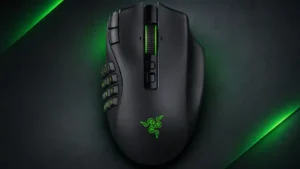
Razer Naga V3 Pro Feature Scores
Overall Scorata score: 4.2/5
Based on 24 analyzed reviews · View source samples
Explore all 121 feature scores for Razer Naga V3 Pro, organized into pros and cons.
Scores by Feature
Summary
121 reviewed features-
Very positive 4.5-5.062 (51%)
-
Positive 3.5-4.426 (21%)
-
Neutral 2.5-3.420 (17%)
-
Negative 1.5-2.413 (11%)
Pros
Sort
-
The twelve-button grid and extra modifiers make complex MMO abilities easier to reach without stretching to keyboard shortcuts.
-
Three magnetic side panels make it easy to switch between two, six and twelve thumb buttons. The secure attachment and quick recognition make this flexibility genuinely practical.
-
The redesigned wheel is a standout for precise notches and fast free spinning. Mode changes and overly sensitive free spin occasionally frustrate.
-
Up to 23 programmable inputs and modifier layers provide substantial flexibility for abilities and work shortcuts.
-
The flagship optical sensor tracks smoothly and precisely, with very little perceptible delay.
-
Tracking is accurate and consistent even at high sensitivity. The physical weight can make fine aim adjustments harder despite the excellent sensor.
-
The Gen-4 optical switches feel firm and crisp with fast actuation.
-
The mouse feels responsive and precise, though high-end internals cannot fully compensate for its mass in fast shooters.
-
The extra ring-finger button is useful for modifiers and shortcuts, but some hands press it unintentionally. A physical lock turns it into a solid finger rest.
-
Precision tactile mode gives finer control over scroll steps and weapon selection, though some prefer standard notches.
-
A dedicated ring-finger platform supports the hand; the physical lock restores a fixed rest when the button is unwanted.
-
The optical switches feel crisp and deliberate, though opinions about their sound are less favorable.
-
The construction feels robust, with secure panels and little flex or rattling.
-
The sculpted right-handed body supports a relaxed hand position, especially for palm-grip users.
-
Optional dock or charging mat can eliminate routine cable charging, though the excellent battery life makes them unnecessary for many users.
-
Battery life is a major strength, with some users going weeks between charges. Actual runtime depends on lighting, polling and connection mode.
-
Remapping can be extensive and easy, but software failures and restrictions on the AI shortcut can interfere.
-
The precision tactile mode is especially useful for weapon swaps and skill cycling.
-
The wide, sculpted shell and finger rest feel comfortable for many users, particularly with a palm grip. Its short, bulky shape is not universally appealing.
-
Six- and twelve-button panels work well for MOBA abilities and customizable shortcuts.
-
Primary clicks are generally crisp, tactile and responsive.
-
Optional wireless charging accessories can keep the mouse powered continuously and pair easily.
-
Game-specific profiles make changing layouts convenient, including automatic switching where configured.
-
Profiles and automatic panel recognition make complex configurations practical, though occasional saving or detection problems occur.
-
Distinct wheel modes offer useful flexibility and fine control, although manual mode switching can have a brief delay.
-
Free spin is excellent for long pages and spreadsheets, but it can feel too sensitive or accelerate unexpectedly.
-
The main optical switches respond quickly and register clicks accurately.
-
The wheel and remappable buttons make everyday work, spreadsheets and editing more efficient.
-
A relaxed palm grip is the natural fit for the wide shell and dedicated finger support.
-
Excellent sensor performance and modular controls support many genres, particularly MMO and MOBA play.
-
Setup is generally easy, including pairing with the optional charging mat.
-
Side buttons are sculpted and tactile, especially on the six-button panel. A few users find the two-button layout mushy or the twelve-button grid difficult to distinguish.
-
Double-shot molded legends are a welcome upgrade over printed labels and should resist fading with repeated use.
-
The tilt wheel is useful for horizontal navigation and can also be remapped to in-game commands.
-
A hidden receiver compartment under the side panel helps keep the dongle secure when traveling.
-
The supportive shape and balanced weight are comfortable through extended work and gaming sessions for compatible hand sizes.
-
Motion response is fast and smooth with little perceptible lag.
-
Efficient sensor operation contributes to long battery life, even with substantial daily use.
-
Wireless operation is generally fast and dependable, including with the optional charging mat.
-
The 2.4GHz connection feels fast and dependable for games, with straightforward pairing.
-
Synapse offers powerful, often intuitive configuration, but desktop software dependence and bugs frustrate some users.
-
Comfortable grip and finger support are a strong point for many users, with caveats for smaller hands and the full grid panel.
-
Macros and modifier layers expand the available commands considerably. Automation can be against the rules of some online games.
-
Optical switches provide consistent, accurate clicks and clear tactile feedback.
-
Horizontal wheel tilt makes spreadsheets, wide webpages and editing timelines easier to navigate.
-
Motion feels smooth and consistent without noticeable stuttering.
-
The unusually high input count is excellent for complex commands, but it is more than many players need.
-
Bluetooth is convenient for work and multiple computers, with excellent endurance and unusually good response for the connection type.
-
Accidental presses are a concern on the dense grid and extra ring-finger button, but the latter can be physically locked.
-
Wireless and panel connections generally stay stable in short-term use.
-
The broad shape generally suits larger hands. Small or less flexible hands can struggle to reach the extra buttons.
-
Dedicated DPI buttons are useful for quick sensitivity changes, including sniping, when they are easy to reach.
-
Receiver storage makes taking the mouse on the go more convenient.
-
Synapse has extensive features and is easy for many to configure, but bugs, resource complaints and lack of web support are notable drawbacks.
-
Wired USB, Bluetooth and 2.4GHz wireless make it easy to move between work and gaming setups.
-
Setup and customization are straightforward for many users, although mastering the full button grid takes practice.
-
The sensitivity-matching tool works well for transferring familiar sensitivity settings from another mouse.
-
Onboard profiles reduce the need to keep Synapse running after configuration.
-
The included receiver connects seamlessly for quick plug-and-play operation.
-
The sensor tracks accurately across varied surfaces, and the feet glide well on both hard and soft pads.
-
Well-distributed weight helps the mouse feel stable, although the larger plate or rearward balance can affect agility.
-
Most side inputs are easy to reach with the right grip, but the extra edge buttons and dense grid can require awkward stretches.
-
The optional charging setup includes a charge limit to help manage battery health.
-
The feet provide smooth glide on hard surfaces and soft pads, though the charging puck restricts the bottom skate area.
-
Smart-Reel is convenient for some, but oversensitive free spin, audible transitions and occasional mode-switch delays make others prefer manual modes.
-
The lighter body, improved internals and additional controls are worthwhile refinements, but the familiar design makes upgrading from the V2 Pro optional.
-
The familiar matte-black design manages to accommodate numerous buttons without looking excessively cluttered.
-
The broad sensitivity range offers plenty of adjustment, although most players do not need the maximum DPI.
-
Wireless response is excellent overall, although Bluetooth can introduce a delay after idling.
-
Feet feel smooth on various surfaces, though the puck leaves limited space for replacement skates and early wear marks concern some users.
-
RGB complements the black design, but only the full twelve-button panel is illuminated.
-
The wheel offers useful resistance choices, although free movement can be too easy for some.
-
Customizable RGB looks attractive, although the six-button panel lacks backlighting and some lighting effects can distract.
-
Claw grip is workable for many players, though the broad hump can encourage a palm grip or feel awkward.
-
Optical switches respond immediately and deliver satisfying feedback.
-
Moving between work laptops and gaming PCs is straightforward.
-
Tactile wheel feedback gives more control over rapid scrolling and item selection.
-
Adjustable lift-off behavior helps keep the crosshair stable during wide sweeps.
-
Bluetooth and wireless connectivity make using the mouse with multiple computers convenient.
-
Automatic polling-rate switching is convenient for balancing game response with desktop battery savings.
-
Some enjoy the tactile wheel sound, while others dislike the audible click during automatic mode changes.
-
Sculpted buttons make the grid easier to navigate by touch, especially the six-button layout. Some players still miss a tactile home marker on the twelve-button grid.
-
Rubber grips help secure the mouse, but the twelve-button panel leaves little thumb-rest space and rubber wear is a concern.
-
The sensor offers extensive sensitivity adjustment for fine tuning.
-
Independently replaceable wheel microswitches are a useful repairability advantage despite the proprietary wheel mechanism.
-
The wheel uses separately replaceable microswitches, which is helpful for repairs.
-
The rated 100-million-click lifespan inspires confidence, but it is not a demonstrated long-term result.
-
USB-C is a welcome upgrade, although the recessed port and adapter can restrict third-party cable fit.
Cons
Sort
-
Desktop Synapse support is extensive, but the web configurator is unavailable in several accounts, limiting software flexibility.
-
Many advanced controls depend on Synapse for setup; users who dislike installed software may find that frustrating.
-
The wide, relatively short shell is substantial and can be unwieldy for smaller hands or users who prefer longer mice.
-
Fingertip grip is often awkward because of the weight, width and reach required for extra buttons.
-
The box provides the essentials but omits the receiver needed for maximum polling. A storage case for unused panels would also be useful.
-
One reported sleep-related cursor movement bug can wake the computer or interrupt display maintenance.
-
An idle or sleep transition can cause unwanted cursor movement or delayed inputs, according to one detailed account.
-
One user felt the desktop software noticeably slowed down their computer.
-
Software stability varies: some experience immediate, reliable changes while others lose bindings, encounter profile failures or see sleep-related bugs.
-
The AI Prompt Master shortcut divides opinion: some appreciate workflow efficiencies, while others disable it or find it unnecessary and limited.
-
The recessed USB connector may be picky about cable compatibility.
-
The bundled braided cable is stiff and drags more than a flexible gaming cable.
-
Black is the only color available, and an additional finish would have been welcome.
-
The pointer can feel lethargic when moving quickly compared with a lightweight mouse.
-
Rubber grips raise concerns about becoming grimy or wearing down over years of use.
-
The plastic packaging feels underwhelming for such an expensive mouse.
-
Main clicks can sound high-pitched, hollow or loud. Some accept the noise in exchange for responsive feedback.
-
The relatively rough shell texture is not universally liked; some prefer smoother plastic or a more grippy coating.
-
The mouse feels dependable in use, but software binding failures and complex internal circuitry introduce caveats.
-
Lighter than its predecessor, it remains heavy next to esports mice. Some players appreciate the stability while others struggle with fast movements.
-
Long-term usefulness depends partly on ongoing companion software support, a concern for a mouse with so many programmable controls.
-
More separately available side panel options would make the modular design more useful over time.
-
Free-spin acceleration can feel excessively fast, making scrolling harder to control.
-
The included receiver runs at 1,000Hz, which is plenty for most players. Unlocking 8,000Hz requires extra hardware according to most accounts.
-
The roughly $180 price is steep, especially with optional accessories. Its versatility is most convincing when it replaces several mice or simplifies complex controls.
-
Visible marks on the feet after little use raise concerns about wear.
-
The dense twelve-button grid takes practice and muscle memory, although the sculpted six-button layout is easier to learn.
-
The included cable receives mixed feedback: one likes it, while another finds it stiff and draggy.
-
Wired operation adds flexibility, but the stiff cable makes it less appealing for active gaming.
-
Sturdy internal supports feel reassuring, but some users find the exterior plastics and rubber less refined than expected.
-
The sturdy, feature-packed construction feels premium to some, but rough plastics and rubber disappoint others.
-
Button quality is generally good, although edge buttons and the simpler two-button panel can feel mushy.
-
Shooter performance is technically strong and the two-button layout helps, but weight and bulk limit fast competitive movement for many players.
Use Cases
Best for
Sort
-
The twelve-button plate makes MMO rotations and complex keybinds easier, while the six-button option offers simpler access when fewer skills are needed.
-
The three layouts make this particularly good for players who switch between games with very different control requirements.
-
The six-button layout is especially useful for MOBA ability binds, with additional buttons available for more complex setups.
-
Programmable shortcuts and the multi-mode wheel make it a capable desktop productivity mouse.
-
The ring-finger and edge buttons allow modifiers, sensitivity changes and other shortcuts without moving to the keyboard.
-
Palm support, stability and long battery runtime make extended gaming sessions comfortable for users who fit the shape.
-
Modular controls, versatile scrolling and long battery life make this especially appealing as one mouse for both gaming and work.
-
Abundant customizable controls and the wheel are helpful for content creation and repetitive editing tasks.
-
Horizontal tilt and free spin are especially helpful for navigating wide or long spreadsheets.
-
Remappable thumb controls and horizontal wheel movement make timeline editing and repetitive video commands convenient.
-
Larger hands generally benefit from the wide shell and finger rest, although individual reach preferences still matter.
-
The simple two-button panel and scrolling features are useful for everyday computing, though some prefer a less bulky everyday mouse.
-
Free spin quickly navigates long documents, while tactile steps allow finer control when reading closely.
-
Programmable side buttons can replace repetitive photo-editing keyboard shortcuts.
-
The adaptable controls and comfortable shape are attractive for casual players who switch genres rather than chase competitive speed.
-
The six-button panel gives battle royale players additional shortcuts without crowding the entire thumb area.
-
Bluetooth and multiple connection options make moving between work and gaming computers convenient.
-
Fine wheel steps help navigate dense code precisely.
-
The comfortable body and multiple connection modes make it a strong home-office mouse when also used for gaming.
-
Extra buttons are particularly useful for RTS shortcuts such as selecting units and assigning regiments.
-
Free-spin scrolling makes long webpages quick to navigate.
-
Hidden dongle storage and a sturdy shell make it a reasonable mouse to carry in a backpack.
Conditional or not ideal for
Sort
-
FPS gamingThe two-button panel and flagship sensor make casual shooters enjoyable, but its bulk often makes it less suitable for competitive FPS.
-
Budget-conscious buyersBudget buyers are better served by cheaper fixed-layout or genre-specific mice unless the modular controls are essential.
-
Competitive gamingDespite the high-end sensor, competitive players often prefer lighter, narrower mice for rapid flicks and micro-adjustments. Some find its performance entirely adequate.
-
Small-handed usersSmall hands can find the mouse unwieldy and struggle to reach some of its extra inputs.
-
Long-term ownershipStrong construction is promising for long-term use, but dependence on companion software creates future support concerns.
-
Mouse customization and moddingThe narrow bottom skate mounting area limits the choice of aftermarket dot skates.