If you want better left and right click quality
Choose Turtle Beach Kone II. It scores 5.0 vs 3.5 for left and right click quality, with a 4.3 overall score.

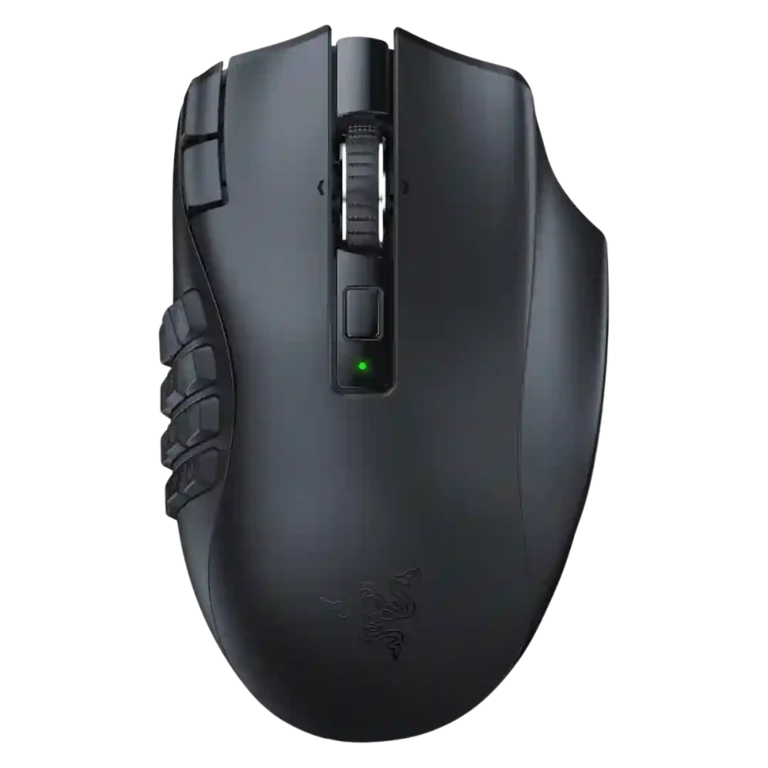
Choose the Razer Naga V2 HyperSpeed for MMO/MOBA macro control, strong wireless, and long battery life. Skip it if you need a light FPS mouse, left-handed shape, USB charging, or a lower-price all-rounder.
Best for right-handed MMO and MOBA players who want many programmable buttons, macro access, strong 2.4GHz wireless, and long battery life. It especially suits palm-grip users who value stability over ultralight movement.
Not for left-handed users, fingertip-grip players, or FPS-first gamers who want a light mouse for rapid flicks. It is also a poor fit for users who expect USB charging, cable mode, or broad RGB features.
The Razer Naga V2 HyperSpeed comes across as a focused MMO mouse rather than a universal gaming mouse. Reviewers consistently liked its dense programmable layout, useful macro control, strong 2.4GHz wireless performance, stable connection, long battery life, and accurate Focus Pro tracking. The main tradeoff is that the same body that supports a 12-button thumb grid also makes the mouse heavy, right-handed, and less appealing for FPS flicks or fingertip grip. Charging is another compromise: the AA battery can be swapped instantly, but several reviewers disliked the lack of USB charging or cable mode. For palm-grip MMO players, the evidence is strongly positive; for lightweight-mouse users, it is clearly more conditional.
Compared with other Gaming Mice, this product is above average in tilt gesture controls, MMO gaming suitability, polling rate, near average in side button quality, portability, below average in fingertip grip comfort, cable flexibility, charging convenience.
| Attribute | This product | Category average | Difference |
|---|---|---|---|
| fingertip grip comfort | 1.5 | 3.8 | -2.3 |
| cable flexibility | 1.5 | 3.7 | -2.2 |
| tilt gesture controls | 5.0 | 3.0 | +2.0 |
| charging convenience | 2.3 | 4.0 | -1.8 |
| handedness options | 1.0 | 2.6 | -1.6 |
| MMO gaming suitability | 4.8 | 3.4 | +1.3 |
| FPS gaming suitability | 3.0 | 4.2 | -1.2 |
| polling rate | 5.0 | 3.9 | +1.1 |
Choose Turtle Beach Kone II. It scores 5.0 vs 3.5 for left and right click quality, with a 4.3 overall score.
Choose Corsair Darkstar RGB. It scores 4.7 vs 3.3 for materials quality, with a 3.9 overall score.
Choose Razer Viper V3 Pro. It scores 4.7 vs 3.0 for FPS gaming suitability, with a 4.2 overall score.
Choose Razer Basilisk V3 Pro 35K. It scores 4.8 vs 3.9 for ergonomic design, with a 4.2 overall score.
Compared with Razer Naga V2 HyperSpeed
Yes. Multiple reviews praised it as a strong MMO mouse because of the 12-button thumb grid, broad programmability, macro support, and stable wireless performance.
Only conditionally. One review found DOOM easy enough, but the detailed testing warned that the 134g weight can cause fatigue during rapid flicks and 180-degree turns.
The 2.4GHz HyperSpeed connection was rated very highly. Reviewers described near-wired latency, consistent polling, and no disconnections or tracking stutters.
Bluetooth adds flexibility and longer battery life, but reviewers described it as laggier than 2.4GHz and better suited to productivity than competitive gaming.
It can be comfortable for palm-grip users, especially with 18-21cm hands, and one reviewer reported minimal wrist fatigue. Claw grip is more compromised, and fingertip grip was judged impractical.
The biggest drawbacks are the heavy right-handed shape and the AA-battery design. Several reviewers disliked the lack of USB charging or cable mode.
These are a few of the reviews included in our analysis.


Choose the ROG Harpe II Ace for ultralight FPS play, precise tracking, smooth glide, and web-based tuning. Skip it if you need palm-grip support, MMO buttons, onboard profiles, or long...
Pros: glide smoothness, weight
Cons: handedness options

Excellent tracking, comfortable right-handed ergonomics and a versatile scroll wheel make the Basilisk V3 a strong gaming and productivity mouse. Its substantial weight, fixed cable and sometimes over-sensitive automatic scrolling...
Pros: scroll wheel quality, RGB features
Cons: weight, handedness options

The L7 Pro delivers remarkably light handling, precise aiming and a grippy shell at a budget price. Stock skates are less impressive, and conflicting click-latency measurements warrant caution for latency-sensitive...
Pros: value for money, weight
Cons: wired connectivity

Best for ultra-light, competition-focused speed, precise tracking, stable wireless, and long battery life. Skip it if you need quieter clicks, left-handed support, Bluetooth, more buttons, or better value for casual...
Pros: value for money, weight
Cons: click noise, RGB features