If you want better charging convenience
Choose ASUS ROG Spatha X. It scores 4.6 vs 4.1 for charging convenience, with a 3.9 overall score.

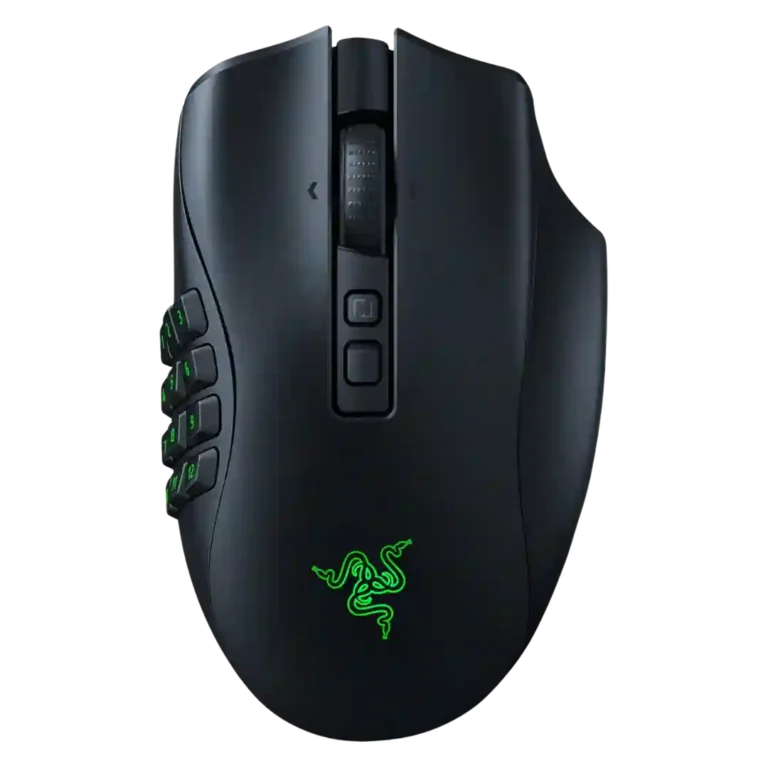
Choose the Razer Naga V2 Pro for MMO/MOBA control, swappable panels, strong wireless performance, and long battery life. Skip it if you want a light FPS mouse, low price, or no Synapse quirks.
Best for MMO and MOBA players who will actually use the swappable plates, programmable buttons, macros, and long wireless battery life. It also suits users who want one premium mouse for gaming plus shortcut-heavy productivity.
Not for buyers who mainly play fast FPS games, prefer ultralight mice, or want a simple low-cost mouse. It is also a weaker fit for people who dislike running Razer Synapse or managing many profiles.
Across the supplied reviews, the Razer Naga V2 Pro stands out as a highly adaptable MMO-first mouse with excellent tracking, strong 2.4GHz wireless performance, long battery life, and unusually deep button and scroll-wheel customization. The tradeoff is that its versatility adds complexity, weight, and cost: reviewers often loved the swappable panels and programmable controls, but several said the mouse felt heavy for fast FPS play or excessive for users who will not use the extra inputs. Synapse is powerful and usually usable, yet stability complaints around profiles, lighting, and background software keep it from feeling effortless. Overall reviewer sentiment is positive, especially for MMO players who will exploit the full control layout.
Compared with other Gaming Mice, this product is above average in tilt gesture controls, MMO gaming suitability, MOBA gaming suitability, near average in software usability, wireless performance, below average in weight, FPS gaming suitability, Bluetooth support.
| Attribute | This product | Category average | Difference |
|---|---|---|---|
| tilt gesture controls | 4.7 | 3.0 | +1.7 |
| weight | 2.8 | 4.1 | -1.3 |
| MMO gaming suitability | 4.7 | 3.5 | +1.2 |
| MOBA gaming suitability | 4.9 | 3.9 | +1.0 |
| side button quality | 4.5 | 3.7 | +0.8 |
| FPS gaming suitability | 3.3 | 4.1 | -0.9 |
| onboard memory | 5.0 | 3.9 | +1.1 |
| Bluetooth support | 2.7 | 3.6 | -0.9 |
Choose ASUS ROG Spatha X. It scores 4.6 vs 4.1 for charging convenience, with a 3.9 overall score.
Choose Logitech G502 X Lightspeed. It scores 5.0 vs 3.8 for profile switching, with a 4.2 overall score.
Choose Turtle Beach Kone II. It scores 5.0 vs 4.6 for battery life, with a 4.3 overall score.
Choose Corsair Scimitar Elite Wireless SE. It scores 5.0 vs 3.5 for cross-platform compatibility, with a 4.4 overall score.
Compared with Razer Naga V2 Pro
Yes. Reviewers repeatedly described it as a top MMO mouse, with the 12-button panel making spells, hotkeys, and macros easier to access after the learning curve.
It depends on the genre. Reviewers generally adapted to the weight for MMOs and general use, but many found it less ideal for fast FPS flicks.
The 2.4GHz wireless connection was consistently praised as responsive, stable, and close to wired performance. Bluetooth was treated more as a battery-saving or fallback mode.
Most reviewers praised the HyperScroll Pro wheel and its customization, with some calling it a standout feature. A few found the presets stiff, limiting, or more complex than necessary.
The mouse can work without deep software setup, but reviewers said Synapse unlocks much of the customization. Some also reported Synapse bugs, profile issues, or background-software frustration.
Reviewers saw the feature set as premium and often justified for MMO-focused users. Value is weaker if you will not use the swappable plates, extra buttons, dock support, or scroll-wheel customization.
These are a few of the reviews included in our analysis.



Choose the ROG Harpe II Ace for ultralight FPS play, precise tracking, smooth glide, and web-based tuning. Skip it if you need palm-grip support, MMO buttons, onboard profiles, or long...
Pros: glide smoothness, weight
Cons: handedness options

Excellent tracking, comfortable right-handed ergonomics and a versatile scroll wheel make the Basilisk V3 a strong gaming and productivity mouse. Its substantial weight, fixed cable and sometimes over-sensitive automatic scrolling...
Pros: scroll wheel quality, RGB features
Cons: weight, handedness options

The L7 Pro delivers remarkably light handling, precise aiming and a grippy shell at a budget price. Stock skates are less impressive, and conflicting click-latency measurements warrant caution for latency-sensitive...
Pros: value for money, weight
Cons: wired connectivity

Best for ultra-light, competition-focused speed, precise tracking, stable wireless, and long battery life. Skip it if you need quieter clicks, left-handed support, Bluetooth, more buttons, or better value for casual...
Pros: value for money, weight
Cons: click noise, RGB features