If you want better rechargeable battery
Choose Logitech MX Master 3S. It scores 5.0 vs 2.0 for rechargeable battery, with a 4.2 overall score.

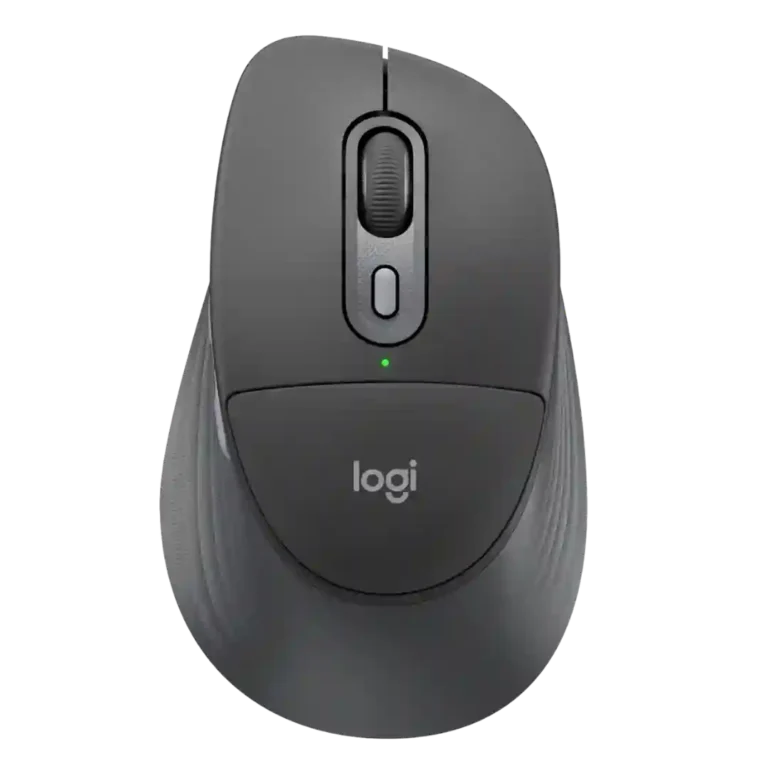
Choose it for quiet office work, multi-device switching, long battery life, and deep Logi Options+ customization. Skip it if you want a proven palm-support upgrade, competitive-gaming performance, a lighter travel mouse, or an included 2.4GHz receiver.
Office, study, and hybrid-work users who spend long hours at a desk, value quiet clicks and deep customization, or regularly move among multiple devices.
Competitive gamers, frequent travelers who want a lighter compact mouse, or buyers expecting the palm cushion to guarantee better support for every hand and grip.
The Signature Comfort Plus M850 L is strongest as a quiet, feature-rich productivity mouse. Reviewers consistently praise its long battery life, subdued clicks, grippy sides, solid build, adaptive scrolling, and flexible Logi Options+ customization. Multi-device switching is also a dependable advantage for mixed-device desks. The central tradeoff is the palm cushion: some testers found it transformative for all-day comfort, while others barely noticed it or wanted better wrist and lower-palm support. Its heavier body, office-grade polling, lack of onboard memory, and missing 2.4GHz receiver in the standard package further narrow the audience. Overall, it is a strong desk mouse, but not an automatic ergonomic upgrade for every hand or grip.
Compared with other Mice, this product is above average in click noise, grip comfort, hand size compatibility, near average in productivity performance, weight, below average in rechargeable battery, onboard memory, 2.4GHz connectivity.
| Attribute | This product | Category average | Difference |
|---|---|---|---|
| rechargeable battery | 2.0 | 4.8 | -2.8 |
| onboard memory | 1.5 | 3.8 | -2.3 |
| 2.4GHz connectivity | 2.3 | 4.4 | -2.1 |
| horizontal scrolling | 2.5 | 4.2 | -1.7 |
| portability | 2.3 | 3.9 | -1.6 |
| sensor performance | 3.0 | 4.6 | -1.6 |
| click noise | 4.9 | 3.6 | +1.3 |
| grip comfort | 5.0 | 3.9 | +1.1 |
Choose Logitech MX Master 3S. It scores 5.0 vs 2.0 for rechargeable battery, with a 4.2 overall score.
Choose Logitech MX Anywhere 3S. It scores 4.9 vs 2.3 for portability, with a 4.5 overall score.
Choose Razer Basilisk Mobile. It scores 4.5 vs 1.5 for onboard memory, with a 4.1 overall score.
Choose Turtle Beach Kone II Air. It scores 4.9 vs 2.3 for 2.4GHz connectivity, with a 4.3 overall score.
Products reviewers directly compared with this model, grouped into quick takeaways.
It depends on fit and grip. Some reviewers loved the pressure relief and all-day comfort, while others barely contacted the cushion or found its support negligible.
Yes. Quiet main clicks are one of the most consistently praised traits, although one reviewer noted that auxiliary buttons and the wheel click are louder.
No. It uses a replaceable disposable battery, and reviewers consistently praised the long runtime, though some disliked the lack of a rechargeable design.
Yes. Reviewers found Bluetooth device switching easy and generally stable, including smooth movement between Windows and Mac systems.
It is adequate for casual games, but reviewers do not recommend it for competitive play because its office-focused polling and sensor setup prioritize productivity.
Very useful for productivity. Reviewers praised its button remapping, app-specific shortcuts, Actions Ring, Smart Actions, and Flow, though some features require setup and the mouse lacks onboard memory.
These are a few of the reviews included in our analysis.
Logitech Signature Comfort Plus is a mid-range mouse with basic hardware and some advanced features, including customisable buttons. It’s...
Working from home sounded relaxing at first. But now, we all know, it is anything but that. Long meetings, hours of typing, switching between...
Looking for a comfortable, cushioned mouse for extended work sessions? Our Logitech Signature Comfort Plus M850 L review gets
Review of the Logitech Signature Comfort Plus M850 L universal wireless mouse: unboxing, setup and user experience.
The Logitech M850L is the brand's first mouse with a built-in cushioned palm rest and though it sounds gimmicky, it's actually useful. Here's...
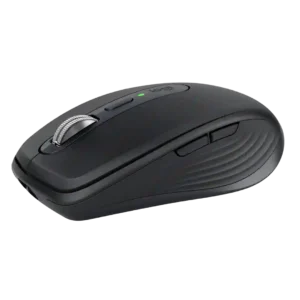
Best for travel, quiet shared spaces, precise any-surface tracking, and multi-device productivity. Skip it if you have large hands, want all-day palm support, or need a gaming-focused mouse.
Pros: motion consistency, programmable buttons
Cons: palm grip comfort, hand support

Choose it if you want a premium MMO/productivity mouse with 12 adjustable side buttons, strong battery life, and Stream Deck integration. Skip it if you need an ultralight FPS mouse,...
Pros: click latency, macro support
Cons: firmware reliability, tilt gesture controls

Choose the Kone II if you want a large, ergonomic mouse with deep customization and strong sensor performance. Skip it if you have small hands, need an ambidextrous mouse, or...
Pros: click latency, motion consistency
Cons: handedness options, portability

Good if you want a large, ergonomic wireless mouse with long battery life and deep customization. Skip it if you have small hands, prioritize ultralight FPS speed, or want the...
Pros: left and right click quality, software stability
Cons: polling rate, cross-platform compatibility