If you want better RGB features
Choose Razer Cobra Pro. It scores 4.6 vs 3.1 for RGB features, with a 4.0 overall score.

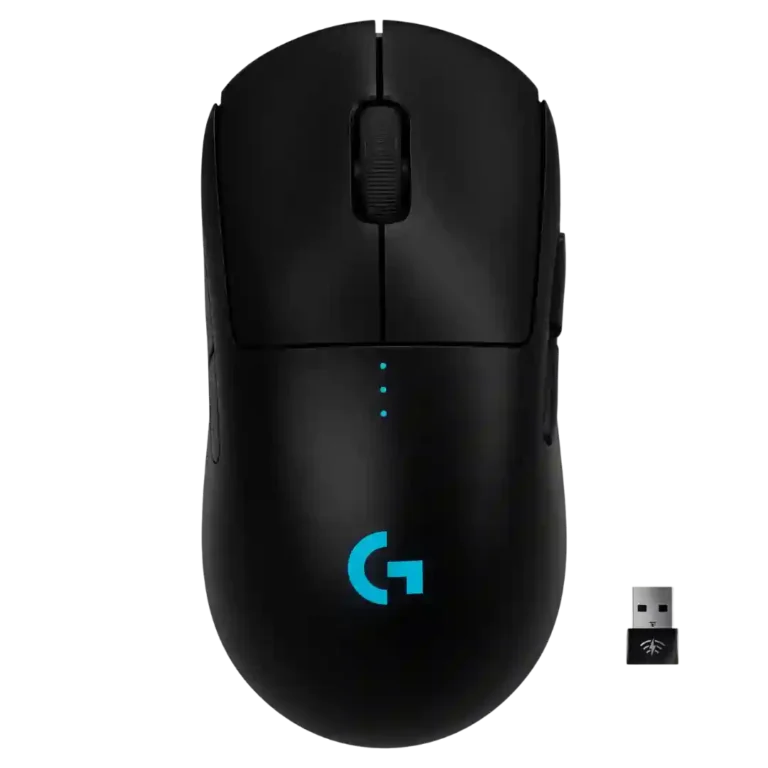
Choose the Logitech G Pro Wireless for FPS-focused, ambidextrous, cable-free play with excellent tracking and battery life. Skip it if you need MMO buttons, Bluetooth, top-tier value, or worry about long-term double-click issues.
Best for FPS and competitive players who want a light, ambidextrous wireless mouse with precise tracking, low latency, strong battery life, and customizable side buttons.
Not for MMO players or users who need many top-mounted controls, Bluetooth support, heavy weight tuning, flashy RGB, or the cheapest possible price-to-performance option.
Reviewers consistently frame the Logitech G Pro Wireless as a high-performance wireless gaming mouse built around a light 80g body, excellent HERO sensor, and responsive Lightspeed connection. Its safest strengths are FPS tracking, ambidextrous shape, removable side buttons, click feel, and battery life. The main tradeoff is that its pro-focused simplicity keeps the top surface clean but leaves fewer buttons, a bottom DPI control, basic RGB, and a plain plastic finish that does not always feel as premium as the price suggests. Long-term evidence is also split: some owners report years without double-clicking or connection issues, while others cite double-click failures, coating wear, skate wear, or occasional dropouts.
Compared with other Gaming Mice, this product is above average in handedness options, click noise, side button quality, near average in shape comfort, sensor performance, below average in MOBA gaming suitability, durability over time, switch durability.
| Attribute | This product | Category average | Difference |
|---|---|---|---|
| handedness options | 4.6 | 2.5 | +2.0 |
| MOBA gaming suitability | 2.0 | 4.0 | -2.0 |
| durability over time | 2.2 | 4.0 | -1.8 |
| switch durability | 2.6 | 4.3 | -1.6 |
| Bluetooth support | 2.3 | 3.6 | -1.3 |
| click noise | 4.8 | 3.5 | +1.3 |
| side button quality | 4.6 | 3.7 | +0.9 |
| palm grip comfort | 5.0 | 3.8 | +1.2 |
Choose Razer Cobra Pro. It scores 4.6 vs 3.1 for RGB features, with a 4.0 overall score.
Choose Logitech G PRO X Superlight 2. It scores 4.7 vs 2.6 for switch durability, with a 4.0 overall score.
Choose ASUS ROG Harpe Ace Mini. It scores 4.8 vs 3.4 for cable flexibility, with a 4.2 overall score.
Choose Logitech G Pro X2 Superstrike. It scores 4.8 vs 3.1 for premium feel, with a 4.0 overall score.
Compared with Logitech G Pro Wireless
Yes. Reviewers repeatedly praised its tracking, low latency, light weight, and wireless freedom for FPS titles and competitive aiming.
No in the review evidence overall. Multiple reviewers said the Lightspeed connection felt wired-like, lag-free, or impossible to distinguish from wired use.
Most reviewers found it strong, often aligning with roughly 48 to 60 hours depending on lighting. One long-term reviewer thought it needed charging too often for daily use.
Generally yes. Reviewers praised the safe ambidextrous shape for palm, claw, and fingertip use, though larger-hand palm users and some fingertip users noted fit caveats.
Usually not as a first choice. Some reviewers noted G-Shift or extra side buttons help, but others said the limited button count is not ideal for MMO players.
Yes, evidence is mixed. Some long-term users reported no double-clicking, but several reviews mentioned double-click issues, middle-click problems, coating wear, or skate wear.
Reviewers often felt the performance justified the premium, especially on sale, but the high original price and plain finish made value a recurring concern.
These are a few of the reviews included in our analysis.





Choose the ROG Harpe II Ace for ultralight FPS play, precise tracking, smooth glide, and web-based tuning. Skip it if you need palm-grip support, MMO buttons, onboard profiles, or long...
Pros: glide smoothness, weight
Cons: handedness options

Excellent tracking, comfortable right-handed ergonomics and a versatile scroll wheel make the Basilisk V3 a strong gaming and productivity mouse. Its substantial weight, fixed cable and sometimes over-sensitive automatic scrolling...
Pros: scroll wheel quality, RGB features
Cons: weight, handedness options

The L7 Pro delivers remarkably light handling, precise aiming and a grippy shell at a budget price. Stock skates are less impressive, and conflicting click-latency measurements warrant caution for latency-sensitive...
Pros: value for money, weight
Cons: wired connectivity

Best for ultra-light, competition-focused speed, precise tracking, stable wireless, and long battery life. Skip it if you need quieter clicks, left-handed support, Bluetooth, more buttons, or better value for casual...
Pros: value for money, weight
Cons: click noise, RGB features