If you want better compatibility
Choose Keychron Q3 HE. It scores 4.7 vs 3.0 for compatibility, with a 4.4 overall score.

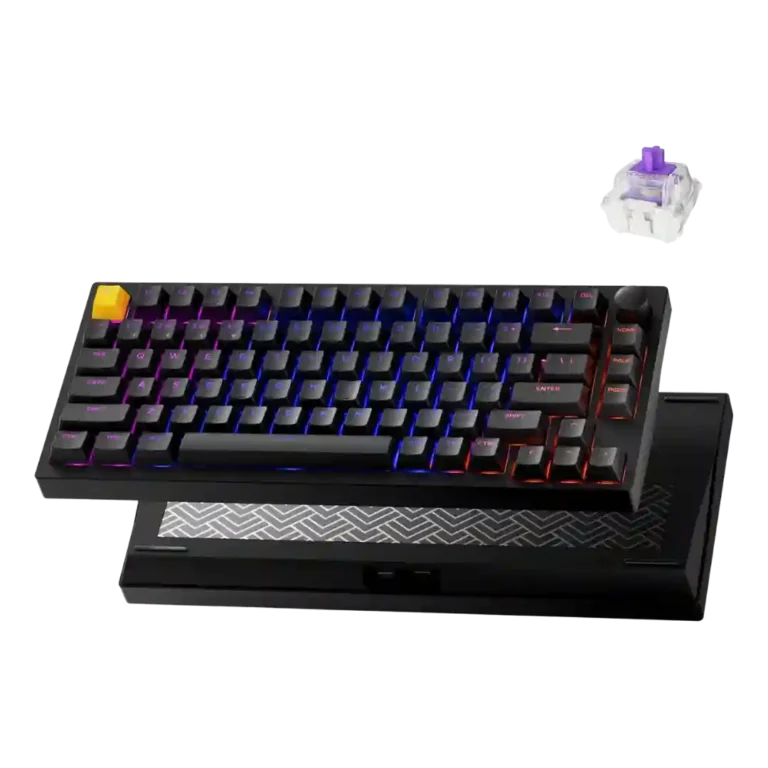
Choose the Lemokey P1 HE if you want a premium-feeling Hall-effect keyboard with responsive gaming controls, smooth typing, and strong value. Skip it if you need advanced per-key RGB, effortless Mac layout support, or a lightweight travel board.
Best for gamers and typists who want a sturdy 75% Hall-effect keyboard with responsive actuation control, strong typing feel, and flexible wired or wireless connectivity.
Not for users who need a light portable keyboard, advanced per-key RGB effects, seamless Mac-specific layout support, or broad mechanical-switch hot-swap freedom.
Across the review set, the Lemokey P1 HE lands as a high-value Hall-effect gaming keyboard with unusually strong crossover appeal. Reviewers consistently praised its aluminum build, responsive magnetic switches, rapid-trigger and analog features, smooth typing feel, useful wireless connectivity, and approachable browser-based software. The clearest tradeoff is that it favors performance, materials, and customization depth over polish in every corner: Mac users may need manual remapping, RGB control is more limited than some gaming rivals, and the heavy metal body hurts portability. Switch flexibility is also narrower than traditional hot-swap expectations. Even with those caveats, the evidence points to a premium-feeling board whose gaming features and typing quality justify its price.
Compared with other Gaming Keyboards, this product is above average in analog input support, value for money, stabilizer quality, near average in customization options, build quality, below average in per-key lighting control, RGB customization, layout options.
| Attribute | This product | Category average | Difference |
|---|---|---|---|
| per-key lighting control | 2.0 | 4.1 | -2.1 |
| RGB customization | 2.5 | 4.3 | -1.8 |
| analog input support | 4.8 | 3.1 | +1.6 |
| value for money | 4.8 | 3.6 | +1.1 |
| stabilizer quality | 5.0 | 3.9 | +1.1 |
| layout options | 3.0 | 4.0 | -1.0 |
| portability | 2.5 | 3.5 | -1.0 |
| rapid trigger support | 4.5 | 3.5 | +1.0 |
Choose Keychron Q3 HE. It scores 4.7 vs 3.0 for compatibility, with a 4.4 overall score.
Choose Epomaker G84 HE. It scores 4.9 vs 3.0 for layout options, with a 4.3 overall score.
Choose Keychron Q1 HE. It scores 4.9 vs 3.7 for design aesthetics, with a 4.2 overall score.
Choose ASUS ROG Azoth Extreme. It scores 5.0 vs 4.0 for key spacing, with a 4.1 overall score.
Products reviewers directly compared with this model, grouped into quick takeaways.
Yes. Reviewers praised its Hall-effect switches, adjustable actuation, rapid trigger, and responsive feel, especially for FPS-style movement and fast repeated inputs.
Typing impressions were strongly positive, with reviewers calling it smooth, comfortable, and close to ideal. One reviewer noted minor spring-ping resonance, but most sound and feel comments were favorable.
Mostly yes. Reviewers liked the browser-based Lemokey/Keychron Launcher and found it simple or streamlined, though some setup can take time and Mac remapping was criticized.
Wireless feedback was positive. Reviewers reported no issues with Bluetooth or 2.4GHz, and the keyboard also supports wired use.
Not really. Several reviewers emphasized the heavy aluminum body, making it better for staying on a desk than carrying in a backpack all day.
Only within a limited magnetic-switch ecosystem. Reviewers noted some hot-swap support, but also criticized that the board is limited to compatible Gateron Double-Rail magnetic switches.
These are a few of the reviews included in our analysis.


Good if you want a premium 96% Hall Effect keyboard for work and gaming with excellent build, sound, and customization. Skip it if you need cheaper esports-first speed, 8,000Hz polling,...
Pros: size and form factor, typing feel
Cons: switch options, portability

Choose it if competitive gaming speed, Rapid Trigger, and deep per-key customization matter more than extras. Skip it if you need wireless, dedicated arrows/media keys, adjustable height, or a lower-cost...
Pros: overall satisfaction, customization options
Cons: value for money, switch options

Good if you want a premium, quiet TKL Hall Effect keyboard for typing and gaming. Skip it if price, portability, 8,000Hz polling, or broad switch choice matters most.
Pros: build quality, switch feel
Cons: switch options

Good if you want a premium full-size Hall Effect keyboard with smooth switches, quiet sound, and deep customization. Skip it if you need a portable, budget-friendly board or broad switch...
Pros: build quality, keycap quality
Cons: switch options, portability