GameSir Pocket Taco

GameSir Pocket Taco Review

Brand: GameSir
Released: January 6, 2026
Updated: 3 months ago
3.6
Overall review score Expert score: 4.1 Customer score: 3.0
315
Review insights
49
Scored features
58
Total reviews
24 expert / 34 customer

Bottom Line

Choose the Pocket Taco for cheap, pocketable retro phone emulation with real buttons. Skip it if you need dependable D-pad precision, easy iPhone setup, or a full-size controller for modern games.

Best for

Best for retro emulation fans who want a cheap, pocketable Game Boy-style controller for short phone sessions and are comfortable adjusting emulator layouts or app settings.

Not for

Not for players who need flawless D-pad accuracy, analog sticks, modern landscape-game controls, or guaranteed plug-and-play iPhone and Delta setup.

Verdict

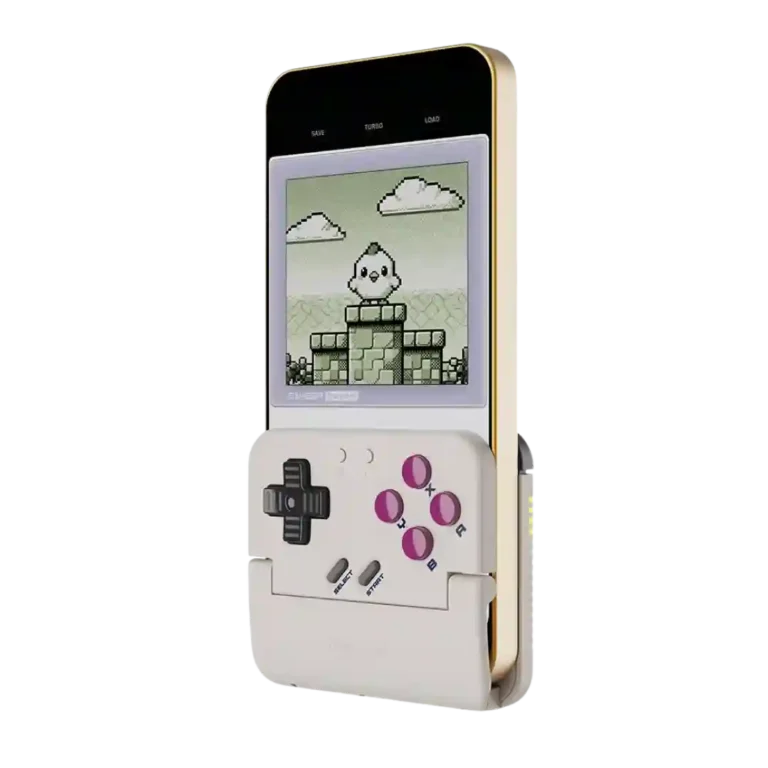
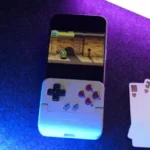
The GameSir Pocket Taco wins when it is treated as a tiny retro accessory rather than a universal mobile controller. Reviewers love the Game Boy feel, pocketable size, long battery life, included case, and the ability to charge a phone while playing. It is especially convincing with Game Boy, GBA, NES, SNES, DS, and arcade-style emulation. The tradeoff is reliability and fit: several customers report missed D-pad inputs, right-direction failures, awkward Delta or iPhone setup, and screen coverage that needs emulator skins or layout tweaks. At around $35, it is a charming buy for tolerant retro fans, but a risky one for precision platformers or anyone expecting effortless compatibility.

Feature Scorecards

Summary

49 reviewed features
  • Very positive 4.5-5.0
    10 (20%)
  • Positive 3.5-4.4
    22 (45%)
  • Neutral 2.5-3.4
    11 (22%)
  • Negative 1.5-2.4
    6 (12%)

Pros highlights

  • 4.4
    21 reviews strong consensus
    retro gaming suitability: 4.4, 21 reviews, strong consensus
    Retro gaming is the Pocket Taco’s clearest strength. When used for Game Boy, GBA, NES, SNES, DS, or arcade-style emulation, reviewers often described it as nostalgic, authentic, fun, and purpose-built.
  • 3.5
    17 reviews low consensus
    ease of setup: 3.5, 17 reviews, low consensus
    Setup ranges from seamless to frustrating. Some reviewers paired it in seconds, while others needed firmware, app setup, emulator skins, or repeated Bluetooth attempts before it behaved.
  • 4.8
    16 reviews strong consensus
    portability: 4.8, 16 reviews, strong consensus
    Portability is a major win. Reviewers repeatedly called it tiny, light, pocketable, easy to carry, and a controller they would actually bring along just in case.
  • 4.4
    16 reviews moderate consensus
    value for money: 4.4, 16 reviews, moderate consensus
    Value is strong when the hardware works. Reviewers repeatedly called the roughly $35 price affordable, a steal, or worth it, though defective D-pad reports make that value riskier for unlucky buyers.
  • 4.5
    13 reviews strong consensus
    battery life: 4.5, 13 reviews, strong consensus
    Battery life is one of the more consistently positive traits. Reviewers regularly cited long runtime, 30-hour claims, or simply not having to think about charging often.
  • 4.0
    13 reviews moderate consensus
    button quality: 4.0, 13 reviews, moderate consensus
    The face controls are often praised for nostalgic membrane feel and usable tactility, but several customers found them mushy, sticky, clicky, or only adequate.

Cons highlights

  • 3.4
    31 reviews low consensus
    overall satisfaction: 3.4, 31 reviews, low consensus
    Overall satisfaction is mixed but leans positive among experts and early enthusiasts, especially at the price. Customer reviews add a warning: the concept is loved, but D-pad defects and iPhone/app issues can turn it into a return.
  • 2.1
    14 reviews low consensus
    d-pad accuracy: 2.1, 14 reviews, low consensus
    D-pad accuracy is the most divisive trait. Experts often liked its pivot and texture, but many customers reported missed right inputs, false diagonals, barely registering presses, or unusable play.
  • 2.2
    7 reviews moderate consensus
    screen obstruction and app fit: 2.2, 7 reviews, moderate consensus
    The vertical form factor solves touchscreen smudging for retro games, but it can also cover the lower screen or require emulator skins and careful layout settings.
  • 2.4
    7 reviews strong consensus
    size suitability for different hand sizes: 2.4, 7 reviews, strong consensus
    Phone and hand-size fit is mixed. Smaller or normal setups can feel secure and compact, while larger hands, thick cases, or certain phone sizes make the controller cramped or imperfect.
  • 2.5
    7 reviews low consensus
    platformer control precision: 2.5, 7 reviews, low consensus
    Platformer precision is sharply split. Some reviewers played action platformers confidently, but customers with faulty D-pads said missed inputs made many genres or precision platformers unusable.
  • 2.6
    6 reviews moderate consensus
    companion app quality: 2.6, 6 reviews, moderate consensus
    The companion app is one of the bigger friction points. It enables testing, remapping, firmware, and screen tools, but reviewers also called it confusing, limited, or unhelpful.

Compared With Category Average

Compared with other Video Game Controller, this product is above average in firmware update support, portability, value for money, near average in retro gaming suitability, battery life, below average in consistency across sessions, d-pad accuracy, brand software support.

Comparison summary

48 compared features
  • Above average 0.4+ pts higher
    12 (25%)
  • Same as average within 0.3 pts
    15 (31%)
  • Below average 0.4+ pts lower
    21 (44%)

Largest category differences

Attribute This product Category average Difference
consistency across sessions 1.5 3.9 -2.4
d-pad accuracy 2.1 3.6 -1.5
brand software support 1.5 3.1 -1.6
overall satisfaction 3.4 4.4 -1.0
back button placement 2.6 4.0 -1.4
platformer control precision 2.5 3.8 -1.3
firmware update support 4.2 2.9 +1.3
size suitability for different hand sizes 2.4 3.6 -1.2

Consider This Instead

If you want better screen obstruction and app fit

Choose GameSir X5 Lite. It scores 4.3 vs 2.2 for screen obstruction and app fit, with a 4.1 overall score.

Compare

If you want better consistency across sessions

Choose GameSir G8 Galileo. It scores 4.1 vs 1.5 for consistency across sessions, with a 4.1 overall score.

Compare

If you want better back button placement

Choose GameSir G8 Plus MFi. It scores 5.0 vs 2.6 for back button placement, with a 4.2 overall score.

Compare

Compared in Reviews

Products reviewers directly compared with this model, grouped into quick takeaways.

8BitDo FlipPad

  • Compared: build and feature expectations The reviewer expects the Pocket Taco to compare well unless 8BitDo’s rival dramatically outdoes it.

Backbone One 2nd Gen

  • Better: native mobile gaming docked experience The Pocket Taco is framed as clunkier for native docked play than Backbone-style mobile controllers.

GameSir X2s Type-C

  • More expensive: price The Pocket Taco is called cheaper than GameSir’s own budget mobile controller pick.

FAQ

Is the GameSir Pocket Taco good for retro games?

Yes, that is its strongest use case. Reviewers liked it most for Game Boy, GBA, NES, SNES, DS, arcade, and other 2D-style games.

Does the D-pad work well?

Expert reviews often praised the D-pad, but many customers reported missed inputs, false diagonals, or right-direction failures. It is the biggest reliability risk.

Is setup easy on iPhone?

Sometimes, but not always. Some reviewers paired quickly, while others needed firmware updates, GameSir app steps, Delta skins, or repeated Bluetooth attempts.

Can you charge your phone while using it?

Yes, the bottom cutout is praised for phone charging during play. A few reviewers warned that thicker USB-C cable heads may not fit through the opening.

Is it comfortable for large hands?

It can feel cramped for larger hands or longer sessions. Several reviewers found it surprisingly comfortable, but others mentioned hand cramps or hard-to-reach shoulder buttons.

Can it replace a full mobile controller?

No. It lacks analog sticks and is built around vertical retro play, so modern 3D, FPS, cloud, or competitive games are better served by a full-size controller.

Sample Expert Reviews We Analyzed

These are a few of the reviews included in our analysis.
Video Reviews

Article Reviews

Top Video Game Controller to Consider

#1 Asus ROG Raikiri II
4.3

Best for precise TMR sticks, fast trigger stops, low-latency 2.4GHz play, and deep tuning. Skip it if you want a cheaper all-rounder, softer buttons for long sessions, or painless console-only...

Pros: overall satisfaction, button quality

Cons: d-pad accuracy, charging dock support

#2 Hyperkin The Competitor
4.3

Best for a comfortable, affordable Xbox/PC pad with precise Hall sticks, a PlayStation-style layout, and useful rear buttons. Skip it if wireless play, deep software tuning, or consistently top-tier D-pad...

Pros: overall satisfaction, value for money

Cons: wired performance, vibration quality
#3 Corsair Novablade Pro
4.3

Choose it if you want a premium, tournament-ready leverless controller with excellent 2.4GHz wireless, deep actuation tuning, and sturdy construction. Skip it if loud, tall buttons, a heavy chassis, or...

Pros: overall satisfaction, button quality

Cons: control placement, button noise

#4 GameSir Cyclone 2 Wireless Controller
4.2

Choose the GameSir Cyclone 2 if you want a low-cost PC/Switch/mobile controller with precise sticks, deep customization, and a dock. Skip it if Xbox/PS5 support, premium buttons, or flawless dock/battery...

Pros: value for money, charging dock support

Cons: d-pad feel, compatibility with Xbox