If you want better stick drift resistance
Choose GameSir G8 Galileo. It scores 5.0 vs 3.9 for stick drift resistance, with a 4.1 overall score.


Choose the X5 Lite for cheap, low-lag mobile and cloud gaming with strong Hall sticks. Skip it if you need analog triggers, a reliable D-pad, rumble, or roomy grips.
Best for budget-focused mobile gamers who want physical controls for Android, newer iPhones, small tablets, emulators, and cloud gaming without Bluetooth lag. It especially suits casual play and travel.
Not for players who need analog triggers, precise D-pad diagonals, rumble, a headphone jack, roomy full-size grips, or guaranteed compatibility with every unsupported mobile game.
The GameSir X5 Lite reads as a very strong budget mobile controller for players who want a simple USB-C grip for phones, foldables, small tablets, emulators, and cloud streaming. Reviewers consistently like the low price, minimal latency, light body, secure pad system, and Hall-effect sticks, which feel unusually good for this class. The tradeoff is that it is clearly a Lite product: the triggers are digital and often soft, the D-pad disappoints some retro and fighting-game players, pass-through charging is inconsistent, and large hands or thick cases can make fit less ideal. It is best viewed as an affordable everyday controller, not a premium replacement.
Compared with other Video Game Controller, this product is above average in companion app quality, compatibility with PlayStation, customer support, near average in ergonomics, phone grip and fit, below average in firmware update support, Hall effect stick performance, face button responsiveness.
| Attribute | This product | Category average | Difference |
|---|---|---|---|
| companion app quality | 4.1 | 3.3 | +0.9 |
| firmware update support | 1.8 | 3.1 | -1.3 |
| Hall effect stick performance | 4.0 | 4.8 | -0.8 |
| compatibility with PlayStation | 4.2 | 3.0 | +1.2 |
| face button responsiveness | 3.3 | 4.4 | -1.1 |
| analog trigger precision | 2.9 | 4.0 | -1.1 |
| stick drift resistance | 3.9 | 4.5 | -0.7 |
| input lag | 4.0 | 4.6 | -0.6 |
Choose GameSir G8 Galileo. It scores 5.0 vs 3.9 for stick drift resistance, with a 4.1 overall score.
Choose GameSir G8 Plus MFi. It scores 5.0 vs 1.8 for firmware update support, with a 4.2 overall score.
Choose GameSir G7 Pro 8K. It scores 4.7 vs 4.0 for Hall effect stick performance, with a 4.2 overall score.
Choose GameSir Cyclone 2 Wireless Controller. It scores 5.0 vs 3.5 for size suitability for different hand sizes, with a 4.2 overall score.
Products reviewers directly compared with this model, grouped into quick takeaways.
Yes. Value is the strongest pattern across reviews, with many calling it unusually capable around the $35 range.
Reviewers generally report little to no lag because it connects directly over USB-C instead of Bluetooth.
Yes. The sticks are widely praised for smooth, precise movement and drift resistance, though some players wish they were taller.
The main complaints are digital membrane triggers, inconsistent D-pad diagonals, compact grips for large hands, and uneven pass-through charging performance.
Often, but not always. The swappable pads help with many cases and tablets, while thick cases, pop sockets, camera bumps, or USB-C alignment can still cause issues.
Mostly yes. Reviewers like it for Steam Link, Game Pass, Android emulators, iPad Mini use, and portable streaming, though D-pad-heavy retro games can expose its weakest control.
These are a few of the reviews included in our analysis.






Best for precise TMR sticks, fast trigger stops, low-latency 2.4GHz play, and deep tuning. Skip it if you want a cheaper all-rounder, softer buttons for long sessions, or painless console-only...
Pros: overall satisfaction, button quality
Cons: d-pad accuracy, charging dock support

Best for a comfortable, affordable Xbox/PC pad with precise Hall sticks, a PlayStation-style layout, and useful rear buttons. Skip it if wireless play, deep software tuning, or consistently top-tier D-pad...
Pros: overall satisfaction, value for money
Cons: wired performance, vibration quality
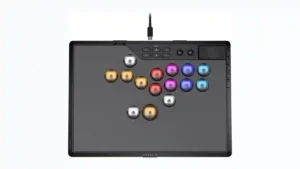
Choose it if you want a premium, tournament-ready leverless controller with excellent 2.4GHz wireless, deep actuation tuning, and sturdy construction. Skip it if loud, tall buttons, a heavy chassis, or...
Pros: overall satisfaction, button quality
Cons: control placement, button noise

Choose the GameSir Cyclone 2 if you want a low-cost PC/Switch/mobile controller with precise sticks, deep customization, and a dock. Skip it if Xbox/PS5 support, premium buttons, or flawless dock/battery...
Pros: value for money, charging dock support
Cons: d-pad feel, compatibility with Xbox