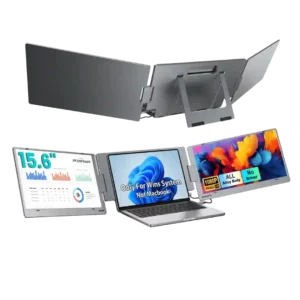
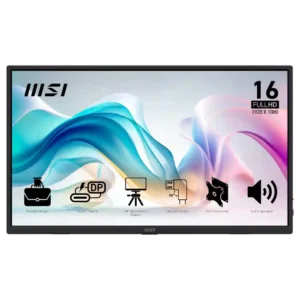
KYY X90E
Where It Has the Edge
- build quality is 4.8 vs 4.5. Build quality is a major strength, with repeated praise for the metal frame, sturdy kickstand hardware, robust hinges,...

Scorata scores summarize analyzed review evidence on a 1–5 scale; they are not laboratory measurements or a simple average of customer star ratings. Feature scores summarize the reviews covering that feature. The overall score averages feature scores within each review, then combines review averages. When both expert and customer evidence are available, those two groups receive equal weight. Products can have different review coverage, so small score gaps do not establish a winner.
Recommendations prioritize important features for the category, with a score of at least 3.5, a gap of at least 0.25 points and at least two supporting reviews per product. Features with widely varying scores or broad connectivity contexts are excluded from recommendations. These safeguards do not establish statistical significance.
Quick verdict
The review evidence points to a tradeoff: build quality versus reflection handling and design and aesthetics. Choose according to which strengths matter more to you; the overall score alone does not settle that choice.
Choose KYY X90E for build quality.
Choose MSI Pro MP165 E6 for reflection handling and design and aesthetics.
Scores are out of 5. Missing scores mean missing review evidence, not a missing feature.
The ALT-DP USB-C connection is a strong part of the design because it can carry video to both screens through one cable. The catch is that the host device needs a compatible video-capable USB-C or Thunderbolt port.
USB-C display connectivity can be convenient, but at least one owner found it unreliable across phones and foldables.
Contrast is described as decent rather than exceptional. The expert review finds it usable for the class but clearly behind higher-end OLED or MicroLED displays.
Contrast is typical budget IPS fare: usable for work, but dark scenes look washed out and gaming lacks depth.
The per-screen controls are useful, but usability is mixed. One expert calls the button-driven OSD painful and dated, while a customer likes being able to adjust each screen independently.
The OSD ranges from comprehensive and useful to slightly awkward or limited depending on the reviewer. Most appreciate having real controls at this price.
Color reproduction is generally liked, with reviewers describing rich, vibrant colors and one expert calling the included colors very accurate. That strength does not fully offset the narrower overall gamut.
Color quality is good enough for everyday use to some owners, but measured accuracy and muted hues make it unsuitable for color-critical work.
Brightness is usually considered sufficient indoors and several customers call the screens bright, but outdoor performance is less convincing. One reviewer specifically found the display too dull for daylight use.
Brightness is usually adequate to good for indoor portable use, with several owners praising it, though some reviewers find it mediocre or too dim for demanding lighting.
Most reviewers find the screens clear, crisp, and pleasant for everyday work, with several strong customer endorsements of picture quality. Expert testing is more measured, especially for professional color work, and a small number of customers report display failures.
Picture quality is widely considered good for basic portable-monitor use, especially text and productivity. Expert measurements expose muted color, average contrast, and budget-grade limitations.
Delivery presentation is positively described in the one direct customer report. The unit arrived in a premium-looking box and was considered very well packaged.
A small number of units arrived scratched, making delivery condition an occasional concern despite the included sleeve.
Port selection is restrictive. The expert review notes that the two USB-C ports are effectively split between connection and power, limiting multi-device use and leaving no HDMI input.
Port selection is a major strength, especially full-size HDMI plus USB-C. Several owners specifically value avoiding mini-HDMI adapters.
The single-cable USB-C setup is one of the X90E’s clearest wins. Reviewers repeatedly praise the cleaner desk, fewer adapters, and ability to run both extra screens from one connection.
Right-angle cables can keep setups tidy, but side port placement and short included cables create clutter or reach problems in some desk layouts.
Console gaming gets one enthusiastic customer endorsement. That user reports successful PS5 use and says Call of Duty looked excellent on the screens.
Console compatibility is generally solid, especially with Nintendo Switch, though some setups require HDMI plus external power.
The 1080p resolution is generally judged well matched to the 15.6-inch panels. Reviewers repeatedly describe text and images as crisp, with several saying the resolution is more than adequate for everyday work.
1080p is generally sharp enough at 15.6 inches and works well for office tasks, but some buyers find it merely adequate compared with higher-resolution screens.
Portability gets unusually split feedback. Many owners say it folds neatly, fits a laptop bag, and travels well, while experts and several customers point out the roughly 2.1–2.2 kg weight and large footprint.
Portability is one of the strongest points: reviewers repeatedly praise the thin, light chassis and easy fit in laptop bags or travel setups.
Competitive gaming is not a strong fit. Reviewers point to the 60Hz refresh rate and explicitly frame the screens as productivity displays rather than gaming-focused panels.
Competitive gaming is a poor fit because the 60Hz ceiling limits fast-paced play. Casual gaming is much less problematic.
The inexpensive IPS panels are considered serviceable for productivity, but they do not match OLED or MicroLED for contrast and color performance. The panel choice is practical rather than premium.
The IPS-LCD panel is practical and affordable, but it looks dull and washed out next to OLED alternatives.
The matte surface handles reflections well. Reviewers say it helps with bright environments and cuts distracting reflections, even though brightness itself can still be insufficient outdoors.
The matte anti-glare finish works well indoors and in bright offices, though extreme sunlight can still overwhelm the panel.
The kickstand and screen articulation are usually praised for flexible positioning, rotation, and stable desk use. Still, several customers report fit or stability issues, including a low working height, loose-feeling support, or limited recline.
The kickstand is generally sturdy and useful across several angles, though portrait use is awkward and some owners prefer an external stand.
The 60Hz refresh rate is acceptable for productivity but a clear limitation for gaming. The one direct evaluation calls it a little unfortunate.
The 60Hz refresh rate is acceptable for office work and casual use but repeatedly criticized as a gaming limitation at this price.
Viewing angles are consistently strong. IPS panel behavior keeps colors stable from the side, which reviewers say works well for collaboration and shared viewing.
Viewing angles are a strength of the IPS panel and are specifically praised for off-axis use.
Color gamut is adequate for normal office work but limited for demanding creative use. Expert testing and commentary both point to coverage that falls short of professional photo or video needs.
Color gamut is the most consistent picture-quality compromise. Reviewers repeatedly describe muted or limited color, even though a handful of owners are satisfied with everyday vibrancy.
Productivity is the X90E’s strongest use case. Reviewers repeatedly say the extra screens make spreadsheets, documents, coding, meetings, presentations, and travel work much easier by reducing constant window switching.
Productivity is the monitor's clearest use case. Reviewers repeatedly praise it for second-screen work, coding, travel, editing, field diagnostics, and flexible office setups.
Overall satisfaction is strongly positive, with many customers calling the X90E a game changer, a great travel tool, or an easy recommendation. The minority of negative reviews center on incompatibility, instability, dimness, or defective units.
Most owners are highly satisfied and many recommend it enthusiastically. Negative experiences cluster around specific failures, weak audio, or price-to-performance expectations.
Speaker feedback is weak overall. One customer says the built-in audio is barely worth having, while another only notes that sound is somewhat louder than an older version.
Speaker feedback is one of the clearest weaknesses: several reviewers call the sound tinny, muffled, or terrible, though a minority find it decent for basic audio.
The X90E generally feels more premium than its price suggests. Metal construction, a tactile frame, and the overall high-tech presentation are repeatedly praised.
Some reviewers find the monitor noticeably sturdier and more premium-feeling than cheap rivals, despite its plastic construction.
Sharpness is a standout in the customer feedback that addresses it directly. Reviewers call the screens super sharp and the images super crisp.
Sharpness is a strong point for productivity: text and small UI elements are repeatedly described as crisp and easy to read.
Power-state behavior is a serious concern in the small amount of feedback available. Two customers report unwanted shutoffs, power loss, or entry into power-saving mode during use.
Power behavior is usually uneventful, but one failed unit repeatedly shut itself off and another owner reported spontaneous power-offs.
Support feedback is mostly positive, with several customers praising quick, responsive, helpful service. One defective-unit buyer reports the opposite experience and criticizes the lack of live support.
Warranty value is praised in markets with strong coverage, but one international buyer reports no support outside the United States.
Long-term reliability is the most uneven area. Some owners expect years of use or report dependable travel performance, while others describe screens that shut off, lose power, fail to work, or arrive effectively unusable.
Most owners report reliable plug-and-play operation, but a few units suffered severe early failures. Reliability therefore looks good overall with a meaningful outlier risk.
Value is widely praised, especially for getting two extra screens and a stand in one package at a comparatively modest price. A few negative experiences with brightness, stability, or outright failure make the value less convincing for those buyers.
Value is a major strength when priced near or below $100, with many owners calling it a bargain. A few reviewers think cheaper rivals offer better picture or hardware for the money.
Setup is overwhelmingly described as quick and simple, often just plugging in one USB-C cable and extending the displays in Windows. The main exception is a defective-unit complaint that turned setup into hours of frustration.
Setup is usually one of the easiest parts of ownership, with many plug-and-play experiences over USB-C or HDMI. Cable and power quirks create a few notable exceptions.
Software and device compatibility is mixed. The main X90E expert reviews emphasize Windows and video-capable USB-C or Thunderbolt requirements, while some customers report seamless operation and others say the monitor would not work with their laptops.
MSI Display Kit adds convenient software controls and presets, giving the monitor more flexibility than many budget rivals.
The dual 15.6-inch panels are a major attraction for buyers who want more workspace. Customers especially appreciate the larger viewing area for documents and multitasking.
The 15.6-inch size is widely appreciated for compact desks and travel, though one buyer found it too small for their purpose.
Build quality is a major strength, with repeated praise for the metal frame, sturdy kickstand hardware, robust hinges, and a generally durable feel. Several owners describe it as solid or even tank-like.
Build impressions are mostly positive, with many owners finding it sturdy and travel-ready. A few reviewers criticize the flexible plastic chassis, so expectations should stay budget-minded.
The design is generally well received, from the subtle gunmetal finish to the foldable, adjustable form. Reviewers tend to see it as clean and polished rather than purely utilitarian.
The design is simple and functional, with slim bezels and a thinner profile earning positive comments rather than luxury-level praise.
Eye comfort receives limited but very positive feedback. One reviewer specifically describes the screen as easy on the eyes and clean for reading while traveling.
The eye-comfort package is well regarded, with anti-flicker, low-blue-light, and matte treatment framed as useful for long work sessions.
Adaptive Sync is absent, and that limitation contributes to merely tolerable motion performance. Buyers focused on variable-refresh gaming should look elsewhere.
Aspect-ratio control has one mixed customer assessment. The adjustment is said to need work, though the reviewer also says it can be worked around.
Black levels are acceptable for a budget IPS portable display, but they are visibly behind OLED depth.
The included sleeve is appreciated for travel and some owners find it durable, but others worry that it lacks rigid protection or enough cushioning.
Documentation is a weak point. Owners describe the printed instructions as sparse or poor pictographics, forcing some setup discovery on their own.
Ghosting can be severe in scrolling and video according to one owner, making motion-heavy use a risk.
The monitor itself can stay cool over long sessions, but one owner reported alarming laptop heat when powering it over USB-C.
Motion clarity is only average at 60Hz, and one owner reports heavy ghosting. It is fine for static work but not ideal for motion-heavy viewing.
PC gaming works acceptably for casual play, but the display is not built for high-refresh gaming.
The quoted 4ms response time is considered sufficient for casual gaming and video, not for serious competitive play.
Luminance uniformity is a weak point. The expert test found noticeably darker corners, making the backlighting less even than the rest of the picture-quality results.
Single-player and slower-paced games are acceptable on the 60Hz panel, but cinematic quality is held back by muted color and limited contrast.
Tripod mounting is a standout practical extra for field work, cameras, presentations, and flexible positioning. Multiple reviewers call it a meaningful advantage over cheap portable monitors.
USB-C pass-through charging is a useful convenience, letting connected phones or computers receive power while the monitor is in use.
VESA mounting is a differentiator in expert reviews, but customer reports conflict sharply, with some saying the two-hole implementation is not secure or not truly VESA-compatible.
VRR support is effectively absent, which limits gaming smoothness and flexibility.

Best for exceptional 4K HDR, accurate color, fast 240Hz gaming, and strong work connectivity. Skip it if you need built-in speakers, ultrawide immersion, television-level HDR brightness, or a budget-friendly upgrade.
Pros: brightness, reflection handling
Cons: cable management

Best for class-leading 360Hz ultrawide motion, spectacular HDR, deep blacks, and unusually strong work-and-play connectivity. Skip it if you want 4K-like text sharpness, a matte screen, or the best value...
Pros: overall satisfaction, sharpness
Cons: Resolution, cable management

Choose the RD280UG for coding, trading, writing, or creative work that benefits from a tall, sharp 3:2 screen and strong eye-care features. Skip it for serious HDR, color-critical creation, esports,...
Pros: productivity versatility, aspect ratio
Cons: value for money, competitive gaming suitability

Best for fast 1440p OLED gaming, deep blacks, and a flexible stand at a bargain sale price. Skip it for bright rooms, USB-C/KVM productivity, or the reassurance of a three-year...
Pros: color gamut, overall picture quality
Cons: brightness, HDR performance