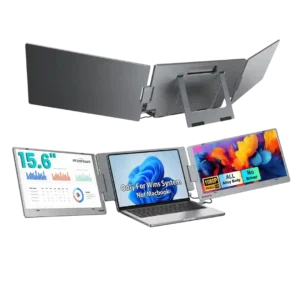

KYY X90E
Where It Has the Edge
- reflection handling is 4.3 vs 2.3. The matte surface handles reflections well. Reviewers say it helps with bright environments and cuts distracting reflections, even...

Scorata scores summarize analyzed review evidence on a 1–5 scale; they are not laboratory measurements or a simple average of customer star ratings. Feature scores summarize the reviews covering that feature. The overall score averages feature scores within each review, then combines review averages. When both expert and customer evidence are available, those two groups receive equal weight. Products can have different review coverage, so small score gaps do not establish a winner.
Recommendations prioritize important features for the category, with a score of at least 3.5, a gap of at least 0.25 points and at least two supporting reviews per product. Features with widely varying scores or broad connectivity contexts are excluded from recommendations. These safeguards do not establish statistical significance.
Quick verdict
The review evidence points to a tradeoff: reflection handling versus color gamut and Resolution. Choose according to which strengths matter more to you; the overall score alone does not settle that choice.
Choose KYY X90E for reflection handling.
Choose espresso Pro 15 for color gamut and Resolution.
Scores are out of 5. Missing scores mean missing review evidence, not a missing feature.
Console gaming gets one enthusiastic customer endorsement. That user reports successful PS5 use and says Call of Duty looked excellent on the screens.
Consoles such as Switch 2 can be cumbersome to connect because docking, specialized HDMI conversion, and additional power may be necessary.
The matte surface handles reflections well. Reviewers say it helps with bright environments and cuts distracting reflections, even though brightness itself can still be insufficient outdoors.
The glossy glass behaves almost like a mirror near windows and lights. Bright output offsets some glare without eliminating reflections.
Luminance uniformity is a weak point. The expert test found noticeably darker corners, making the backlighting less even than the rest of the picture-quality results.
Measured uniformity is generally solid, with a few small hotspots detected instrumentally rather than visible in routine use.
Color gamut is adequate for normal office work but limited for demanding creative use. Expert testing and commentary both point to coverage that falls short of professional photo or video needs.
Adobe RGB coverage is a major draw for portable creative work, and colors often look rich and vibrant. Measurements vary between publications, especially in P3 coverage.
Speaker feedback is weak overall. One customer says the built-in audio is barely worth having, while another only notes that sound is somewhat louder than an older version.
The integrated speakers are a recurring weak point: reviewers describe thin, quiet, sometimes scratchy audio that falls behind laptop speakers.
The kickstand and screen articulation are usually praised for flexible positioning, rotation, and stable desk use. Still, several customers report fit or stability issues, including a low working height, loose-feeling support, or limited recline.
The magnetic Stand+ is a standout, offering height, tilt, landscape, portrait, and above-laptop placements in a compact folding form.
The inexpensive IPS panels are considered serviceable for productivity, but they do not match OLED or MicroLED for contrast and color performance. The panel choice is practical rather than premium.
The IPS LCD is bright and sharp, but reviewers comparing it with OLED portable screens miss the richer image punch of OLED.
Overall satisfaction is strongly positive, with many customers calling the X90E a game changer, a great travel tool, or an easy recommendation. The minority of negative reviews center on incompatibility, instability, dimness, or defective units.
Most accounts enthusiastically recommend the high-end portable experience, especially for work. Price, glare, color precision, and gaming limitations keep it from being universal.
Port selection is restrictive. The expert review notes that the two USB-C ports are effectively split between connection and power, limiting multi-device use and leaving no HDMI input.
Only two USB-C ports are provided. They suit modern laptops but complicate HDMI-only computers and some console connections.
Portability gets unusually split feedback. Many owners say it folds neatly, fits a laptop bag, and travels well, while experts and several customers point out the roughly 2.1–2.2 kg weight and large footprint.
Its thin aluminum body is easy to pack, especially compared with the larger Pro 17. The heavier metal construction and stand are the main carrying compromises.
The 1080p resolution is generally judged well matched to the 15.6-inch panels. Reviewers repeatedly describe text and images as crisp, with several saying the resolution is more than adequate for everyday work.
The 4K panel is a defining strength: text, images, and fine interface details look much crisper than on ordinary 1080p portable screens.
The 60Hz refresh rate is acceptable for productivity but a clear limitation for gaming. The one direct evaluation calls it a little unfortunate.
The 60Hz ceiling is the main display-speed compromise. It is adequate for office tasks and video but disappointing for fast games and motion-sensitive workflows.
The X90E generally feels more premium than its price suggests. Metal construction, a tactile frame, and the overall high-tech presentation are repeatedly praised.
Aluminum construction, hardened glass, and restrained styling give this portable monitor a noticeably high-end feel.
The single-cable USB-C setup is one of the X90E’s clearest wins. Reviewers repeatedly praise the cleaner desk, fewer adapters, and ability to run both extra screens from one connection.
One USB-C connection reduces desktop cable clutter and keeps a laptop-and-monitor arrangement tidy.
Sharpness is a standout in the customer feedback that addresses it directly. Reviewers call the screens super sharp and the images super crisp.
Clear, precise lettering and crisp graphics make this a credible companion to high-resolution laptop displays.
Viewing angles are consistently strong. IPS panel behavior keeps colors stable from the side, which reviewers say works well for collaboration and shared viewing.
The IPS panel keeps colors and brightness consistent when viewed from the side, even at unusually wide angles.
Long-term reliability is the most uneven area. Some owners expect years of use or report dependable travel performance, while others describe screens that shut off, lose power, fail to work, or arrive effectively unusable.
An extended desk-use account reports stable connections and a trouble-free workflow, though long-term durability remains less established.
Value is widely praised, especially for getting two extra screens and a stand in one package at a comparatively modest price. A few negative experiences with brightness, stability, or outright failure make the value less convincing for those buyers.
The premium materials, stand, and 4K touch display explain the price, but several reviewers still find it expensive compared with simpler portable alternatives.
Setup is overwhelmingly described as quick and simple, often just plugging in one USB-C cable and extending the displays in Windows. The main exception is a defective-unit complaint that turned setup into hours of frustration.
Compatible laptops generally connect with one cable and little effort. Consoles and some low-power devices require more adapters or power connections.
Color reproduction is generally liked, with reviewers describing rich, vibrant colors and one expert calling the included colors very accurate. That strength does not fully offset the narrower overall gamut.
Opinions vary: some see convincing color beside a MacBook, while others notice red and sRGB deviations. Critical projects may still need calibration or a reference screen.
Brightness is usually considered sufficient indoors and several customers call the screens bright, but outdoor performance is less convincing. One reviewer specifically found the display too dull for daylight use.
Unusually high brightness for a portable monitor is consistently praised. It helps in cafés, offices, and some outdoor situations, although glare still matters.
Contrast is described as decent rather than exceptional. The expert review finds it usable for the class but clearly behind higher-end OLED or MicroLED displays.
The LCD gives solid daytime contrast and readable off-axis images, though it lacks the stronger visual impact of OLED competitors.
Most reviewers find the screens clear, crisp, and pleasant for everyday work, with several strong customer endorsements of picture quality. Expert testing is more measured, especially for professional color work, and a small number of customers report display failures.
Sharp 4K images, vivid colors, and strong brightness stand out. The LCD cannot match every OLED or Apple display for contrast and color fidelity.
The per-screen controls are useful, but usability is mixed. One expert calls the button-driven OSD painful and dated, while a customer likes being able to adjust each screen independently.
Touch gestures give access to basic brightness, contrast, and volume controls, but precision is limited and the gesture can fail in nonstandard orientations.
Software and device compatibility is mixed. The main X90E expert reviews emphasize Windows and video-capable USB-C or Thunderbolt requirements, while some customers report seamless operation and others say the monitor would not work with their laptops.
The Flow and Jot utilities add window layouts, cursor alignment, auto-rotation, and note tools. Their useful polish is occasionally undercut by rotated-screen control glitches.
The design is generally well received, from the subtle gunmetal finish to the foldable, adjustable form. Reviewers tend to see it as clean and polished rather than purely utilitarian.
Reviewers admire the clean, understated black aluminum-and-glass design, which looks professional beside premium laptops.
Build quality is a major strength, with repeated praise for the metal frame, sturdy kickstand hardware, robust hinges, and a generally durable feel. Several owners describe it as solid or even tank-like.
The solid aluminum chassis and protective glass feel substantially more durable than budget plastic portable monitors. Reviewers repeatedly call the construction premium.
The dual 15.6-inch panels are a major attraction for buyers who want more workspace. Customers especially appreciate the larger viewing area for documents and multitasking.
The 15.6-inch format strikes a practical balance between a useful extra workspace and the ability to fit beside a laptop in a bag or cramped location.
Magnetic stands, cases, protectors, and pens offer flexibility, but compatibility is not universal; Apple Pencil is specifically reported not to work.
Aspect-ratio control has one mixed customer assessment. The adjustment is said to need work, though the reviewer also says it can be worked around.
With Flow installed, rotation and positioning can update automatically as the screen moves, easing changes between portrait and landscape work.
Music lacks convincing bass and dynamic range through the monitor speakers, making separate speakers or headphones preferable.
Competitive gaming is not a strong fit. Reviewers point to the 60Hz refresh rate and explicitly frame the screens as productivity displays rather than gaming-focused panels.
Delivery presentation is positively described in the one direct customer report. The unit arrived in a premium-looking box and was considered very well packaged.
The stand can position the screen above a laptop, creating a surprisingly efficient two-screen arrangement on tiny tables and narrow work surfaces.
Macs, Windows laptops, tablets, and some phones work well over USB-C, though iPad touch control and the power needs of smaller devices impose limits.
Full-size laptops often drive the display directly, while cameras, handhelds, and phones can require additional power and adapters.
The bundled Stand+ and USB-C cable are welcome additions, with basic cleaning materials included in the package.
EspressoFlow adds touch, display positioning, and rotation to Mac workflows. macOS itself remains less finger-friendly than Windows, and some touch apps can lag.
A slim package with thoughtfully arranged contents contributes to the polished unboxing experience.
Games run on a connected computer, but the 60Hz display can tear in fast action and is better suited to less demanding play.
The 4K detail and Adobe RGB range help with retouching and previews on location. Some reviewers still keep truly color-sensitive images on their primary Mac or iPad screen.
The compact 4K screen packs in exceptionally fine detail, keeping text and images sharp even at close viewing distances.
Compatible machines recognize the screen quickly after the cable is plugged in, keeping setup nearly frictionless.
Drawing monitor power from the host can markedly shorten a laptop’s untethered runtime, especially during prolonged work.
Productivity is the X90E’s strongest use case. Reviewers repeatedly say the extra screens make spreadsheets, documents, coding, meetings, presentations, and travel work much easier by reducing constant window switching.
The glossy glass keeps the picture clear and polished, but it also trades away the light-diffusing qualities of a matte finish.
Power-state behavior is a serious concern in the small amount of feedback available. Two customers report unwanted shutoffs, power loss, or entry into power-saving mode during use.
Voice reproduction sounds hollow or scratchy, and the overall audio is too thin to recommend for serious listening.
The magnetic attachment and sturdy metal base are repeatedly praised for holding the display steady, including during touchscreen use.
The stand is sturdy and more compact than older versions, but its substantial metal weight noticeably increases the load in a travel bag.
The optional pen supports quick sketches and annotations, and Jot feels responsive. It is an extra purchase and not a drop-in replacement for an Apple Pencil.
Single-cable power is impressively convenient on full-power laptops, but phones, tablets, and consoles sometimes require a second power supply or cause brightness cutoffs.
The pair of right-side USB-C ports are easy to reach for the host cable and an additional accessory or power connection.
Vivid, punchy colors help photos, graphics, and video feel lively rather than washed out.
The ALT-DP USB-C connection is a strong part of the design because it can carry video to both screens through one cable. The catch is that the host device needs a compatible video-capable USB-C or Thunderbolt port.
It is not presented as a strong option for HDR video, reflecting its productivity-focused LCD performance.
Fine display tuning is limited: the touch menu exposes basic sliders without numerical precision, presets, or a gamma adjustment.
Automatic setup and display-positioning tools make the companion software helpful without a complicated driver process.
Touch is convenient for navigation, shortcuts, and pen interaction. Some Mac applications exhibit lag or awkwardly small targets, while Windows interaction is typically smoother.
Eye comfort receives limited but very positive feedback. One reviewer specifically describes the screen as easy on the eyes and clean for reading while traveling.
The lower chin is less prominent than on earlier 15-inch models, contributing to a cleaner, more current appearance.
Running the display from a laptop can cut battery endurance significantly; reviewers recommend planning for wall or battery-bank power on longer sessions.
Support feedback is mostly positive, with several customers praising quick, responsive, helpful service. One defective-unit buyer reports the opposite experience and criticizes the lack of live support.

This 360Hz QD-OLED ultrawide delivers exceptional gaming motion, vibrant HDR and dramatically cleaner text. Its high price, less-than-perfect bright-room blacks and occasional HDR dimming are the main reasons to hesitate.
Pros: color gamut, contrast
Cons: value for money, Resolution

A huge, sharp ultrawide workspace and unusually capable Thunderbolt dock make the U4025QW outstanding for demanding productivity and editing. Its high price, modest HDR, and imperfect motion handling keep it...
Pros: overall picture quality, color accuracy
Cons: value for money, built-in speakers

Lightning-fast 360Hz OLED gaming, rich color and an unusually flexible USB-C/KVM setup are the big draws. Strong room lighting, limited full-screen HDR brightness and static-content burn-in concerns keep it from...
Pros: color gamut, overall satisfaction
Cons: reflection handling, VRR flicker

The 27-inch 4K OLED picture is exceptionally crisp and responsive, with useful USB-C and KVM extras. Its high price, oversized stand, and bright-room compromises limit its appeal.
Pros: sharpness, overall satisfaction
Cons: value for money, VRR flicker