Other features
AI scene optimization
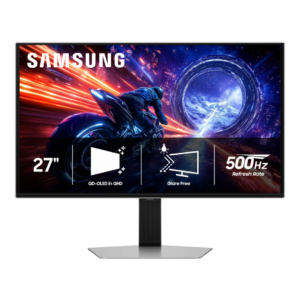
Samsung Odyssey OLED G6 G60SFNo score yet
ASUS ROG Swift OLED PG27AQWP-W
4.0
AI picture tools are available as helpful extras for players who like assistance adjusting game visuals.
Aspect ratio
Samsung Odyssey OLED G6 G60SF
4.5
The familiar 16:9 layout was described as an easy, comfortable transition from typical gaming monitors.
ASUS ROG Swift OLED PG27AQWP-WNo score yet
Backlight bleed control
Samsung Odyssey OLED G6 G60SF
5.0
OLED’s self-emissive pixels eliminate the backlight-bleed look seen on LCDs, producing pitch-black edges and dark scenes.
ASUS ROG Swift OLED PG27AQWP-WNo score yet
Blooming control
Samsung Odyssey OLED G6 G60SFNo score yet
ASUS ROG Swift OLED PG27AQWP-W
5.0
OLED pixel-level illumination avoids the halos and backlight bleed that can affect locally dimmed LCDs.
Built-in RGB lighting
Samsung Odyssey OLED G6 G60SFNo score yet
ASUS ROG Swift OLED PG27AQWP-W
3.3
ROG lighting is configurable and visually distinctive, although some consider the projected desk logo unnecessary.
Curved screen immersion
Samsung Odyssey OLED G6 G60SF
2.0
The flat 27-inch format cannot match the wraparound immersion of a large curved display, making it less compelling for buyers prioritizing cinematic scale.
ASUS ROG Swift OLED PG27AQWP-WNo score yet
Desk footprint
Samsung Odyssey OLED G6 G60SFNo score yet
ASUS ROG Swift OLED PG27AQWP-W
2.0
The tripod-style feet make a design statement but occupy more room than a compact monitor base.
Device compatibility
Samsung Odyssey OLED G6 G60SFNo score yet
ASUS ROG Swift OLED PG27AQWP-W
5.0
Device compatibility works especially well in supported gaming or desktop scenarios, helping the monitor feel polished and capable.
Dual-mode versatility
Samsung Odyssey OLED G6 G60SFNo score yet
ASUS ROG Swift OLED PG27AQWP-W
2.6
Switching to 720Hz is convenient and appealing for niche esports scenarios, but the 720p image is soft, with a larger loss of detail than the speed improvement can usually justify.
ELMB strobing quality
Samsung Odyssey OLED G6 G60SFNo score yet
ASUS ROG Swift OLED PG27AQWP-W
3.2
Black-frame insertion improves motion clarity at 120Hz or 270Hz, but requires fixed refresh, disables VRR and HDR, and can add inconvenience or latency.
Firmware updateability
Samsung Odyssey OLED G6 G60SFNo score yet
ASUS ROG Swift OLED PG27AQWP-W
4.0
Firmware updateability is useful in some scenarios, but there are compromises to consider depending on how the display is used.
Gaming feature selection
Samsung Odyssey OLED G6 G60SFNo score yet
ASUS ROG Swift OLED PG27AQWP-W
5.0
There is a generous range of controls for esports play, picture adjustment and screen care.
Gaming image presets
Samsung Odyssey OLED G6 G60SF
3.5
Samsung provides useful picture controls and flexible sRGB/HDR adjustment, but the preset selection is thinner than some competitors and certain advanced settings are not very explicit.
ASUS ROG Swift OLED PG27AQWP-WNo score yet
GPU demands
Samsung Odyssey OLED G6 G60SFNo score yet
ASUS ROG Swift OLED PG27AQWP-W
2.2
Very high frame rates take exceptional hardware, so an ordinary PC may not exploit the advertised refresh.
HDR highlight detail
Samsung Odyssey OLED G6 G60SFNo score yet
ASUS ROG Swift OLED PG27AQWP-W
4.2
Small highlights can look unusually bright and impactful, although brighter settings may exaggerate their luminance or lose some intended tonal balance.
HDR mode versatility
Samsung Odyssey OLED G6 G60SFNo score yet
ASUS ROG Swift OLED PG27AQWP-W
4.3
Several HDR presets offer different compromises between output and accuracy; Console HDR receives particular praise for balancing them.
Heat management
Samsung Odyssey OLED G6 G60SF
5.0
Samsung’s passive heat-pipe and graphite-based cooling is repeatedly praised for keeping the OLED panel under control without active fan noise. The thermal system also supports burn-in prevention and longevity.
ASUS ROG Swift OLED PG27AQWP-WNo score yet
Image scaling
Samsung Odyssey OLED G6 G60SFNo score yet
ASUS ROG Swift OLED PG27AQWP-W
2.3
The 720p boosted mode looks soft, while some pixel-mapping choices behave inconsistently with Windows timing.
Integrated power supply
Samsung Odyssey OLED G6 G60SFNo score yet
ASUS ROG Swift OLED PG27AQWP-W
5.0
The internal power supply avoids an extra desk or floor power brick and simplifies cable clutter.
Overdrive tuning
Samsung Odyssey OLED G6 G60SF
5.0
OLED response remains consistent across refresh rates, so there is no need to retune overdrive as frame rate changes.
ASUS ROG Swift OLED PG27AQWP-WNo score yet
Photo editing
Samsung Odyssey OLED G6 G60SFNo score yet
ASUS ROG Swift OLED PG27AQWP-W
3.5
The wide color gamut helps with images, although Adobe RGB specialists must profile the display rather than rely on a built-in mode.
Pixel density
Samsung Odyssey OLED G6 G60SFNo score yet
ASUS ROG Swift OLED PG27AQWP-W
3.0
Around 110 pixels per inch is sensible for 27-inch gaming, though text and fine desktop details look less crisp than on 4K displays.
Power efficiency
Samsung Odyssey OLED G6 G60SFNo score yet
ASUS ROG Swift OLED PG27AQWP-W
4.0
Electricity use compares reasonably with other extreme-refresh OLEDs, though 280Hz Tandem models use less.
Productivity versatility
Samsung Odyssey OLED G6 G60SF
3.9
The G6 can handle office and creative work well thanks to strong color and usable 1440p sharpness, but opinions are split for all-day productivity. Text fringing, burn-in risk, missing USB-C, and limited smart/software features make it less ideal as a one-monitor-for-everything setup.
ASUS ROG Swift OLED PG27AQWP-WNo score yet
Proximity sensor responsiveness
Samsung Odyssey OLED G6 G60SFNo score yet
ASUS ROG Swift OLED PG27AQWP-W
4.8
The Neo Proximity Sensor is praised for blanking the screen when you leave and restoring the image promptly when you return, reducing idle static-image exposure.
Screen coating clarity
Samsung Odyssey OLED G6 G60SFNo score yet
ASUS ROG Swift OLED PG27AQWP-W
5.0
TrueBlack Glossy removes coating grain and gives games a crisp, vivid look. Its exceptional clarity is the main reason to prefer this screen finish over matte alternatives.
Shadow detail
Samsung Odyssey OLED G6 G60SFNo score yet
ASUS ROG Swift OLED PG27AQWP-W
3.5
Near-black shades can be crushed in several gaming and HDR presets, even though other testing found dark-scene detail pleasing. Adjustments improve visibility but can alter the whole image.
Stand stability
Samsung Odyssey OLED G6 G60SFNo score yet
ASUS ROG Swift OLED PG27AQWP-W
5.0
The substantial stand keeps the display stable with minimal wobble.
Text fringing
Samsung Odyssey OLED G6 G60SFNo score yet
ASUS ROG Swift OLED PG27AQWP-W
3.2
The updated subpixel arrangement makes text clearer than on older WOLEDs, but small fonts can still look soft or show colored edges compared with LCDs.
Ultrawide gaming experience
Samsung Odyssey OLED G6 G60SF
2.5
The 27-inch flat screen cannot deliver the scale or wraparound immersion of an ultrawide, so buyers focused on cinematic field of view have stronger alternatives.
ASUS ROG Swift OLED PG27AQWP-WNo score yet
USB hub functionality
Samsung Odyssey OLED G6 G60SF
3.8
The two-port USB hub is useful for peripherals and hard-to-reach PCs, but it is a basic hub rather than a high-end docking solution.
ASUS ROG Swift OLED PG27AQWP-WNo score yet
VESA mount compatibility
Samsung Odyssey OLED G6 G60SF
4.5
Standard 100x100 VESA support makes it easy to move the display onto a third-party arm or wall mount when the included stand is not ideal.
ASUS ROG Swift OLED PG27AQWP-WNo score yet
VRR compatibility
Samsung Odyssey OLED G6 G60SF
5.0
VRR support covers both AMD FreeSync Premium Pro and Nvidia G-Sync compatibility, giving broad GPU flexibility.
ASUS ROG Swift OLED PG27AQWP-WNo score yet
VRR flicker
Samsung Odyssey OLED G6 G60SFNo score yet
ASUS ROG Swift OLED PG27AQWP-W
2.5
Dark scenes can flicker when frame rates swing. The anti-flicker option reduces the problem but does not completely remove it and may limit the top refresh rate.
Performance
Automatic brightness adjustment
Samsung Odyssey OLED G6 G60SFNo score yet
ASUS ROG Swift OLED PG27AQWP-W
4.3
The uniform-brightness setting keeps the image steadier when content changes, at the cost of limiting maximum output.
Automatic brightness limiting
Samsung Odyssey OLED G6 G60SFNo score yet
ASUS ROG Swift OLED PG27AQWP-W
3.0
Uniform Brightness mode can stop distracting window-size-related luminance changes, but maximum brightness or certain features can reintroduce noticeable shifts.
Black equalizer performance
Samsung Odyssey OLED G6 G60SFNo score yet
ASUS ROG Swift OLED PG27AQWP-W
5.0
Dynamic shadow boost can raise dark-area visibility without brightening the entire image as aggressively as a simple fixed boost.
Display-mode switching reliability
Samsung Odyssey OLED G6 G60SFNo score yet
ASUS ROG Swift OLED PG27AQWP-W
4.3
The 720Hz mode is conveniently accessible from a dedicated control and can return to native operation without complicated setup, though some pixel-mapping configurations need attention.
Esports display mode
Samsung Odyssey OLED G6 G60SFNo score yet
ASUS ROG Swift OLED PG27AQWP-W
4.5
A simulated 24.5-inch screen helps players who prefer a compact competitive field of view.
Picture-in-picture and picture-by-picture
Samsung Odyssey OLED G6 G60SF
3.0
Picture-in-picture is absent, but one tester considered that a minor limitation on a 27-inch display where split-screen use is less valuable.
ASUS ROG Swift OLED PG27AQWP-WNo score yet
Controls and connectivity
Color calibration controls
Samsung Odyssey OLED G6 G60SFNo score yet
ASUS ROG Swift OLED PG27AQWP-W
4.8
Precision color and gamut adjustments can yield very accurate sRGB performance.
HDR adjustment controls
Samsung Odyssey OLED G6 G60SFNo score yet
ASUS ROG Swift OLED PG27AQWP-W
5.0
Brightness and additional image settings remain adjustable in HDR when the appropriate option is enabled, allowing useful control over the effect.
HDR tone mapping accuracy
Samsung Odyssey OLED G6 G60SFNo score yet
ASUS ROG Swift OLED PG27AQWP-W
3.0
Default HDR modes can track content closely, but turning brightness up can overbrighten highlights, while other modes roll off or darken details.
Ownership and support
Content aspect-ratio support
Samsung Odyssey OLED G6 G60SFNo score yet
ASUS ROG Swift OLED PG27AQWP-W
4.3
Smaller simulated screen areas and 4:3 or square ratios offer practical flexibility for esports and retro titles.
Dolby Vision support
Samsung Odyssey OLED G6 G60SFNo score yet
ASUS ROG Swift OLED PG27AQWP-W
2.0
Dolby Vision is missing, even though HDR10 works over supported console inputs.
Tracking and training
Gamma tracking
Samsung Odyssey OLED G6 G60SFNo score yet
ASUS ROG Swift OLED PG27AQWP-W
3.6
Greyscale tracking is acceptable overall but varies with preset and factory settings.
Comfort and build
Screen size
Samsung Odyssey OLED G6 G60SF
3.3
The 27-inch size is ideal for close-up competitive play and smaller desks, but it can feel modest for the price and lacks the cinematic scale of larger displays.
ASUS ROG Swift OLED PG27AQWP-WNo score yet