Scorata scores summarize analyzed review evidence on a 1–5 scale; they are not laboratory measurements or a simple average of customer star ratings. Feature scores summarize the reviews covering that feature. The overall score averages feature scores within each review, then combines review averages. When both expert and customer evidence are available, those two groups receive equal weight. Products can have different review coverage, so small score gaps do not establish a winner.
Recommendations prioritize important features for the category, with a score of at least 3.5, a gap of at least 0.25 points and at least two supporting reviews per product. Features with widely varying scores or broad connectivity contexts are excluded from recommendations. These safeguards do not establish statistical significance.
Quick verdict
What each product is best for
The review evidence points to a tradeoff: color gamut and competitive gaming suitability versus build quality and screen size. Choose according to which strengths matter more to you; the overall score alone does not settle that choice.
Choose MSI MPG 322UR QD-OLED X24 for color gamut and competitive gaming suitability.
Choose KYY X90E for build quality and screen size.
Why these recommendations?
MSI MPG 322UR QD-OLED X24
Where It Has the Edge
color gamut is 4.9 vs 2.8. QD-OLED delivers near-complete DCI-P3 coverage and strong HDR color volume. The wide gamut is excellent for games, movies,...
competitive gaming suitability is 4.2 vs 2.3. The 240Hz refresh rate, fast response, and low native lag make competitive games look and feel excellent. Dedicated...
Resolution is 4.9 vs 4.6. The 3840×2160 resolution is exceptionally sharp at 32 inches and clearly more detailed than 27-inch QHD displays. It...
KYY X90E
Where It Has the Edge
build quality is 4.8 vs 4.3. Build quality is a major strength, with repeated praise for the metal frame, sturdy kickstand hardware, robust hinges,...
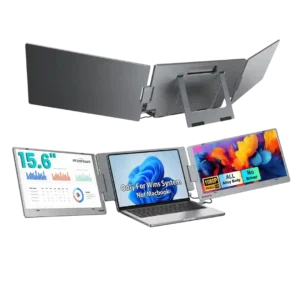
screen size is 5.0 vs 4.6. The dual 15.6-inch panels are a major attraction for buyers who want more workspace. Customers especially appreciate the...
design and aesthetics is 4.5 vs 4.2. The design is generally well received, from the subtle gunmetal finish to the foldable, adjustable form. Reviewers tend...
MSI MPG 322UR QD-OLED X244.4 overall score
KYY X90E4.2 overall score
Compare features
Scores are out of 5. Missing scores mean missing review evidence, not a missing feature.
Scored on both products
Other features
Screen uniformity
MSI MPG 322UR QD-OLED X24
5.0
Color and luminance uniformity are near-flawless, with only minor measured deviation across the panel. The default corner-uniformity setting should be left at its highest level.
KYY X90E
2.0
Luminance uniformity is a weak point. The expert test found noticeably darker corners, making the backlighting less even than the rest of the picture-quality results.
Port selection
MSI MPG 322UR QD-OLED X24
5.0
The port selection is comprehensive and premium, with DisplayPort 2.1a, two HDMI 2.1 inputs, USB-C power delivery, USB-A ports, KVM support, and a headphone jack.
KYY X90E
2.5
Port selection is restrictive. The expert review notes that the two USB-C ports are effectively split between connection and power, limiting multi-device use and leaving no HDMI input.
Color gamut
MSI MPG 322UR QD-OLED X24
4.9
QD-OLED delivers near-complete DCI-P3 coverage and strong HDR color volume. The wide gamut is excellent for games, movies, and some creative work, especially when the correct color-space mode is selected.
KYY X90E
2.8
Color gamut is adequate for normal office work but limited for demanding creative use. Expert testing and commentary both point to coverage that falls short of professional photo or video needs.
Cable management
MSI MPG 322UR QD-OLED X24
3.0
USB-C can reduce clutter in a desktop-and-laptop setup, but the physical cable-routing grommet does not prevent sag. The hanging power cable is particularly difficult to hide.
KYY X90E
5.0
The single-cable USB-C setup is one of the X90E’s clearest wins. Reviewers repeatedly praise the cleaner desk, fewer adapters, and ability to run both extra screens from one connection.
Panel type
MSI MPG 322UR QD-OLED X24
5.0
The fourth-generation Penta Tandem QD-OLED panel is the core attraction, delivering richer color, deeper blacks, and higher usable brightness than older 32-inch QD-OLED models. Reviewers see it as one of the closest approaches yet to an ideal flat-panel display.
KYY X90E
3.0
The inexpensive IPS panels are considered serviceable for productivity, but they do not match OLED or MicroLED for contrast and color performance. The panel choice is practical rather than premium.
Refresh rate
MSI MPG 322UR QD-OLED X24
4.5
At 4K, 240Hz is considered a practical upper limit because few systems can exceed it in modern games. It is smooth enough for competitive play while preserving the detail needed for cinematic titles.
KYY X90E
2.5
The 60Hz refresh rate is acceptable for productivity but a clear limitation for gaming. The one direct evaluation calls it a little unfortunate.
Competitive gaming suitability
MSI MPG 322UR QD-OLED X24
4.2
The 240Hz refresh rate, fast response, and low native lag make competitive games look and feel excellent. Dedicated esports players may still prefer a smaller 27-inch, lower-resolution monitor with a higher refresh rate.
KYY X90E
2.3
Competitive gaming is not a strong fit. Reviewers point to the 60Hz refresh rate and explicitly frame the screens as productivity displays rather than gaming-focused panels.
Built-in speakers
MSI MPG 322UR QD-OLED X24
1.0
There are no built-in speakers, so buyers need headphones, a soundbar, or separate desk speakers.
KYY X90E
2.8
Speaker feedback is weak overall. One customer says the built-in audio is barely worth having, while another only notes that sound is somewhat louder than an older version.
Aspect ratio
MSI MPG 322UR QD-OLED X24
4.0
Selectable screen-size modes and a forced 4:3 option give competitive players extra flexibility. The feature is useful for shrinking the active image without changing monitors.
KYY X90E
2.5
Aspect-ratio control has one mixed customer assessment. The adjustment is said to need work, though the reviewer also says it can be worked around.
Stand adjustability
MSI MPG 322UR QD-OLED X24
4.5
The stand provides smooth height, tilt, and swivel adjustment and feels unusually sturdy for a 32-inch display. Rotation is limited and full portrait orientation is not available.
KYY X90E
3.9
The kickstand and screen articulation are usually praised for flexible positioning, rotation, and stable desk use. Still, several customers report fit or stability issues, including a low working height, loose-feeling support, or limited recline.
Console gaming compatibility
MSI MPG 322UR QD-OLED X24
4.6
Modern consoles receive strong 4K/120Hz, VRR, HDMI 2.1, and CEC support. Black-frame insertion cannot be used from a 120Hz console signal, and Dolby Vision is absent.
KYY X90E
5.0
Console gaming gets one enthusiastic customer endorsement. That user reports successful PS5 use and says Call of Duty looked excellent on the screens.
Resolution
MSI MPG 322UR QD-OLED X24
4.9
The 3840×2160 resolution is exceptionally sharp at 32 inches and clearly more detailed than 27-inch QHD displays. It also demands a powerful GPU for high-refresh gaming.
KYY X90E
4.6
The 1080p resolution is generally judged well matched to the 15.6-inch panels. Reviewers repeatedly describe text and images as crisp, with several saying the resolution is more than adequate for everyday work.
Sharpness
MSI MPG 322UR QD-OLED X24
4.7
4K pixel density and the glossy coating produce crisp text and fine detail. The triangular subpixel layout can create faint fringing at very close range, but most reviewers found it negligible at normal distance.
KYY X90E
5.0
Sharpness is a standout in the customer feedback that addresses it directly. Reviewers call the screens super sharp and the images super crisp.
Viewing angles
MSI MPG 322UR QD-OLED X24
5.0
OLED viewing angles remain excellent, with consistent image quality from off-center positions. Reviewers found the picture exceptional from virtually any normal angle.
KYY X90E
4.8
Viewing angles are consistently strong. IPS panel behavior keeps colors stable from the side, which reviewers say works well for collaboration and shared viewing.
Productivity versatility
MSI MPG 322UR QD-OLED X24
4.6
The 32-inch 4K workspace, crisp text, USB-C power delivery, and KVM make it useful for office work as well as gaming. Several reviewers felt it could replace separate work and entertainment monitors.
KYY X90E
4.8
Productivity is the X90E’s strongest use case. Reviewers repeatedly say the extra screens make spreadsheets, documents, coding, meetings, presentations, and travel work much easier by reducing constant window switching.
Reflection handling
MSI MPG 322UR QD-OLED X24
4.4
DarkArmor substantially reduces the purple tint and improves perceived blacks in bright rooms while retaining a sharp glossy image. Direct light can still reveal some tint and reflections, so darker placement remains ideal.
KYY X90E
4.3
The matte surface handles reflections well. Reviewers say it helps with bright environments and cuts distracting reflections, even though brightness itself can still be insufficient outdoors.
Premium feel
MSI MPG 322UR QD-OLED X24
4.8
The panel performance, sturdy stand, connectivity, and feature set create a convincingly premium package. The ordinary-looking exterior plastics are the main visual exception.
KYY X90E
4.9
The X90E generally feels more premium than its price suggests. Metal construction, a tactile frame, and the overall high-tech presentation are repeatedly praised.
Performance
On-screen display usability
MSI MPG 322UR QD-OLED X24
4.8
The central joystick makes the on-screen menu quick and intuitive to navigate. MSI’s menus are praised for useful controls and easy access to the most important settings.
KYY X90E
3.0
The per-screen controls are useful, but usability is mixed. One expert calls the button-driven OSD painful and dated, while a customer likes being able to adjust each screen independently.
Contrast
MSI MPG 322UR QD-OLED X24
5.0
Per-pixel illumination produces effectively infinite contrast with no blooming around bright objects. Reviewers consistently describe the contrast as dramatically better than LCD alternatives.
KYY X90E
4.0
Contrast is described as decent rather than exceptional. The expert review finds it usable for the class but clearly behind higher-end OLED or MicroLED displays.
Brightness
MSI MPG 322UR QD-OLED X24
4.5
Full-screen SDR brightness is now strong enough for normal office and gaming use, and dynamic mode can push smaller highlights higher. HDR remains bright for a monitor, though it still cannot match the searing output of premium OLED televisions or bright mini-LED displays.
KYY X90E
4.1
Brightness is usually considered sufficient indoors and several customers call the screens bright, but outdoor performance is less convincing. One reviewer specifically found the display too dull for daylight use.
Color accuracy
MSI MPG 322UR QD-OLED X24
4.6
Factory calibration is excellent in the accurate color modes, with several reviewers measuring near-professional results. The default wide-gamut presentation can look oversaturated for unmanaged SDR content, and a slight warm bias may remain.
KYY X90E
4.6
Color reproduction is generally liked, with reviewers describing rich, vibrant colors and one expert calling the included colors very accurate. That strength does not fully offset the narrower overall gamut.
DisplayPort connectivity
MSI MPG 322UR QD-OLED X24
5.0
Full-bandwidth DisplayPort 2.1a supports uncompressed 4K at 240Hz and is the preferred PC connection. Reviewers praised MSI for avoiding bandwidth compromises.
KYY X90E
5.0
The ALT-DP USB-C connection is a strong part of the design because it can carry video to both screens through one cable. The catch is that the host device needs a compatible video-capable USB-C or Thunderbolt port.
Comfort and build
Eye comfort features
MSI MPG 322UR QD-OLED X24
3.7
A low-blue-light mode and uniform-luminance control can make long text sessions more comfortable. At maximum output, large white windows may still feel harsh on the eyes.
KYY X90E
5.0
Eye comfort receives limited but very positive feedback. One reviewer specifically describes the screen as easy on the eyes and clean for reading while traveling.
Build quality
MSI MPG 322UR QD-OLED X24
4.3
The stand and chassis generally feel sturdy and premium, with especially strong praise for the improved stand. A few reviewers still found the exterior plastics visually cheaper than the panel’s price suggests.
KYY X90E
4.8
Build quality is a major strength, with repeated praise for the metal frame, sturdy kickstand hardware, robust hinges, and a generally durable feel. Several owners describe it as solid or even tank-like.
Screen size
MSI MPG 322UR QD-OLED X24
4.6
The 32-inch screen creates strong immersion and provides useful desktop space without becoming an ultrawide. Its size is excellent for cinematic games, though some esports players may prefer a smaller panel.
KYY X90E
5.0
The dual 15.6-inch panels are a major attraction for buyers who want more workspace. Customers especially appreciate the larger viewing area for documents and multitasking.
Design and aesthetics
MSI MPG 322UR QD-OLED X24
4.2
The understated black design, thin bezels, and restrained RGB are widely liked. The overall look is clean rather than flashy, though one reviewer thought the dark plastics appeared too ordinary.
KYY X90E
4.5
The design is generally well received, from the subtle gunmetal finish to the foldable, adjustable form. Reviewers tend to see it as clean and polished rather than purely utilitarian.
Ownership and support
Reliability over time
MSI MPG 322UR QD-OLED X24
3.9
OLED Care features, presence sensing, pixel shifting, panel refresh routines, and a three-year burn-in warranty improve confidence. Burn-in remains the main long-term uncertainty, especially for heavy static desktop use.
KYY X90E
2.9
Long-term reliability is the most uneven area. Some owners expect years of use or report dependable travel performance, while others describe screens that shut off, lose power, fail to work, or arrive effectively unusable.
Value for money
MSI MPG 322UR QD-OLED X24
4.0
Reviewers generally consider the monitor strong value within the premium OLED category because it undercuts some same-panel rivals and includes extensive connectivity. It is still expensive, and cheaper trimmed-down models or discounted older QD-OLEDs may be better bargains.
KYY X90E
4.4
Value is widely praised, especially for getting two extra screens and a stand in one package at a comparatively modest price. A few negative experiences with brightness, stability, or outright failure make the value less convincing for those buyers.
Controls and connectivity
Software support
MSI MPG 322UR QD-OLED X24
4.0
Gaming Intelligence, the remote app, firmware updates, and AI Care controls provide extensive customization. Some promised features were not available during testing, and a few mode settings are not remembered independently.
KYY X90E
3.8
Software and device compatibility is mixed. The main X90E expert reviews emphasize Windows and video-capable USB-C or Thunderbolt requirements, while some customers report seamless operation and others say the monitor would not work with their laptops.
Evidence available for one product
Performance
Adaptive sync performance
MSI MPG 322UR QD-OLED X24
4.4
Adaptive Sync works across Nvidia and AMD graphics cards and generally keeps gameplay tear-free. Flicker can still appear in darker scenes when frame rates fluctuate or cross the low-framerate compensation boundary.
KYY X90ENo score yet
Black equalizer performance
MSI MPG 322UR QD-OLED X24
4.2
AI Vision can lift shadow detail without raising the black floor, helping players see into dark areas while preserving OLED blacks.
KYY X90ENo score yet
HDR performance
MSI MPG 322UR QD-OLED X24
4.6
HDR is the monitor’s headline strength, combining true blacks, vivid color, and bright highlights for a striking cinematic image. True Black 500, Peak 1000, and EOTF Boost each trade brightness against accuracy, so no single mode is ideal for every scene.
KYY X90ENo score yet
Local dimming performance
MSI MPG 322UR QD-OLED X24
5.0
Per-pixel local dimming produces precise highlights without halos or blooming. Reviewers consider it fundamentally superior to even full-array local-dimming LCDs for dark HDR scenes.
KYY X90ENo score yet
Overall picture quality
MSI MPG 322UR QD-OLED X24No score yet
KYY X90E
4.3
Most reviewers find the screens clear, crisp, and pleasant for everyday work, with several strong customer endorsements of picture quality. Expert testing is more measured, especially for professional color work, and a small number of customers report display failures.
Picture-in-picture and picture-by-picture
MSI MPG 322UR QD-OLED X24
4.0
Picture-in-picture and picture-by-picture are included alongside the KVM and multi-input controls, strengthening the monitor’s multi-system flexibility.
KYY X90ENo score yet
Other features
Backlight bleed control
MSI MPG 322UR QD-OLED X24
5.0
The OLED panel has no conventional backlight, so it avoids IPS glow and backlight bleed entirely.
KYY X90ENo score yet
Black levels
MSI MPG 322UR QD-OLED X24
4.9
Black levels are a major strength, with true pixel-off blacks and noticeably less purple lift in brighter rooms than older QD-OLED panels. DarkArmor does not eliminate ambient-light tint completely, but it makes the improvement easy to see.
KYY X90ENo score yet
Curved screen immersion
MSI MPG 322UR QD-OLED X24
1.5
This is a flat 32-inch display, so it will not satisfy buyers seeking a curved, wraparound presentation. Reviewers point curved-screen fans toward other models.
KYY X90ENo score yet
Delivery condition
MSI MPG 322UR QD-OLED X24No score yet
KYY X90E
5.0
Delivery presentation is positively described in the one direct customer report. The unit arrived in a premium-looking box and was considered very well packaged.
Gaming image presets
MSI MPG 322UR QD-OLED X24
2.0
The accurate color modes are excellent, but several game-themed presets are not recommended because they distort color.
KYY X90ENo score yet
Ghosting control
MSI MPG 322UR QD-OLED X24
5.0
OLED response eliminates visible ghosting across the refresh range. There are no LCD-style overdrive artifacts to manage.
KYY X90ENo score yet
Input lag
MSI MPG 322UR QD-OLED X24
4.3
Native 240Hz input lag is extremely low and competitive with the fastest gaming displays. Some testing found more noticeable delay at 60Hz and when motion-blur reduction is enabled.
KYY X90ENo score yet
Motion clarity
MSI MPG 322UR QD-OLED X24
5.0
Motion is exceptionally clear and fluid at 240Hz, with near-instant OLED transitions making moving targets easy to follow. Black-frame insertion can improve clarity at lower frame rates but adds setup complexity and some lag.
KYY X90ENo score yet
Overall satisfaction
MSI MPG 322UR QD-OLED X24No score yet
KYY X90E
4.3
Overall satisfaction is strongly positive, with many customers calling the X90E a game changer, a great travel tool, or an easy recommendation. The minority of negative reviews center on incompatibility, instability, dimness, or defective units.
Overdrive tuning
MSI MPG 322UR QD-OLED X24
5.0
The panel does not require overdrive tuning because OLED transitions are already fast across the refresh range. That removes the overshoot and profile-selection compromises common to LCD monitors.
KYY X90ENo score yet
PC gaming compatibility
MSI MPG 322UR QD-OLED X24
4.9
The monitor is exceptionally well suited to high-end PCs through DisplayPort 2.1a, USB-C, KVM support, and broad VRR compatibility. Reviewers also reported flawless MacBook use over USB-C.
KYY X90ENo score yet
Portability and weight
MSI MPG 322UR QD-OLED X24No score yet
KYY X90E
4.3
Portability gets unusually split feedback. Many owners say it folds neatly, fits a laptop bag, and travels well, while experts and several customers point out the roughly 2.1–2.2 kg weight and large footprint.
Response time
MSI MPG 322UR QD-OLED X24
5.0
Near-instant 0.03ms-class pixel response keeps action clean and smooth without conventional trailing. Reviewers consistently rank the speed among the monitor’s strongest gaming qualities.
KYY X90ENo score yet
Single-player cinematic gaming suitability
MSI MPG 322UR QD-OLED X24
5.0
The large 4K OLED panel excels in atmospheric, colorful, and story-driven games, where its deep blacks and HDR highlights create a highly cinematic image. Reviewers repeatedly preferred it for RPGs and narrative titles.
KYY X90ENo score yet
Sleep and wake behavior
MSI MPG 322UR QD-OLED X24No score yet
KYY X90E
1.0
Power-state behavior is a serious concern in the small amount of feedback available. Two customers report unwanted shutoffs, power loss, or entry into power-saving mode during use.
Ultrawide gaming experience
MSI MPG 322UR QD-OLED X24
2.5
The standard 16:9 screen is less effective than an ultrawide for expansive multitasking or wraparound immersion. Buyers prioritizing a wider field of view should consider a 34-inch ultrawide instead.
KYY X90ENo score yet
USB hub functionality
MSI MPG 322UR QD-OLED X24
4.8
The two-port USB hub and built-in KVM make it easy to share a keyboard and mouse between systems. USB-C also supports a practical single-cable laptop connection.
KYY X90ENo score yet
VESA mount compatibility
MSI MPG 322UR QD-OLED X24
4.5
The quick-release stand can be removed for a standard 100×100mm VESA arm or wall mount, giving buyers an easy alternative to the stock stand.
KYY X90ENo score yet
VRR compatibility
MSI MPG 322UR QD-OLED X24
3.8
VRR works with compatible Nvidia and AMD hardware across a broad 48–240Hz range. Like other OLEDs, the monitor can show brightness flicker during unstable frame rates, though reviewers generally found it mild.
KYY X90ENo score yet
Ownership and support
HDMI 2.1 support
MSI MPG 322UR QD-OLED X24
4.9
Two full-bandwidth HDMI 2.1 inputs provide proper 4K/120Hz support for current Xbox and PlayStation consoles.
KYY X90ENo score yet
Setup ease
MSI MPG 322UR QD-OLED X24No score yet
KYY X90E
4.8
Setup is overwhelmingly described as quick and simple, often just plugging in one USB-C cable and extending the displays in Windows. The main exception is a defective-unit complaint that turned setup into hours of frustration.
Warranty and support service
MSI MPG 322UR QD-OLED X24No score yet
KYY X90E
4.0
Support feedback is mostly positive, with several customers praising quick, responsive, helpful service. One defective-unit buyer reports the opposite experience and criticizes the lack of live support.
This 360Hz QD-OLED ultrawide delivers exceptional gaming motion, vibrant HDR and dramatically cleaner text. Its high price, less-than-perfect bright-room blacks and occasional HDR dimming are the main reasons to hesitate.
The 360Hz QD-OLED panel delivers exceptional HDR gaming, responsive motion, and cleaner text than earlier ultrawides. Its 3440×1440 resolution is less sharp than 4K, and premium pricing remains a hurdle.
A huge, sharp ultrawide workspace and unusually capable Thunderbolt dock make the U4025QW outstanding for demanding productivity and editing. Its high price, modest HDR, and imperfect motion handling keep it...
Lightning-fast 360Hz OLED gaming, rich color and an unusually flexible USB-C/KVM setup are the big draws. Strong room lighting, limited full-screen HDR brightness and static-content burn-in concerns keep it from...