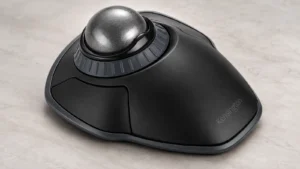
Battery and charging
Battery life
Kensington Orbit Wireless Trackball with Scroll Ring
4.5
Reviewers expect relatively infrequent battery changes, though no measured runtime is established here.
Ploopy Adept TrackballNo score yet
Replaceable battery support
Kensington Orbit Wireless Trackball with Scroll Ring
4.0
Replaceable AA batteries are convenient for users who already keep spares available.
Ploopy Adept TrackballNo score yet
Other features
Acceleration control
Kensington Orbit Wireless Trackball with Scroll Ring
2.0
One Windows 11 test found the companion application's acceleration setting ineffective, requiring the operating system's own controls.
Ploopy Adept TrackballNo score yet
Assembly ease
Kensington Orbit Wireless Trackball with Scroll RingNo score yet
Ploopy Adept Trackball
4.8
The kit goes together quickly and intuitively, although soldering the sensor and inserting roller bearings require care.
Click consistency
Kensington Orbit Wireless Trackball with Scroll RingNo score yet
Ploopy Adept Trackball
5.0
Button presses register reliably across the button surface, with consistent actuation force.
Coating quality
Kensington Orbit Wireless Trackball with Scroll RingNo score yet
Ploopy Adept Trackball
4.0
The printed finish ranges from impressively smooth to visibly uneven, depending on the unit and the owner's expectations.
Color options
Kensington Orbit Wireless Trackball with Scroll RingNo score yet
Ploopy Adept Trackball
1.0
The available colors have a polarizing appearance, with one owner preferring only the black case and red ball combination.
Connection stability
Kensington Orbit Wireless Trackball with Scroll Ring
4.0
Bluetooth range was sufficient for ordinary desk use, with one test reporting disconnection only beyond roughly 15–20 feet.
Ploopy Adept TrackballNo score yet
Cross-platform compatibility
Kensington Orbit Wireless Trackball with Scroll RingNo score yet
Ploopy Adept Trackball
4.0
On-device configurations work across operating systems, although Mac drag scrolling may need a specialized workaround.
Dedicated DPI switch
Kensington Orbit Wireless Trackball with Scroll Ring
4.5
A dedicated underside DPI switch makes sensitivity changes possible without relying on the companion application.
Ploopy Adept TrackballNo score yet
Device compatibility
Kensington Orbit Wireless Trackball with Scroll Ring
4.5
Bluetooth offers an easy connection to compatible tablets and other mobile devices.
Ploopy Adept TrackballNo score yet
Firmware updateability
Kensington Orbit Wireless Trackball with Scroll RingNo score yet
Ploopy Adept Trackball
4.3
QMK firmware can be replaced or edited to change scrolling and orientation. Simple flashes are easy, but some changes require compiling code and invalid files can cause problems.
Grip texture
Kensington Orbit Wireless Trackball with Scroll RingNo score yet
Ploopy Adept Trackball
4.5
The buttons have a pleasant flat texture that feels smoother than their printed appearance suggests.
Included accessories
Kensington Orbit Wireless Trackball with Scroll Ring
3.8
The included detachable wrist rest is a welcome option, though its loose attachment and preferred hand position make it less useful for some owners.
Ploopy Adept TrackballNo score yet
Instruction readability
Kensington Orbit Wireless Trackball with Scroll RingNo score yet
Ploopy Adept Trackball
4.5
Clear assembly instructions and helpful firmware guidance support hands-on configuration.
Left and right click quality
Kensington Orbit Wireless Trackball with Scroll Ring
3.8
Left and right clicks are functional and accessible, although their hollow feel detracts from tactile quality.
Ploopy Adept TrackballNo score yet
Mac integration
Kensington Orbit Wireless Trackball with Scroll RingNo score yet
Ploopy Adept Trackball
2.5
Mac-specific scroll handling may require firmware customization to avoid intermittent drag-scroll behavior.
MacOS compatibility
Kensington Orbit Wireless Trackball with Scroll RingNo score yet
Ploopy Adept Trackball
2.5
Mac drag scrolling can be intermittent; a custom vertical-only workaround restores consistency at the cost of horizontal scrolling.
Maintenance frequency
Kensington Orbit Wireless Trackball with Scroll RingNo score yet
Ploopy Adept Trackball
3.0
The bearings need occasional cleaning, and that upkeep is a little more involved than with some other trackballs.
Middle click quality
Kensington Orbit Wireless Trackball with Scroll Ring
2.0
The lack of a dedicated middle-click button is frustrating for users accustomed to conventional mouse wheels.
Ploopy Adept TrackballNo score yet
Onboard memory
Kensington Orbit Wireless Trackball with Scroll RingNo score yet
Ploopy Adept Trackball
5.0
Mappings are stored directly on the device, so they survive power cycles and carry over to another computer.
Packaging quality and presentation
Kensington Orbit Wireless Trackball with Scroll Ring
5.0
The predominantly cardboard packaging with minimal plastic was well received.
Ploopy Adept TrackballNo score yet
Polling rate
Kensington Orbit Wireless Trackball with Scroll RingNo score yet
Ploopy Adept Trackball
5.0
Its polling rate is higher than the GameBall's in the tested comparison, contributing to strong raw performance.
Profile management
Kensington Orbit Wireless Trackball with Scroll RingNo score yet
Ploopy Adept Trackball
5.0
Multiple layers allow separate mappings for different hands, games and operating systems.
Profile switching
Kensington Orbit Wireless Trackball with Scroll RingNo score yet
Ploopy Adept Trackball
5.0
Configurable layers allow quick switching between handedness, work and gaming setups, or OS-specific controls.
Receiver quality
Kensington Orbit Wireless Trackball with Scroll Ring
3.0
The tiny receiver is unobtrusive when installed but easy to misplace.
Ploopy Adept TrackballNo score yet
Retail availability
Kensington Orbit Wireless Trackball with Scroll RingNo score yet
Ploopy Adept Trackball
2.0
A September 2025 owner reported that shipping to the United States was temporarily unavailable.
Scroll precision
Kensington Orbit Wireless Trackball with Scroll RingNo score yet
Ploopy Adept Trackball
5.0
Ball-based scrolling offers precise, fluid control instead of conventional stepped wheel movements.
Scroll wheel precision
Kensington Orbit Wireless Trackball with Scroll Ring
5.0
The scroll ring offers precise control over vertical movement and is easy to operate.
Ploopy Adept TrackballNo score yet
Scroll wheel quality
Kensington Orbit Wireless Trackball with Scroll Ring
4.9
The ring surrounding the ball provides exceptionally smooth, effortless vertical scrolling. It cannot scroll horizontally.
Ploopy Adept TrackballNo score yet
Scroll wheel resistance
Kensington Orbit Wireless Trackball with Scroll Ring
4.3
The ring is generally smooth and easy to turn. One tester noticed slight plastic friction, and others may prefer tactile notches.
Ploopy Adept TrackballNo score yet
Stationary pointer operation
Kensington Orbit Wireless Trackball with Scroll Ring
4.9
The stationary design lets users control the pointer with small finger movements instead of sliding the entire device across a desk.
Ploopy Adept TrackballNo score yet
Switch feel
Kensington Orbit Wireless Trackball with Scroll RingNo score yet
Ploopy Adept Trackball
4.9
Switches feel distinctly clicky and are easy to actuate without excessive pressure.
Switch quality
Kensington Orbit Wireless Trackball with Scroll RingNo score yet
Ploopy Adept Trackball
5.0
The high-quality switches deliver crisp and dependable tactile feedback.
Thumb strain
Kensington Orbit Wireless Trackball with Scroll Ring
4.5
Finger-operated movement distributes effort rather than relying solely on the thumb, which some find more relaxing and precise.
Ploopy Adept TrackballNo score yet
Trackball bearing modification
Kensington Orbit Wireless Trackball with Scroll RingNo score yet
Ploopy Adept Trackball
4.5
Replacing bearings can improve movement when an original bearing is problematic, and alternative bearing materials are suggested for prolonged use.
Trackball directional freedom
Kensington Orbit Wireless Trackball with Scroll RingNo score yet
Ploopy Adept Trackball
3.0
The roller-bearing arrangement resists certain sideways movements, making it less freely multidirectional than static-bearing designs.
Trackball drag scrolling
Kensington Orbit Wireless Trackball with Scroll RingNo score yet
Ploopy Adept Trackball
3.6
Using the ball to scroll is fluid and precise, but holding a button prevents simultaneous cursor movement. Default speed, direction and Mac behavior may need adjustment.
Twist scrolling
Kensington Orbit Wireless Trackball with Scroll RingNo score yet
Ploopy Adept Trackball
2.3
Roller bearings resist twisting the ball sideways, so users accustomed to twist-based scrolling need a different technique.
Unit-to-unit quality control
Kensington Orbit Wireless Trackball with Scroll RingNo score yet
Ploopy Adept Trackball
3.0
An owner encountered a problematic bearing that performed better after replacement.
Windows compatibility
Kensington Orbit Wireless Trackball with Scroll Ring
3.8
Initial operation was easy on Windows 10, while a Windows 11 test encountered problems with some companion-app adjustments.
Ploopy Adept TrackballNo score yet
Wired connectivity
Kensington Orbit Wireless Trackball with Scroll RingNo score yet
Ploopy Adept Trackball
4.0
For stationary desk use, the wired connection is generally unobtrusive, although it limits reclining away from the desk.
Wrist rest attachment stability
Kensington Orbit Wireless Trackball with Scroll Ring
2.3
The detachable rest can move around or come away too easily. Its unusual mounting method is a recurring ergonomic caveat.
Ploopy Adept TrackballNo score yet
Controls and connectivity
Bluetooth support
Kensington Orbit Wireless Trackball with Scroll Ring
4.5
Bluetooth is valued for dongle-free operation and convenient mobile connections; the older protocol still provides adequate desk-range connectivity.
Ploopy Adept TrackballNo score yet
DPI customization
Kensington Orbit Wireless Trackball with Scroll Ring
4.1
Hardware sensitivity presets help tailor pointer speed, especially across multiple monitors. Companion-app DPI adjustments did not work in one Windows 11 test.
Ploopy Adept TrackballNo score yet
Scroll speed customization
Kensington Orbit Wireless Trackball with Scroll RingNo score yet
Ploopy Adept Trackball
2.8
Stock scrolling speed is not easily adjustable to every preference, especially horizontally. Alternative firmware or third-party tools can help tailor it.
Scroll wheel customization
Kensington Orbit Wireless Trackball with Scroll Ring
3.8
Scroll speed and direction can be customized through the app, although these settings did not take effect in one test.
Ploopy Adept TrackballNo score yet
Simultaneous button input
Kensington Orbit Wireless Trackball with Scroll Ring
4.3
Pressing both buttons together can add a useful shortcut such as media playback, but it supplies only one extra action.
Ploopy Adept TrackballNo score yet
Software and driver support
Kensington Orbit Wireless Trackball with Scroll Ring
3.5
Companion software can enable valuable shortcuts, but one Windows 11 experience required native mouse settings because several controls did not work.
Ploopy Adept TrackballNo score yet
Software resource usage
Kensington Orbit Wireless Trackball with Scroll RingNo score yet
Ploopy Adept Trackball
5.0
Stored mappings avoid the ongoing overhead of background configuration software.
Comfort and build
Claw grip comfort
Kensington Orbit Wireless Trackball with Scroll Ring
4.5
The symmetrical shape is especially well suited to a claw-style grip.
Ploopy Adept TrackballNo score yet
Durability over time
Kensington Orbit Wireless Trackball with Scroll RingNo score yet
Ploopy Adept Trackball
4.0
The 3D-printed construction has held up comparably to a conventional mouse in one owner's experience so far.
Fingertip grip comfort
Kensington Orbit Wireless Trackball with Scroll RingNo score yet
Ploopy Adept Trackball
4.5
Fingertip operation feels natural, particularly after rotating and remapping the device.
Hand size compatibility
Kensington Orbit Wireless Trackball with Scroll Ring
4.0
The medium-size ball was adequate even for a reviewer with large hands and long fingers.
Ploopy Adept TrackballNo score yet
Long-session comfort
Kensington Orbit Wireless Trackball with Scroll RingNo score yet
Ploopy Adept Trackball
4.4
Several owners comfortably use it for hours or full workdays. Larger trackballs may offer a more relaxed hand position for some users.
Open-source design
Kensington Orbit Wireless Trackball with Scroll RingNo score yet
Ploopy Adept Trackball
4.8
Open design files and firmware give owners meaningful control over the device, especially if they have the tools and skills to modify it themselves.
Performance
Cleaning ease
Kensington Orbit Wireless Trackball with Scroll RingNo score yet
Ploopy Adept Trackball
3.0
Bearing cleaning is somewhat more involved than with conventional static-bearing trackballs.
Click noise
Kensington Orbit Wireless Trackball with Scroll RingNo score yet
Ploopy Adept Trackball
4.5
The switches produce a satisfying click sound.
Operating noise
Kensington Orbit Wireless Trackball with Scroll RingNo score yet
Ploopy Adept Trackball
3.3
The bearings are noticeably louder than static-bearing alternatives. Some users enjoy that audible feedback, while others find it a drawback.
Sensor performance
Kensington Orbit Wireless Trackball with Scroll RingNo score yet
Ploopy Adept Trackball
5.0
The PixArt sensor is highly regarded for accurate tracking and strong raw performance.
Wireless performance
Kensington Orbit Wireless Trackball with Scroll Ring
4.5
Wireless operation is welcomed primarily for reducing clutter and offering more convenient placement.
Ploopy Adept TrackballNo score yet
Ownership and support
Dongle-free setup
Kensington Orbit Wireless Trackball with Scroll Ring
4.5
Bluetooth is a useful alternative when a USB receiver is inconvenient or easy to lose.
Ploopy Adept TrackballNo score yet
Firmware reliability
Kensington Orbit Wireless Trackball with Scroll RingNo score yet
Ploopy Adept Trackball
2.0
Firmware flashing is quick and easy, but loading an invalid file can brick the device.
Macro support
Kensington Orbit Wireless Trackball with Scroll RingNo score yet
Ploopy Adept Trackball
4.5
Macros, modifiers and layers allow personalized shortcuts through configurable firmware.
Product support lifespan
Kensington Orbit Wireless Trackball with Scroll RingNo score yet
Ploopy Adept Trackball
5.0
Open firmware allows technically skilled owners to maintain or adapt the trackball independently if official software support changes.
Replacement parts availability
Kensington Orbit Wireless Trackball with Scroll RingNo score yet
Ploopy Adept Trackball
5.0
Standard electronic components and replaceable printed parts make sourcing repairs more approachable.
Upgrade value
Kensington Orbit Wireless Trackball with Scroll Ring
4.5
The wireless update removes the cable while retaining the familiar wired design, a worthwhile improvement for those wanting a tidier desk.
Ploopy Adept TrackballNo score yet
Wrist rest and tilt support
Kensington Orbit Wireless Trackball with Scroll RingNo score yet
Ploopy Adept Trackball
3.2
There is no included wrist rest, and some owners add foam or wedges to achieve a more comfortable angle.