Compare ELECOM Huge M-HT1DRBK vs Ploopy Adept Trackball

ELECOM Huge M-HT1DRBK

ELECOM Huge M-HT1DRBK

Overall score 3.7 / 5

Based on 10 scored reviews

vs
Ploopy Adept Trackball

Ploopy Adept Trackball

Overall score 4.3 / 5

Based on 8 scored reviews

How we score

Scorata scores summarize analyzed review evidence on a 1–5 scale; they are not laboratory measurements or a simple average of customer star ratings. Feature scores summarize the reviews covering that feature. The overall score averages feature scores within each review, then combines review averages. When both expert and customer evidence are available, those two groups receive equal weight. Products can have different review coverage, so small score gaps do not establish a winner.

Recommendations prioritize important features for the category, with a score of at least 3.5, a gap of at least 0.25 points and at least two supporting reviews per product. Features with widely varying scores or broad connectivity contexts are excluded from recommendations. These safeguards do not establish statistical significance.

Quick verdict

What each product is best for

The review evidence points to a tradeoff: premium feel and hand support versus click consistency and button quality. Choose according to which strengths matter more to you; the overall score alone does not settle that choice.

Choose ELECOM Huge M-HT1DRBK for premium feel and hand support.

Choose Ploopy Adept Trackball for click consistency and button quality.

Why these recommendations?

ELECOM Huge M-HT1DRBK

Where It Has the Edge

  • premium feel is 4.3 vs 3.3. The plush rest and solid-feeling body give a surprisingly substantial impression for the price.
  • hand support is 4.5 vs 3.8. The integrated cushioned palm rest and finger supports are widely appreciated, although the raised pad can create pressure...
  • productivity performance is 4.5 vs 3.9. Multiple assignable controls and accurate finger tracking make everyday desktop tasks efficient once the unusual layout is learned.

Ploopy Adept Trackball

Where It Has the Edge

  • click consistency is 5.0 vs 2.5. Button presses register reliably across the button surface, with consistent actuation force.
  • button quality is 4.9 vs 2.8. The buttons are a standout, with satisfying tactile clicks and well-defined activation areas.
  • size is 4.3 vs 3.0. The compact footprint saves space but may feel cramped to users accustomed to larger trackballs.
ELECOM Huge M-HT1DRBK 3.7 overall score
Ploopy Adept Trackball 4.3 overall score

Compare features

Scores are out of 5. Missing scores mean missing review evidence, not a missing feature.

Scored on both products

Other features

Ease of use
ELECOM Huge M-HT1DRBK
4.3

The ball itself is easy to manipulate and many controls are intuitive after adaptation, despite the initial learning curve.

Ploopy Adept Trackball
4.3

After a few hours of practice and remapping, everyday operation becomes natural, although the bearings reward a slightly different movement technique.

Portability
ELECOM Huge M-HT1DRBK
1.5

The oversized chassis and receiver-dependent design are not convenient for frequent transport.

Ploopy Adept Trackball
5.0

Its relatively small footprint makes it easier to carry than larger top-ball trackballs.

Handedness options
ELECOM Huge M-HT1DRBK
2.0

The asymmetric layout is designed for right-handed operation rather than ambidextrous use.

Ploopy Adept Trackball
5.0

The symmetrical top-ball design can move between left- and right-handed operation with mirrored button mappings.

Polling rate
ELECOM Huge M-HT1DRBK
2.0

Low polling can make cursor motion look choppy on high-refresh, high-resolution displays.

Ploopy Adept Trackball
5.0

Its polling rate is higher than the GameBall's in the tested comparison, contributing to strong raw performance.

Click consistency
ELECOM Huge M-HT1DRBK
2.5

The primary and auxiliary clicks can differ noticeably in feel, and some units have off-center or inconsistent actuation.

Ploopy Adept Trackball
5.0

Button presses register reliably across the button surface, with consistent actuation force.

Click latency
ELECOM Huge M-HT1DRBK
2.5

Click latency is high by modern gaming standards, even though it is lower than on some competing trackballs and rarely troublesome for desktop work.

Ploopy Adept Trackball
5.0

Click latency compares favorably with the GameBall, benefiting responsive input.

Repairability
ELECOM Huge M-HT1DRBK
2.7

Bearing modifications are possible with disassembly, but receiver failures and unavailable parts can force a full replacement.

Ploopy Adept Trackball
5.0

Bearings can be swapped, and the open modular construction allows owners to replace worn parts instead of the entire device.

Wired connectivity
ELECOM Huge M-HT1DRBK
2.0

This wireless model cannot fall back to a cable; a separate wired version is preferable if radio interference or batteries are unwanted.

Ploopy Adept Trackball
4.0

For stationary desk use, the wired connection is generally unobtrusive, although it limits reclining away from the desk.

Unit-to-unit quality control
ELECOM Huge M-HT1DRBK
1.5

One reviewer needed three units before finding one without defects; sticky scrolling, click issues and receiver problems can vary between samples.

Ploopy Adept Trackball
3.0

An owner encountered a problematic bearing that performed better after replacement.

Horizontal scrolling
ELECOM Huge M-HT1DRBK
4.0

Left and right wheel tilt provide horizontal navigation that several competing trackballs lack.

Ploopy Adept Trackball
2.8

Omnidirectional scrolling is a useful capability, but horizontal movement can be sluggish or unreliable on Mac setups without modification.

Cross-platform compatibility
ELECOM Huge M-HT1DRBK
3.0

Windows and macOS support is useful, but full customization should not be assumed on every future OS release.

Ploopy Adept Trackball
4.0

On-device configurations work across operating systems, although Mac drag scrolling may need a specialized workaround.

Gaming suitability
ELECOM Huge M-HT1DRBK
3.5

The trackball is much more convincing for leisurely games than competitive play, though some praise its precision and macros for gaming generally.

Ploopy Adept Trackball
4.5

Smooth, precise pointing makes gaming enjoyable, particularly for mouse-driven titles.

Switch quality
ELECOM Huge M-HT1DRBK
4.0

The main OMRON switches feel premium, but the auxiliary controls use less satisfying switches.

Ploopy Adept Trackball
5.0

The high-quality switches deliver crisp and dependable tactile feedback.

Wrist and forearm strain relief
ELECOM Huge M-HT1DRBK
3.9

Stationary pointing and cushioning can reduce wrist movement and strain, but the thick rest and thumb workload may introduce discomfort.

Ploopy Adept Trackball
4.8

Several owners report little or no unusual wrist discomfort during extended use, although individual ergonomic needs differ.

Premium feel
ELECOM Huge M-HT1DRBK
4.3

The plush rest and solid-feeling body give a surprisingly substantial impression for the price.

Ploopy Adept Trackball
3.3

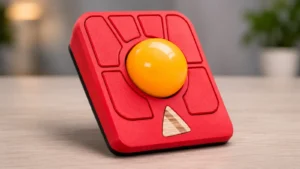
The wooden logo adds character, but the handmade finish does not have the same polished feel as many mass-produced trackballs.

DPI range
ELECOM Huge M-HT1DRBK
4.3

Three sensitivity presets allow users to balance fine control against faster cursor travel.

Ploopy Adept Trackball
5.0

The sensor's wide sensitivity range supports accurate tracking.

Profile management
ELECOM Huge M-HT1DRBK
4.5

Mouse Assistant can activate different shortcut profiles when specific apps launch.

Ploopy Adept Trackball
5.0

Multiple layers allow separate mappings for different hands, games and operating systems.

Overall satisfaction
ELECOM Huge M-HT1DRBK
4.4

The spacious finger-operated trackball and plentiful controls win enthusiastic recommendations, although wireless interruptions and inconsistent units temper satisfaction.

Ploopy Adept Trackball
4.9

Many owners describe it as a favorite or exceptional trackball thanks to its smoothness, customization and button feel. Some still prefer alternatives for particular workflows.

Trackball rolling smoothness
ELECOM Huge M-HT1DRBK
4.4

Many find the large ball exceptionally smooth and easy to control, although some report less fluid motion and contamination-related sluggishness.

Ploopy Adept Trackball
4.8

The roller bearings deliver exceptionally smooth movement with little initial sticking, although their rolling texture can still be felt.

Learning curve
ELECOM Huge M-HT1DRBK
3.3

The finger-operated ball and unusual thumb and finger assignments take practice; some adapt quickly, while others still misclick weeks later.

Ploopy Adept Trackball
3.6

Basic operation becomes intuitive fairly quickly after remapping, but drag scrolling, bearing movement and advanced firmware changes take practice.

Connectivity versatility
ELECOM Huge M-HT1DRBK
2.3

The dedicated wireless receiver is less flexible than tri-mode trackballs that support Bluetooth and wired fallback.

Ploopy Adept Trackball
2.0

Wired-only operation limits connectivity flexibility, particularly for setups that need easy switching between computers.

Switch feel
ELECOM Huge M-HT1DRBK
5.0

The main switches have a satisfying, firm click compared with ordinary mouse buttons.

Ploopy Adept Trackball
4.9

Switches feel distinctly clicky and are easy to actuate without excessive pressure.

Cursor control
ELECOM Huge M-HT1DRBK
4.2

Fine cursor control is a major strength when the connection and ball motion behave; interference can cause erratic movement.

Ploopy Adept Trackball
4.3

Fine cursor adjustments are smooth and accurate, while the smaller ball makes long screen-crossing movements less effortless.

Grip texture
ELECOM Huge M-HT1DRBK
4.5

The soft, compressible hand-rest material feels comfortable against the palm.

Ploopy Adept Trackball
4.5

The buttons have a pleasant flat texture that feels smoother than their printed appearance suggests.

Trackball bearing modification
ELECOM Huge M-HT1DRBK
4.5

Replacing the synthetic ruby bearings with ceramic ones can make the ball slightly smoother and quieter without a difficult modification process.

Ploopy Adept Trackball
4.5

Replacing bearings can improve movement when an original bearing is problematic, and alternative bearing materials are suggested for prolonged use.

Ownership and support

Replacement parts availability
ELECOM Huge M-HT1DRBK
1.3

Replacement receivers and balls are difficult or impossible to obtain, making lost or damaged components a concern.

Ploopy Adept Trackball
5.0

Standard electronic components and replaceable printed parts make sourcing repairs more approachable.

Hand support
ELECOM Huge M-HT1DRBK
4.5

The integrated cushioned palm rest and finger supports are widely appreciated, although the raised pad can create pressure for some users.

Ploopy Adept Trackball
3.8

The hand can rest comfortably on or beside the device, but the small footprint may encourage some fingers to curl inward.

Setup ease
ELECOM Huge M-HT1DRBK
4.5

The receiver makes initial setup straightforward, with customization available afterward through the companion software.

Ploopy Adept Trackball
4.7

Initial configuration is straightforward through VIA, and the kit can be configured quickly after assembly.

Value for money
ELECOM Huge M-HT1DRBK
4.3

The large ball, padded rest and extensive controls offer strong value, although poor quality control can erode the savings.

Ploopy Adept Trackball
4.3

The kit saves money for those willing to assemble it, and the Adept costs substantially less than the original Classic in the comparison.

Macro support
ELECOM Huge M-HT1DRBK
4.5

Keyboard macros and other assigned commands make the numerous buttons useful for repetitive work and games.

Ploopy Adept Trackball
4.5

Macros, modifiers and layers allow personalized shortcuts through configurable firmware.

Plug-and-play support
ELECOM Huge M-HT1DRBK
5.0

Basic pointing works quickly after plugging in the included USB receiver.

Ploopy Adept Trackball
5.0

The assembled kit worked immediately when connected to the computer.

Performance

Sensor performance
ELECOM Huge M-HT1DRBK
2.5

Tracking is generally usable, but possible cursor spinout makes it less dependable for rapid competitive movement.

Ploopy Adept Trackball
5.0

The PixArt sensor is highly regarded for accurate tracking and strong raw performance.

Cleaning ease
ELECOM Huge M-HT1DRBK
3.8

The ball can be popped out for straightforward cleaning, but regular removal of dust and skin oil is necessary to maintain smoothness.

Ploopy Adept Trackball
3.0

Bearing cleaning is somewhat more involved than with conventional static-bearing trackballs.

Productivity performance
ELECOM Huge M-HT1DRBK
4.5

Multiple assignable controls and accurate finger tracking make everyday desktop tasks efficient once the unusual layout is learned.

Ploopy Adept Trackball
3.9

The Adept handles everyday computer work well. Small-ball cursor sweeps and the inability to scroll and point simultaneously can slow some workflows.

Controls and connectivity

Button quality
ELECOM Huge M-HT1DRBK
2.8

The main clicks can feel excellent, but auxiliary buttons are sometimes soft, flexible, loose or difficult to actuate.

Ploopy Adept Trackball
4.9

The buttons are a standout, with satisfying tactile clicks and well-defined activation areas.

Button responsiveness
ELECOM Huge M-HT1DRBK
3.5

Missed button inputs are not expected to be common, although overall gaming latency remains a limitation.

Ploopy Adept Trackball
5.0

Clicks register cleanly without free play or bouncing, including when pressing different areas of a button.

Software resource usage
ELECOM Huge M-HT1DRBK
4.0

Mouse Assistant is appreciated for its simple, non-bloated approach.

Ploopy Adept Trackball
5.0

Stored mappings avoid the ongoing overhead of background configuration software.

Button placement
ELECOM Huge M-HT1DRBK
3.6

The arrangement is thoughtful and efficient after practice, though some buttons and the rearward wheel are awkward to reach.

Ploopy Adept Trackball
4.4

The six surrounding buttons are generally accessible and clearly defined, especially after remapping or reorientation. A farther button may still require stretching.

Button count
ELECOM Huge M-HT1DRBK
4.8

The many button functions give this trackball unusually broad shortcut options for its price.

Ploopy Adept Trackball
4.3

Six buttons give more options than four-button rivals, though other trackballs offer even more programmable controls.

Software usability
ELECOM Huge M-HT1DRBK
4.3

The software is straightforward and makes mapping shortcuts easy, even if its interface looks old-fashioned.

Ploopy Adept Trackball
4.2

Browser-based VIA makes basic changes easy. More complex scroll tuning and custom layouts can take extra software or technical effort.

Programmable buttons
ELECOM Huge M-HT1DRBK
4.7

The abundance of programmable controls is a standout, allowing shortcuts for navigation, editing and other repetitive tasks.

Ploopy Adept Trackball
4.6

The freely assignable buttons make it possible to tailor common actions and shortcuts to individual preferences.

Button customization
ELECOM Huge M-HT1DRBK
4.6

Mouse Assistant enables extensive button remapping, including practical shortcuts and custom functions.

Ploopy Adept Trackball
4.6

VIA makes remapping straightforward, while QMK opens up deeper customization including layers, macros and altered scrolling behavior.

Software quality
ELECOM Huge M-HT1DRBK
4.3

The free Mouse Assistant software is useful and customizable, although its interface feels dated and some competing features are absent.

Ploopy Adept Trackball
4.3

VIA and QMK offer extensive customization, but advanced changes and scroll-speed adjustments can call for extra tools.

Comfort and build

Size
ELECOM Huge M-HT1DRBK
3.0

The oversized chassis provides extensive hand support, but the usable control area is not equally generous and the bulk can limit fit.

Ploopy Adept Trackball
4.3

The compact footprint saves space but may feel cramped to users accustomed to larger trackballs.

Chassis height comfort
ELECOM Huge M-HT1DRBK
2.3

The thick, elevated wrist rest can press into the forearm or require additional arm support, even though its padding is comfortable.

Ploopy Adept Trackball
3.5

The casing is a little taller than some owners would prefer, though a hovering hand position or added tilt can make it comfortable.

Aesthetic design
ELECOM Huge M-HT1DRBK
4.5

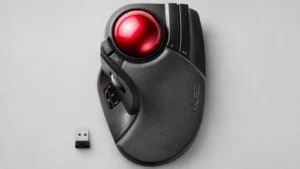
The deep red ball and black sculpted chassis have a distinctive, professional appearance that many find attractive.

Ploopy Adept Trackball
3.7

The 3D-printed case and wooden badge have a distinctive handmade look that some find charming and others find unattractive.

Durability over time
ELECOM Huge M-HT1DRBK
4.8

Long-term users report months or years without notable rattling or flex, although unit quality varies.

Ploopy Adept Trackball
4.0

The 3D-printed construction has held up comparably to a conventional mouse in one owner's experience so far.

Long-session comfort
ELECOM Huge M-HT1DRBK
3.7

Some users find it exceptionally comfortable for hours of work, while others need extra arm support to offset the chassis height.

Ploopy Adept Trackball
4.4

Several owners comfortably use it for hours or full workdays. Larger trackballs may offer a more relaxed hand position for some users.

Ergonomic design
ELECOM Huge M-HT1DRBK
4.6

The sculpted stationary design and padded rest can make pointing much more comfortable than a conventional mouse. Grip and desk height still matter.

Ploopy Adept Trackball
4.2

The design is generally comfortable and adaptable through remapping or physical tilting. Holding a button to scroll and the relatively small body are less ergonomic for some users.

Shape comfort
ELECOM Huge M-HT1DRBK
4.4

Many find the wide, contoured shape exceptionally comfortable, though others need to reposition their hand to reach the buttons.

Ploopy Adept Trackball
4.3

The finger-operated shape feels comfortable to many owners, although its compact body can curl the fingers inward and its height may call for a small adjustment.

Materials quality
ELECOM Huge M-HT1DRBK
4.0

The plastic construction is generally solid, although some surfaces feel inexpensive and can creak when flexed.

Ploopy Adept Trackball
3.9

Quality sensors, switches and other internal components are a strength, while the printed plastic can have loose filaments or small imperfections.

Build quality
ELECOM Huge M-HT1DRBK
4.3

The housing generally feels solid, with some owners reporting months or years of good service. Button flex, wheel wobble and creaking are the main exceptions.

Ploopy Adept Trackball
4.3

The assembled device feels solid and well crafted, despite occasional rough printing and less polished construction than established trackball brands.

Fingertip grip comfort
ELECOM Huge M-HT1DRBK
4.5

A relaxed finger grip can improve access to the controls without forcing the palm against the chassis.

Ploopy Adept Trackball
4.5

Fingertip operation feels natural, particularly after rotating and remapping the device.

Tracking and training

Accuracy and tracking precision
ELECOM Huge M-HT1DRBK
4.7

The large ball makes subtle, accurate movements easy for experienced users, although initial precision takes practice.

Ploopy Adept Trackball
4.8

Low stiction and a capable optical sensor make small cursor adjustments unusually accurate.

Evidence available for one product

Battery and charging

Battery life
ELECOM Huge M-HT1DRBK
5.0

One long-term owner reports three months or more on a single set of batteries.

Ploopy Adept TrackballNo score yet
Charging convenience
ELECOM Huge M-HT1DRBK
3.0

Replaceable batteries avoid charging cables but introduce periodic battery management.

Ploopy Adept TrackballNo score yet
Replaceable battery support
ELECOM Huge M-HT1DRBK
4.0

Standard AA batteries are simple to replace and avoid downtime for charging.

Ploopy Adept TrackballNo score yet

Ownership and support

Reliability
ELECOM Huge M-HT1DRBK
2.0

Reliability varies considerably; intermittent wireless problems and unit-specific defects can require exchanges.

Ploopy Adept TrackballNo score yet
Firmware reliability
ELECOM Huge M-HT1DRBKNo score yet
Ploopy Adept Trackball
2.0

Firmware flashing is quick and easy, but loading an invalid file can brick the device.

Multi-device support
ELECOM Huge M-HT1DRBK
2.0

The single receiver connection lacks the flexible device switching offered by newer multi-mode trackballs.

Ploopy Adept TrackballNo score yet
Product support lifespan
ELECOM Huge M-HT1DRBKNo score yet
Ploopy Adept Trackball
5.0

Open firmware allows technically skilled owners to maintain or adapt the trackball independently if official software support changes.

Tilt wheel support
ELECOM Huge M-HT1DRBK
4.0

The tilting wheel adds useful lateral scrolling inputs to the control layout.

Ploopy Adept TrackballNo score yet
Wrist rest and tilt support
ELECOM Huge M-HT1DRBKNo score yet
Ploopy Adept Trackball
3.2

There is no included wrist rest, and some owners add foam or wedges to achieve a more comfortable angle.

Other features

2.4GHz connectivity
ELECOM Huge M-HT1DRBK
1.5

The 2.4GHz connection is susceptible to interference and can become unstable even with the receiver nearby.

Ploopy Adept TrackballNo score yet
Assembly ease
ELECOM Huge M-HT1DRBKNo score yet
Ploopy Adept Trackball
4.8

The kit goes together quickly and intuitively, although soldering the sensor and inserting roller bearings require care.

Coating quality
ELECOM Huge M-HT1DRBKNo score yet
Ploopy Adept Trackball
4.0

The printed finish ranges from impressively smooth to visibly uneven, depending on the unit and the owner's expectations.

Color options
ELECOM Huge M-HT1DRBKNo score yet
Ploopy Adept Trackball
1.0

The available colors have a polarizing appearance, with one owner preferring only the black case and red ball combination.

Connection stability
ELECOM Huge M-HT1DRBK
2.1

Wireless stability is a substantial weakness: some units skip or disconnect near USB devices or other sources of interference.

Ploopy Adept TrackballNo score yet
Dedicated DPI switch
ELECOM Huge M-HT1DRBK
4.5

The physical three-position sensitivity control makes it easy to change DPI without opening software.

Ploopy Adept TrackballNo score yet
Dust resistance
ELECOM Huge M-HT1DRBK
4.5

The relatively large bearing contact points can help resist clogging, though occasional cleaning is still advisable.

Ploopy Adept TrackballNo score yet
Environmental sustainability
ELECOM Huge M-HT1DRBKNo score yet
Ploopy Adept Trackball
5.0

The ability to replace only worn components and update firmware can reduce the need to discard the whole device.

Feet quality
ELECOM Huge M-HT1DRBK
3.5

Anti-slip pads usually hold the trackball in place, but one user found it could slide on a desk mat under pressure.

Ploopy Adept TrackballNo score yet
Firmware updateability
ELECOM Huge M-HT1DRBKNo score yet
Ploopy Adept Trackball
4.3

QMK firmware can be replaced or edited to change scrolling and orientation. Simple flashes are easy, but some changes require compiling code and invalid files can cause problems.

Free-spin scrolling
ELECOM Huge M-HT1DRBK
2.3

The notched scroll wheel lacks a free-spinning mode, a feature some users miss from other mice and trackballs.

Ploopy Adept TrackballNo score yet
Instruction readability
ELECOM Huge M-HT1DRBKNo score yet
Ploopy Adept Trackball
4.5

Clear assembly instructions and helpful firmware guidance support hands-on configuration.

Left and right click quality
ELECOM Huge M-HT1DRBK
5.0

The main left and right clicks receive particularly strong praise for their firm, tactile feel.

Ploopy Adept TrackballNo score yet
Mac integration
ELECOM Huge M-HT1DRBKNo score yet
Ploopy Adept Trackball
2.5

Mac-specific scroll handling may require firmware customization to avoid intermittent drag-scroll behavior.

MacOS compatibility
ELECOM Huge M-HT1DRBKNo score yet
Ploopy Adept Trackball
2.5

Mac drag scrolling can be intermittent; a custom vertical-only workaround restores consistency at the cost of horizontal scrolling.

Maintenance frequency
ELECOM Huge M-HT1DRBKNo score yet
Ploopy Adept Trackball
3.0

The bearings need occasional cleaning, and that upkeep is a little more involved than with some other trackballs.

Motion consistency
ELECOM Huge M-HT1DRBK
2.2

Cursor movement can skip, twitch or spin out, especially when the wireless connection is disrupted.

Ploopy Adept TrackballNo score yet
Motion latency
ELECOM Huge M-HT1DRBK
4.0

Physical cursor lag is generally unlikely to be noticeable in ordinary use, provided the wireless setup is favorable.

Ploopy Adept TrackballNo score yet
Onboard memory
ELECOM Huge M-HT1DRBKNo score yet
Ploopy Adept Trackball
5.0

Mappings are stored directly on the device, so they survive power cycles and carry over to another computer.

Packaging quality and presentation
ELECOM Huge M-HT1DRBK
4.0

The packaging is more modern-looking than the basic cartons used for some other trackballs.

Ploopy Adept TrackballNo score yet
Power efficiency
ELECOM Huge M-HT1DRBK
4.0

A low-energy operating mode offers a convenient way to conserve battery power.

Ploopy Adept TrackballNo score yet
Profile switching
ELECOM Huge M-HT1DRBKNo score yet
Ploopy Adept Trackball
5.0

Configurable layers allow quick switching between handedness, work and gaming setups, or OS-specific controls.

Receiver quality
ELECOM Huge M-HT1DRBK
1.8

The USB receiver can be sensitive to neighboring devices and cannot easily be replaced or paired with a donor unit.

Ploopy Adept TrackballNo score yet
Responsiveness
ELECOM Huge M-HT1DRBKNo score yet
Ploopy Adept Trackball
5.0

Raw pointing performance compares favorably with established trackball alternatives.

Retail availability
ELECOM Huge M-HT1DRBKNo score yet
Ploopy Adept Trackball
2.0

A September 2025 owner reported that shipping to the United States was temporarily unavailable.

Scroll precision
ELECOM Huge M-HT1DRBKNo score yet
Ploopy Adept Trackball
5.0

Ball-based scrolling offers precise, fluid control instead of conventional stepped wheel movements.

Scroll wheel precision
ELECOM Huge M-HT1DRBK
4.8

The wheel can offer smooth, precise and responsive notched scrolling.

Ploopy Adept TrackballNo score yet
Scroll wheel quality
ELECOM Huge M-HT1DRBK
3.4

The thumb-operated notched wheel can feel smooth and precise, but some units wobble or feel sticky. Its rearward position also makes it awkward for some hands.

Ploopy Adept TrackballNo score yet
Scroll wheel resistance
ELECOM Huge M-HT1DRBK
4.5

The wheel has pleasant, soft tactile feedback that makes ordinary scrolling easy.

Ploopy Adept TrackballNo score yet
Stationary pointer operation
ELECOM Huge M-HT1DRBK
4.5

Finger-operated tracking eliminates the need to repeatedly lift and reposition the mouse across a desk.

Ploopy Adept TrackballNo score yet
Suspend and resume
ELECOM Huge M-HT1DRBK
1.5

One defective unit repeatedly woke a sleeping PC, with unplugging the receiver the only workable immediate solution.

Ploopy Adept TrackballNo score yet
Thumb strain
ELECOM Huge M-HT1DRBK
1.8

The thumb handles several controls, and the wheel reach or prolonged use of the side buttons can cause discomfort.

Ploopy Adept TrackballNo score yet
Trackball directional freedom
ELECOM Huge M-HT1DRBKNo score yet
Ploopy Adept Trackball
3.0

The roller-bearing arrangement resists certain sideways movements, making it less freely multidirectional than static-bearing designs.

Trackball drag scrolling
ELECOM Huge M-HT1DRBKNo score yet
Ploopy Adept Trackball
3.6

Using the ball to scroll is fluid and precise, but holding a button prevents simultaneous cursor movement. Default speed, direction and Mac behavior may need adjustment.

Twist scrolling
ELECOM Huge M-HT1DRBKNo score yet
Ploopy Adept Trackball
2.3

Roller bearings resist twisting the ball sideways, so users accustomed to twist-based scrolling need a different technique.

USB-A receiver compatibility
ELECOM Huge M-HT1DRBK
2.0

The dedicated USB-A receiver requires an adapter or dock on USB-C-only computers.

Ploopy Adept TrackballNo score yet
USB receiver storage
ELECOM Huge M-HT1DRBK
4.5

A built-in receiver compartment helps keep the small dongle from getting misplaced during transport.

Ploopy Adept TrackballNo score yet
Weight
ELECOM Huge M-HT1DRBK
3.5

The heavier construction is seen as a reasonable tradeoff for a substantial, solid stationary device.

Ploopy Adept TrackballNo score yet
Wireless latency
ELECOM Huge M-HT1DRBK
2.5

Wireless delay can be unobtrusive in ordinary work yet become problematic when interference causes lag and skipping.

Ploopy Adept TrackballNo score yet

Controls and connectivity

Accidental button activation
ELECOM Huge M-HT1DRBK
2.3

The unconventional button layout can cause wrong or accidental presses even after days or weeks of use.

Ploopy Adept TrackballNo score yet
Bluetooth support
ELECOM Huge M-HT1DRBK
1.9

Bluetooth is conspicuously absent, especially frustrating for users who encounter receiver interference.

Ploopy Adept TrackballNo score yet
Companion software dependence
ELECOM Huge M-HT1DRBKNo score yet
Ploopy Adept Trackball
4.5

Saved mappings and browser configuration eliminate most ongoing software requirements. Some scroll adjustments still benefit from an extra utility.

DPI customization
ELECOM Huge M-HT1DRBK
4.8

Switching between preset sensitivities is convenient, particularly when adapting cursor speed to different tasks.

Ploopy Adept TrackballNo score yet
Scroll speed customization
ELECOM Huge M-HT1DRBKNo score yet
Ploopy Adept Trackball
2.8

Stock scrolling speed is not easily adjustable to every preference, especially horizontally. Alternative firmware or third-party tools can help tailor it.

Simultaneous button input
ELECOM Huge M-HT1DRBK
1.5

The default thumb layout makes holding the left button while scrolling difficult or impossible without remapping.

Ploopy Adept TrackballNo score yet
Software and driver support
ELECOM Huge M-HT1DRBK
3.5

Button customization is available on Windows and macOS, but full functionality can vary by operating system version.

Ploopy Adept TrackballNo score yet
Zoom controls
ELECOM Huge M-HT1DRBK
5.0

Assigning zoom to a dedicated button is particularly useful for changing on-screen content quickly.

Ploopy Adept TrackballNo score yet

Comfort and build

Claw grip comfort
ELECOM Huge M-HT1DRBK
4.2

A relaxed claw grip can improve button reach, especially when the palm is positioned farther back.

Ploopy Adept TrackballNo score yet
Hand size compatibility
ELECOM Huge M-HT1DRBK
3.5

Fit depends as much on finger reach and grip as hand size. Medium and large hands often fare well, but some very large hands overshoot the controls.

Ploopy Adept TrackballNo score yet
Open-source design
ELECOM Huge M-HT1DRBKNo score yet
Ploopy Adept Trackball
4.8

Open design files and firmware give owners meaningful control over the device, especially if they have the tools and skills to modify it themselves.

Palm grip comfort
ELECOM Huge M-HT1DRBK
3.3

A palm grip works for many users, but very long fingers can extend past the buttons.

Ploopy Adept TrackballNo score yet
Trackball size
ELECOM Huge M-HT1DRBKNo score yet
Ploopy Adept Trackball
2.5

The small ball helps keep the unit compact, but larger balls are preferred for broad cursor sweeps and a more spacious feel.

Performance

Click noise
ELECOM Huge M-HT1DRBKNo score yet
Ploopy Adept Trackball
4.5

The switches produce a satisfying click sound.

Operating noise
ELECOM Huge M-HT1DRBKNo score yet
Ploopy Adept Trackball
3.3

The bearings are noticeably louder than static-bearing alternatives. Some users enjoy that audible feedback, while others find it a drawback.

Scroll wheel noise
ELECOM Huge M-HT1DRBK
5.0

The scroll wheel provides soft tactile feedback without an audible click in one hands-on assessment.

Ploopy Adept TrackballNo score yet
Wireless performance
ELECOM Huge M-HT1DRBK
2.0

The wireless connection can work well, but receiver placement and intermittent interference can make it frustrating.

Ploopy Adept TrackballNo score yet

Other Top Mice to Consider

#1 Logitech MX Anywhere 3S
4.5

Best for travel, quiet shared spaces, precise any-surface tracking, and multi-device productivity. Skip it if you have large hands, want all-day palm support, or need a gaming-focused mouse.

Pros: portability, click noise

Cons: hand size compatibility, dongle-free setup

#2 Corsair Scimitar Elite Wireless SE
4.4

Choose it if you want a premium MMO/productivity mouse with 12 adjustable side buttons, strong battery life, and Stream Deck integration. Skip it if you need an ultralight FPS mouse,...

Pros: button customization, MMO gaming suitability

Cons: FPS gaming suitability

#3 Logitech MX Master 2S
4.4

Dual scroll wheels, extensive shortcuts and seamless multi-computer control make this a superb productivity mouse. Its bulky right-handed shape, modest gaming performance and dated Micro USB charging are the main...

Pros: Overall satisfaction, ergonomic design

Cons: gaming suitability, button placement

#4 VXE R1 Pro
4.3

Fast tracking, a very light shell and a grippy coating make this a compelling affordable FPS mouse. The optional 4K receiver costs extra, and Bluetooth is absent.

Pros: Overall satisfaction, gaming suitability

Cons: polling rate, Software and driver support